Part 2 of a 4-part series on building with GraphQL, Strapi v5, and Next.js 16. Each part builds directly on the project from the previous post, so keep an eye out as we release them:
- Part 1, GraphQL basics with Strapi v5. Fresh install, a full Shadow CRUD tour, and your first custom resolvers.
- Part 2 (this post), Advanced backend customization. A
Note+Tagmodel, middlewares and policies, Shadow CRUD restrictions, custom queries, and custom mutations. - Part 3, Next.js 16 frontend. Apollo Client on the App Router: Server Component reads, Server Action writes.
- Part 4, Users and per-user content. Authentication, an ownership model, and two-layer authorization (read middlewares, write policies).
New to Strapi or GraphQL? Start with Part 1. Already comfortable with Shadow CRUD and basic custom resolvers? You are in the right place.
TL;DR
- This post picks up directly from Part 1. Same Strapi v5 project, same
src/extensions/graphql/folder, same aggregator. Nothing gets thrown out; everything new is added alongside. - You will add a small note-taking model in the Content-Type Builder (a
Noteand aTag, joined many-to-many), then use it to walk through the rest of the GraphQL plugin's customization APIs. - What is covered: middlewares and a named policy via
resolversConfig; turning parts of Shadow CRUD off (actions, output fields, filter inputs); adding new object types for aggregate responses withnexus.objectType; three custom queries that use the Document Service (and one raw-SQL example withstrapi.db.connection.raw); three custom mutations. - Every resolver added here is tested in the Apollo Sandbox before moving on. Part 3 picks up the same schema and consumes it from a Next.js 16 App Router frontend.
- Who this is for: developers who finished Part 1, or anyone with a Strapi v5 project that already has
@strapi/plugin-graphqlinstalled and a working aggregator undersrc/extensions/graphql/.
Picking up from Part 1
Part 1 left you with a Strapi v5 project named server. It has the example blog model (Article, Author, Category), @strapi/plugin-graphql installed and configured in config/plugins.ts, and a small customization folder under src/extensions/graphql/ containing an aggregator, a computed-fields factory (Article.wordCount), and a custom-queries factory (Query.searchArticles).
Here is the folder you ended Part 1 with:
server/
├── config/
│   └── plugins.ts                        # depthLimit, maxLimit, defaultLimit, landingPage, introspection
└── src/
    ├── index.ts                          # calls registerGraphQLExtensions
    └── extensions/
        └── graphql/
            ├── index.ts                  # aggregator
            ├── computed-fields.ts        # Article.wordCount
            └── queries.ts                # Query.searchArticles
In this post we will add:
- Two new content types (Note and Tag) through the admin UI.
- One new file under
src/extensions/graphql/:middlewares-and-policies.ts. - A policy file at
src/policies/cap-page-size.ts. - New entries in the existing
computed-fields.tsandqueries.ts(alongside what Part 1 wrote, not in place of it). - A new
mutations.tsundersrc/extensions/graphql/. - Updated wiring in
src/extensions/graphql/index.tsto register the three new factories.
If you skipped Part 1, run through it first. The setup, plugin configuration, and aggregator scaffolding are not repeated here.
What you will build
The note-taking model has two collection types:
- Tag:
name(text),slug(UID),color(enumeration with a fixed palette). No relations to define by hand; the inverse relation back to Note is generated for you. - Note:
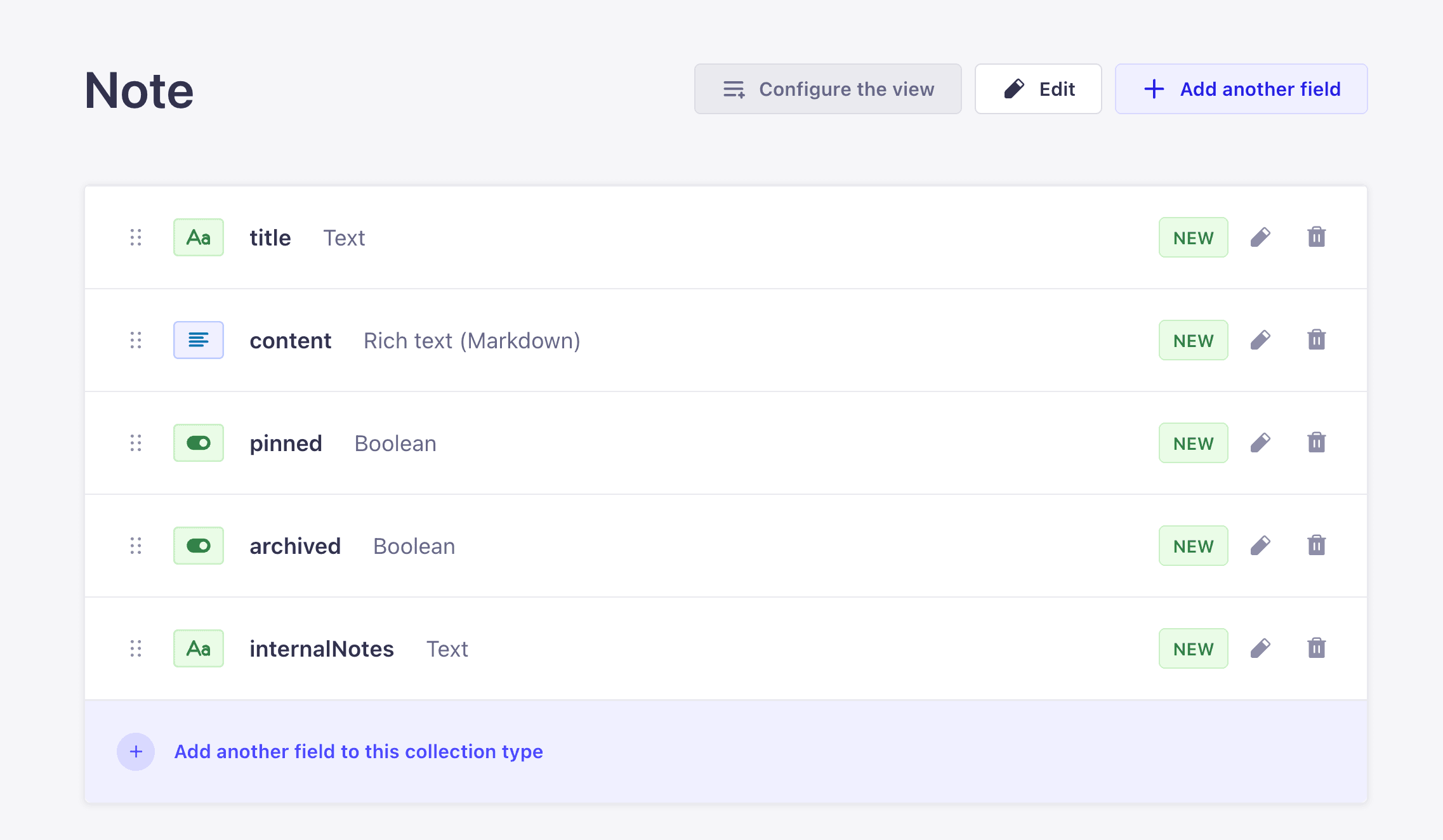
title(text),content(rich text, Markdown),pinned(boolean, defaultfalse),archived(boolean, defaultfalse),internalNotes(long text, marked private), plus a many-to-many relation to Tag.
Then, in order:
- Hide
internalNotesfrom the public schema and close off filter access to it. - Add a soft-delete contract to
Query.notesandQuery.noteusing middlewares, and cap the page size with a named policy. - Add three computed fields to
Note:wordCount,readingTime, andexcerpt(length: Int). - Add two new object types,
NoteStatsandTagCount, for aggregate responses. - Add three custom queries:
searchNotes,noteStats, andnotesByTag. - Add three custom mutations:
togglePin,archiveNote, andduplicateNote.
By the end, every customization API the GraphQL plugin exposes has been used at least once against a realistic model.
Step 1: Create the Tag content type
Start the dev server if it is not already running:
npm run developOpen the admin UI at http://localhost:1337/admin, then:
- Click Content-Type Builder in the left sidebar (the blocks icon).
- Under Collection Types, click Create new collection type.
- Set Display name to
Tag. Leave API ID (singular) astagand API ID (plural) astags. Click the Advanced Settings tab in the same dialog and uncheck Draft & Publish. Click Continue. - In the Select a field modal:
- Click Text, name it
name, leave the type as Short text. Open the Advanced settings tab and check Required field. Click Add another field. - Click UID, name it
slug, and set Attached field toname. Click Add another field. - Click Enumeration, name it
color, and add these values one per line:red,blue,green,yellow,purple,gray. Open the Advanced settings tab and set Default value togray. Click Finish.
- Click Text, name it
- Click Save in the top right. The server restarts.
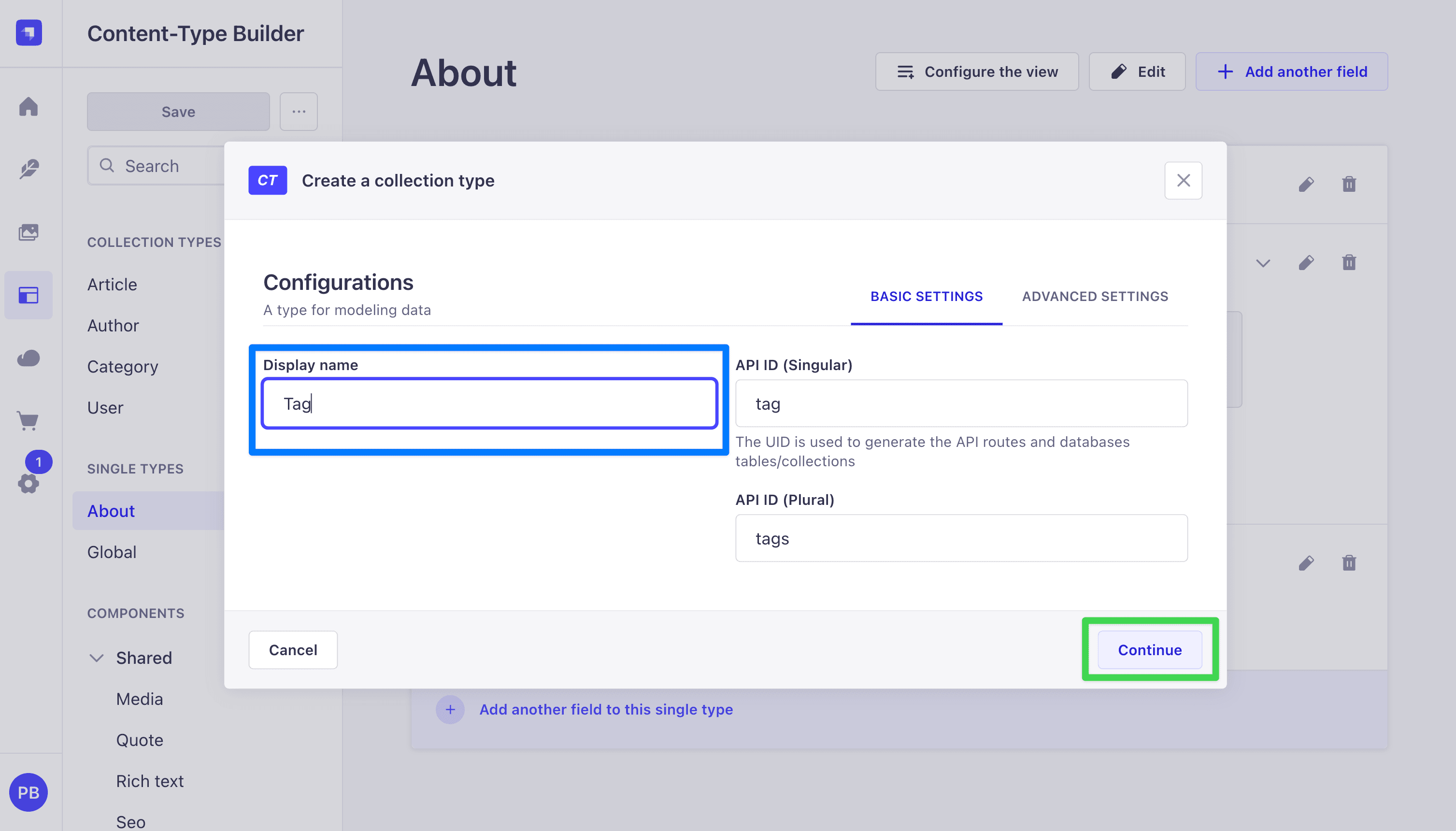
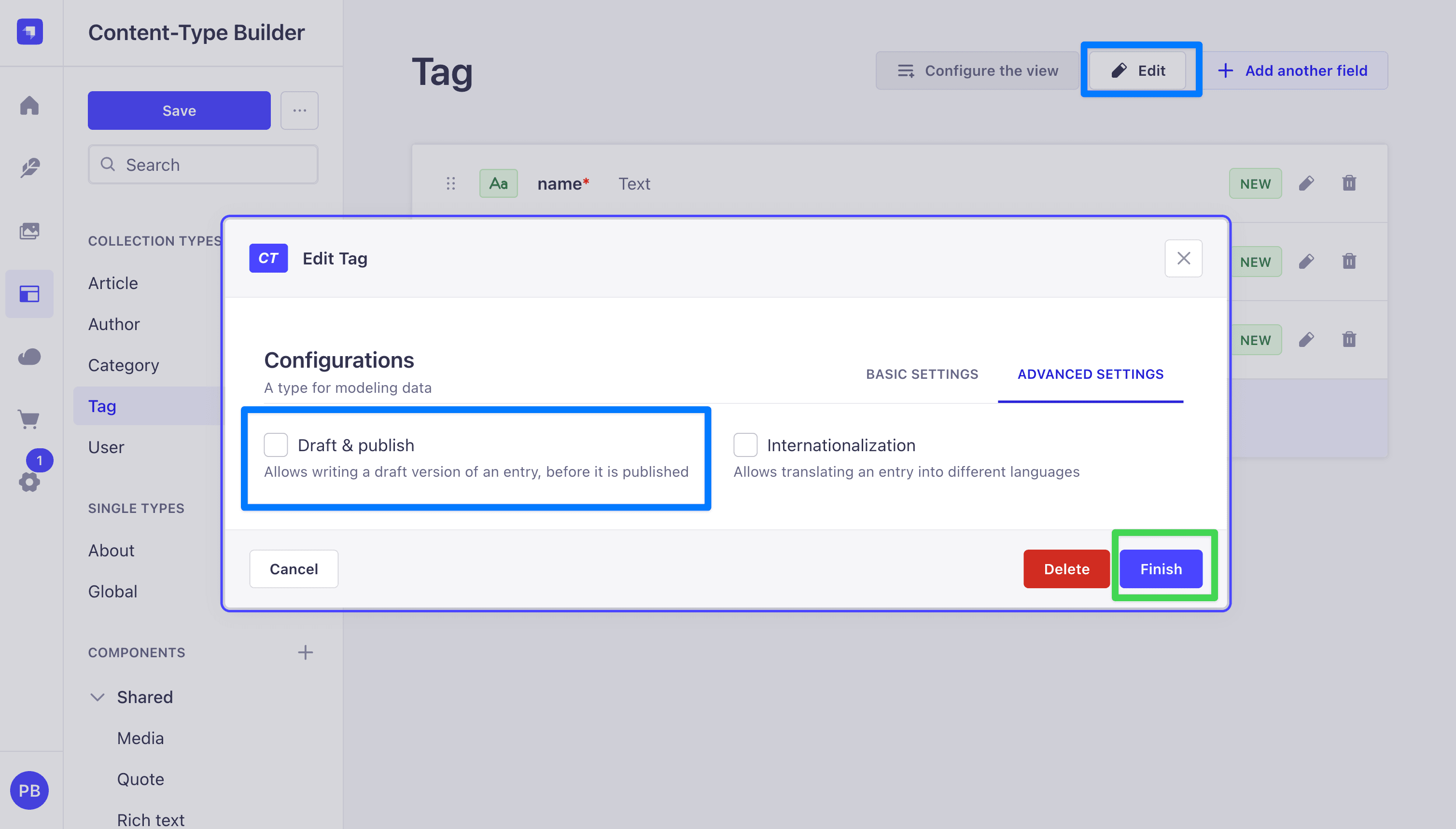
Tags are pure labels, so Draft & Publish adds nothing here. Turning it off means a tag is live the moment you save it, and you do not have to pass status: 'published' in any tag-related query later.
Here is the final look at our tag collection:
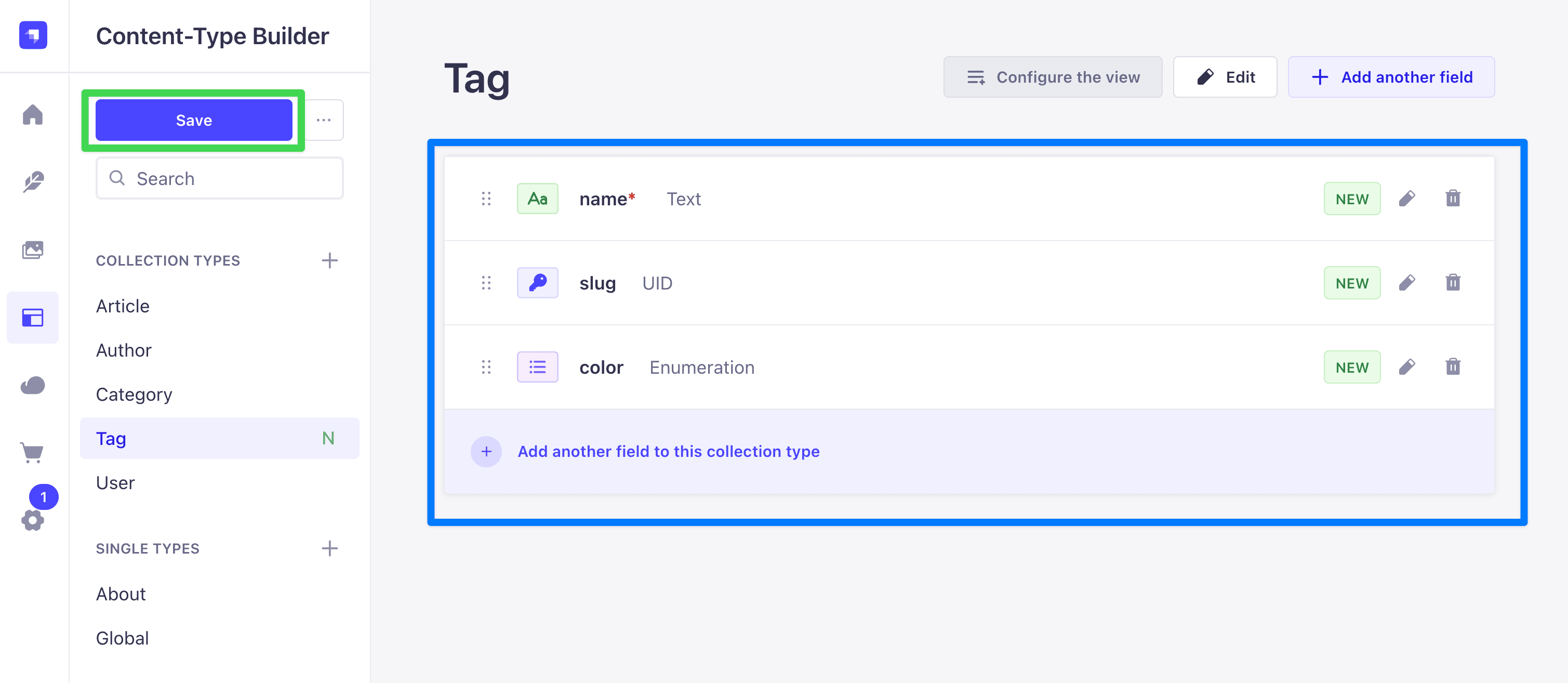
Open src/api/tag/content-types/tag/schema.json to confirm the attributes look right:
{
  "kind": "collectionType",
  "collectionName": "tags",
  "info": {
    "singularName": "tag",
    "pluralName": "tags",
    "displayName": "Tag"
  },
  "options": {
    "draftAndPublish": false
  },
  "pluginOptions": {},
  "attributes": {
    "name": {
      "type": "string",
      "required": true
    },
    "slug": {
      "type": "uid",
      "targetField": "name"
    },
    "color": {
      "type": "enumeration",
      "default": "gray",
      "enum": ["red", "blue", "green", "yellow", "purple", "gray"]
    }
  }
}
Step 2: Create the Note content type
Back in the Content-Type Builder:
- Click Create new collection type under Collection Types.
- Set Display name to
Noteand click the Advanced Settings tab in the same dialog. Uncheck Draft & Publish. Click Continue. (Turning Draft & Publish off on Note means our custom resolvers do not need to passstatus: 'published'. Article in Part 1 had it on, which is whysearchArticleshad to pass it.) - Add the fields one at a time:
- Text named
title, Short text, Required. - Rich text (Markdown) named
content. (Strapi has two rich-text variants: Blocks, an AST-style array, and Markdown, a plain string. Markdown is easier to render on the Next.js frontend in Part 3 and cheaper to handle on the backend, so we use it here.) - Boolean named
pinned. Under Advanced settings, set Default value tofalse. - Boolean named
archived. Under Advanced settings, set Default value tofalse. - Text named
internalNotes, Long text. No required flag. Open the Advanced settings tab and check Private field.internalNotesis admin-only context (moderation notes, triage flags, anything the public API should never see). Marking it private keeps it out of every client-facing surface. On REST, Strapi strips private attributes from response bodies during sanitization. On GraphQL, the plugin goes further and removes private attributes from the output type, the filter input type, and the mutation input type. We verify this with an introspection query right after the schema snippet below.
- Text named
- Add the relation to Tag:
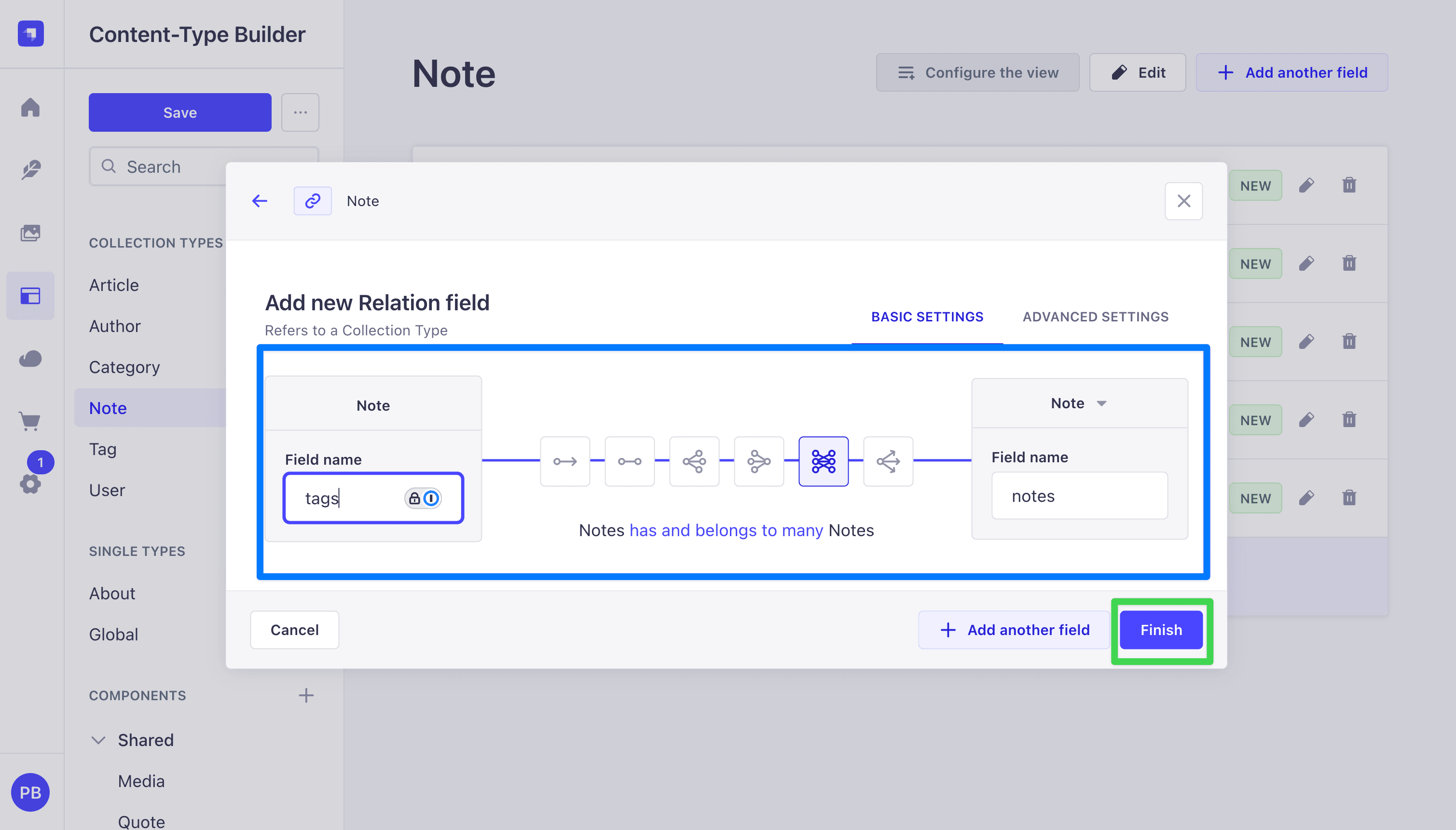
- Click Relation in the field picker.
- In the relation builder, the left card is
Note(you are editing it) and the right card is the target. Click the right-hand dropdown and pick Tag. - Choose the many-to-many icon (the one where both sides show multiple arrows). The field on the Note side should be named
tags, the inverse field on the Tag side should be namednotes. - Click Finish.
- Click Save. The server restarts again.
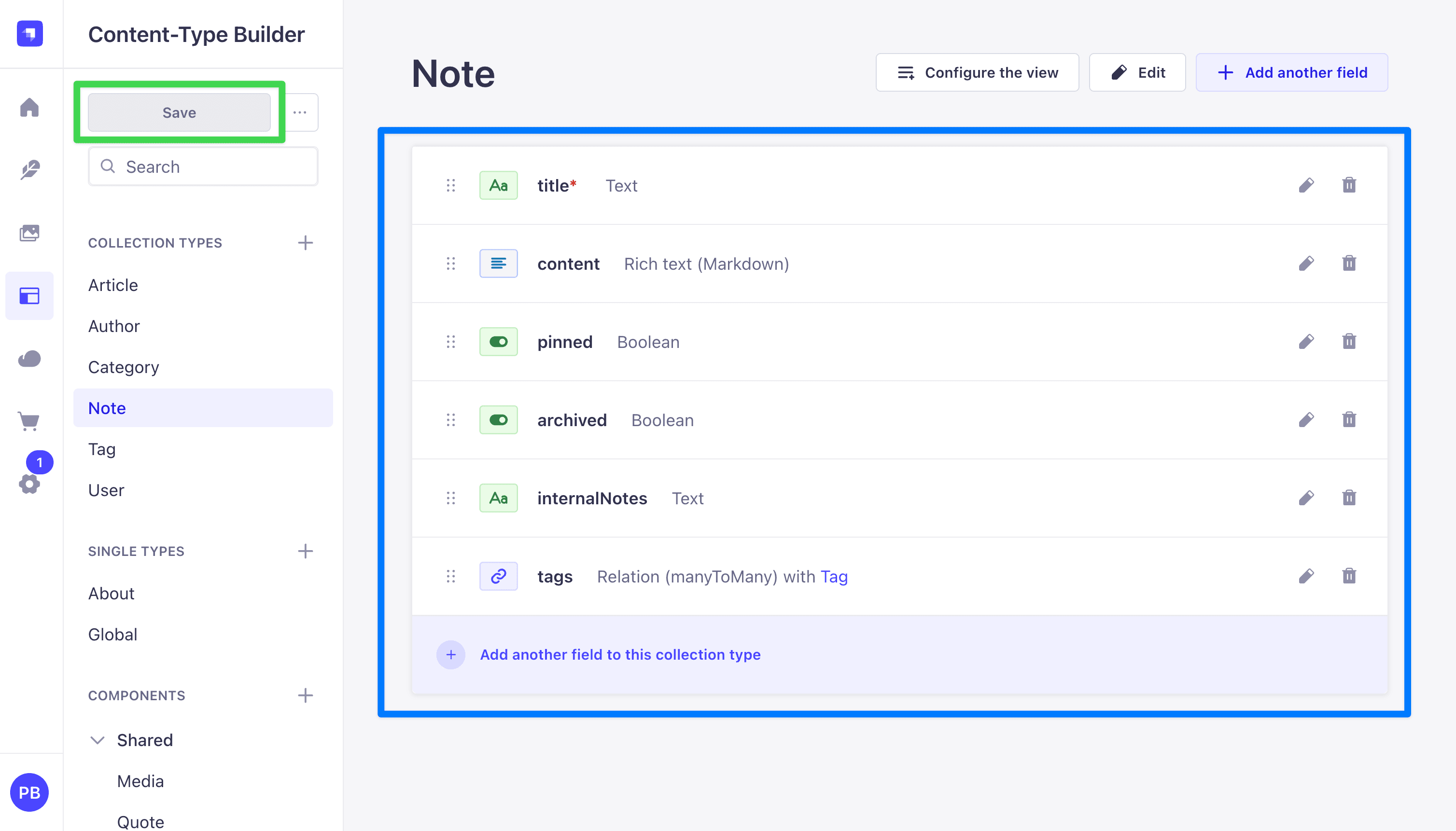
Open src/api/note/content-types/note/schema.json to confirm the attributes look right:
{
  "kind": "collectionType",
  "collectionName": "notes",
  "info": {
    "singularName": "note",
    "pluralName": "notes",
    "displayName": "Note"
  },
  "options": {
    "draftAndPublish": false
  },
  "pluginOptions": {},
  "attributes": {
    "title": {
      "type": "string",
      "required": true
    },
    "content": {
      "type": "richtext"
    },
    "pinned": {
      "type": "boolean",
      "default": false
    },
    "archived": {
      "type": "boolean",
      "default": false
    },
    "internalNotes": {
      "type": "text",
      "private": true
    },
    "tags": {
      "type": "relation",
      "relation": "manyToMany",
      "target": "api::tag.tag",
      "inversedBy": "notes"
    }
  }
}
Verify private: true hid internalNotes from GraphQL
Open the Apollo Sandbox at http://localhost:1337/graphql and run:
query PrivateReference {
  note: __type(name: "Note") {
    fields {
      name
    }
  }
  filter: __type(name: "NoteFiltersInput") {
    inputFields {
      name
    }
  }
  input: __type(name: "NoteInput") {
    inputFields {
      name
    }
  }
}
Scan all three lists in the response. internalNotes is absent from every one. The GraphQL plugin reads the private: true flag out of schema.json and removes the attribute from the output type, the filter input type, and the mutation input type in one go. REST sanitization strips it from response bodies at the same time, so GET /api/notes never returns it either.
This is the Strapi-native way to hide sensitive fields from the public API. No extension code needed.
Step 3: Grant public permissions for Note and Tag
Same flow as Part 1, applied to the new content types.
- In the admin UI, open Settings (gear icon, bottom of the left sidebar).
- Under Users & Permissions Plugin, click Roles, then Public.
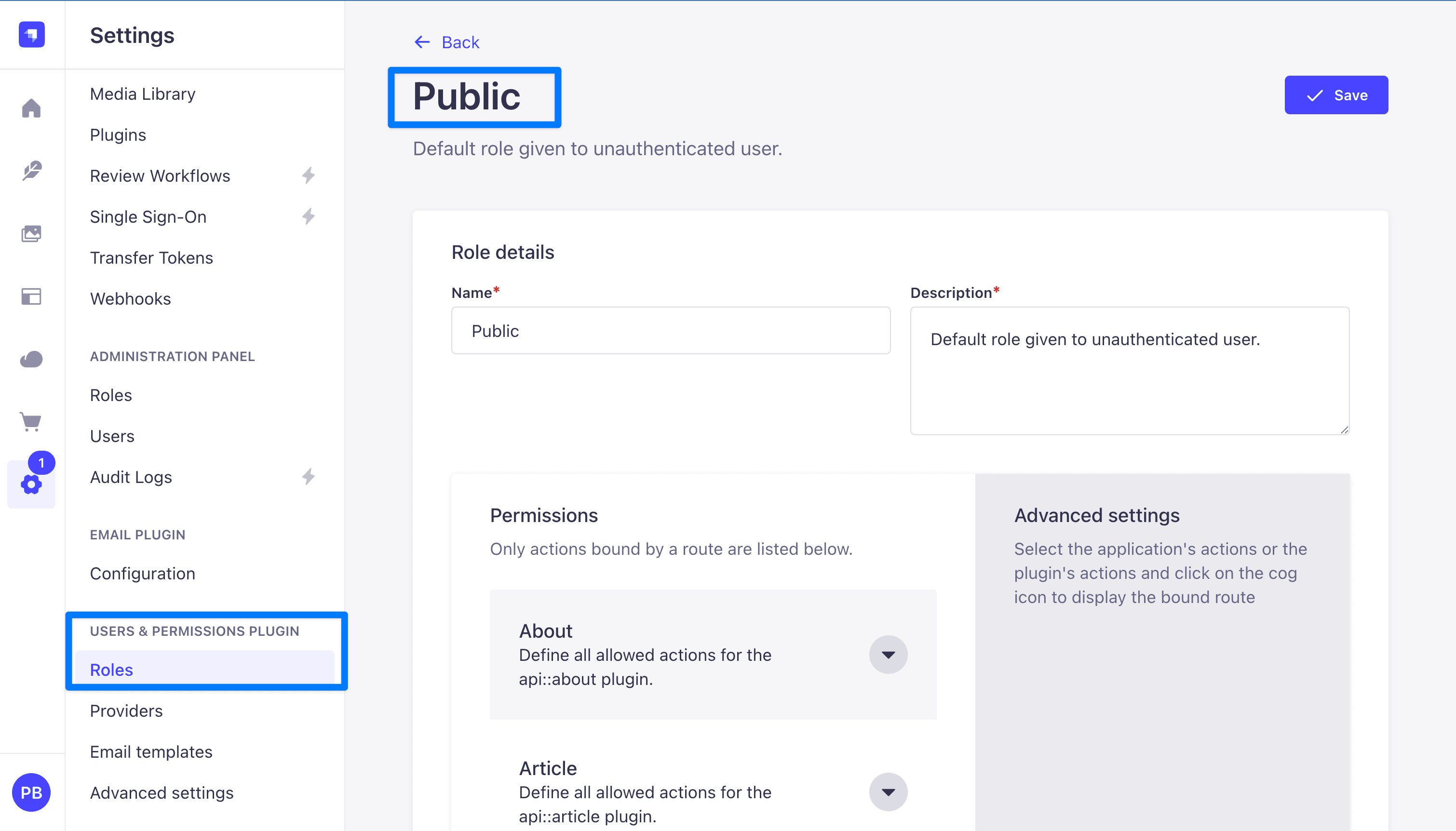
- Expand Note and check
find,findOne,create, andupdate. Leavedeleteunchecked. The frontend uses soft-delete via thearchivedflag, so the public API should never be able to hard-delete a note.
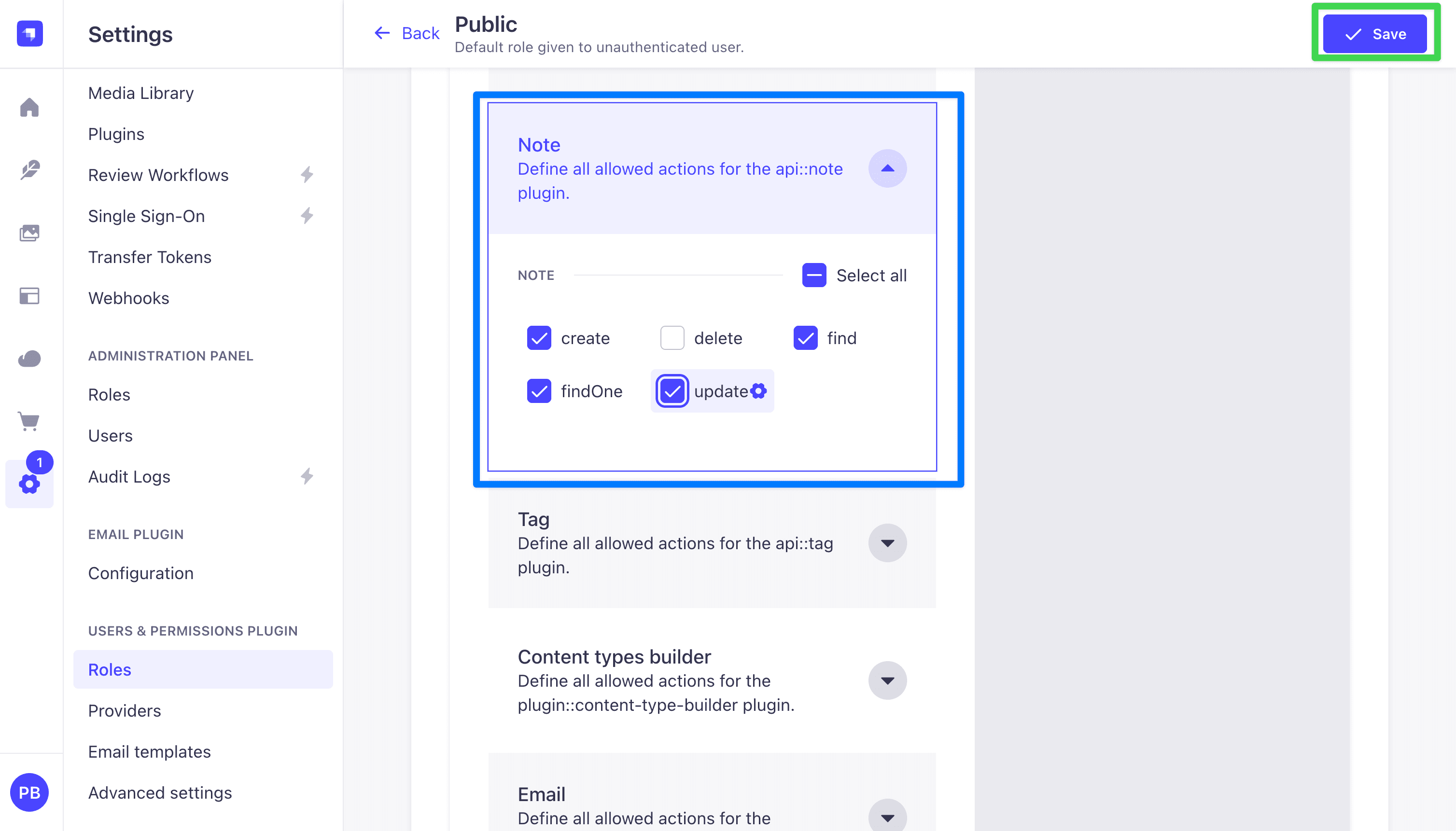
- Expand Tag and check
find,findOne,create,update, anddelete.
- Click Save.
Step 4: Seed a handful of entries
The queries, policies, and aggregations later in this post need data to return. Create a few entries by hand so the Sandbox has something to work with.
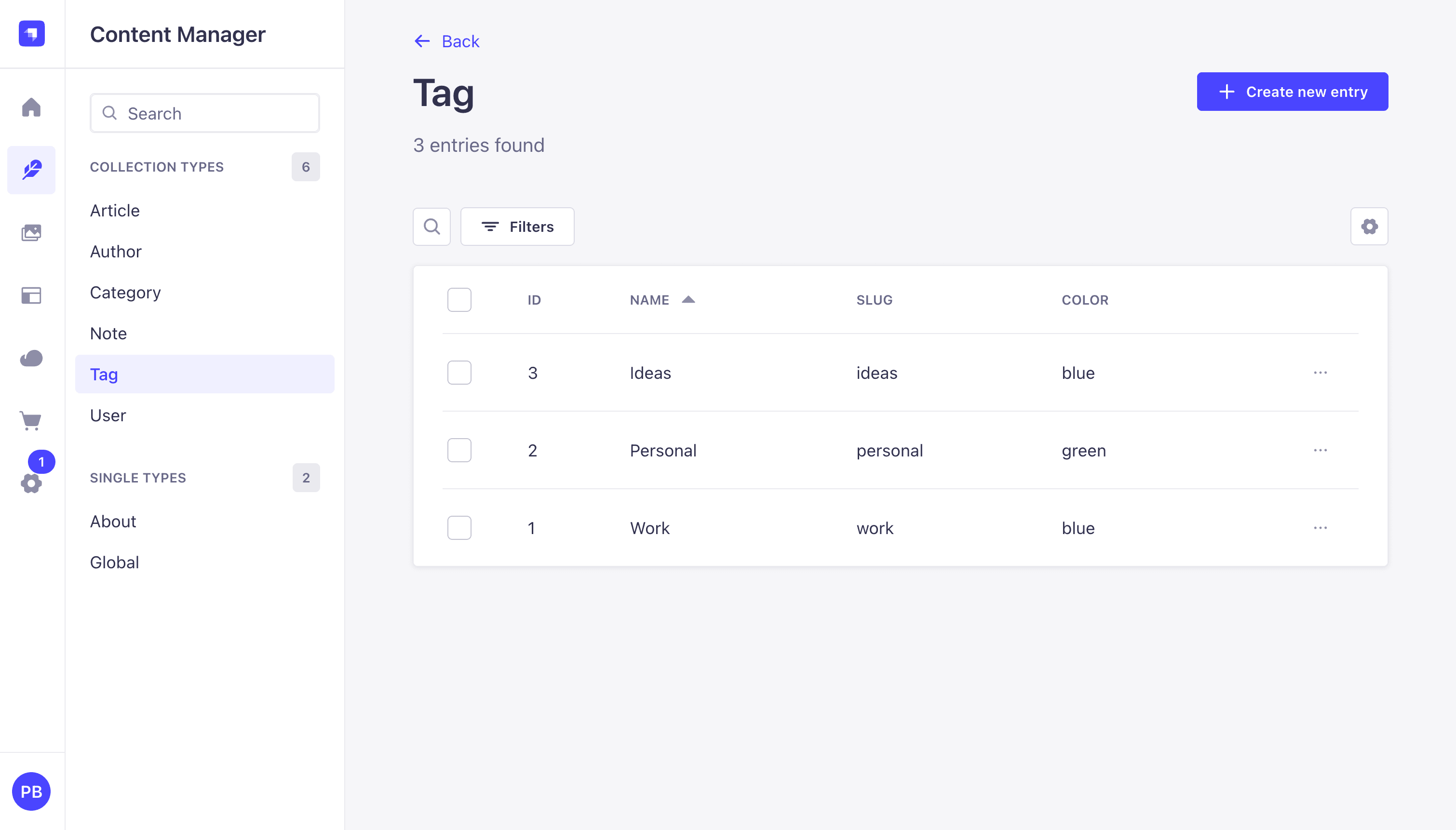
Create three Tag entries through Content Manager, Tag, Create new entry. Suggested starter values:
| name | slug | color |
|---|---|---|
| Work | work | blue |
| Personal | personal | green |
| Ideas | ideas | yellow |
Strapi renders the color field as a dropdown with the six values from Step 1. The frontend in Part 3 maps each enum value to a Tailwind class, so you do not need to use every color in your seed data.
Click Save
Create three Note entries through Content Manager, Note, Create new entry. For each note:
- Pick a title like
Weekly review,Gift ideas, orSide-project backlog. - In content, add a paragraph or two of text. The wording does not matter, but make each note at least a sentence long so
wordCountreturns a real count in Step 7. (readingTimeusesMath.max(1, ...)so it is always at least 1, even on an empty note.) - Toggle
pinnedon for one of the three; leave the others off. - Leave
archivedoff for all of them. You can flip one toarchived: truelater when testing the archive rules. - Fill
internalNoteswith anything, for examplemoderator flag: low priority. Theprivate: trueflag from Step 2 keeps it out of every public GraphQL and REST response, so whatever you write here only shows up in the admin UI. - Under Tags, add one or two tags from the dropdown.
- Click Save.
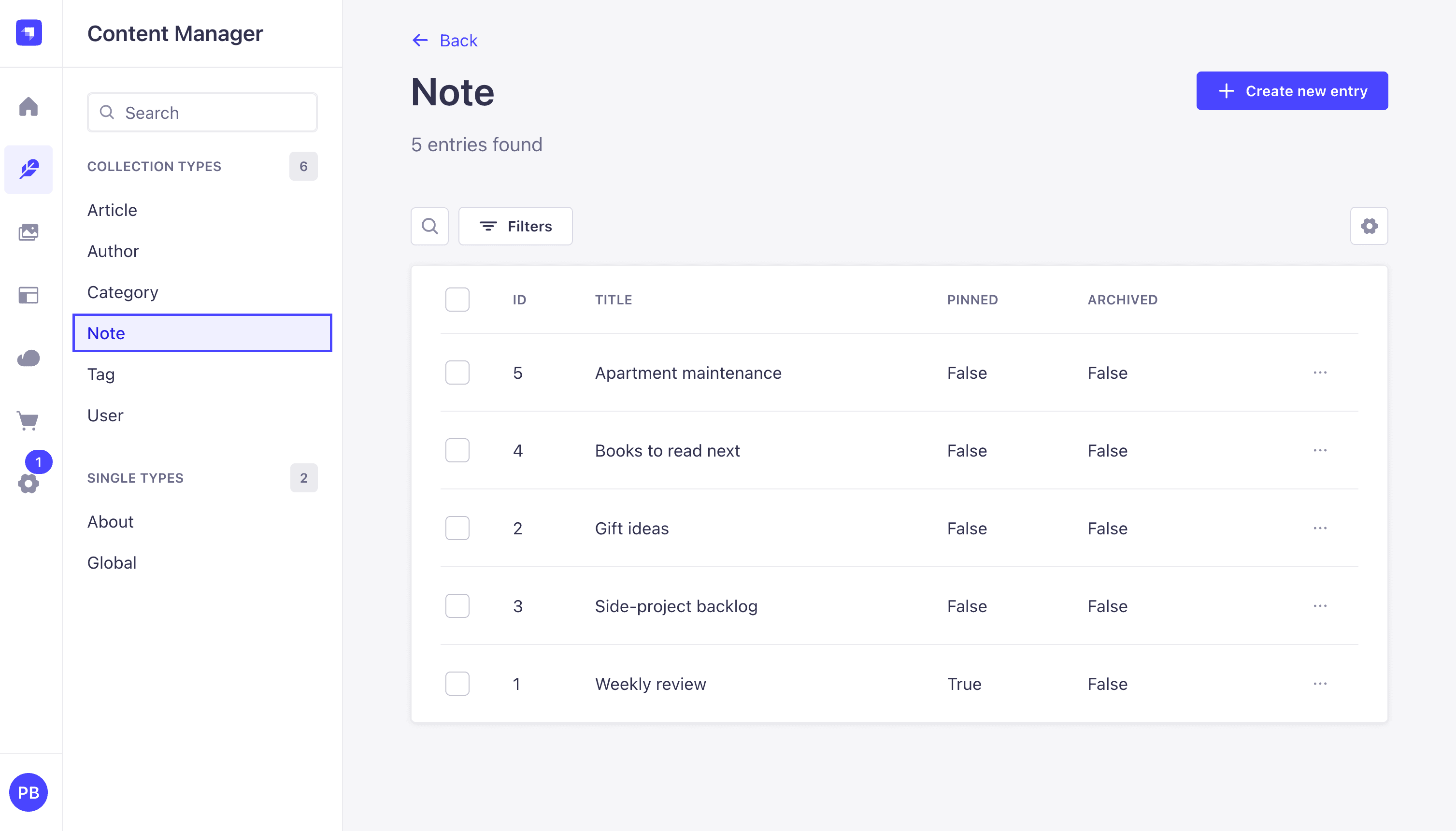
Three notes are enough to test every resolver in the rest of the post. Add more if you like.
Step 5: Shadow CRUD, what it is and why you rarely customize it
Shadow CRUD is how Strapi auto-generates your GraphQL schema at boot. At startup, the GraphQL plugin reads every registered content type and emits matching queries, mutations, input types, and filter types. Everything you used in Part 1, the full notes / note / createNote / updateNote surface, came out of Shadow CRUD.
The plugin does expose an extension API for turning parts of the generated schema off:
strapi
  .plugin("graphql")
  .service("extension")
  .shadowCRUD("api::note.note")
  .disable() // remove the whole content type
  .disableQueries() // remove find/findOne
  .disableMutations() // remove create/update/delete
  .disableAction("delete");

strapi
  .plugin("graphql")
  .service("extension")
  .shadowCRUD("api::note.note")
  .field("internalNotes")
  .disable() // remove the field entirely
  .disableOutput() // remove from the Note output type
  .disableInput() // remove from create/update inputs
  .disableFilters(); // remove from NoteFiltersInput
The full vocabulary, for reference:
| Content-type level | Field level |
|---|---|
.disable() | .disable() |
.disableQueries() | .disableOutput() |
.disableMutations() | .disableInput() |
.disableAction('delete') | .disableFilters() |
.disableActions(['create','update']) |
Documented in full on the GraphQL plugin docs page.
Most projects skip this API
Two simpler tools cover almost everything you would use Shadow CRUD customization for:
- Permissions already block calls at runtime. If you do not want the public role calling
deleteNote, uncheckdeletefor the Public role in Step 3. The REST endpoint and the GraphQL resolver both return aForbiddenerror. The mutation still appears in the schema, but no one can actually run it. private: truealready hides sensitive fields. Step 2 putprivate: trueoninternalNotes. The GraphQL plugin removes the field from theNoteoutput type, fromNoteFiltersInput, and fromNoteInput. No extension file needed.
So when would you use Shadow CRUD customization? When you also want the field or action gone from the schema itself, so it does not show up in the Sandbox docs panel, in introspection responses, or in generated client types. Permissions block the call but leave the schema unchanged. Shadow CRUD customization changes the schema. For most projects the runtime block is enough, so this tutorial does not add a shadow-crud.ts file.
For real access control, use permissions (Step 3) and private: true (Step 2) first, then middlewares and policies (Step 6) for anything those two cannot express.
Step 6: resolversConfig, middlewares and policies
resolversConfig is how you attach middlewares, policies, and auth rules to a resolver. The resolver can be one Shadow CRUD generated for you (like Query.notes or Mutation.createNote) or one you wrote yourself (like the searchNotes query in Step 9). resolversConfig is a plain object: keys are the resolver's full name (Query.notes, Mutation.createNote, Note.wordCount), values are configuration objects.
Middleware vs. policy, and when to use each
Both are functions that run around a resolver. They answer different questions.
Policies answer "should this request even proceed?" Per the Strapi docs, policies are "functions that execute specific logic on each request before it reaches the controller. They are mostly used for securing business logic." A policy returns true to let the request through or false to reject it. If the policy returns false, the resolver never runs. Policies are the natural home for authorization checks like "is the user logged in", "does this user own this row", or "is this request coming from an allowed IP".
Policies for the GraphQL plugin live in either src/policies/ (the global folder) or src/api/<api>/policies/ (the per-content-type folder). You refer to them by name in resolversConfig: global::<filename> for the first folder, api::<api>.<filename> for the second. The word "global" here means "lives in the global folder", not "applies to everything". A policy in src/policies/ is available everywhere by name, but you still have to attach it to each resolver in resolversConfig (or to each REST route in the route's config.policies) where you want it. Nothing applies a policy automatically.
Middlewares answer "what should happen before and after?" Per the Strapi docs, middlewares "alter the request or response flow at application or API levels." A middleware wraps the resolver call. It can run code before the resolver, call next(...) to let the resolver run, and run code after the resolver with the result in hand. Use a middleware for things like:
- Timing or logging a call (the timing middleware in this step does this).
- Adding cache hints, CORS headers, or extra fields to the response.
- Changing the request before the resolver sees it (the soft-delete injection middleware does this; it adds
archived: { eq: false }toargs.filters). - Changing or rejecting the response after the resolver has run (the
Query.notemiddleware does this; it throwsNotFoundErrorif the loaded note is archived).
Do not use a middleware to reject a request for authorization reasons. That is what policies are for.
The GraphQL plugin exposes both through the same resolversConfig key (see the plugin docs). middlewares is an array; each entry can be either a function (defined inline) or a string (the name of a middleware you registered elsewhere). policies accepts the same two shapes.
They run in a fixed order: middlewares first (in the order you list them), then policies, then the resolver. Each middleware has a "before" half (the code before next(...)) and an "after" half (the code after next(...) returns). At request time:
- The "before" halves of each middleware run in array order.
- Once they have all called
next(...), the policies run in array order. - If any policy returns
false, the request is rejected and nothing further runs. - Otherwise the resolver runs.
- Then each middleware's "after" half runs, in reverse order.
What this step builds
The file below attaches four middlewares and one policy across two resolvers.
On Query.notes (the list query):
- A soft-delete rejection middleware that throws
ForbiddenErrorif the caller tried to filter onarchived(whether they asked fortrueorfalse). Only the server changesarchived, so callers do not get to ask about it. - A soft-delete injection middleware that runs after the rejection middleware and adds
archived: { eq: false }toargs.filters. By the time this runs, we already know the caller did not sendarchived, so adding it cannot overwrite anything they sent. - A timing middleware that logs how long every call takes and prints the filter the resolver ended up running against. Just for observability.
- A named policy (
global::cap-page-size) that rejects anyQuery.notescall asking for more than 100 rows in one page. A simple yes/no check based on what the caller sent, which is exactly what policies are for.
On Query.note (the single-fetch query):
- A soft-delete coverage middleware that lets the resolver run, then looks at the loaded note and throws
NotFoundErrorif the note is archived. The list query is already covered by rules 1 and 2, but fetching a single note bydocumentIdgoes through a different code path. Without this middleware, anyone holding an archived note'sdocumentIdcould still pull it down. With it, an archived note no longer exists from the public API's point of view, whether you ask for the list or fetch one by ID.
Why use two middlewares for the soft-delete rule on Query.notes instead of one? Each one does a different job. The first looks at one field (args.filters.archived) and throws if it is present. The second sets that same field to { eq: false }, every time. You could put both checks in a single middleware, but splitting them keeps each one short, and it gives us three small middleware examples on the same resolver to compare against the timing middleware.
Why does Query.note check after the resolver runs instead of before? Because before the resolver runs, we do not yet know whether the requested note is archived. The Document Service has not loaded it. The simplest correct pattern is to call next(...) first, let the Document Service load the row, then check result.archived on the way back. This is the second basic middleware pattern: let the resolver run, then change or reject the response. The rejection middleware on Query.notes is the first pattern: look at args, reject before calling next(...). Both show up in the file below.
Create the file:
// src/extensions/graphql/middlewares-and-policies.ts
import type { GraphQLResolveInfo } from "graphql";
import { errors } from "@strapi/utils";

type NotesArgs = {
  filters?: Record<string, unknown>;
  pagination?: Record<string, unknown>;
  sort?: string | string[];
};

type NoteArgs = {
  documentId?: string;
};

type ResolverNext<A> = (
  parent: unknown,
  args: A,
  context: unknown,
  info: GraphQLResolveInfo,
) => Promise<unknown>;

export default function middlewaresAndPolicies() {
  return {
    resolversConfig: {
      "Query.notes": {
        middlewares: [
          // Soft-delete invariant — rejection half.
          // The `archived` field is server-controlled. Any caller-supplied
          // filter on `archived` is rejected up front.
          async (
            next: ResolverNext<NotesArgs>,
            parent: unknown,
            args: NotesArgs,
            context: unknown,
            info: GraphQLResolveInfo,
          ) => {
            if (args?.filters?.archived !== undefined) {
              throw new errors.ForbiddenError(
                "Cannot filter on `archived` directly. Soft-deleted notes are not accessible via the public API.",
              );
            }
            return next(parent, args, context, info);
          },
          // Soft-delete invariant — injection half.
          // The first middleware guarantees `archived` was undefined here,
          // so the injection is unconditional.
          async (
            next: ResolverNext<NotesArgs>,
            parent: unknown,
            args: NotesArgs,
            context: unknown,
            info: GraphQLResolveInfo,
          ) => {
            args.filters = {
              ...(args?.filters ?? {}),
              archived: { eq: false },
            };
            return next(parent, args, context, info);
          },
          // Timing logger.
          // Wraps the rest of the chain to record how long Query.notes
          // takes. Sees the final filter value because both soft-delete
          // middlewares ran first.
          async (
            next: ResolverNext<NotesArgs>,
            parent: unknown,
            args: NotesArgs,
            context: unknown,
            info: GraphQLResolveInfo,
          ) => {
            const label = `[graphql] Query.notes (${JSON.stringify(args?.filters ?? {})})`;
            console.time(label);
            try {
              return await next(parent, args, context, info);
            } finally {
              console.timeEnd(label);
            }
          },
        ],
        policies: ["global::cap-page-size"],
      },
      "Query.note": {
        middlewares: [
          // Soft-delete invariant — single-fetch coverage.
          // Direct documentId lookup is a separate code path from
          // Query.notes and needs its own enforcement. Let the resolver
          // run so the entity is loaded, then inspect `archived` on the
          // result and surface NotFoundError if it is true. From the
          // public API's point of view, an archived note simply does not
          // exist.
          async (
            next: ResolverNext<NoteArgs>,
            parent: unknown,
            args: NoteArgs,
            context: unknown,
            info: GraphQLResolveInfo,
          ) => {
            const result = (await next(parent, args, context, info)) as
              | { archived?: boolean }
              | null
              | undefined;
            if (result && result.archived === true) {
              throw new errors.NotFoundError("Note not found.");
            }
            return result;
          },
        ],
      },
    },
  };
}
Order matters on Query.notes. Middlewares run in the order they appear in the array, the policy runs after them, and the resolver runs last. So at request time:
- The rejection middleware runs first. If the caller passed
archivedinfilters, it throwsForbiddenErrorand the chain stops here. The remaining middlewares, the policy, and the resolver are all skipped. - If the request gets past rejection, the injection middleware runs and sets
args.filters.archivedto{ eq: false }. From this point on, every later step sees the same final filter. - The timing middleware runs and prints the filter. The log line reflects what the resolver actually ran against.
- The policy reads
policyContext.args.pagination.pageSizeand rejects if it is over 100. - The resolver runs with
archived: falseand a capped page size.
Query.note works in reverse. Its single middleware lets the resolver run first, then checks the result on the way back. If the loaded entity has archived: true, the middleware throws NotFoundError. Otherwise it returns the entity untouched. This is the second basic middleware shape from earlier.
What these middlewares cover, and what they do not.
The middlewares above stop archived notes from coming back when someone calls the
notesquery (the list) or thenotequery (single fetch). Those are the two main ways the public API reads notes.If you want archived notes hidden everywhere, three more places need attention:
- Custom queries. The custom queries we add in Step 9 (
searchNotes,notesByTag) are separate resolvers. The middlewares above do not run on them. Both happen to be fine already:notesByTagfilters out archived notes inside its own resolver, andsearchNoteshas anincludeArchivedargument that defaults tofalse. Any new custom query you add later has to do its own archived check.- REST. Calls to
GET /api/notesorGET /api/notes/:documentIddo not go through the GraphQL plugin at all, so these middlewares never run. REST will return archived notes. The "GraphQL-only vs. both APIs" section right below shows how to make REST behave the same way.- Write mutations.
togglePin,updateNote, andduplicateNotewill currently let you change an archived note. That arguably contradicts the point of soft-delete: a "deleted" note should not be editable. Adding a guard is short: load the note, checkarchived, throw if true. We leave it as an exercise. Part 4 adds per-user ownership on top of these mutations and is the natural place to revisit them.
The two function signatures to remember:
-
A middleware is an async function written as
async (next, parent, args, context, info) => .... The first argument,next, is a function: call it to let the next middleware run, or, if there are no more middlewares, to let the resolver run. Inside a middleware you can:- Change
argsbefore you callnext(...). That changes what the resolver sees. The injection middleware does this; it addsarchived: { eq: false }toargs.filtersbefore the resolver runs. - Run code after
next(...)finishes, with the response in hand. TheQuery.notemiddleware does this; it looks at the loaded note, and ifnote.archivedistrue, it throwsNotFoundErrorinstead of returning the note. - Run code both before and after
next(...). The timing middleware does this; it records the start time before, then logs the duration after.
If you throw an error instead of calling
next(...), no further middleware runs, no policy runs, and the resolver does not run. The error goes back to the caller in the GraphQL response. That is how the rejection middleware works: it throwsForbiddenErrorand the request stops there. - Change
-
A policy is a function written as
(policyContext, config, { strapi }) => .... Returntrueorundefinedto let the request through. Returnfalseto reject it; Strapi turns that into aPolicy Failederror. Policies run after every middleware, so by the time a policy runs, any middleware has already had a chance to changeargs.
When to pick which:
- Use a policy when the rule is "yes or no, based on what the caller sent", and the default
Policy Failederror is good enough. - Use a middleware when you need to change the request, change the response, add timing or logging, or reject with a specific error type. For example, the rejection middleware in this file throws
ForbiddenErroron purpose, so the GraphQL response carriesextensions.code: "FORBIDDEN". That code matches the meaning ("you are not allowed to ask about archived") better thanPolicy Failedwould.
Policies in resolversConfig can be either inline functions or strings that name a policy file (the plugin docs say both shapes work). The string form is global::<filename> for a file in src/policies/, or api::<api>.<filename> for one in src/api/<api>/policies/. We use the string form below so the same policy file can be referenced from both resolversConfig.policies (GraphQL) and a route's config.policies (REST). Part 4 takes advantage of that.
Before writing the policy, look at what its first argument is. Per the GraphQL plugin docs, when a policy runs from resolversConfig:
Policies directly implemented in resolversConfig are functions that take a context object and the strapi instance as arguments. The context object gives access to:
- the parent, args, context and info arguments of the GraphQL resolver,
- Koa's context with context.http and state with context.state.
So policyContext.args gives you the GraphQL resolver arguments (filters, pagination, sort, and whatever else the resolver accepts). policyContext.context.http gives you the underlying Koa request, in case you need to read headers. And policyContext.state.user gives you the signed-in user. (policyContext.context.state.user works too; both point at the same object.) The reason that matters: REST policies access the same user as policyContext.state.user. Using the short path lets the same policy file work in both REST and GraphQL, which Part 4 relies on. The PolicyContext type in the file below picks out only the fields this policy actually reads.
Create the policy file:
// src/policies/cap-page-size.ts
import type { Core } from "@strapi/strapi";

const MAX_PAGE_SIZE = 100;

type Pagination = {
  pageSize?: number | string;
  limit?: number | string;
};

type PolicyContext = {
  args?: { pagination?: Pagination };
};

const capPageSize = (
  policyContext: PolicyContext,
  _config: unknown,
  { strapi }: { strapi: Core.Strapi },
): boolean => {
  const pagination = policyContext?.args?.pagination ?? {};
  const requested = Number(pagination.pageSize ?? pagination.limit ?? 0);

  if (Number.isFinite(requested) && requested > MAX_PAGE_SIZE) {
    strapi.log.warn(
      `Query.notes blocked: pageSize ${requested} exceeds cap of ${MAX_PAGE_SIZE}.`,
    );
    return false;
  }

  return true;
};

export default capPageSize;
The policy reads policyContext.args.pagination.pageSize (the GraphQL plugin also accepts limit as an alias for offset-style pagination, so we check both), coerces it to a number, and rejects if it is over the cap. Anything inside the cap, or any query without a pagination argument at all, returns true and the request proceeds.
Register the factory in the aggregator:
// src/extensions/graphql/index.ts
import type { Core } from "@strapi/strapi";
import computedFields from "./computed-fields";
import queries from "./queries";
import middlewaresAndPolicies from "./middlewares-and-policies";

export default function registerGraphQLExtensions(strapi: Core.Strapi) {
  const extensionService = strapi.plugin("graphql").service("extension");

  extensionService.use(middlewaresAndPolicies);
  extensionService.use(computedFields);
  extensionService.use(function extendQueries({ nexus }: any) {
    return queries({ nexus, strapi });
  });
}
Restart. From a terminal, check that all four rules are active.
First, the soft-delete middlewares. A bare query should succeed and exclude archived rows. A query that tries to filter on archived should be rejected with Forbidden, regardless of the value the caller passes:
# Bare query, no filter: succeeds, archived rows absent
curl -s -X POST http://localhost:1337/graphql \
  -H 'Content-Type: application/json' \
  -d '{"query":"{ notes { title archived } }"}'
# -> {"data":{"notes":[{"title":"...","archived":false}, ...]}}

# Sneaky query, archived: true: rejected
curl -s -X POST http://localhost:1337/graphql \
  -H 'Content-Type: application/json' \
  -d '{"query":"{ notes(filters:{ archived:{ eq: true } }){ title } }"}'
# -> {"errors":[{"message":"Cannot filter on `archived` directly. ... ", "extensions":{"code":"FORBIDDEN", ... }}],"data":null}

# Polite query, archived: false: also rejected. The server alone manages archived.
curl -s -X POST http://localhost:1337/graphql \
  -H 'Content-Type: application/json' \
  -d '{"query":"{ notes(filters:{ archived:{ eq: false } }){ title } }"}'
# -> {"errors":[{"message":"Cannot filter on `archived` directly. ... ", "extensions":{"code":"FORBIDDEN", ... }}],"data":null}
Next, the page-cap policy. Oversized requests should fail with Policy Failed. Requests inside the cap should succeed:
# pageSize over the cap: Policy Failed
curl -s -X POST http://localhost:1337/graphql \
  -H 'Content-Type: application/json' \
  -d '{"query":"{ notes(pagination:{ pageSize: 500 }){ documentId } }"}'
# -> {"errors":[{"message":"Policy Failed", ... }],"data":null}

# pageSize inside the cap: 200 OK
curl -s -X POST http://localhost:1337/graphql \
  -H 'Content-Type: application/json' \
  -d '{"query":"{ notes(pagination:{ pageSize: 10 }){ documentId } }"}'
# -> {"data":{"notes":[ ... ]}}
Notice the two error shapes. The middleware throws ForbiddenError and produces extensions.code: "FORBIDDEN". The policy returns false and produces the standard Policy Failed message. Callers can branch on the code.
Finally, the single-fetch coverage on Query.note. Archive a note in the admin UI (or via the archiveNote mutation), grab its documentId, and run:
# Direct fetch of an archived note: rejected with NotFound
curl -s -X POST http://localhost:1337/graphql \
  -H 'Content-Type: application/json' \
  -d '{"query":"query F($id: ID!){ note(documentId: $id){ documentId title archived } }","variables":{"id":"<archived-documentId>"}}'
# -> {"errors":[{"message":"Note not found.", "extensions":{"code":"STRAPI_NOT_FOUND_ERROR", ... }}],"data":{"note":null}}

# Direct fetch of an active note: 200 OK
curl -s -X POST http://localhost:1337/graphql \
  -H 'Content-Type: application/json' \
  -d '{"query":"query F($id: ID!){ note(documentId: $id){ documentId title } }","variables":{"id":"<active-documentId>"}}'
# -> {"data":{"note":{"documentId":"...","title":"..."}}}
In the Strapi process output, every successful list call should also log a line like [graphql] Query.notes ({"archived":{"eq":false}}): 12ms. The filter in the log always includes archived: { eq: false }, even for bare queries, because the injection middleware runs before the timing middleware. Rejected calls do not produce a timing log; the chain stops before the timing middleware runs.
Query.note does not log timings. If you want timing on the single-fetch path too, copy the timing middleware and drop it in front of the soft-delete middleware in Query.note's middlewares array.
Heads up: resolversConfig only protects GraphQL
The middleware and the policy we just wrote sit in resolversConfig. That key is part of the GraphQL plugin's extension API, so the rules only run for /graphql requests. A caller hitting GET /api/notes skips both: the soft-delete middleware does not fire, and the page-size policy does not fire either.
You can see this from the terminal. GraphQL rejects the archived filter, REST returns archived rows without complaint:
# GraphQL: the middleware blocks the archived filter
curl -s -X POST http://localhost:1337/graphql \
  -H 'Content-Type: application/json' \
  -d '{"query":"{ notes(filters:{ archived:{ eq: true } }){ title archived } }"}'
# -> {"errors":[{"message":"Cannot filter on `archived` directly. ... ",
#                "extensions":{"code":"FORBIDDEN", ... }}],"data":null}

# REST: nothing blocks it, archived rows come back
curl -s "http://localhost:1337/api/notes?filters\[archived\]\[\$eq\]=true"
# -> {"data":[ ... archived notes here ... ],"meta":{ ... }}
If your application only exposes a GraphQL endpoint, this is fine: the GraphQL rule is the only entry point, so the only door is locked. But if both surfaces are exposed (which is the default in Strapi v5), and the rule is genuinely "no caller of any API should ever see archived notes by default", you have to add the rule to REST as well.
Add the same rule to REST
The most direct way to mirror the rule onto REST is a route-level middleware on the Note router. Strapi's core router accepts a config block per action where you can attach Koa middlewares (see the Strapi route configuration docs). The middleware mirrors what the GraphQL pair does: reject if the caller asked for archived, then inject archived: false so the response only includes active notes.
// src/api/note/routes/note.ts
import { factories } from "@strapi/strapi";
import { errors } from "@strapi/utils";

const enforceSoftDelete = (ctx, next) => {
  const filters = (ctx.query.filters ??= {}) as Record<string, unknown>;

  // Rejection half: match the GraphQL behavior. If the caller tried to
  // filter on `archived`, return a clear FORBIDDEN error instead of
  // silently overwriting their filter.
  if (filters.archived !== undefined) {
    throw new errors.ForbiddenError(
      "Cannot filter on `archived` directly. Soft-deleted notes are not accessible via the public API.",
    );
  }

  // Injection half: every other request is forced to `archived: false`.
  filters.archived = { $eq: false };
  return next();
};

export default factories.createCoreRouter("api::note.note", {
  config: {
    find: { middlewares: [enforceSoftDelete] },
    findOne: { middlewares: [enforceSoftDelete] },
  },
});
REST find and findOne now behave the same way GraphQL does. A caller who sends ?filters[archived][$eq]=true gets a 403 Forbidden response with a clear message. A caller who sends nothing gets back only active notes. Two notes on the syntax: the querystring operator is $eq rather than eq because Strapi's REST filters use $-prefixed operators, and errors.ForbiddenError from @strapi/utils translates to a 403 response on REST (the same error class translates to extensions.code: "FORBIDDEN" on GraphQL).
Restart the dev server, then verify from a terminal. The same REST request that returned a 200 OK with archived rows earlier in this section should now return a 403:
# REST: caller-supplied archived filter, now rejected by the route middleware
curl -s -i "http://localhost:1337/api/notes?filters\[archived\]\[\$eq\]=true"
# -> HTTP/1.1 403 Forbidden
# -> {"data":null,"error":{"status":403,"name":"ForbiddenError",
#      "message":"Cannot filter on `archived` directly. ...",
#      "details":{}}}

# REST: bare query, succeeds and excludes archived notes
curl -s "http://localhost:1337/api/notes" | jq '.data | map(.archived)'
# -> [false, false, false, ...]
The first request gets a 403 with the same message GraphQL produces. The second request comes back 200 OK with only active notes (the injection half added archived: { $eq: false } to the filter before the controller ran).
The cost of this approach: the soft-delete rule now lives in two files. The GraphQL version is in src/extensions/graphql/middlewares-and-policies.ts. The REST version is in src/api/note/routes/note.ts. If a future change updates one and not the other, the two surfaces drift apart.
Other options worth knowing
There are two more places you could put a rule like this, each with its own trade-offs.
Global application middleware (config/middlewares.ts). A middleware registered here runs for every HTTP request before any router dispatches. For soft-delete this works, because the rule is "always inject archived: false", regardless of who the caller is. The catch is timing: a global middleware runs before Strapi populates ctx.state.user, so it cannot read the signed-in user. Any rule that depends on the user (like Part 4's ownership check) cannot live here.
Document Service middleware (src/index.ts register()). The Document Service is the layer below both REST and GraphQL. Every Note read, whether it arrives via GET /api/notes or { notes } in GraphQL, eventually calls strapi.documents("api::note.note").findMany(...) or findOne(...). A middleware registered there with strapi.documents.use(...) fires once and covers both APIs from a single file. The shape of such a middleware looks like:
// src/index.ts (inside register, sketch only)
strapi.documents.use(async (context, next) => {
  if (context.uid !== "api::note.note") return next();
  if (context.action !== "findMany" && context.action !== "findOne") return next();
  // ... inspect or change context.params.filters here ...
  return next();
});
The Strapi docs document this API on its own page (Document Service middlewares) but do not call it out as the cross-API solution; that framing is ours, derived from the architecture (Shadow CRUD GraphQL resolvers and REST controllers both go through the Document Service, source-confirmed in builders/resolvers/query.ts). We do not implement this version in Part 2; Part 4 uses the Document Service middleware approach for ownership scoping, where covering both APIs in one place becomes load-bearing instead of a nice-to-have.
Looking ahead to Part 4. Soft-delete is a simple rule that does not need the signed-in user, so the route-middleware approach above is enough for Part 2. Part 4's ownership rule is different: it must scope every read and write to
ctx.state.user. Repeating that rule inresolversConfigfor GraphQL and insrc/api/note/routes/note.tsfor REST means two files to keep in sync, plus extra code for any custom resolver. Part 4 instead implements the rule once as a Document Service middleware insrc/index.tsregister(), reads the user viastrapi.requestContext.get()?.state?.user, and gets both API surfaces covered from one file. Part 4 also keeps anis-note-ownerpolicy on the GraphQL write mutations as a worked policy example.
Step 7: Add computed fields to Note
Part 1 introduced computed fields on Article with a single-line description field. Note's body lives in content, a markdown string. Word counting and excerpting run directly on that string; a small helper strips common markdown syntax so the results reflect rendered text, not the raw source.
Extend the existing computed-fields.ts so Article's wordCount from Part 1 stays as it is, and three new fields appear on Note:
// src/extensions/graphql/computed-fields.ts
const WORDS_PER_MINUTE = 200;
const DEFAULT_EXCERPT_LENGTH = 180;

type ArticleSource = { description?: string | null };
type NoteSource = { content?: string | null };

/** Remove common markdown syntax so counts and excerpts reflect rendered text. */
function stripMarkdown(md: string): string {
  return (md ?? "")
    .replace(/```[\s\S]*?```/g, " ") // code fences
    .replace(/`[^`]*`/g, " ") // inline code
    .replace(/!\[([^\]]*)\]\([^)]*\)/g, "$1") // images  -> alt
    .replace(/\[([^\]]*)\]\([^)]*\)/g, "$1") // links   -> text
    .replace(/^#+\s+|^>\s+|^[-*+]\s+|^\d+\.\s+/gm, "") // headings, quotes, list markers
    .replace(/\*\*([^*]*)\*\*|__([^_]*)__/g, (_, a, b) => a ?? b) // **bold** / __bold__
    .replace(/\*([^*]*)\*|_([^_]*)_/g, (_, a, b) => a ?? b) // *italic* / _italic_
    .replace(/\s+/g, " ")
    .trim();
}

function countWords(text: string): number {
  const trimmed = text.trim();
  return trimmed ? trimmed.split(/\s+/).length : 0;
}

function truncateAt(text: string, maxLength: number): string {
  return text.length <= maxLength
    ? text
    : text.slice(0, maxLength).trimEnd() + "...";
}

export default function computedFields({
  nexus,
}: {
  nexus: typeof import("nexus");
}) {
  return {
    types: [
      nexus.extendType({
        type: "Article",
        definition(t) {
          t.nonNull.int("wordCount", {
            description: "Word count of the article description.",
            resolve: (parent: ArticleSource) =>
              countWords(parent?.description ?? ""),
          });
        },
      }),

      nexus.extendType({
        type: "Note",
        definition(t) {
          t.nonNull.int("wordCount", {
            description: "Word count of the note body (markdown stripped).",
            resolve: (parent: NoteSource) =>
              countWords(stripMarkdown(parent?.content ?? "")),
          });

          t.nonNull.int("readingTime", {
            description: `Estimated reading time in minutes (${WORDS_PER_MINUTE} wpm).`,
            resolve: (parent: NoteSource) => {
              const words = countWords(stripMarkdown(parent?.content ?? ""));
              return Math.max(1, Math.ceil(words / WORDS_PER_MINUTE));
            },
          });

          t.nonNull.string("excerpt", {
            description: "First N characters of the note, markdown stripped.",
            args: { length: nexus.intArg({ default: DEFAULT_EXCERPT_LENGTH }) },
            resolve: (parent: NoteSource, { length }: { length: number }) =>
              truncateAt(stripMarkdown(parent?.content ?? ""), length),
          });
        },
      }),
    ],
    resolversConfig: {
      "Article.wordCount": { auth: false },
      "Note.wordCount": { auth: false },
      "Note.readingTime": { auth: false },
      "Note.excerpt": { auth: false },
    },
  };
}
Reading the factory
A computed-fields factory returns an object with two keys:
typesis an array of type definitions written with Nexus. At startup, the GraphQL plugin collects every entry from every factory and stitches them all into one schema. The callnexus.extendType({ type: "Note", definition(t) { ... } })reads "find the existingNotetype and add these fields to it." The same pattern works on any type Shadow CRUD generated, likeArticleorTag.resolversConfigsets per-resolver options. For computed fields this is almost always justauth: falseon each added field (more on that below).
Inside definition(t), each field is declared as t.nonNull.<scalar>("fieldName", { ... }). nonNull marks the field as required in the schema, so the value is never null and a client can read it without checking for null. Every field takes a description that shows up in the Sandbox schema panel and in generated client types.
The two nexus.extendType calls are independent. Article's wordCount runs off the description string. Note's three fields run off the markdown string in content. stripMarkdown removes code fences, inline code, images, links, headings, list bullets, blockquote markers, and bold/italic markers, so the counts and excerpts reflect readable text rather than raw markdown.
Why auth: false is needed here
Look at the bottom of the file: every computed field is marked auth: false. We did not need this on Query.notes in Step 6, because the Public role already has the find checkbox checked for Note in Settings → Users & Permissions Plugin → Roles → Public.
Here is what would happen without auth: false on a computed field. Before the resolver runs, the GraphQL plugin asks the Users & Permissions plugin: "does the current role have permission to call this?" For Query.notes it looks for api::note.note.find, which exists in the admin UI as a checkbox. Match found, request allowed.
For Note.wordCount it would look for api::note.note.wordCount. That permission does not exist. The admin UI only has checkboxes for the five built-in actions: find, findOne, create, update, delete. There is nowhere to grant wordCount. The lookup fails and the request comes back as Forbidden access.
auth: false tells the plugin to skip that lookup for the field. The field then runs whenever the parent object's own resolver runs. That is the behavior we want: if a caller is allowed to read a Note, they are allowed to read Note.wordCount on that same note. There is no separate "may they read the word count" question to answer.
Rule of thumb: any field you add with nexus.extendType on an existing content type needs auth: false in resolversConfig. The exception is when you want a custom rule to decide whether the field can be read, in which case you would attach a policy or middleware to that field instead. (None of the computed fields in this step do that, but Part 4's is-note-owner policy is an example of attaching a custom rule to a resolver.)
From the Sandbox, the new fields are selectable on any Note:
query ComputedNoteFields {
  notes(pagination: { pageSize: 3 }) {
    title
    wordCount
    readingTime
    excerpt(length: 60)
  }
}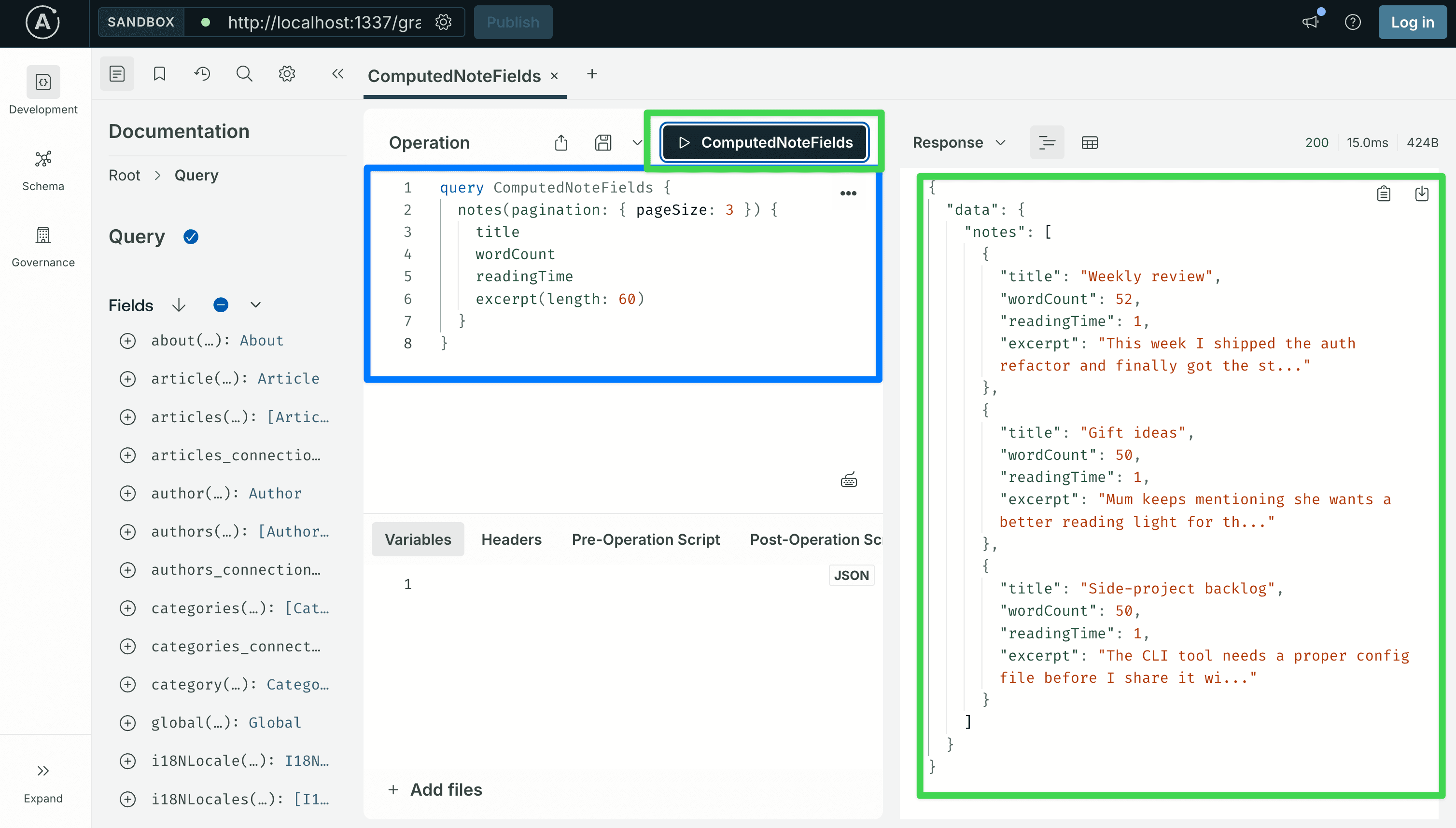
Every note should return a wordCount that matches its content (zero only for an empty note) and a readingTime of at least 1 (the resolver clamps to 1 via Math.max). If wordCount is 0 across the board, the resolver is being called but content is empty or null. Open a note in the admin UI and check that there is actual text in the markdown editor, or query notes { content } and look at the raw string.
Step 8: Create new object types for aggregate responses
Step 7 used nexus.extendType to add fields to types Shadow CRUD had already generated. But not every response is a Note or a Tag. Sometimes a resolver returns something that does not match any row in the database:
- An aggregate, like
{ total: 42, published: 30, draft: 12 }. - A per-group breakdown, like
[{ tagName: "Work", count: 7 }, ...]. - A wrapper object around an operation, like
{ success: true, conflicts: [...] }.
For each of these you need a new GraphQL type. nexus.objectType is the API for declaring one.
So when do you use which?
nexus.extendType: add a field to a type that already exists. Used in Step 7 forNote.wordCount,Note.readingTime,Note.excerpt.nexus.objectType: declare a brand-new type. Used here forTagCountandNoteStats.
The noteStats query in the next step returns three counts (total, pinned, archived) plus a per-tag breakdown. Neither return value matches a content type, so we declare two new types: NoteStats for the wrapper, and TagCount for each item in the per-tag list.
Open src/extensions/graphql/queries.ts. Part 1 created it with a single searchArticles query. You will add two nexus.objectType entries and three new Query fields alongside the existing one. The two object types come first; the query resolvers come in Step 9.
Nexus and SDL, briefly
Two terms worth defining first; they come up several times below.
SDL stands for Schema Definition Language. It is GraphQL's standard syntax for describing a schema, the same in any language and any framework. It looks like this:
type TagCount {
  slug: String!
  name: String!
  count: Int!
}
SDL is what a GraphQL client sees when it asks the server "what does your schema look like" (an introspection query, like the one we ran in Step 2). It is also what tools like Apollo Sandbox, GraphQL Code Generator, and IDE plugins read to give you autocomplete and type information. Every GraphQL server, no matter how it builds its schema internally, eventually returns it as SDL.
Nexus is the TypeScript library that Strapi's GraphQL plugin uses to build that SDL from code, instead of asking you to write the SDL out as a string. Instead of typing the SDL above directly, you write:
nexus.objectType({
  name: "TagCount",
  definition(t) {
    t.nonNull.string("slug");
    t.nonNull.string("name");
    t.nonNull.int("count");
  },
});
At startup, Nexus collects every objectType and extendType call across all your factory files and produces one SDL schema from them. That SDL is what gets handed to Apollo Server and what clients see. The end result is identical SDL; the difference is just how you wrote it.
Why Strapi uses Nexus instead of SDL strings:
- TypeScript can check the resolvers. When you write
resolve: (parent: NoteSource) => ..., TypeScript already knows the return value has to match the field type you declared witht.nonNull.int(...). If you wrote the schema as SDL strings, you would need an extra build step that reads the SDL and generates matching TypeScript types. Nexus skips that step. - Many files can contribute to the same schema.
computed-fields.ts,queries.ts, andmutations.tseach return their own Nexus types, and Nexus merges them at startup. With SDL strings, two files cannot both add fields to the sameNotetype without extra glue. - Shadow CRUD already uses Nexus. The plugin walks over your content types and calls
objectTypeandextendTypeto build the auto-generated schema. Your hand-written extensions use the same API, so there is one mental model instead of two.
The tradeoff: Nexus is a little more verbose than raw SDL, and you have to read several files to see what the final schema looks like. That is why every new type in this step is shown alongside its SDL equivalent. The SDL block is what clients will actually see.
Nexus recap
Part 1 covered the minimum Nexus you need for searchArticles. Two more pieces show up in this post.
Defining a new object type with nexus.objectType. Inside the call, the definition(t) callback declares each field on the type. The whole objectType call goes inside the types array your factory returns (the same array you saw in computed-fields.ts in Step 7). The pattern is always the same:
export default function queries({ nexus, strapi }: { ... }) {
  return {
    types: [
      // nexus.objectType({ ... })   <- new types go here
      // nexus.extendType({ ... })   <- field extensions go here too
    ],
    resolversConfig: { /* ... */ },
  };
}
Step 9 shows the full queries.ts with both TagCount and NoteStats declared in the types array alongside the existing searchArticles extension. For now, look at one object type on its own:
nexus.objectType({
  name: "TagCount",
  definition(t) {
    t.nonNull.string("slug");
    t.nonNull.string("name");
    t.nonNull.int("count");
  },
});
The resulting SDL equivalent:
type TagCount {
  slug: String!
  name: String!
  count: Int!
}
Modifiers stack left to right. You can chain .nonNull (the field is required, never null) and .list (the field is an array) in front of the field type. The order matches what the SDL would say, read left to right:
| Nexus call | GraphQL type |
|---|---|
t.string('a') | a: String |
t.nonNull.string('a') | a: String! |
t.list.string('a') | a: [String] |
t.list.nonNull.string('a') | a: [String!] |
t.nonNull.list.nonNull.string('a') | a: [String!]! |
For object-typed fields, use t.field(name, { type }) or the chained forms (t.list.field, t.nonNull.field):
t.nonNull.list.nonNull.field("byTag", { type: "TagCount" });
// byTag: [TagCount!]!
Type references by name. When a field's type is given as a string (type: 'Note', type: 'NoteStats'), Nexus looks up that name at startup against every type that has been declared. This is what lets different files reference each other without imports. queries.ts can reference 'Note' without importing anything from the Note files; by the time Nexus puts everything together, Note is already known. If you misspell the name, Nexus either throws an error at startup (strict mode) or returns null for that field at query time (lax mode).
Add TagCount to queries.ts
Time to put this to work. Open src/extensions/graphql/queries.ts. Part 1 left it like this:
// src/extensions/graphql/queries.ts (BEFORE)
import type { Core } from "@strapi/strapi";

export default function queries({
  nexus,
  strapi,
}: {
  nexus: typeof import("nexus");
  strapi: Core.Strapi;
}) {
  return {
    types: [
      nexus.extendType({
        type: "Query",
        definition(t) {
          t.list.field("searchArticles", {
            type: nexus.nonNull("Article"),
            args: { q: nexus.nonNull(nexus.stringArg()) },
            async resolve(_parent: unknown, args: { q: string }) {
              return strapi.documents("api::article.article").findMany({
                filters: { title: { $containsi: args.q } },
                sort: ["publishedAt:desc"],
                status: "published",
              });
            },
          });
        },
      }),
    ],
    resolversConfig: {
      "Query.searchArticles": { auth: false },
    },
  };
}
Add TagCount as a sibling entry at the top of the types array, in front of the existing nexus.extendType({ type: "Query", ... }). Nothing else changes yet: not resolversConfig, not the existing searchArticles block, not the factory signature.
// src/extensions/graphql/queries.ts (AFTER adding TagCount)
import type { Core } from "@strapi/strapi";

export default function queries({
  nexus,
  strapi,
}: {
  nexus: typeof import("nexus");
  strapi: Core.Strapi;
}) {
  return {
    types: [
      // NEW: standalone object type for the per-tag breakdown in noteStats (Step 9).
      nexus.objectType({
        name: "TagCount",
        definition(t) {
          t.nonNull.string("slug");
          t.nonNull.string("name");
          t.nonNull.int("count");
        },
      }),

      // Existing from Part 1.
      nexus.extendType({
        type: "Query",
        definition(t) {
          t.list.field("searchArticles", {
            type: nexus.nonNull("Article"),
            args: { q: nexus.nonNull(nexus.stringArg()) },
            async resolve(_parent: unknown, args: { q: string }) {
              return strapi.documents("api::article.article").findMany({
                filters: { title: { $containsi: args.q } },
                sort: ["publishedAt:desc"],
                status: "published",
              });
            },
          });
        },
      }),
    ],
    resolversConfig: {
      "Query.searchArticles": { auth: false },
    },
  };
}
Three things to notice about the edit:
TagCountis a sibling entry intypes, not nested inside theextendTypeblock. Each entry in thetypesarray is its own contribution to the schema. Nexus reads them as a flat list at startup.- Order does not matter.
TagCountcould come before or after theQueryextension and the resulting schema would be identical. Nexus looks up type references by name once everything has been collected, so the order in the array does not affect correctness. Putting new object types first is a readability choice, not a requirement. resolversConfigis unchanged.TagCounthas no resolver of its own; it is just a type declaration. The fields on it get filled in by whatever resolver returns aTagCountvalue, which isnoteStatsin Step 9. Object types only need entries inresolversConfigwhen you want to attach anauth, middleware, or policy rule to one of their fields, and we do not forTagCount.
Save the file. Now a Nexus quirk worth knowing: if you introspect the schema for TagCount right now, you will get null.
curl -s -X POST http://localhost:1337/graphql \
  -H 'Content-Type: application/json' \
  -d '{"query":"{ __type(name: \"TagCount\") { name } }"}'
# -> {"data":{"__type":null}}
That is not a bug in your edit. Before exposing the final schema, the GraphQL plugin runs pruneSchema from @graphql-tools/utils. That helper walks the schema starting from Query, Mutation, and Subscription, and removes any type that nothing else reaches. No field anywhere has type: "TagCount" yet, so TagCount is unreachable and gets pruned.
TagCount will appear the moment something references it. That happens in Step 9, when we add NoteStats.byTag: [TagCount!]! and the noteStats query that returns a NoteStats. Until then the declaration sits in the file with nothing to use it. That is fine: you can build a schema piece by piece, and the parts that nobody uses yet just stay invisible.
If you want to confirm the TagCount declaration is at least syntactically correct right now, the only evidence available is that the dev server restarted without a TypeScript error after the save. A typo in the name or a misspelled modifier would crash Strapi on reload. The full check happens at the end of Step 9.
Step 9: Custom queries
Step 9 adds three query resolvers to the same queries.ts file, plus one more object type (NoteStats). All three resolvers read data using the Document Service, which is Strapi's main API for working with content. One of them also has a side note showing the same query written as raw SQL.
Strapi gives you three ways to read or write data inside a resolver. Use the first one by default. The other two exist for the rare case when the Document Service cannot do what you need.
| API | When to use |
|---|---|
strapi.documents('api::foo.foo') | Default. Use for reads, writes, and filtered counts. Respects Draft & Publish, locales, and lifecycle hooks. |
strapi.db.query('api::foo.foo') | The Query Engine. Use only when you need to skip something the Document Service does for you (skipping lifecycle hooks in a bulk seed script, ignoring draft/publish, using a database operator the Document Service has not added yet). |
strapi.db.connection.raw | Direct SQL via Knex. Use only when the Document Service cannot express the query: grouped aggregates, window functions, joins across many tables, database-specific features. |
For almost everything, use the Document Service. The Query Engine is for specific cases, not the default. Raw SQL is the last resort. The four sub-steps below each make one small edit to queries.ts. By the end, the file matches the full version printed at the bottom of Step 9.
Step 9.1: Declare the NoteStats object type
NoteStats is the return type for the noteStats query. It has three integer counts (total, pinned, archived) and a list of TagCount items for the per-tag breakdown. Because it references TagCount (which you declared in Step 8), TagCount is finally reachable from a real query and Nexus stops pruning it from the schema.
Open src/extensions/graphql/queries.ts. Paste this nexus.objectType call as a sibling entry in the types array, right after the existing TagCount declaration:
nexus.objectType({
  name: "NoteStats",
  definition(t) {
    t.nonNull.int("total");
    t.nonNull.int("pinned");
    t.nonNull.int("archived");
    t.nonNull.list.nonNull.field("byTag", { type: "TagCount" });
  },
}),
The one line worth pausing on is t.nonNull.list.nonNull.field("byTag", { type: "TagCount" }). Reading the chain left to right: "a non-null list of non-null TagCount". The SDL equivalent is byTag: [TagCount!]!. See the modifier table in Step 8 if you need a refresher.
NoteStats refers to TagCount by the string "TagCount". At startup, Nexus looks up every type by name across all the factories. TagCount was declared in the same types array, so the lookup succeeds. Both types now have at least one place that uses them: NoteStats uses TagCount, and the noteStats query (which we add in 9.3) will use NoteStats. Neither will be pruned from the final schema.
Step 9.2: Add searchNotes (Document Service API)
searchNotes filters notes by a substring of the title and lets the caller decide whether to include archived notes. It uses the Document Service, strapi.documents("api::note.note"). This is the same API the table at the top of Step 9 listed as the default; for any query that does not need to drop down to the Query Engine or raw SQL, this is the one to use.
Add one new field, searchNotes, to the Query extendType, just below the existing searchArticles field. After the edit, the whole Query extendType block in queries.ts should look like this:
nexus.extendType({
  type: "Query",
  definition(t) {
    t.list.field("searchArticles", {
      type: nexus.nonNull("Article"),
      args: { q: nexus.nonNull(nexus.stringArg()) },
      async resolve(_parent: unknown, args: { q: string }) {
        return strapi.documents("api::article.article").findMany({
          filters: { title: { $containsi: args.q } },
          sort: ["publishedAt:desc"],
          status: "published",
        });
      },
    });

    // NEW below, everything above stays exactly as-is.
    t.list.field("searchNotes", {
      type: nexus.nonNull("Note"),
      args: {
        query: nexus.nonNull(nexus.stringArg()),
        includeArchived: nexus.booleanArg({ default: false }),
      },
      async resolve(
        _parent: unknown,
        { query, includeArchived }: { query: string; includeArchived: boolean },
      ) {
        const where: any = { title: { $containsi: query } };
        if (!includeArchived) where.archived = false;
        return strapi.documents("api::note.note").findMany({
          filters: where,
          populate: ["tags"],
          sort: ["pinned:desc", "updatedAt:desc"],
        });
      },
    });
  },
}),
Three things to notice about the new field:
includeArchiveddefaults tofalse. A caller who passes nothing for this argument gets back only active notes. They have to explicitly passincludeArchived: trueto see archived rows. The default protects callers from accidentally getting deleted-looking notes mixed in with the live ones.populate: ["tags"]. This tells the Document Service to load the related tags for each note and include them in the response. Without it, every note in the result comes back withtags: undefined, and a client that selectedtags { name }would see empty arrays even though the relations exist in the database.sort: ["pinned:desc", "updatedAt:desc"]. Pinned notes come first; within each group, the most recently edited note comes first. Same sort syntax as Strapi's REST API.
Then add the resolversConfig entry. Your resolversConfig object at the bottom of the file now has two keys instead of one:
resolversConfig: {
  "Query.searchArticles": { auth: false },
  "Query.searchNotes": { auth: false }, // NEW
},
Step 9.3: Add noteStats (Document Service, with a raw-SQL aside)
noteStats returns three counts plus a per-tag breakdown. Both halves use the Document Service:
- The three counts (total, pinned, archived) are three calls to
strapi.documents("api::note.note").count({ filters: ... }). - The per-tag breakdown is one call to
strapi.documents("api::tag.tag").findMany({ populate: ["notes"] }). We then counttag.notes.lengthfor each tag in plain JavaScript.
At the end of this sub-step there is also a side note showing the same per-tag count written as a single SQL query, for the case where the JavaScript version becomes slow on a very large dataset.
Add one more field, noteStats, to the Query extendType, just below searchNotes. The Query extendType now has three fields:
nexus.extendType({
  type: "Query",
  definition(t) {
    t.list.field("searchArticles", {
      /* ... same as before ... */
    });

    t.list.field("searchNotes", {
      /* ... same as Step 9.2 ... */
    });

    // NEW below, everything above stays exactly as-is.
    t.nonNull.field("noteStats", {
      type: "NoteStats",
      async resolve() {
        const [total, pinned, archived, tags] = await Promise.all([
          strapi.documents("api::note.note").count({}),
          strapi.documents("api::note.note").count({
            filters: { pinned: true },
          }),
          strapi.documents("api::note.note").count({
            filters: { archived: true },
          }),
          strapi.documents("api::tag.tag").findMany({
            populate: ["notes"],
            sort: ["name:asc"],
          }),
        ]);

        const byTag = tags
          .map((tag: any) => ({
            slug: tag.slug,
            name: tag.name,
            count: Array.isArray(tag.notes) ? tag.notes.length : 0,
          }))
          .sort(
            (a, b) => b.count - a.count || a.name.localeCompare(b.name),
          );

        return { total, pinned, archived, byTag };
      },
    });
  },
}),
A few notes on the implementation:
strapi.documents(...).count({ filters: ... }): three counts, one per filter. The Document Service docs confirmcounttakes the samefiltersargument asfindMany. Going through the Document Service also means these counts will respect Draft & Publish if you ever turn that setting back on for Note.strapi.documents("api::tag.tag").findMany({ populate: ["notes"] }): loads every Tag with its linked notes attached. The resolver then readstag.notes.lengthto get the count for each tag. The.sort()call after the.map()orders the results by count descending, with name as a tie-breaker.Promise.allruns all four database calls at the same time instead of one after the other. The four results do not depend on each other, so there is no reason for them to wait their turn.
When would you use
strapi.db.query(...)instead? The Query Engine is useful when you specifically need to skip something the Document Service does for you. Three examples: skipping lifecycle hooks in a bulk seed script, ignoring draft/publish and locale resolution, or filtering with a database-specific operator that the Document Service has not added yet. For a filtered count on a normal content type, the Document Service is the right tool.
Aside: the same per-tag count as raw SQL
The version above loads every Tag row, plus all of its linked Notes, and then counts in JavaScript. For a few dozen tags and a few hundred notes, that is fine. If you ever end up with thousands of tags and millions of notes, the database has to send all that note data over the wire just so the resolver can count it. At that point, doing the count in SQL avoids the round-trip cost. For reference, here is the per-tag count as a single SQL query:
// Replace the `tags` fetch and the `byTag` mapping above with this, if the
// populate-based approach becomes measurably slow on your dataset.
const rows = await strapi.db.connection.raw(`
  SELECT tags.slug AS slug, tags.name AS name, COUNT(link.note_id) AS count
  FROM tags
  LEFT JOIN notes_tags_lnk link ON link.tag_id = tags.id
  GROUP BY tags.id
  ORDER BY count DESC, tags.name ASC
`);

const byTag = (Array.isArray(rows) ? rows : []).map((r: any) => ({
  slug: r.slug,
  name: r.name,
  count: Number(r.count ?? 0),
}));
Don't copy this version into the resolver unless you have actually measured a slowness problem. Raw SQL skips validation, lifecycle hooks, Draft & Publish handling, and any future improvements to Strapi's higher-level APIs. The link-table name notes_tags_lnk is a Strapi internal, not a documented API, and a future Strapi version could rename it. Use raw SQL only when the Document Service truly cannot express what you need, not because typing SQL feels faster.
One more thing worth knowing: strapi.db.connection.raw(...) returns whatever the underlying Knex driver returns, and the return value is different from one database to another. SQLite (better-sqlite3, which Part 1 set up by default) returns a plain array of row objects, which is the Array.isArray(rows) branch in the code above. PostgreSQL returns an object like { rows: [...], ... }, so with that driver you would read rows.rows instead, and the Array.isArray(...) ? ... : [] fallback above would quietly drop all your data. If you switch databases, update the unwrapping code.
Your resolversConfig object now has three keys:
resolversConfig: {
  "Query.searchArticles": { auth: false },
  "Query.searchNotes": { auth: false },
  "Query.noteStats": { auth: false }, // NEW
},
Step 9.4: Add notesByTag (nested relation filter)
notesByTag returns every active (non-archived) note that has a given tag, with pinned notes first. The resolver itself is a single Document Service call. The interesting part is how the filter walks across the relation.
Add the final field, notesByTag, to the Query extendType, below noteStats. All four Query fields are now in place:
nexus.extendType({
  type: "Query",
  definition(t) {
    t.list.field("searchArticles", {
      /* ... same as before ... */
    });

    t.list.field("searchNotes", {
      /* ... same as Step 9.2 ... */
    });

    t.nonNull.field("noteStats", {
      /* ... same as Step 9.3 ... */
    });

    // NEW below, everything above stays exactly as-is.
    t.list.field("notesByTag", {
      type: nexus.nonNull("Note"),
      args: { slug: nexus.nonNull(nexus.stringArg()) },
      async resolve(_parent: unknown, { slug }: { slug: string }) {
        return strapi.documents("api::note.note").findMany({
          filters: { archived: false, tags: { slug: { $eq: slug } } },
          populate: ["tags"],
          sort: ["pinned:desc", "updatedAt:desc"],
        });
      },
    });
  },
}),
The filter tags: { slug: { $eq: slug } } reads "match every note that has at least one related tag whose slug equals the argument I passed in." This is the same nested filter syntax Shadow CRUD already exposes on the auto-generated notes(filters: ...) query. The Document Service and Shadow CRUD use the same filter syntax everywhere, so once you know one you know the other.
The final state of resolversConfig:
resolversConfig: {
  "Query.searchArticles": { auth: false },
  "Query.searchNotes": { auth: false },
  "Query.noteStats": { auth: false },
  "Query.notesByTag": { auth: false }, // NEW
},
Complete file, for verification
After all four sub-steps, src/extensions/graphql/queries.ts should look like this end-to-end:
// src/extensions/graphql/queries.ts
import type { Core } from "@strapi/strapi";

export default function queries({
  nexus,
  strapi,
}: {
  nexus: typeof import("nexus");
  strapi: Core.Strapi;
}) {
  return {
    types: [
      nexus.objectType({
        name: "TagCount",
        definition(t) {
          t.nonNull.string("slug");
          t.nonNull.string("name");
          t.nonNull.int("count");
        },
      }),
      nexus.objectType({
        name: "NoteStats",
        definition(t) {
          t.nonNull.int("total");
          t.nonNull.int("pinned");
          t.nonNull.int("archived");
          t.nonNull.list.nonNull.field("byTag", { type: "TagCount" });
        },
      }),
      nexus.extendType({
        type: "Query",
        definition(t) {
          t.list.field("searchArticles", {
            type: nexus.nonNull("Article"),
            args: { q: nexus.nonNull(nexus.stringArg()) },
            async resolve(_parent: unknown, args: { q: string }) {
              return strapi.documents("api::article.article").findMany({
                filters: { title: { $containsi: args.q } },
                sort: ["publishedAt:desc"],
                status: "published",
              });
            },
          });

          t.list.field("searchNotes", {
            type: nexus.nonNull("Note"),
            args: {
              query: nexus.nonNull(nexus.stringArg()),
              includeArchived: nexus.booleanArg({ default: false }),
            },
            async resolve(
              _parent: unknown,
              {
                query,
                includeArchived,
              }: { query: string; includeArchived: boolean },
            ) {
              const where: any = { title: { $containsi: query } };
              if (!includeArchived) where.archived = false;
              return strapi.documents("api::note.note").findMany({
                filters: where,
                populate: ["tags"],
                sort: ["pinned:desc", "updatedAt:desc"],
              });
            },
          });

          t.nonNull.field("noteStats", {
            type: "NoteStats",
            async resolve() {
              const [total, pinned, archived, tags] = await Promise.all([
                strapi.documents("api::note.note").count({}),
                strapi.documents("api::note.note").count({
                  filters: { pinned: true },
                }),
                strapi.documents("api::note.note").count({
                  filters: { archived: true },
                }),
                strapi.documents("api::tag.tag").findMany({
                  populate: ["notes"],
                  sort: ["name:asc"],
                }),
              ]);

              const byTag = tags
                .map((tag: any) => ({
                  slug: tag.slug,
                  name: tag.name,
                  count: Array.isArray(tag.notes) ? tag.notes.length : 0,
                }))
                .sort(
                  (a, b) => b.count - a.count || a.name.localeCompare(b.name),
                );

              return { total, pinned, archived, byTag };
            },
          });

          t.list.field("notesByTag", {
            type: nexus.nonNull("Note"),
            args: { slug: nexus.nonNull(nexus.stringArg()) },
            async resolve(_parent: unknown, { slug }: { slug: string }) {
              return strapi.documents("api::note.note").findMany({
                filters: { archived: false, tags: { slug: { $eq: slug } } },
                populate: ["tags"],
                sort: ["pinned:desc", "updatedAt:desc"],
              });
            },
          });
        },
      }),
    ],
    resolversConfig: {
      "Query.searchArticles": { auth: false },
      "Query.searchNotes": { auth: false },
      "Query.noteStats": { auth: false },
      "Query.notesByTag": { auth: false },
    },
  };
}
Restart the dev server. The Sandbox's left-hand Schema panel should now show TagCount, NoteStats, searchNotes, noteStats, and notesByTag. A quick smoke test:
curl -s -X POST http://localhost:1337/graphql \
  -H 'Content-Type: application/json' \
  -d '{"query":"{ noteStats { total pinned archived byTag { slug name count } } }"}'
The response should include the three counts and a non-empty byTag array (assuming the seed data from Step 4 tagged some notes).
Scaling beyond one file
This tutorial keeps every custom query in queries.ts, every custom mutation in mutations.ts, and every computed field in computed-fields.ts. That is a role-based layout: one file per kind of code. It works well while each file is under about 200 lines and the project has a small number of content types with custom logic.
Once a file passes that threshold, or the project grows to many content types, the natural next step is a feature-based layout: one folder per content type.
src/extensions/graphql/
├── index.ts                       # aggregator
├── note/
│   ├── index.ts                   # barrel combining everything below
│   ├── types.ts                   # TagCount, NoteStats
│   ├── queries.ts                 # searchNotes, noteStats, notesByTag
│   ├── mutations.ts               # togglePin, archiveNote, duplicateNote
│   └── computed-fields.ts         # Note.wordCount, readingTime, excerpt
├── article/
│   └── ...
└── shared/
    └── types.ts                   # types used across multiple features
Each feature file exports its own factory that returns its own nexus.extendType({ type: "Query" }) (or Mutation, or whatever it needs). Nexus is fine with the same type being extended in many places: at startup it gathers every extension of Query from every factory and merges them, so the feature files do not have to know about each other. The index.ts inside each feature folder pulls together the types, the resolversConfig, and any nested factories. The top-level index.ts registers each feature with the GraphQL plugin.
Four guidelines, whichever layout you pick:
- One factory per file, registered at the top. Each file exports a factory that returns
{ types, resolversConfig }, or callsextensionService.use(...)directly. The top-levelindex.tsis the only place that callsextensionService.use(...)for everything in your project. - Keep object types next to the resolver that returns them.
TagCountis only used byNoteStats.byTag, andNoteStatsis only returned bynoteStats. SoTagCountbelongs in the Notes feature folder. Move a type into ashared/folder only when more than one feature actually returns it. - Do not write your own helper to register resolvers. Nexus already does that job.
t.list.field("searchNotes", { ... })is what the GraphQL plugin expects; if you wrap it in something likeregisterQuery(config), you lose TypeScript's inline type-checking on the resolver and you get nothing back in return. - Do not split too early. A single 150-line
queries.tsis easier to read than a six-file feature folder where everything imports from everything else. Split when the file is genuinely hard to navigate, not before.
For this tutorial (three content types, four custom queries, three custom mutations), the role-based layout is correct. Switch to feature folders once a single resolver file is over about 200 lines, or the project has three or four content types each with their own custom logic.
Step 10: Custom mutations
Custom mutations work the same way as custom queries. You call nexus.extendType on the Mutation type, add new fields, and each field has its own arguments and resolver. Create a new file:
// src/extensions/graphql/mutations.ts
import type { Core } from "@strapi/strapi";

export default function mutations({
  nexus,
  strapi,
}: {
  nexus: typeof import("nexus");
  strapi: Core.Strapi;
}) {
  return {
    types: [
      nexus.extendType({
        type: "Mutation",
        definition(t) {
          t.field("togglePin", {
            type: "Note",
            args: { documentId: nexus.nonNull(nexus.idArg()) },
            async resolve(
              _parent: unknown,
              { documentId }: { documentId: string },
            ) {
              const current = await strapi
                .documents("api::note.note")
                .findOne({ documentId });
              if (!current) throw new Error(`Note ${documentId} not found`);
              return strapi.documents("api::note.note").update({
                documentId,
                data: { pinned: !current.pinned },
                populate: ["tags"],
              });
            },
          });

          t.field("archiveNote", {
            type: "Note",
            args: { documentId: nexus.nonNull(nexus.idArg()) },
            async resolve(
              _parent: unknown,
              { documentId }: { documentId: string },
            ) {
              return strapi.documents("api::note.note").update({
                documentId,
                data: { archived: true, pinned: false },
                populate: ["tags"],
              });
            },
          });

          t.field("duplicateNote", {
            type: "Note",
            args: { documentId: nexus.nonNull(nexus.idArg()) },
            async resolve(
              _parent: unknown,
              { documentId }: { documentId: string },
            ) {
              const original = await strapi
                .documents("api::note.note")
                .findOne({
                  documentId,
                  populate: ["tags"],
                });
              if (!original) throw new Error(`Note ${documentId} not found`);
              const tagIds = ((original as any).tags ?? [])
                .map((tag: any) => tag.documentId)
                .filter(Boolean);
              return strapi.documents("api::note.note").create({
                data: {
                  title: `${(original as any).title} (copy)`,
                  content: (original as any).content,
                  pinned: false,
                  archived: false,
                  tags: tagIds,
                },
                populate: ["tags"],
              });
            },
          });
        },
      }),
    ],
    resolversConfig: {
      "Mutation.togglePin": { auth: false },
      "Mutation.archiveNote": { auth: false },
      "Mutation.duplicateNote": { auth: false },
    },
  };
}
Register the new factory the same way the others are registered, in src/extensions/graphql/index.ts:
// src/extensions/graphql/index.ts
import type { Core } from "@strapi/strapi";
import computedFields from "./computed-fields";
import queries from "./queries";
import mutations from "./mutations";
import middlewaresAndPolicies from "./middlewares-and-policies";

export default function registerGraphQLExtensions(strapi: Core.Strapi) {
  const extensionService = strapi.plugin("graphql").service("extension");

  extensionService.use(middlewaresAndPolicies);
  extensionService.use(computedFields);
  extensionService.use(function extendQueries({ nexus }: any) {
    return queries({ nexus, strapi });
  });
  extensionService.use(function extendMutations({ nexus }: any) {
    return mutations({ nexus, strapi });
  });
}
Two things to notice about the three mutations:
- Each one returns the note it changed. A GraphQL client typically caches the result of a mutation so it can update its UI without making a second
findOnecall. IftogglePindid not return anything, the client would have no way to know the new value ofpinnedwithout a follow-up query. Every resolver above returns theNoteit just created or updated. - Each one passes
populate: ["tags"]to the Document Service. Withoutpopulate, the returned note hastags: undefined. A client that selectstags { name }would gettags: nullback even if the note has tags in the database. Apollo Client would cache thatnull, and the UI in Part 3 would show the note with no tags until the cache is invalidated. Always populate the relations the client might select.
Step 11: Validate everything in the Apollo Sandbox
Open the Sandbox at http://localhost:1337/graphql. The operations below cover every Shadow CRUD surface, every custom type, every custom query, every custom mutation, and the policy. Paste each into the Operation editor; paste any variables into the Variables panel (including the outer { ... } braces).
Prefer automation? The same set of checks is available as a single Node script. The full source is below; save it as
server/scripts/test-graphql.mjs.
Run node scripts/test-graphql.mjs from the server/ directory and you get a pass/fail summary for all 33 checks in about a second. Each manual walkthrough below still teaches something specific to the Sandbox UI, so skim them even if you rely on the script.
// test-graphql.mjs
// Automated validation of Part 2's GraphQL schema.
// Usage: node scripts/test-graphql.mjs
// Requires: Node 18+ and the Strapi dev server running on localhost:1337.

const ENDPOINT = process.env.STRAPI_GRAPHQL_URL ?? "http://localhost:1337/graphql";

let pass = 0;
let fail = 0;
const failed = [];

const gql = async (query, variables, headers = {}) => {
  const res = await fetch(ENDPOINT, {
    method: "POST",
    headers: { "Content-Type": "application/json", ...headers },
    body: JSON.stringify({ query, variables }),
  });
  return res.json();
};

const check = (label, condition, detail = "") => {
  if (condition) {
    console.log(`  ✓ ${label}`);
    pass++;
  } else {
    const line = detail ? `${label} — ${detail}` : label;
    console.log(`  ✗ ${line}`);
    failed.push(line);
    fail++;
  }
};

const section = (name) => console.log(`\n${name}`);

async function main() {
  // Server reachability
  try {
    const ping = await gql("{ __typename }");
    if (!ping?.data) throw new Error("No data");
  } catch (e) {
    console.error(`Cannot reach ${ENDPOINT}. Is npm run develop running?`);
    process.exit(2);
  }

  // 1. Shadow CRUD queries on Note and Tag
  section("Shadow CRUD queries");
  const active = await gql(
    `{ notes(sort: ["pinned:desc","updatedAt:desc"]) {
        documentId title pinned tags { name slug color }
      } }`,
  );
  const activeNotes = active?.data?.notes ?? [];
  check("List active notes returns an array", Array.isArray(activeNotes));
  check(
    "Active notes hydrate the tags relation",
    activeNotes.some((n) => Array.isArray(n.tags)),
  );

  const firstNote = activeNotes[0];
  if (!firstNote) {
    console.error("\nNo active notes in the database. Seed at least one via the admin UI and re-run.");
    process.exit(2);
  }

  // Select `content` too so we exercise the richtext → String mapping
  // referenced by the detail page and Part 3 Step 4.
  const single = await gql(
    `query Note($documentId: ID!) {
       note(documentId: $documentId) { documentId title content }
     }`,
    { documentId: firstNote.documentId },
  );
  check(
    "Fetch by documentId works",
    single?.data?.note?.documentId === firstNote.documentId,
  );
  check(
    "note.content returns a string or null (richtext → String)",
    single?.data?.note?.content === null ||
      typeof single?.data?.note?.content === "string",
  );

  // Array-form sort, matching the corrected Sandbox example in Part 2.
  const tagsResult = await gql(
    `{ tags(sort: ["name:asc"]) { documentId name slug } }`,
  );
  const tagsList = tagsResult?.data?.tags ?? [];
  check("List tags returns an array", Array.isArray(tagsList));

  // Shadow CRUD mutations: createNote + updateNote
  section("Shadow CRUD mutations");
  const createdTitle = `Test note ${Date.now()}`;
  const created = await gql(
    `mutation CreateNote($data: NoteInput!) {
       createNote(data: $data) { documentId title pinned archived }
     }`,
    {
      data: {
        title: createdTitle,
        content: "Created by the validation script.",
        pinned: false,
        archived: false,
        tags: [],
      },
    },
  );
  const createdId = created?.data?.createNote?.documentId;
  check(
    "createNote returns a new Note with the submitted title",
    created?.data?.createNote?.title === createdTitle,
  );

  if (createdId) {
    const updated = await gql(
      `mutation UpdateNote($documentId: ID!, $data: NoteInput!) {
         updateNote(documentId: $documentId, data: $data) { documentId title }
       }`,
      { documentId: createdId, data: { title: `${createdTitle} (updated)` } },
    );
    check(
      "updateNote changes the title of an existing Note",
      updated?.data?.updateNote?.title === `${createdTitle} (updated)`,
    );

    // Tag replacement: updateNote with a different `tags: [...]` array should
    // overwrite the relation. Confirms the "full replacement" behavior the
    // tutorial calls out in Part 3 Step 5.
    if (tagsList[0]) {
      await gql(
        `mutation U($id: ID!, $data: NoteInput!) {
           updateNote(documentId: $id, data: $data) { documentId }
         }`,
        { id: createdId, data: { tags: [tagsList[0].documentId] } },
      );
      const reread = await gql(
        `query N($id: ID!) { note(documentId: $id) { tags { documentId } } }`,
        { id: createdId },
      );
      const newTagIds = (reread?.data?.note?.tags ?? []).map(
        (t) => t.documentId,
      );
      check(
        "updateNote replaces the tags relation when a new array is passed",
        newTagIds.length === 1 && newTagIds[0] === tagsList[0].documentId,
      );
    }

    // Excerpt length argument: `excerpt(length: 10)` should respect the arg
    // (up to 10 chars plus a "..." suffix when truncated).
    const excerptCheck = await gql(
      `query N($id: ID!) { note(documentId: $id) { excerpt(length: 10) } }`,
      { id: createdId },
    );
    const ex = excerptCheck?.data?.note?.excerpt;
    check(
      "excerpt(length: 10) respects the argument",
      typeof ex === "string" && ex.length <= 13,
    );

    // Archive on the primary test note (not just the duplicate from later).
    const archivedDirect = await gql(
      `mutation A($id: ID!) { archiveNote(documentId: $id) { archived } }`,
      { id: createdId },
    );
    check(
      "archiveNote sets archived=true on a fresh note",
      archivedDirect?.data?.archiveNote?.archived === true,
    );
  }

  // 2. Hidden-field confirmations (private: true)
  section("Hidden fields (private: true)");
  const hiddenOutput = await gql(`{ notes { internalNotes } }`);
  check(
    "internalNotes is not selectable on Note",
    hiddenOutput?.errors?.some((e) =>
      e.message.includes('Cannot query field "internalNotes"'),
    ),
  );

  const hiddenFilter = await gql(
    `{ notes(filters: { internalNotes: { containsi: "probe" } }) { documentId } }`,
  );
  check(
    "internalNotes is absent from NoteFiltersInput",
    hiddenFilter?.errors?.some((e) =>
      e.message.includes('"internalNotes" is not defined by type "NoteFiltersInput"'),
    ),
  );

  const hiddenInput = await gql(
    `mutation N { createNote(data: { title: "x", internalNotes: "probe" }) { documentId } }`,
  );
  check(
    "internalNotes is absent from NoteInput",
    hiddenInput?.errors?.some((e) =>
      e.message.includes('"internalNotes" is not defined by type "NoteInput"'),
    ),
  );

  // 3. Computed fields
  section("Computed fields");
  const computed = await gql(
    `{ notes(pagination: { pageSize: 3 }) { title wordCount readingTime excerpt(length: 60) } }`,
  );
  const cNotes = computed?.data?.notes ?? [];
  check(
    "wordCount is a number on every note",
    cNotes.every((n) => typeof n.wordCount === "number"),
  );
  check(
    "readingTime is a number on every note",
    cNotes.every((n) => typeof n.readingTime === "number"),
  );
  check(
    "excerpt is a string on every note",
    cNotes.every((n) => typeof n.excerpt === "string"),
  );

  // 4. Custom queries
  section("Custom queries");
  const searchTerm = (firstNote.title ?? "").split(/\s+/)[0] || "a";
  const search = await gql(
    `query S($q: String!) { searchNotes(query: $q) { documentId title } }`,
    { q: searchTerm },
  );
  check(
    `searchNotes("${searchTerm}") returns at least one result`,
    (search?.data?.searchNotes ?? []).length > 0,
  );

  const stats = await gql(
    `{ noteStats { total pinned archived byTag { slug name count } } }`,
  );
  const s = stats?.data?.noteStats;
  check(
    "noteStats returns total/pinned/archived as numbers",
    typeof s?.total === "number" &&
      typeof s?.pinned === "number" &&
      typeof s?.archived === "number",
  );
  check("noteStats.byTag is an array", Array.isArray(s?.byTag));

  if (tagsList[0]) {
    const byTag = await gql(
      `query B($slug: String!) { notesByTag(slug: $slug) { documentId title } }`,
      { slug: tagsList[0].slug },
    );
    check(
      `notesByTag(slug: "${tagsList[0].slug}") returns an array`,
      Array.isArray(byTag?.data?.notesByTag),
    );

    // notesByTag should exclude archived notes even when they have the tag.
    const archivedProbeTitle = `Archived probe ${Date.now()}`;
    const probe = await gql(
      `mutation C($data: NoteInput!) {
         createNote(data: $data) { documentId }
       }`,
      {
        data: {
          title: archivedProbeTitle,
          content: "archived probe",
          pinned: false,
          archived: true,
          tags: [tagsList[0].documentId],
        },
      },
    );
    const probeId = probe?.data?.createNote?.documentId;

    const byTagAfter = await gql(
      `query B($slug: String!) { notesByTag(slug: $slug) { documentId } }`,
      { slug: tagsList[0].slug },
    );
    const ids = (byTagAfter?.data?.notesByTag ?? []).map((n) => n.documentId);
    check(
      "notesByTag excludes archived notes",
      !!probeId && !ids.includes(probeId),
    );
    // Leave the probe archived; the next run will re-create (different title).
  }

  // 5. Custom mutations (toggles and duplicates; restores state on success)
  section("Custom mutations");
  const pinBefore = firstNote.pinned;
  const toggle = await gql(
    `mutation T($id: ID!) { togglePin(documentId: $id) { pinned } }`,
    { id: firstNote.documentId },
  );
  check(
    "togglePin flips the pinned flag",
    toggle?.data?.togglePin?.pinned === !pinBefore,
  );
  // Restore original state.
  await gql(`mutation T($id: ID!) { togglePin(documentId: $id) { pinned } }`, {
    id: firstNote.documentId,
  });

  const dup = await gql(
    `mutation D($id: ID!) { duplicateNote(documentId: $id) { documentId title } }`,
    { id: firstNote.documentId },
  );
  const dupTitle = dup?.data?.duplicateNote?.title;
  check(
    "duplicateNote returns a new note titled '<original> (copy)'",
    typeof dupTitle === "string" && dupTitle.endsWith("(copy)"),
  );

  if (dup?.data?.duplicateNote?.documentId) {
    const archived = await gql(
      `mutation A($id: ID!) { archiveNote(documentId: $id) { archived pinned } }`,
      { id: dup.data.duplicateNote.documentId },
    );
    check(
      "archiveNote sets archived=true and pinned=false on the duplicate",
      archived?.data?.archiveNote?.archived === true &&
        archived?.data?.archiveNote?.pinned === false,
    );
  }

  // 6. Middleware: soft-delete invariant on Query.notes
  section("Middleware: soft-delete invariant on Query.notes");

  const bare = await gql(`{ notes { documentId archived } }`);
  const bareNotes = bare?.data?.notes ?? [];
  check(
    "Bare notes query succeeds and returns no archived rows",
    !bare?.errors && bareNotes.every((n) => n.archived === false),
  );

  const sneaky = await gql(
    `{ notes(filters: { archived: { eq: true } }) { documentId } }`,
  );
  check(
    "Caller-supplied `archived: { eq: true }` is rejected",
    sneaky?.errors?.some((e) => /archived/i.test(e.message)) &&
      !sneaky?.data?.notes,
  );
  check(
    "Rejection middleware surfaces extensions.code: FORBIDDEN",
    sneaky?.errors?.some((e) => e.extensions?.code === "FORBIDDEN"),
  );

  const polite = await gql(
    `{ notes(filters: { archived: { eq: false } }) { documentId } }`,
  );
  check(
    "Caller-supplied `archived: { eq: false }` is also rejected",
    polite?.errors?.some((e) => /archived/i.test(e.message)) &&
      !polite?.data?.notes,
  );

  // 7. Policy: cap-page-size on Query.notes
  section("Policy: cap-page-size");

  const overCap = await gql(
    `{ notes(pagination: { pageSize: 500 }) { documentId } }`,
  );
  check(
    "Pagination over the cap is rejected (Policy Failed)",
    overCap?.errors?.some((e) => e.message.includes("Policy Failed")),
  );

  const underCap = await gql(
    `{ notes(pagination: { pageSize: 10 }) { documentId } }`,
  );
  check(
    "Pagination at/under the cap is allowed",
    !underCap?.errors,
  );

  // 8. Middleware: soft-delete on Query.note (single fetch by documentId)
  section("Middleware: soft-delete on Query.note");

  const probeCreate = await gql(
    `mutation N { createNote(data: { title: "soft-delete probe ${Date.now()}", content: "probe" }) { documentId } }`,
  );
  const probeId = probeCreate?.data?.createNote?.documentId;
  if (probeId) {
    await gql(
      `mutation A($id: ID!) { archiveNote(documentId: $id) { archived } }`,
      { id: probeId },
    );

    const archivedFetch = await gql(
      `query F($id: ID!) { note(documentId: $id) { documentId title archived } }`,
      { id: probeId },
    );
    check(
      "Direct fetch of an archived note returns NotFound",
      archivedFetch?.errors?.some((e) => /not found/i.test(e.message)) &&
        !archivedFetch?.data?.note,
    );
    check(
      "Single-fetch coverage surfaces extensions.code: STRAPI_NOT_FOUND_ERROR",
      archivedFetch?.errors?.some(
        (e) => e.extensions?.code === "STRAPI_NOT_FOUND_ERROR",
      ),
    );

    const activeFetch = await gql(
      `query F($id: ID!) { note(documentId: $id) { documentId } }`,
      { id: firstNote.documentId },
    );
    check(
      "Direct fetch of an active note still works",
      !activeFetch?.errors && activeFetch?.data?.note?.documentId,
    );
  } else {
    check("Probe note created for soft-delete test", false, "createNote returned no documentId");
  }

  // Summary
  console.log(`\n${pass} passed, ${fail} failed`);
  if (failed.length) {
    console.log("\nFailures:");
    failed.forEach((f) => console.log(`  • ${f}`));
  }
  process.exit(fail === 0 ? 0 : 1);
}

main().catch((err) => {
  console.error(err);
  process.exit(1);
});
Shadow CRUD queries on Note and Tag
List active notes, sorted by pinned then recency.
query ActiveNotes {
  notes(
    filters: { archived: { eq: false } }
    sort: ["pinned:desc", "updatedAt:desc"]
  ) {
    documentId
    title
    pinned
    tags {
      name
      slug
      color
    }
  }
}
Fetch a single note by documentId.
query Note($documentId: ID!) {
  note(documentId: $documentId) {
    documentId
    title
    content
    tags {
      name
      slug
    }
  }
}
Variables:
{ "documentId": "paste-a-real-documentId-here" }Grab a documentId from the previous query's response and paste it into the Variables panel.
List tags.
query Tags {
  tags(sort: ["name:asc"]) {
    documentId
    name
    slug
    color
  }
}
Shadow CRUD mutations
Create a note. data uses the generated NoteInput type. content is a Markdown string (since we declared the field as richtext in Step 2). Tags are referenced by their documentId.
mutation CreateNote($data: NoteInput!) {
  createNote(data: $data) {
    documentId
    title
  }
}
Variables:
{
  "data": {
    "title": "Testing from the Sandbox",
    "content": "Hello from Apollo Sandbox.\n\nA second paragraph.",
    "pinned": false,
    "archived": false,
    "tags": []
  }
}
Update a note.
mutation UpdateNote($documentId: ID!, $data: NoteInput!) {
  updateNote(documentId: $documentId, data: $data) {
    documentId
    title
  }
}
Variables:
{
  "documentId": "paste-a-real-documentId-here",
  "data": { "title": "Updated title" }
}
Note on deleteNote. Mutation.deleteNote still exists in the schema. We did not apply any Shadow CRUD customization, following Step 5's argument that permissions (not schema-level deletion) are the standard way to prevent unwanted actions. Because Step 3 left delete unchecked on the Public role, calling mutation { deleteNote(documentId: "...") { documentId } } from the Sandbox returns Forbidden access at runtime, not a schema error. If you also want the mutation gone from introspection, add it back as a single disableAction('delete') call in a shadow-crud.ts factory.
Hidden-field confirmation
Querying internalNotes on a note should fail validation:
query {
  notes {
    documentId
    internalNotes
  }
}
Expected error: Cannot query field "internalNotes" on type "Note".. If the field were still selectable, the private: true flag set on internalNotes in Step 2 would not be taking effect. (That flag is what hides it from the GraphQL output type. Shadow CRUD's disableOutput() is the alternative covered conceptually in Step 5.)
Similarly, trying to filter on it should fail:
query { notes(filters: { internalNotes: { $containsi: "probe" } }) { documentId } }Expected error: Field "internalNotes" is not defined by type "NoteFiltersInput".. This confirms disableFilters().
Custom computed fields
query ComputedFields {
  notes(pagination: { pageSize: 3 }) {
    title
    wordCount
    readingTime
    excerpt(length: 60)
  }
}
Every note should return non-null values for all three fields.
Custom queries
searchNotes, title search across active notes.
query SearchNotes($q: String!) {
  searchNotes(query: $q) {
    documentId
    title
    excerpt(length: 80)
  }
}
Variables:
{ "q": "review" }Substitute a word that matches the titles you created in Step 4.
noteStats, aggregate counts with per-tag breakdown.
query NoteStats {
  noteStats {
    total
    pinned
    archived
    byTag {
      slug
      name
      count
    }
  }
}notesByTag, notes for a given tag slug.
query NotesByTag($slug: String!) {
  notesByTag(slug: $slug) {
    documentId
    title
    pinned
  }
}
Variables:
{ "slug": "work" }Custom mutations
togglePin. Flips the pinned flag and returns the updated note.
mutation TogglePin($documentId: ID!) {
  togglePin(documentId: $documentId) {
    documentId
    pinned
  }
}archiveNote. Sets archived: true and pinned: false.
mutation ArchiveNote($documentId: ID!) {
  archiveNote(documentId: $documentId) {
    documentId
    archived
    pinned
  }
}duplicateNote. Creates a new row with the same content and tags, title suffixed with (copy).
mutation DuplicateNote($documentId: ID!) {
  duplicateNote(documentId: $documentId) {
    documentId
    title
    tags {
      name
    }
  }
}
All three take the same variable shape:
{ "documentId": "paste-a-real-documentId-here" }Sandbox tests for the middlewares and the policy
Four quick checks confirm that the soft-delete middlewares (on both resolvers) and the page-cap policy from Step 6 behave the way the curl smoke tests showed.
Soft-delete rejection on Query.notes. Run a query that explicitly filters on archived:
query {
  notes(filters: { archived: { eq: true } }) {
    title
  }
}
The response contains a FORBIDDEN error with the message Cannot filter on \archived` directly. .... The same query with archived: { eq: false }` is also rejected, because the rule is "the server alone manages archived." There is no header or other escape hatch.
Soft-delete default. Run a bare query:
query {
  notes {
    title
    archived
  }
}
The response is a 200 OK and every entry has archived: false. The injection middleware added the filter automatically.
Soft-delete coverage on Query.note. Archive a note in the admin UI (or via the archiveNote mutation), copy its documentId, and run:
query F($id: ID!) {
  note(documentId: $id) {
    documentId
    title
    archived
  }
}
with the variable { "id": "<archived-documentId>" } in the Variables panel. The response contains a NOT_FOUND error with the message Note not found.. Replace the variable with an active note's documentId and the same query returns the row. From the public API's point of view, the archived note does not exist on either read path.
Page-size cap. Run a query that asks for more than 100 rows in one page:
query {
  notes(pagination: { pageSize: 500 }) {
    documentId
  }
}
The response contains Policy Failed. Drop the page size to 10 and the same query succeeds.
Introspection in the Sandbox
The Sandbox's left panel is populated by the same introspection query any GraphQL tool would use. Expand it to confirm the schema matches what we built:
- Under
Query, the custom fieldssearchNotes,noteStats, andnotesByTagappear alongside the Shadow-CRUD-generatednotes,note,tags,tag, andsearchArticles. - Under
Mutation, the custom mutationstogglePin,archiveNote, andduplicateNoteappear alongside the Shadow-CRUD-generatedcreateNote,updateNote, anddeleteNote. - Under types,
NoteStatsandTagCountappear as standalone object types. - Expand
Note, andinternalNotesis absent from the fields list because of theprivate: trueflag from Step 2. - Expand
NoteFiltersInput, andinternalNotesis likewise absent from the filter fields.
If any of the above does not match, the corresponding Step 2, 7, 8, 9, or 10 change did not take effect. Restart the dev server and re-check; the server needs to rebuild the Nexus schema after every change in src/extensions/graphql/ or the content-type schema.json files.
What you just built
- A Note + Tag content model added through the Content-Type Builder with a many-to-many relation, with
internalNotesflagged asprivate: trueso Strapi hides it from both REST and GraphQL. - A
middlewares-and-policies.tsfactory that attaches three middlewares (soft-delete rejection, soft-delete injection, timing log) and one named policy (global::cap-page-size) toQuery.notes, plus one soft-delete coverage middleware toQuery.note. Together they enforce the invariant that the public GraphQL API cannot return archived rows from either the list path or the single-fetch path. The page-size policy lives insrc/policies/cap-page-size.ts. - Three computed fields on
Note(wordCount,readingTime,excerpt) added to the existingcomputed-fields.ts. - Two new object types (
TagCount,NoteStats) and three custom queries (searchNotes,noteStats,notesByTag) added to the existingqueries.ts. The resolvers use the Document Service throughout, with a raw-SQL aside for the per-tag aggregate innoteStats. - A new
mutations.tsfactory with three mutations (togglePin,archiveNote,duplicateNote). - An updated aggregator that registers all three new customization factories.
The final file layout under server/:
server/
├── config/
│   └── plugins.ts
└── src/
    ├── index.ts
    ├── policies/
    │   └── cap-page-size.ts
    └── extensions/
        └── graphql/
            ├── index.ts                   # aggregator
            ├── middlewares-and-policies.ts
            ├── computed-fields.ts         # Article.wordCount + Note fields
            ├── queries.ts                 # searchArticles + Note queries
            └── mutations.ts
Every real customization API the GraphQL plugin is likely to need in a production project has now been exercised at least once: resolversConfig with both middlewares and policies, new object types, computed fields, custom queries at three levels of data-access abstraction, and custom mutations. Shadow CRUD customization was covered conceptually in Step 5 but not wired into the code, because in practice permissions and private: true cover that ground.
What's next
This is Part 2 of a four-part series.
-
Part 3, Consuming the schema from a Next.js frontend. Wires the backend to a Next.js 16 App Router application using Apollo Client. Covers RSC-based reads, Server Actions for writes, fragment composition, filter syntax on the client, and the create / update / inline-action flows for the mutations defined in this post.
-
Part 4, Users, permissions, and per-user content. The project in Parts 1 and 2 is intentionally single-user. Part 4 adds Strapi's
users-permissionsplugin, anownerrelation onNote, cookie-stored JWTs for the Next.js frontend, and a two-layer authorization model: a resolver middleware that injectsowner: { id: { $eq: me.id } }into read filters, and resolver policies on every write mutation that reject requests targeting someone else's notes. The custom queries, mutations, and computed fields from this post continue to work unchanged; they just run in the context of an authenticated user.
Citations
- Strapi GraphQL plugin (v5 docs): https://docs.strapi.io/cms/plugins/graphql
- Strapi Document Service API: https://docs.strapi.io/cms/api/document-service
- Strapi Database Query Engine: https://docs.strapi.io/cms/api/query-engine
- Strapi Policies: https://docs.strapi.io/cms/backend-customization/policies
- Nexus schema documentation: https://nexusjs.org/