Part 3 of a 4-part series on building with GraphQL, Strapi v5, and Next.js 16. Each part builds directly on the project from the previous post, so keep an eye out as we release them:
- Part 1, GraphQL basics with Strapi v5. Fresh install, a full Shadow CRUD tour, and your first custom resolvers.
- Part 2, Advanced backend customization. A
Note+Tagmodel, middlewares and policies, custom queries, and custom mutations. - Part 3 (this post), Next.js 16 frontend. Apollo Client on the App Router: Server Component reads, Server Action writes, one page per GraphQL operation.
- Part 4, Users and per-user content. Authentication, an ownership model, and two-layer authorization (read middlewares, write policies).
Already have the Part 2 backend running at http://localhost:1337/graphql? You are in the right place.
TL;DR
- This post wires a prebuilt Next.js 16 starter to the Strapi GraphQL schema from Part 2. Every UI component (layout, nav, note card, tag badge, Markdown renderer, search input, action buttons) already exists; the tutorial focuses on the GraphQL glue code.
- You clone
starter-template/, replace its placeholder Apollo stub with a real Apollo client for React Server Components, and then add onegqldocument at a time tolib/graphql.ts. Each step swaps one page's placeholder import for a realquery(...)call. - By the end the frontend exercises
notes,note,tags,searchNotes,notesByTag,noteStats,createNote,updateNote,togglePin, andarchiveNote. One page per operation, one GraphQL document per page. - Target audience: developers who completed Part 2 (or have an equivalent Strapi + GraphQL backend running locally) and want to see what a Server Component + Server Action Apollo client looks like on a real schema.
Prerequisites
- The backend from Part 2 running on
http://localhost:1337/graphql. The examples below assume theNote+Tagschema with Markdown content, enum tag colors, the three custom queries (searchNotes,noteStats,notesByTag), and the two custom mutations (togglePin,archiveNote). - Node.js 20.9+ (Next.js 16 requires it).
- The repo cloned locally, so the
starter-template/directory is available.
Scope
This post is about reading and writing data. Authentication, JWT cookies, route protection, and per-user ownership all live in Part 4.
By the end you will have the following routes, each powered by exactly one GraphQL operation:
| Route | Operation | Kind |
|---|---|---|
/ | notes | Shadow CRUD list |
/notes/[documentId] | note | Shadow CRUD fetch |
/notes/new | createNote | Shadow CRUD mutation |
/notes/[documentId]/edit | updateNote | Shadow CRUD mutation |
/search?q=... | searchNotes | Custom query (Part 2 Step 9.2) |
/tags/[slug] | notesByTag | Custom query (Part 2 Step 9.4) |
/stats | noteStats | Custom query (Part 2 Step 9.3) |
Inline buttons on /notes/[documentId] | togglePin, archiveNote | Custom mutations (Part 2 Step 10) |
The frontend stack at a glance
Two pieces of the stack are worth a short introduction before we start wiring things up. If you have used either before, skim past.
Next.js. A React framework that adds a file-system router, a build pipeline, and a server runtime on top of React. The features used here all live in the App Router (the default since Next.js 13). Every directory under app/ is a route. Every page.tsx is a Server Component by default. Every function tagged with "use server" becomes a Server Action. Server Components render on the server and stream HTML to the browser, which means page.tsx can read from Strapi without sending any GraphQL client code to the browser. Server Actions are the matching feature for writes: a Server Component can pass a server-only function as a prop, and a <form> can run that function via action={...}. Next.js 16 keeps this model and is what the starter is built on. The "Getting Started" guide is the right entry point if you have not used the App Router before.
Apollo Client. A GraphQL client for JavaScript. It builds requests, sends them, normalizes the responses, and gives you an in-memory cache. This post uses the official Next.js integration package: @apollo/client-integration-nextjs. It exposes a registerApolloClient(...) helper that creates a fresh Apollo client on every server request, so two users hitting the app at the same time never share a cache, and the client code never gets sent to the browser. Step 2 wires this up.
This post combines the two: every page is a Server Component that calls query(...). Every mutation runs from a Server Action that calls getClient().mutate(...). No GraphQL code runs in the browser. No useQuery hooks. No separate loading states to manage on the client.
Why a starter template
Writing a note-taking UI from scratch is a detour from the point of this series. The JSX for a note card, the Tailwind palette for tag badges, the debounced search input, the Markdown renderer: none of that is specifically about Strapi or GraphQL. To keep the focus on the integration, this post starts from a starter template on GitHub. The starter already has the UI and routing done, and the post walks through adding the GraphQL layer on top.
What the starter contains:
- Every UI component:
NoteCard,NoteActions,NotesSearch,TagBadge,Markdown,Nav, plus thelayout.tsx. - Every route: the list, detail, edit, create, search, tags, and stats pages are all wired up against hardcoded placeholder data in
lib/placeholder.ts. - Stubs in place of GraphQL:
lib/apollo-client.tsholds a commented-out skeleton;lib/graphql.tsexports nothing; every Server Actionconsole.logs its input.
Once you run through this post, every stub is replaced by a real query or mutation. The end state matches the frontend/ directory in the repository root.
Step 1: Clone, install, run the starter
 Clone the starter template repository linked above, then move into the
 starter-template/ directory and install dependencies:
git clone https://github.com/PaulBratslavsky/strapi-nextjs-grapql-starter-for-post.git client
cd client
# .env.local.example sets STRAPI_GRAPHQL_URL=http://localhost:1337/graphql
cp .env.local.example .env.local
npm install
npm run dev
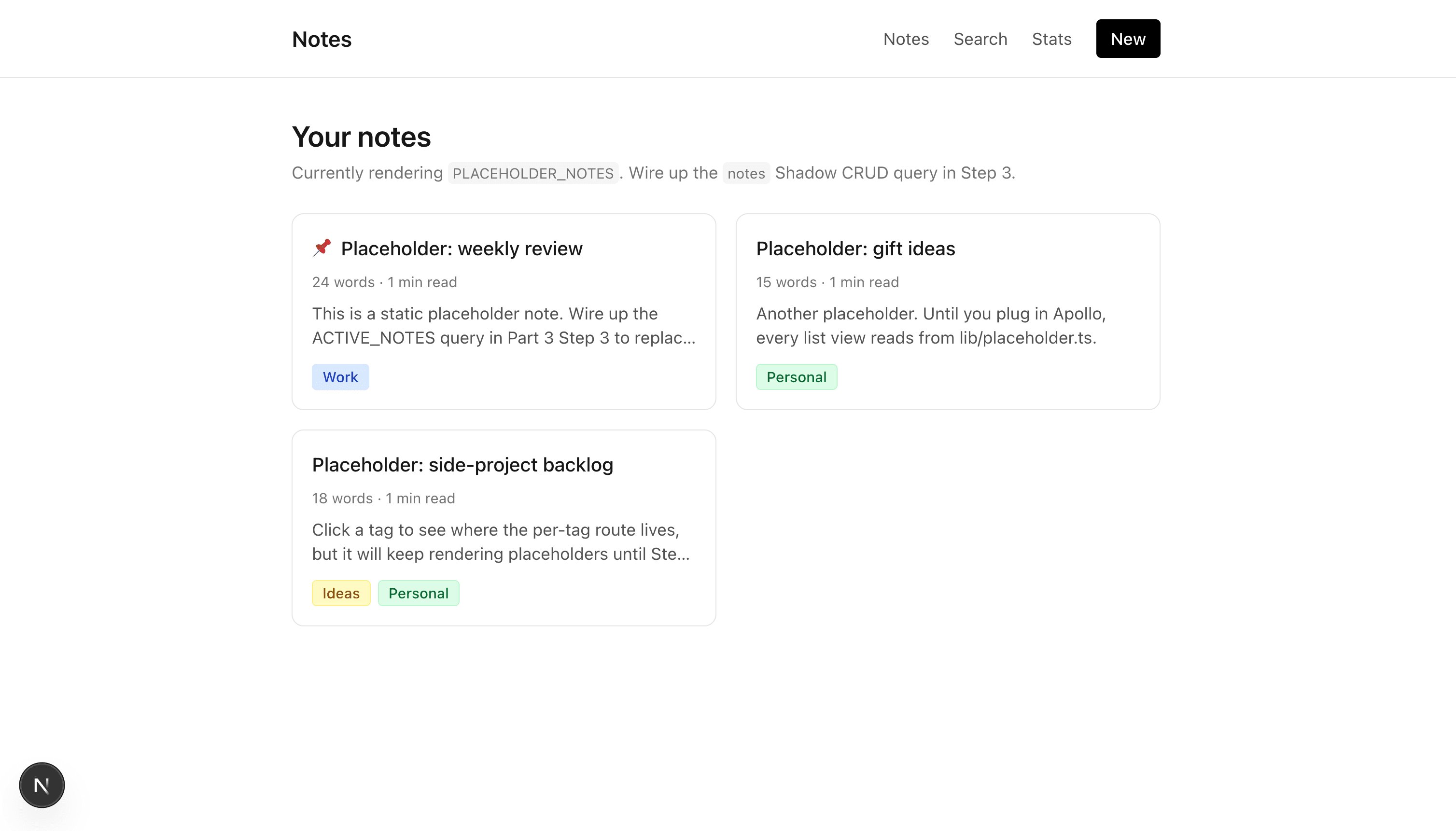
Open http://localhost:3000. You should see three placeholder notes, a nav bar with Notes / Search / Stats / New links, and a description on the home page saying placeholder data is being rendered. Clicking through /notes/[documentId], /search, /stats, /tags/<slug>, and /notes/new all work; they just show placeholder content.
Always load the dev server at
http://localhost:3000, not the LAN IP. Server Actions in Next.js are origin-locked by default, and the starter only allow-listslocalhost:3000. If you load the app at the LAN IP (or a tunnel URL, or a Codespaces preview), the buttons that call Server Actions later in this post (Pin, Archive, Edit save) will silently no-op: the click fires but no network request goes out, and there is no error in the console. The starter'snext.config.tshas a commentedallowedOriginsblock at the bottom showing where to add additional origins if you do need LAN access for testing.
Seed your Strapi backend with demo data
Once the Part 2 backend is running on http://localhost:1337/graphql, populate it with demo tags and notes so the queries you wire up later in this post actually return something. The starter ships a script that does this for you over GraphQL:
npm run seedThis creates five tags (ideas, work, personal, bugs, drafts), nine notes spread across them with a mix of pinned/active/archived states, and is idempotent: re-running it skips entries that already exist (matched by tag slug or note title). The script uses createTag, createNote, and archiveNote against STRAPI_GRAPHQL_URL (defaulting to http://localhost:1337/graphql), so anything that fails surfaces immediately as a GraphQL error.
While you are here, the starter also ships the Part 2 backend test script as scripts/test-graphql.mjs, exposed as npm run test:backend. It is a copy of the script in the backend repo (the comment at the top of the file says so). Run it before you start wiring up queries to confirm the soft-delete and page-cap rules from Part 2 still pass:
npm run test:backendYou should see all green. If anything fails, recheck Part 2 Step 6.
File layout
Take two minutes to explore the file layout. The pieces that matter for the rest of this post:
starter-template/
├── app/                # all routes, today importing from lib/placeholder.ts
├── components/         # all UI components (done, not touched again)
├── scripts/
│   ├── seed.mjs            # populates Strapi with demo tags + notes
│   └── test-graphql.mjs    # backend contract test (copy of the one in graphql-server/)
└── lib/
    ├── apollo-client.ts   # stub with commented-out skeleton; Step 2 fills in
    ├── graphql.ts         # empty; each step appends one gql document
    ├── placeholder.ts     # hardcoded data powering every page until you wire queries
    └── auth.ts            # Part 4 parking spot; ignore for now
Now stop the dev server and start filling in the GraphQL.
Step 2: Apollo Client for React Server Components
Open lib/apollo-client.ts. It currently contains a long comment block showing the target shape. Replace its contents with:
// lib/apollo-client.ts
import { HttpLink } from "@apollo/client";
import {
  registerApolloClient,
  ApolloClient,
  InMemoryCache,
} from "@apollo/client-integration-nextjs";

const STRAPI_GRAPHQL_URL =
  process.env.STRAPI_GRAPHQL_URL ?? "http://localhost:1337/graphql";

export const { getClient, query, PreloadQuery } = registerApolloClient(() => {
  return new ApolloClient({
    cache: new InMemoryCache({
      typePolicies: {
        Note: { keyFields: ["documentId"] },
        Tag: { keyFields: ["documentId"] },
      },
    }),
    link: new HttpLink({
      uri: STRAPI_GRAPHQL_URL,
      fetchOptions: { cache: "no-store" },
    }),
  });
});
Two details worth understanding:
typePolicies keyed by documentId. Apollo's cache uses id to identify entries by default. Strapi v5 uses documentId instead. The numeric id can change across operations, so caching by it would mismatch the same row across two queries. Every content type you read in this app needs an entry in typePolicies with keyFields: ["documentId"]. When Part 4 adds authentication and you start reading User, that type needs an entry here too.
fetchOptions: { cache: "no-store" }. This turns off Next.js's fetch cache for GraphQL requests. A dashboard-style UI like this one needs to show the current state of the data after every mutation, so caching the response would show stale rows. For queries that genuinely are cacheable, pass context: { fetchOptions: { cache: "force-cache" } } on the individual query(...) call instead.
registerApolloClient exports three things:
query({ query, variables }): shorthand forgetClient().query(...). Use this in Server Components.getClient(): the raw client. Use this in Server Actions when you call.mutate().PreloadQuery: a helper for streaming results from server to client. Not used in this post.
Nothing renders differently yet, since no page imports apollo-client yet. That changes in Step 3.
GraphQL documents at a glance
Before lib/graphql.ts starts filling up, here are five things you will see in every document the post adds. If you are coming from Part 2's Apollo Sandbox sessions, these will look familiar.
The gql tag. Every GraphQL document lives inside a template literal tagged with gql (imported from @apollo/client):
import { gql } from "@apollo/client";

export const MY_QUERY = gql`
  query MyQuery { ... }
`;
The gql tag parses the template string into a document AST at build time and validates the syntax. Exporting the result as a named const lets you reuse it across pages.
Queries vs. mutations. Both are declared the same way; only the keyword differs.
// Query: a read. Returns data. Safe, idempotent, cacheable.
query ActiveNotes {
  notes { title }
}

// Mutation: a write. Modifies server state. Returns the affected rows.
mutation CreateNote($data: NoteInput!) {
  createNote(data: $data) { documentId }
}
In this tutorial, queries run through query({ query, variables }) from @/lib/apollo-client inside Server Components. Mutations run through getClient().mutate({ mutation, variables }) inside Server Actions.
Variables. Inputs to a query or mutation. Declared in the operation header with $name: Type, referenced inside the body with $name, and passed at call time via the variables key:
// The document.
export const NOTE_DETAIL = gql`
  query Note($documentId: ID!) {
    note(documentId: $documentId) { title }
  }
`;

// The call site (in a Server Component).
await query({
  query: NOTE_DETAIL,
  variables: { documentId: "abc123" },
});
ID! means the value is required (non-null). Variable types come straight from the schema: ID, String, Int, Boolean, plus the input types Strapi generated for each content type.
Fragments. Reusable selection sets. Define a fragment once, compose it into any query that returns the same type:
export const NOTE_FIELDS = gql`
  fragment NoteFields on Note {
    documentId
    title
    pinned
    tags { name slug color }
  }
`;

export const ACTIVE_NOTES = gql`
  ${NOTE_FIELDS}
  query ActiveNotes {
    notes { ...NoteFields }
  }
`;

export const NOTE_DETAIL = gql`
  ${NOTE_FIELDS}
  query Note($documentId: ID!) {
    note(documentId: $documentId) {
      ...NoteFields
      content
    }
  }
`;
The ${NOTE_FIELDS} interpolation injects the fragment definition into the document so Apollo knows what ...NoteFields means. Any query that extends a fragment can also add extra fields on top (NOTE_DETAIL adds content here).
Apollo's cache normalizes entities by documentId (see Step 2's typePolicies), so a note fetched by a list query is available to a later detail query's render as long as the field sets overlap.
Strapi's Shadow CRUD input types. When Part 2 added the Note content type, Strapi auto-generated a set of input types for it:
NoteInput: the type for thedataargument oncreateNoteandupdateNote. It has one field per attribute onNote(title,content,pinned,archived, plustagsas an array of relateddocumentIds).NoteFiltersInput: the type for thefiltersargument onnotes(...). It has one entry per scalar, each accepting operators (eq,ne,containsi,in, and so on), plusand/or/notfor composing filters.
You do not declare these in lib/graphql.ts. You reference them by name in operation variable headers ($data: NoteInput!, $filters: NoteFiltersInput). Part 2 Step 5 introduced the Shadow CRUD terminology; this is what those auto-generated types look like when you call them from the client.
Every snippet you add to lib/graphql.ts for the rest of this post uses these five patterns.
Step 3: First read, the home page
Add the query
Open lib/graphql.ts (currently export {} only). Replace its contents with:
// lib/graphql.ts
import { gql } from "@apollo/client";

// Fields shown on a note card or list row. `content` is NOT here because it
// is only fetched on the detail page.
export const NOTE_FIELDS = gql`
  fragment NoteFields on Note {
    documentId
    title
    pinned
    archived
    updatedAt
    wordCount
    readingTime
    excerpt(length: 180)
    tags {
      documentId
      name
      slug
      color
    }
  }
`;

export const ACTIVE_NOTES = gql`
  ${NOTE_FIELDS}
  query ActiveNotes {
    notes(sort: ["pinned:desc", "updatedAt:desc"]) {
      ...NoteFields
    }
  }
`;
Two notes on the fragment:
NOTE_FIELDSis reused by every list query you add later (SEARCH_NOTES,NOTES_BY_TAG). Defining it once keeps the selection set consistent and lets Apollo's cache share rows across queries.excerpt(length: 180)calls the computed field from Part 2 Step 7 with a GraphQL argument. Every other computed field (wordCount,readingTime) is a plain selection.
Swap the home page to the real query
Open app/page.tsx. Today it imports PLACEHOLDER_NOTES and renders it. Replace the file's contents with:
// app/page.tsx
import { query } from "@/lib/apollo-client";
import { ACTIVE_NOTES } from "@/lib/graphql";
import { NoteCard } from "@/components/note-card";

type Note = Parameters<typeof NoteCard>[0]["note"];

export const dynamic = "force-dynamic";

export default async function Home() {
  const { data } = await query<{ notes: Note[] }>({ query: ACTIVE_NOTES });
  const notes = data?.notes ?? [];

  return (
    <div className="space-y-6">
      <header className="space-y-1">
        <h1 className="text-2xl font-semibold">Your notes</h1>
        <p className="text-sm text-neutral-500">
          {notes.length} active, sorted by pinned then recency. Powered by the{" "}
          <code className="rounded bg-neutral-100 px-1 py-0.5 font-mono text-xs">
            notes
          </code>{" "}
          Shadow CRUD query.
        </p>
      </header>

      {notes.length === 0 ? (
        <p className="text-sm text-neutral-500">No notes yet.</p>
      ) : (
        <div className="grid gap-4 md:grid-cols-2">
          {notes.map((n) => (
            <NoteCard key={n.documentId} note={n} />
          ))}
        </div>
      )}
    </div>
  );
}
Make sure the Strapi server is running at
http://localhost:1337/graphqlbefore reloading. Without it the Server Component will throw a fetch error and the page will fail to render. Start it from the Part 2 backend directory withnpm run develop.
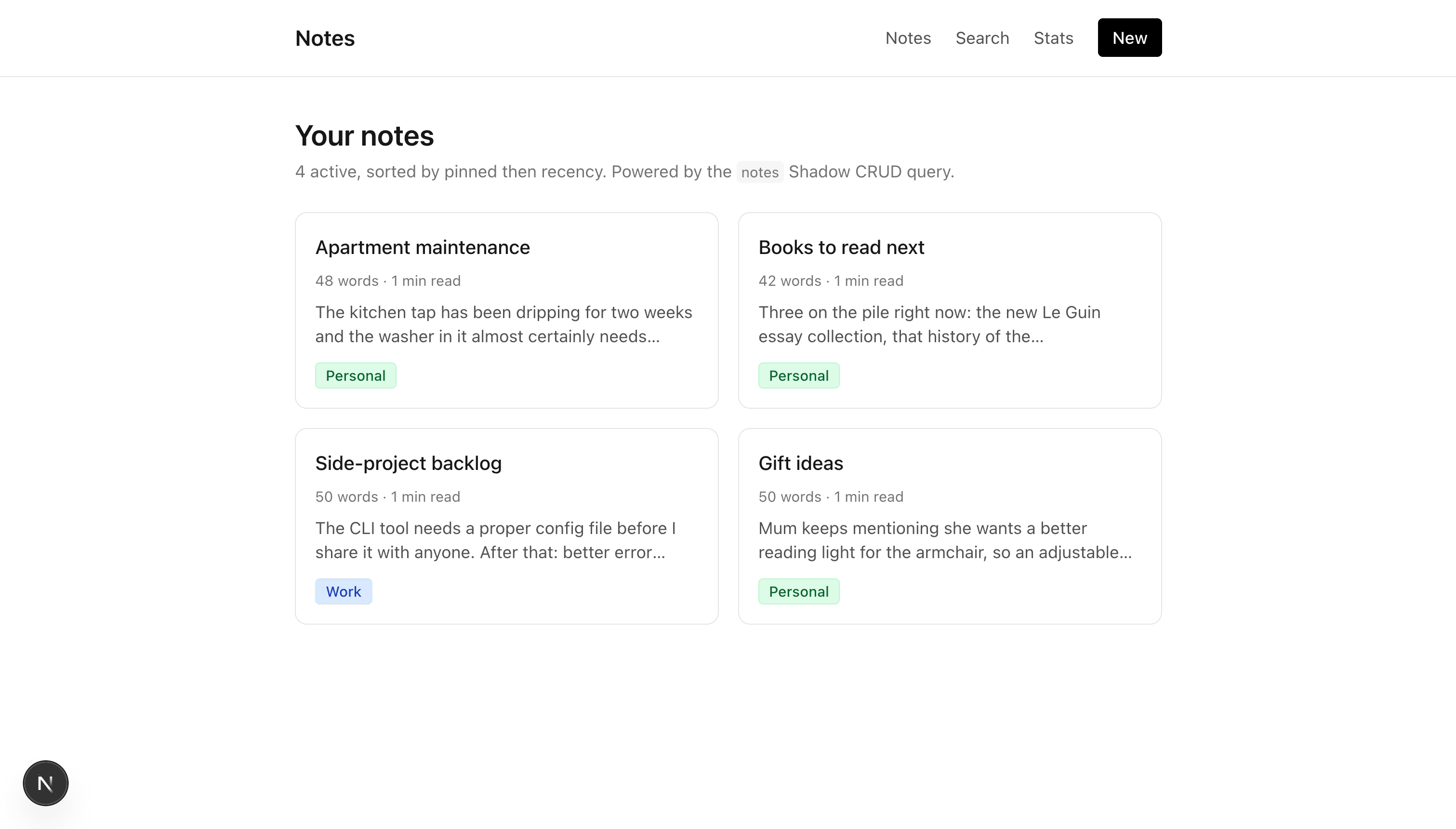
Restart npm run dev (or let Next hot-reload). The home page now shows the notes you seeded in Part 2. The response came from the notes Shadow CRUD resolver, flowed through the RSC Apollo client, and rendered as HTML. No Apollo code runs in the browser.
What just happened
- The browser requested
/. - Next.js rendered
app/page.tsxon the server. query({ query: ACTIVE_NOTES })serialized the document and POSTed it tohttp://localhost:1337/graphql.- Strapi's GraphQL plugin dispatched to the
notesShadow CRUD resolver. - The resolver returned active notes (the soft-delete middleware from Part 2 Step 6 injects
archived: { eq: false }server-side, so the frontend does not pass it), each populated with the fields the fragment selected (including the three computed fields). page.tsxrendered the returned array as HTML.- The browser received the HTML. No client-side JavaScript was involved in steps 3–6.
That is the read pattern you will use for every other list page in this post.
Step 4: Note detail
Add the query
Add this to the bottom of lib/graphql.ts:
export const NOTE_DETAIL = gql`
  ${NOTE_FIELDS}
  query Note($documentId: ID!) {
    note(documentId: $documentId) {
      ...NoteFields
      content
    }
  }
`;
NOTE_DETAIL extends NOTE_FIELDS with content, which is Markdown. react-markdown renders it in the <Markdown> component already present in the starter.
Wire up the detail page
Open app/notes/[documentId]/page.tsx. Replace its contents with:
// app/notes/[documentId]/page.tsx
import Link from "next/link";
import { notFound } from "next/navigation";
import { query } from "@/lib/apollo-client";
import { NOTE_DETAIL } from "@/lib/graphql";
import { Markdown } from "@/components/markdown";
import { TagBadge } from "@/components/tag-badge";
import { NoteActions } from "@/components/note-actions";

type NoteDetail = {
  documentId: string;
  title: string;
  pinned: boolean;
  archived: boolean;
  wordCount: number;
  readingTime: number;
  updatedAt: string;
  content: string | null;
  tags: Array<{
    documentId: string;
    name: string;
    slug: string;
    color?: string | null;
  }>;
};

export const dynamic = "force-dynamic";

export default async function NoteDetailPage({
  params,
}: {
  params: Promise<{ documentId: string }>;
}) {
  const { documentId } = await params;

  const { data } = await query<{ note: NoteDetail | null }>({
    query: NOTE_DETAIL,
    variables: { documentId },
  });

  const note = data?.note;
  if (!note) notFound();

  return (
    <article className="space-y-6">
      <Link href="/" className="text-sm text-neutral-500 hover:text-black">
        ← Back to notes
      </Link>

      <header className="flex items-start justify-between gap-4">
        <div className="space-y-2">
          <h1 className="flex items-center gap-2 text-3xl font-semibold">
            {note.pinned && <span aria-label="pinned">📌</span>}
            {note.title}
          </h1>
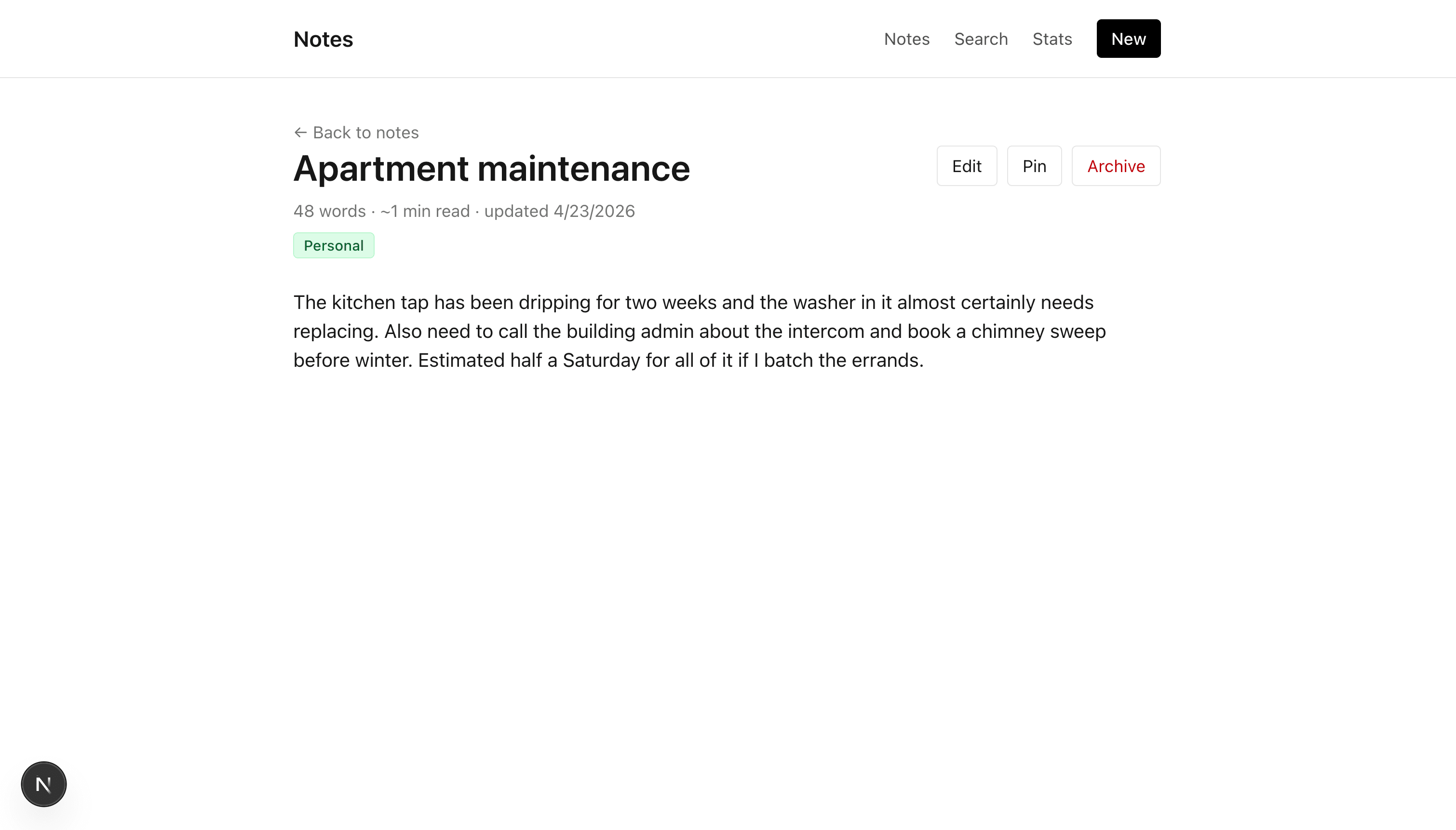
          <p className="text-sm text-neutral-500">
            {note.wordCount} words · ~{note.readingTime} min read · updated{" "}
            {new Date(note.updatedAt).toLocaleDateString()}
          </p>
          {note.tags.length > 0 && (
            <div className="flex flex-wrap gap-1.5">
              {note.tags.map((t) => (
                <TagBadge key={t.documentId} tag={t} />
              ))}
            </div>
          )}
        </div>
        <NoteActions documentId={note.documentId} pinned={note.pinned} />
      </header>

      <Markdown>{note.content}</Markdown>
    </article>
  );
}
Key points:
paramsis a Promise in Next.js 16. Await it before using.notFound()sends the user to the 404 page when thedocumentIddoes not exist. Thenotequery returnsnullfor missing records, and Next.js turns that into its standard 404 page. One edge case to be aware of: Part 2's soft-delete coverage middleware throwsSTRAPI_NOT_FOUND_ERRORon archived notes rather than returningnull, so a hand-typed URL pointing at an archived note will surface as a 500 from the Server Component instead of a 404. The list and tag pages never link to archived notes, so this only matters if a stale link makes its way to a user. If you want a 404 in that case too, wrap thequery(...)call in atry/catchand callnotFound()when the error'sextensions.codeisSTRAPI_NOT_FOUND_ERROR.- The
<NoteActions>buttons still log to the console because Step 5 has not happened yet. That is fine.
Click any note card from the home page. The detail view shows the real Markdown content, the computed fields, the tags, and the formatted updated-at date.
Step 5: Mutations via Server Actions
Reads were Server Components calling query(...). Writes are Server Actions calling getClient().mutate(...). The mutations in this post fall into two flows:
- Forms for create and update (
createNote,updateNote). - Inline buttons for one-field updates (
togglePin,archiveNote).
Add the mutation documents
Add this block to the bottom of lib/graphql.ts:
export const TAGS = gql`
  query Tags {
    tags(sort: ["name:asc"]) {
      documentId
      name
      slug
      color
    }
  }
`;

export const CREATE_NOTE = gql`
  mutation CreateNote($data: NoteInput!) {
    createNote(data: $data) {
      documentId
    }
  }
`;

export const UPDATE_NOTE = gql`
  mutation UpdateNote($documentId: ID!, $data: NoteInput!) {
    updateNote(documentId: $documentId, data: $data) {
      documentId
    }
  }
`;

export const TOGGLE_PIN = gql`
  mutation TogglePin($documentId: ID!) {
    togglePin(documentId: $documentId) {
      documentId
      pinned
    }
  }
`;

export const ARCHIVE_NOTE = gql`
  mutation ArchiveNote($documentId: ID!) {
    archiveNote(documentId: $documentId) {
      documentId
      archived
    }
  }
`;
TAGS is not a mutation but you need it for the create and edit forms (to render the tag checkboxes). The other four match Part 2's Shadow CRUD and custom mutations.
Wire up create
The starter already has app/notes/new/page.tsx rendering the form against PLACEHOLDER_TAGS. Replace the entire file with the GraphQL-wired version:
// app/notes/new/page.tsx
import Link from "next/link";
import { query } from "@/lib/apollo-client";
import { TAGS } from "@/lib/graphql";
import { createNoteAction } from "./actions";
type Tag = {
documentId: string;
name: string;
slug: string;
color?: string | null;
};
export const dynamic = "force-dynamic";
export default async function NewNotePage() {
const { data } = await query<{ tags: Tag[] }>({ query: TAGS });
const tags = data?.tags ?? [];
return (
<div className="max-w-2xl space-y-6">
<header className="space-y-1">
<Link href="/" className="text-sm text-neutral-500 hover:text-black">
← Back to notes
</Link>
<h1 className="text-2xl font-semibold">New note</h1>
<p className="text-sm text-neutral-500">
Submits the{" "}
<code className="rounded bg-neutral-100 px-1 py-0.5 font-mono text-xs">
createNote
</code>{" "}
Shadow CRUD mutation. Content is Markdown.
</p>
</header>
<form action={createNoteAction} className="space-y-5">
<div className="space-y-1">
<label htmlFor="title" className="block text-sm font-medium">
Title
</label>
<input
id="title"
name="title"
type="text"
required
className="w-full rounded border px-3 py-2 text-sm"
placeholder="Untitled note"
/>
</div>
<div className="space-y-1">
<label htmlFor="content" className="block text-sm font-medium">
Content (Markdown)
</label>
<textarea
id="content"
name="content"
rows={10}
className="w-full rounded border px-3 py-2 font-mono text-sm"
placeholder="# Heading A paragraph. - list item"
/>
</div>
{tags.length > 0 && (
<fieldset className="space-y-2">
<legend className="text-sm font-medium">Tags</legend>
<div className="flex flex-wrap gap-2">
{tags.map((t) => (
<label
key={t.documentId}
className="inline-flex cursor-pointer items-center gap-2 rounded border px-3 py-1.5 text-sm hover:bg-neutral-50 has-[:checked]:border-black has-[:checked]:bg-neutral-100"
>
<input
type="checkbox"
name="tagIds"
value={t.documentId}
className="sr-only"
/>
{t.name}
</label>
))}
</div>
</fieldset>
)}
<div className="flex items-center gap-3 pt-2">
<button
type="submit"
className="rounded bg-black px-4 py-2 text-sm font-medium text-white hover:bg-neutral-800"
>
Create note
</button>
<Link
href="/"
className="text-sm text-neutral-500 hover:text-black"
>
Cancel
</Link>
</div>
</form>
</div>
);
}The only change from the starter is the top of the function: two imports and one query(TAGS) call replace the PLACEHOLDER_TAGS import. The form JSX is identical; it renders whatever tags array you pass it.
Replace app/notes/new/actions.ts with the real mutation:
// app/notes/new/actions.ts
"use server";

import { revalidatePath } from "next/cache";
import { redirect } from "next/navigation";
import { getClient } from "@/lib/apollo-client";
import { CREATE_NOTE } from "@/lib/graphql";

// `formData.get()` returns `string | File | null`. Narrow before using.
const asString = (v: FormDataEntryValue | null) =>
  typeof v === "string" ? v : "";

export async function createNoteAction(formData: FormData) {
  const title = asString(formData.get("title")).trim();
  const content = asString(formData.get("content"));
  const tagIds = formData
    .getAll("tagIds")
    .filter((v): v is string => typeof v === "string");

  if (!title) return;

  const { data } = await getClient().mutate<{
    createNote: { documentId: string };
  }>({
    mutation: CREATE_NOTE,
    variables: {
      data: {
        title,
        content,
        pinned: false,
        archived: false,
        tags: tagIds,
      },
    },
  });

  revalidatePath("/");
  const newId = data?.createNote?.documentId;
  if (newId) redirect(`/notes/${newId}`);
}
Three things to notice:
getClient().mutate(...)is how Apollo runs a mutation. Inside a Server Action,getClient()from@/lib/apollo-clientreturns the same per-request client thatquery(...)uses for reads.contentis a plain string becauseNote.contentisrichtext(Markdown). No block conversion is needed; the textarea value goes straight to Strapi.revalidatePath("/")clears the home page's cached server render so the new note appears immediately after the redirect.
Click "New" in the nav, fill in the form, submit.
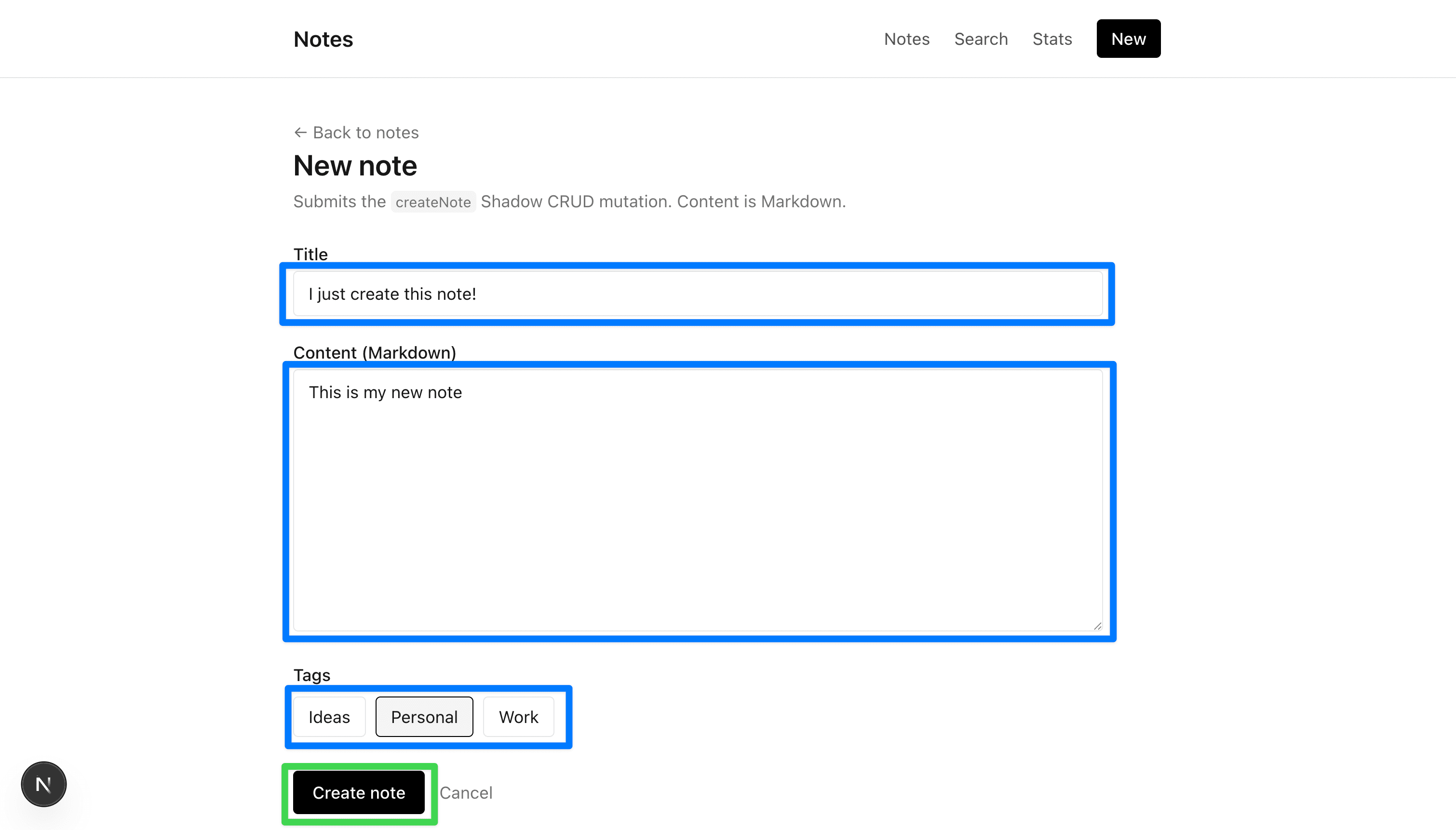
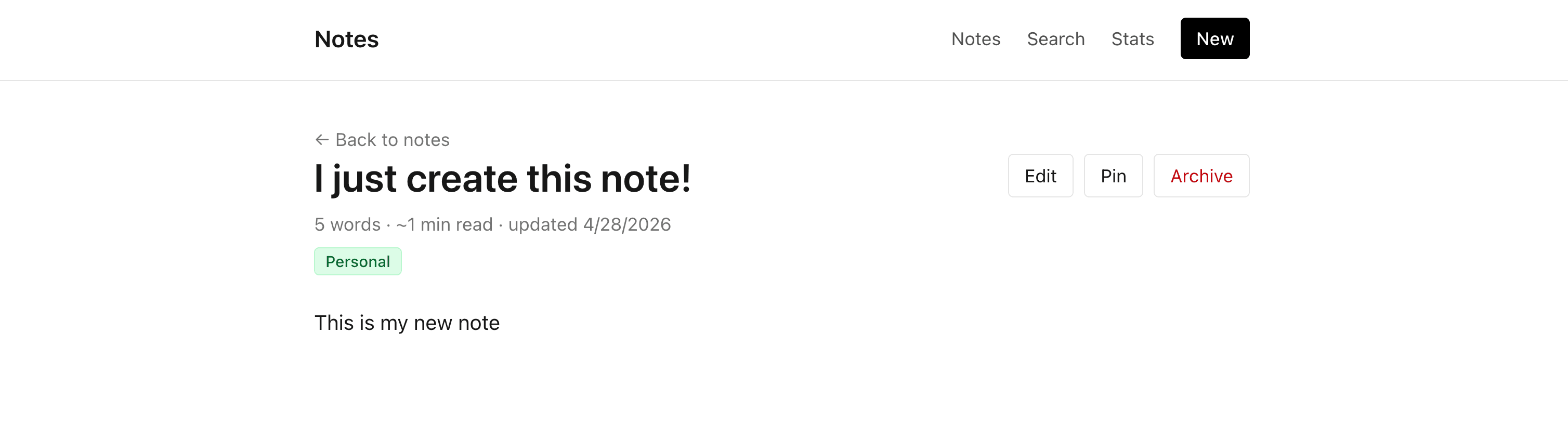
The Server Action runs, Strapi creates the note, and you are redirected to its detail page.
Wire up update
The edit page needs the real note data (to prefill the form) and the real tag list. Replace the entire contents of app/notes/[documentId]/edit/page.tsx with:
// app/notes/[documentId]/edit/page.tsx
import Link from "next/link";
import { notFound } from "next/navigation";
import { query } from "@/lib/apollo-client";
import { NOTE_DETAIL, TAGS } from "@/lib/graphql";
import { updateNoteAction } from "./actions";

type Tag = {
  documentId: string;
  name: string;
  slug: string;
  color?: string | null;
};

type NoteDetail = {
  documentId: string;
  title: string;
  content: string | null;
  tags: Tag[];
};

export const dynamic = "force-dynamic";

export default async function EditNotePage({
  params,
}: {
  params: Promise<{ documentId: string }>;
}) {
  const { documentId } = await params;

  const [noteRes, tagsRes] = await Promise.all([
    query<{ note: NoteDetail | null }>({
      query: NOTE_DETAIL,
      variables: { documentId },
    }),
    query<{ tags: Tag[] }>({ query: TAGS }),
  ]);

  const note = noteRes.data?.note;
  if (!note) notFound();

  const allTags = tagsRes.data?.tags ?? [];
  const selectedTagIds = new Set(note.tags.map((t) => t.documentId));
  const boundAction = updateNoteAction.bind(null, documentId);

  return (
    <div className="max-w-2xl space-y-6">
      <header className="space-y-1">
        <Link
          href={`/notes/${documentId}`}
          className="text-sm text-neutral-500 hover:text-black"
        >
          ← Back to note
        </Link>
        <h1 className="text-2xl font-semibold">Edit note</h1>
        <p className="text-sm text-neutral-500">
          Submits the{" "}
          <code className="rounded bg-neutral-100 px-1 py-0.5 font-mono text-xs">
            updateNote
          </code>{" "}
          Shadow CRUD mutation.
        </p>
      </header>

      <form action={boundAction} className="space-y-5">
        <div className="space-y-1">
          <label htmlFor="title" className="block text-sm font-medium">
            Title
          </label>
          <input
            id="title"
            name="title"
            type="text"
            required
            defaultValue={note.title}
            className="w-full rounded border px-3 py-2 text-sm"
          />
        </div>

        <div className="space-y-1">
          <label htmlFor="content" className="block text-sm font-medium">
            Content (Markdown)
          </label>
          <textarea
            id="content"
            name="content"
            rows={12}
            defaultValue={note.content ?? ""}
            className="w-full rounded border px-3 py-2 font-mono text-sm"
          />
        </div>

        {allTags.length > 0 && (
          <fieldset className="space-y-2">
            <legend className="text-sm font-medium">Tags</legend>
            <div className="flex flex-wrap gap-2">
              {allTags.map((t) => (
                <label
                  key={t.documentId}
                  className="inline-flex cursor-pointer items-center gap-2 rounded border px-3 py-1.5 text-sm hover:bg-neutral-50 has-[:checked]:border-black has-[:checked]:bg-neutral-100"
                >
                  <input
                    type="checkbox"
                    name="tagIds"
                    value={t.documentId}
                    defaultChecked={selectedTagIds.has(t.documentId)}
                    className="sr-only"
                  />
                  {t.name}
                </label>
              ))}
            </div>
          </fieldset>
        )}

        <div className="flex items-center gap-3 pt-2">
          <button
            type="submit"
            className="rounded bg-black px-4 py-2 text-sm font-medium text-white hover:bg-neutral-800"
          >
            Save changes
          </button>
          <Link
            href={`/notes/${documentId}`}
            className="text-sm text-neutral-500 hover:text-black"
          >
            Cancel
          </Link>
        </div>
      </form>
    </div>
  );
}
Two points worth calling out:
Promise.allruns the two queries in parallel. The note and the tags do not depend on each other..bind(null, documentId)is how a Server Action receives arguments beyond theFormData. The browser only posts the form fields; thedocumentIdis captured in the server-side closure.
Replace app/notes/[documentId]/edit/actions.ts:
// app/notes/[documentId]/edit/actions.ts
"use server";

import { revalidatePath } from "next/cache";
import { redirect } from "next/navigation";
import { getClient } from "@/lib/apollo-client";
import { UPDATE_NOTE } from "@/lib/graphql";

const asString = (v: FormDataEntryValue | null) =>
  typeof v === "string" ? v : "";

export async function updateNoteAction(
  documentId: string,
  formData: FormData,
) {
  const title = asString(formData.get("title")).trim();
  const content = asString(formData.get("content"));
  const tagIds = formData
    .getAll("tagIds")
    .filter((v): v is string => typeof v === "string");

  if (!title) return;

  await getClient().mutate({
    mutation: UPDATE_NOTE,
    variables: {
      documentId,
      data: { title, content, tags: tagIds },
    },
  });

  revalidatePath("/");
  revalidatePath(`/notes/${documentId}`);
  redirect(`/notes/${documentId}`);
}
Two properties of updateNote worth knowing:
NoteInputis the same typecreateNoteuses. Every attribute is effectively optional on update; anything not included indatais left unchanged on the server.- Passing
tags: [...]replaces the entire relation. To incrementally add or remove individual tags, Strapi exposestags: { connect: [...], disconnect: [...] }instead. Full replacement is fine for this tutorial.
Click "Edit" from any note detail page. The form prefills with the current title, content, and tag selections.
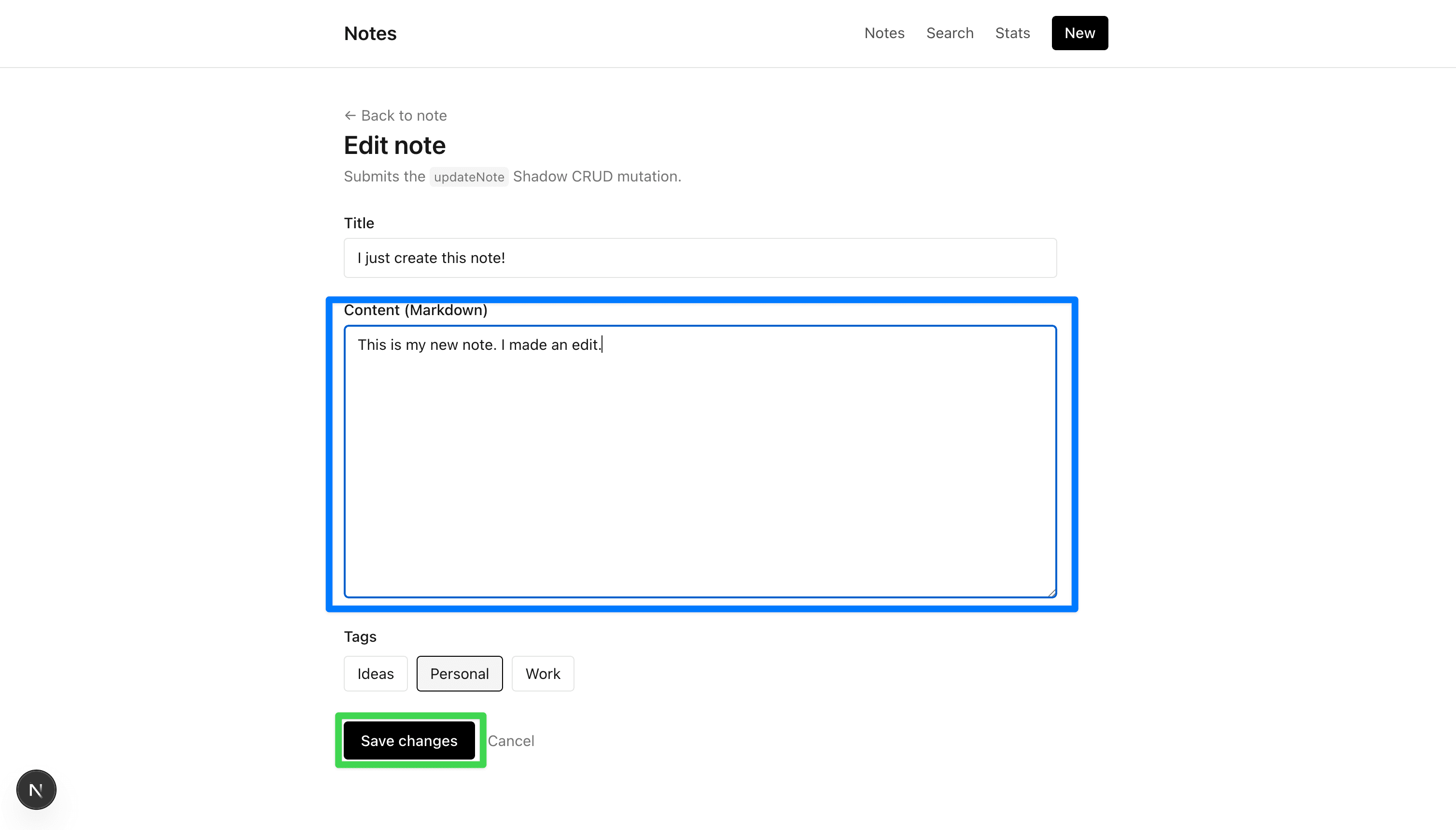
Save. You are redirected back to the detail view with the updated values.

Wire up the inline actions (pin and archive)
The note detail page (app/notes/[documentId]/page.tsx) already includes a <NoteActions> component in its header. That component renders three buttons: Edit, Pin / Unpin, and Archive. The Edit button is a link to the edit page you just wired up. The Pin and Archive buttons call Server Actions that live alongside the detail page at app/notes/[documentId]/actions.ts.
Right now those actions only console.log their input (the starter's placeholder stub). This sub-step replaces them with the two custom mutations from Part 2 Step 10: togglePin (flips the pinned boolean on the note) and archiveNote (sets archived: true, which is the soft-delete flag this app uses to hide notes from the list).
These are called "inline" actions because there is no form involved. The client component calls the Server Action directly from an onClick handler, wrapped in useTransition so the button can disable itself while the request is in flight. That client component already exists in the starter (components/note-actions.tsx) and imports both action names from app/notes/[documentId]/actions.ts. The only missing piece is giving those exported functions real bodies.
Replace the entire contents of app/notes/[documentId]/actions.ts with:
// app/notes/[documentId]/actions.ts
"use server";

import { revalidatePath } from "next/cache";
import { redirect } from "next/navigation";
import { getClient } from "@/lib/apollo-client";
import { TOGGLE_PIN, ARCHIVE_NOTE } from "@/lib/graphql";

export async function togglePinAction(documentId: string) {
  await getClient().mutate({
    mutation: TOGGLE_PIN,
    variables: { documentId },
  });
  revalidatePath(`/notes/${documentId}`);
  revalidatePath("/");
}

export async function archiveNoteAction(documentId: string) {
  await getClient().mutate({
    mutation: ARCHIVE_NOTE,
    variables: { documentId },
  });
  revalidatePath("/");
  redirect("/");
}
The <NoteActions> client component (already in the starter) calls these via useTransition, so the buttons disable during the server round trip and re-enable once revalidatePath refreshes the page.
Open a note detail page. Click "Pin"; the 📌 icon appears.


Click "Archive". You are redirected to the home page and the note is gone from the list.
This is the soft-delete pattern from Part 2 Step 10 in action. The entry is not actually deleted. It still exists in Strapi with archived: true on the record, and you can confirm this by opening the Content Manager in the Strapi admin UI.
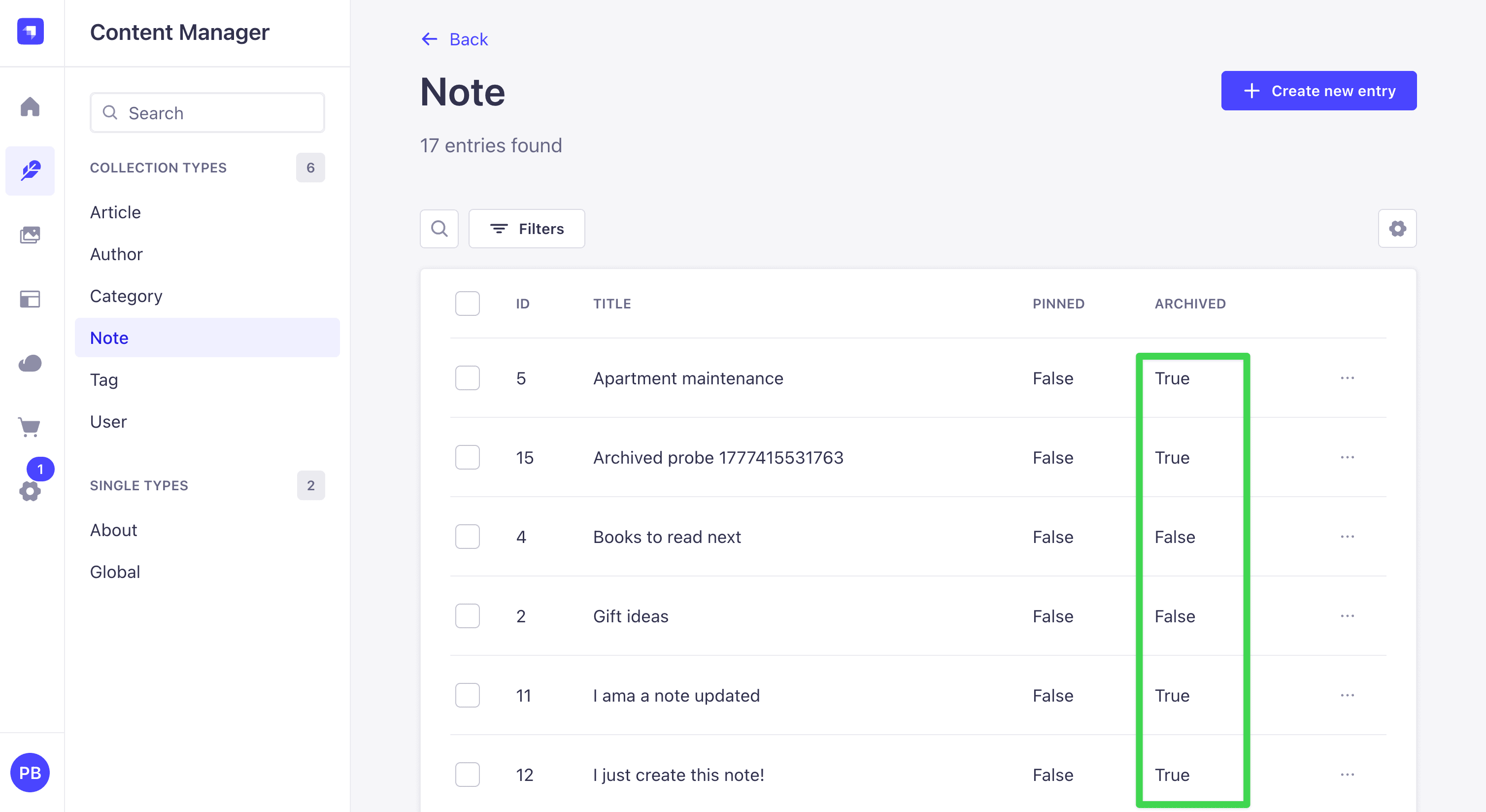
The frontend never sees it because the soft-delete middlewares from Part 2 Step 6 do the work on the server: callers cannot filter on archived, and Query.notes only ever returns rows where archived: false. The frontend does not need to do anything; the backend enforces the rule on its own.
Try to ask for archived notes from the Sandbox
To confirm the contract from the client side, open the Apollo Sandbox at http://localhost:1337/graphql and try a query that explicitly asks for archived rows:
query {
  notes(filters: { archived: { eq: true } }) {
    title
  }
}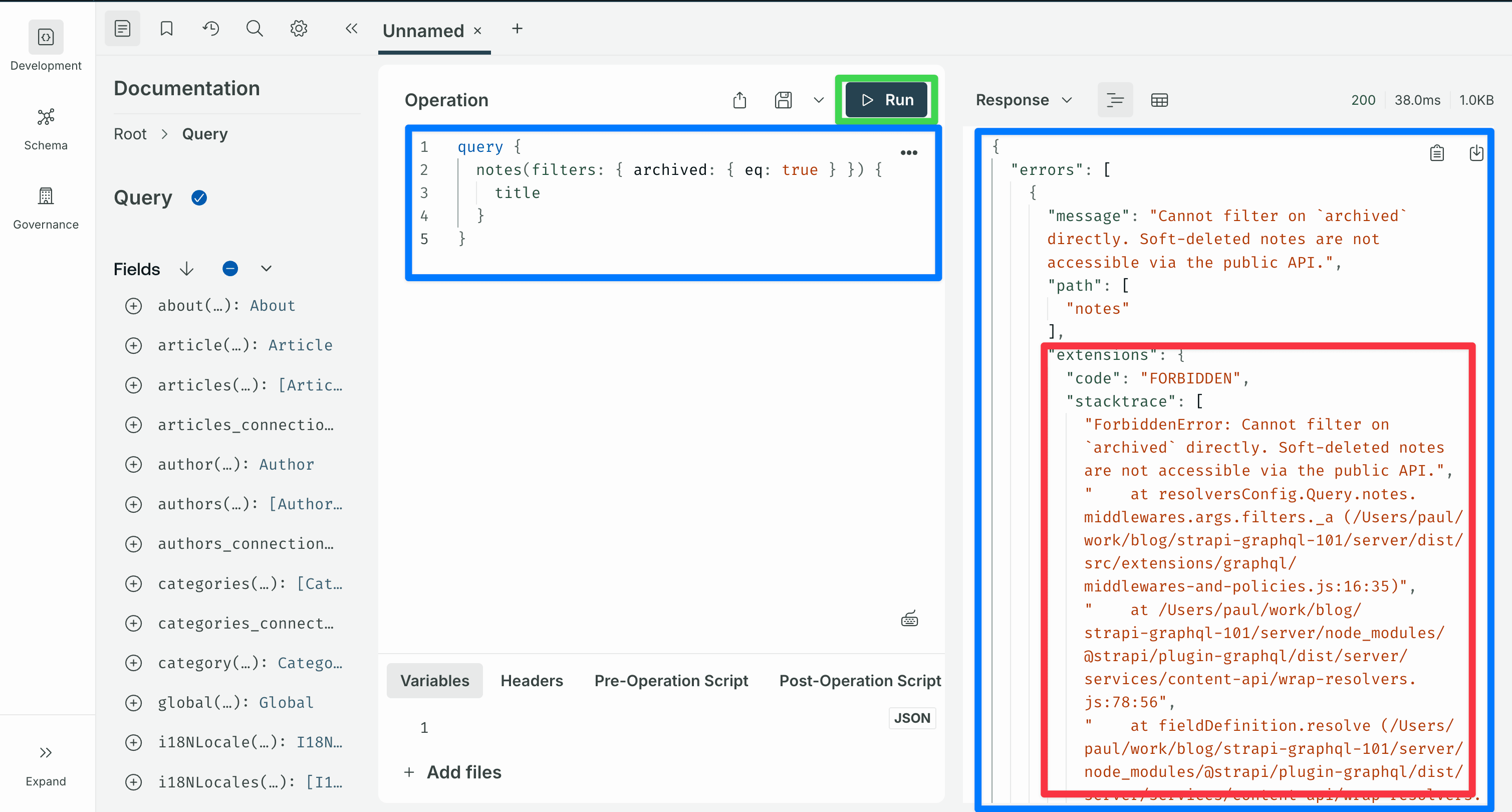
The response is rejected with FORBIDDEN and the message Cannot filter on \archived` directly. ...`. Drop the filter argument:
query {
notes {
title
archived
}
}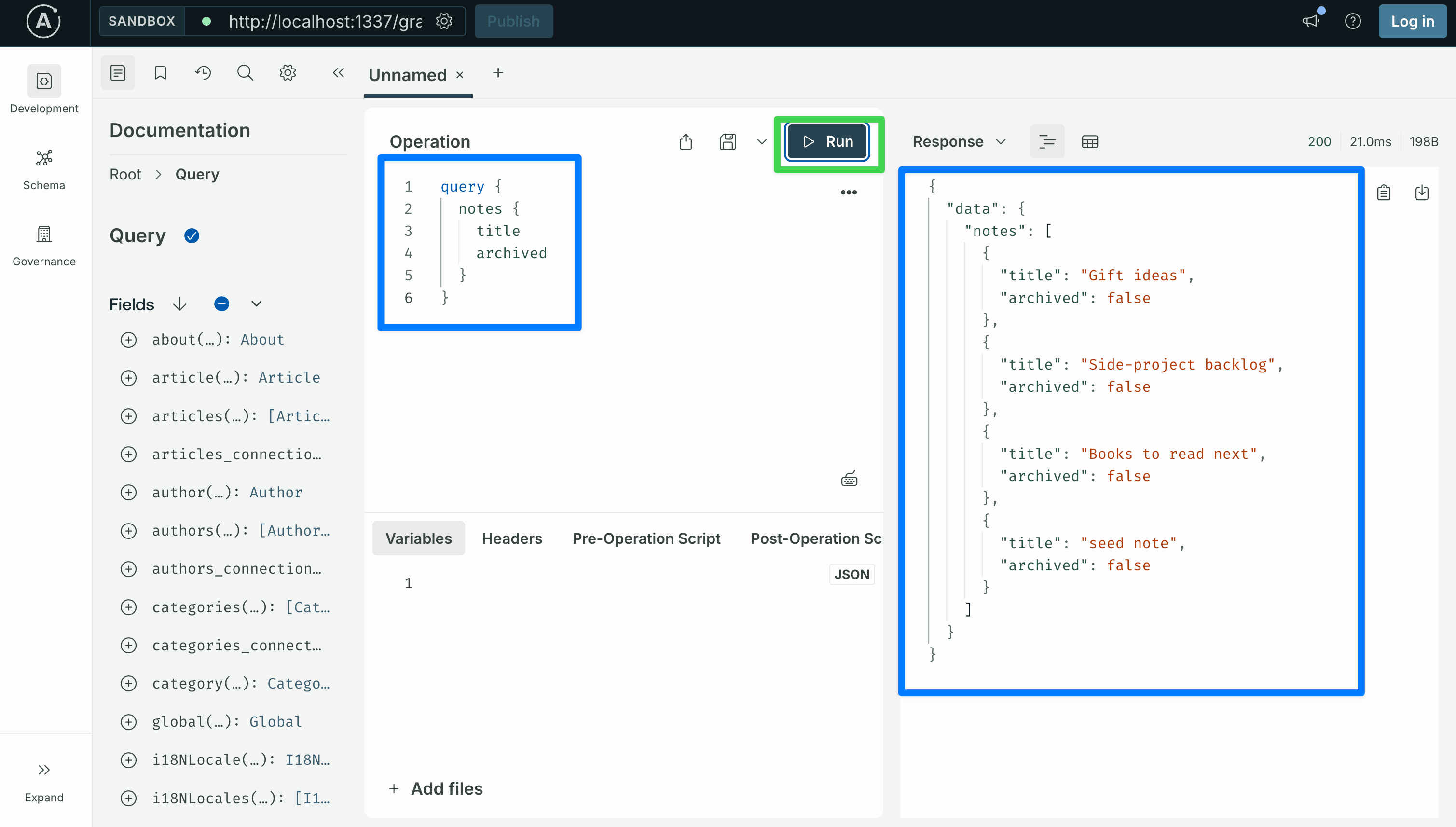 The response is a 200 OK with every entry showing
 archived: false. The archived note you just created is absent. The soft-delete middlewares are doing their job.
Step 6: Search
Add this to the bottom of lib/graphql.ts:
export const SEARCH_NOTES = gql`
  ${NOTE_FIELDS}
  query SearchNotes($q: String!) {
    searchNotes(query: $q) {
      ...NoteFields
    }
  }
`;
Replace app/search/page.tsx:
// app/search/page.tsx
import { query } from "@/lib/apollo-client";
import { SEARCH_NOTES } from "@/lib/graphql";
import { NoteCard } from "@/components/note-card";
import { NotesSearch } from "@/components/notes-search";
type Note = Parameters<typeof NoteCard>[0]["note"];
export const dynamic = "force-dynamic";
export default async function SearchPage({
searchParams,
}: {
searchParams: Promise<{ q?: string }>;
}) {
const { q } = await searchParams;
const term = (q ?? "").trim();
let notes: Note[] = [];
if (term) {
const { data } = await query<{ searchNotes: Note[] }>({
query: SEARCH_NOTES,
variables: { q: term },
});
notes = data?.searchNotes ?? [];
}
return (
<div className="space-y-6">
<header className="space-y-1">
<h1 className="text-2xl font-semibold">Search</h1>
<p className="text-sm text-neutral-500">
Calls the{" "}
<code className="rounded bg-neutral-100 px-1 py-0.5 font-mono text-xs">
searchNotes
</code>{" "}
custom query. Archived notes are excluded.
</p>
</header>
<NotesSearch initialQuery={term} />
{term && (
<p className="text-sm text-neutral-500">
{notes.length} result{notes.length === 1 ? "" : "s"} for “{term}
”.
</p>
)}
{notes.length > 0 && (
<div className="grid gap-4 md:grid-cols-2">
{notes.map((n) => (
<NoteCard key={n.documentId} note={n} />
))}
</div>
)}
</div>
);
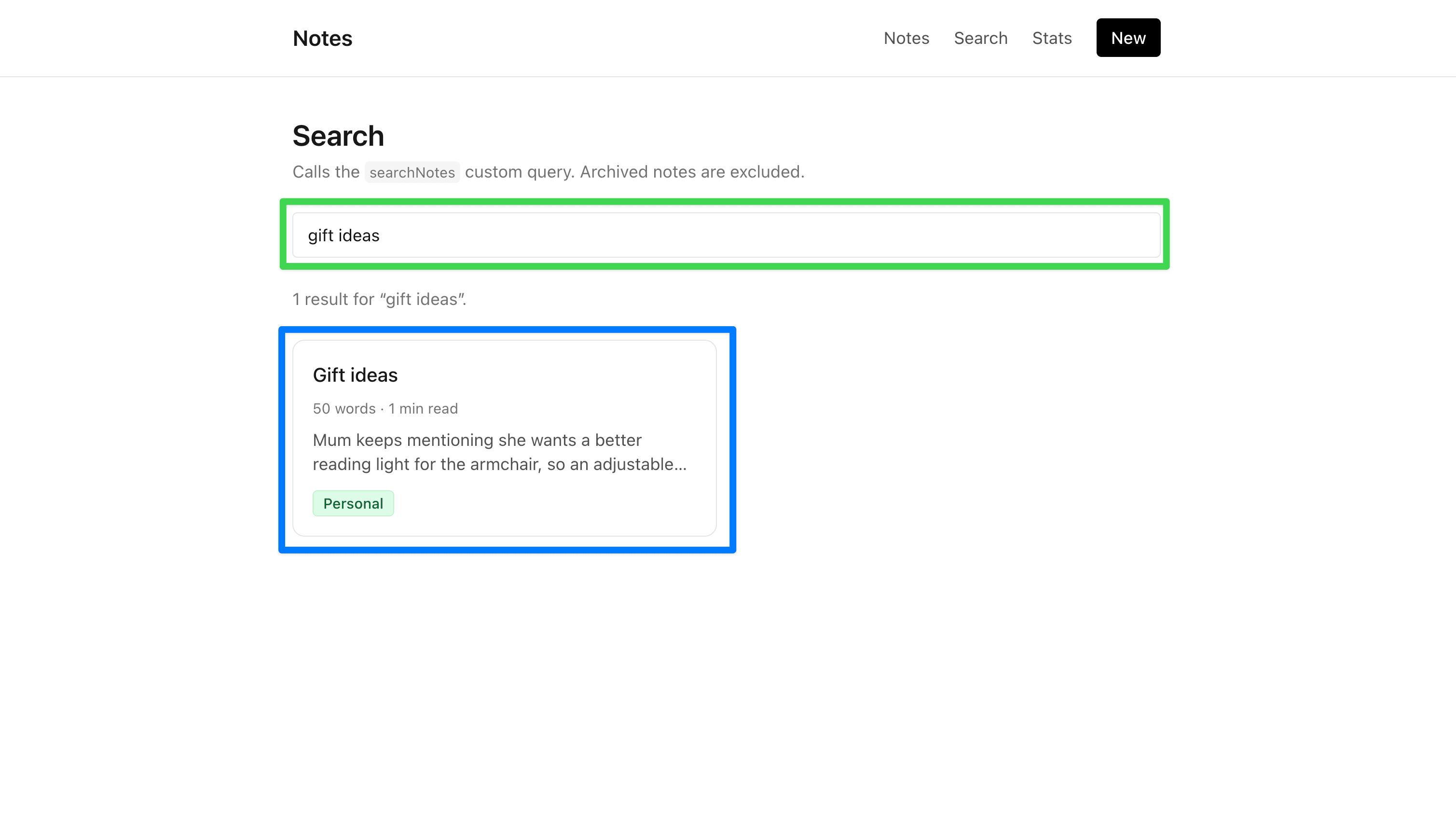
}The <NotesSearch> client component (already in the starter) debounces input for 300 ms and pushes ?q=... into the URL via router.replace inside startTransition. When the URL changes, Next re-renders this page as an RSC with the new q search parameter. No client-side GraphQL code runs.
Type into the input. Each debounced commit fires a new GraphQL request to Strapi's searchNotes resolver.
Step 7: Notes by tag
Add this to the bottom of lib/graphql.ts:
export const NOTES_BY_TAG = gql`
  ${NOTE_FIELDS}
  query NotesByTag($slug: String!) {
    notesByTag(slug: $slug) {
      ...NoteFields
    }
  }
`;
Replace app/tags/[slug]/page.tsx:
// app/tags/[slug]/page.tsx
import Link from "next/link";
import { query } from "@/lib/apollo-client";
import { NOTES_BY_TAG } from "@/lib/graphql";
import { NoteCard } from "@/components/note-card";

type Note = Parameters<typeof NoteCard>[0]["note"];

export const dynamic = "force-dynamic";

export default async function TagPage({
  params,
}: {
  params: Promise<{ slug: string }>;
}) {
  const { slug } = await params;

  const { data } = await query<{ notesByTag: Note[] }>({
    query: NOTES_BY_TAG,
    variables: { slug },
  });
  const notes = data?.notesByTag ?? [];

  return (
    <div className="space-y-6">
      <header className="space-y-1">
        <Link href="/" className="text-sm text-neutral-500 hover:text-black">
          ← Back to notes
        </Link>
        <h1 className="text-2xl font-semibold">
          Notes tagged{" "}
          <code className="rounded bg-neutral-100 px-2 py-0.5 font-mono text-lg">
            {slug}
          </code>
        </h1>
        <p className="text-sm text-neutral-500">
          Calls the{" "}
          <code className="rounded bg-neutral-100 px-1 py-0.5 font-mono text-xs">
            notesByTag
          </code>{" "}
          custom query, which runs a nested relation filter on Tag.
        </p>
      </header>

      {notes.length === 0 ? (
        <p className="text-sm text-neutral-500">
          No active notes tagged <code className="font-mono">{slug}</code>.
        </p>
      ) : (
        <div className="grid gap-4 md:grid-cols-2">
          {notes.map((n) => (
            <NoteCard key={n.documentId} note={n} />
          ))}
        </div>
      )}
    </div>
  );
}
Click a tag pill on any note card. The slug flows from the URL into the GraphQL variable, the custom resolver runs Part 2 Step 9.4's nested filter (tags: { slug: { $eq: slug } } under the hood), and the matching notes render.
Step 8: Stats
noteStats is the showcase for Part 2's custom object types. It returns a NoteStats (three scalar counts) plus a list of TagCount objects. Neither is a content-type-derived type; both were declared via nexus.objectType in Part 2 Step 8.
Add this to the bottom of lib/graphql.ts (this is the last GraphQL document the tutorial adds):
export const NOTE_STATS = gql`
  query NoteStats {
    noteStats {
      total
      pinned
      archived
      byTag {
        slug
        name
        count
      }
    }
  }
`;
Replace app/stats/page.tsx:
// app/stats/page.tsx
import Link from "next/link";
import { query } from "@/lib/apollo-client";
import { NOTE_STATS } from "@/lib/graphql";
type Stats = {
total: number;
pinned: number;
archived: number;
byTag: Array<{ slug: string; name: string; count: number }>;
};
export const dynamic = "force-dynamic";
export default async function StatsPage() {
const { data } = await query<{ noteStats: Stats }>({ query: NOTE_STATS });
const stats = data?.noteStats;
if (!stats) return null;
const counts = [
{ label: "Total", value: stats.total },
{ label: "Pinned", value: stats.pinned },
{ label: "Archived", value: stats.archived },
];
return (
<div className="space-y-8">
<header className="space-y-1">
<h1 className="text-2xl font-semibold">Stats</h1>
<p className="text-sm text-neutral-500">
Aggregated via the{" "}
<code className="rounded bg-neutral-100 px-1 py-0.5 font-mono text-xs">
noteStats
</code>{" "}
custom query, returning the{" "}
<code className="rounded bg-neutral-100 px-1 py-0.5 font-mono text-xs">
NoteStats
</code>{" "}
object type with a per-tag{" "}
<code className="rounded bg-neutral-100 px-1 py-0.5 font-mono text-xs">
TagCount
</code>{" "}
breakdown.
</p>
</header>
<section className="grid gap-4 md:grid-cols-3">
{counts.map((c) => (
<div key={c.label} className="rounded-lg border p-4">
<div className="text-xs uppercase tracking-wide text-neutral-500">
{c.label}
</div>
<div className="mt-1 text-3xl font-semibold">{c.value}</div>
</div>
))}
</section>
<section className="space-y-3">
<h2 className="text-xs font-medium uppercase tracking-wider text-neutral-500">
By tag
</h2>
<ul className="divide-y rounded-lg border">
{stats.byTag.map((t) => (
<li
key={t.slug}
className="flex items-center justify-between px-4 py-3"
>
<Link
href={`/tags/${t.slug}`}
className="font-medium hover:underline"
>
{t.name}
</Link>
<span className="text-sm tabular-nums text-neutral-500">
{t.count}
</span>
</li>
))}
</ul>
</section>
</div>
);
}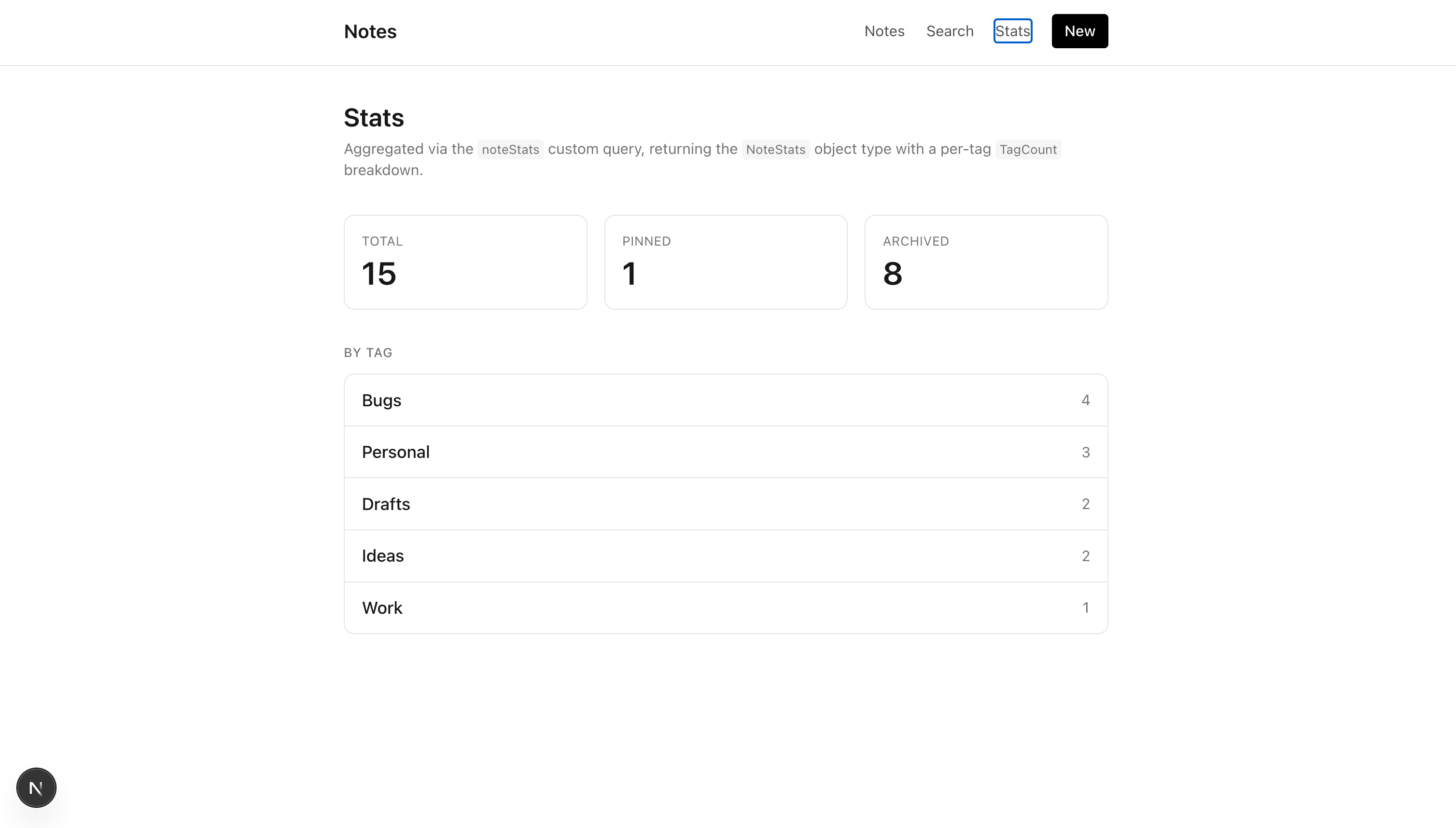 Three GraphQL type features show up on this one page:
- A non-null scalar (
NoteStats.total: Int!) renders as a plain number. The exclamation mark in the schema means the server is guaranteed to return a value, so the render does not need a null check. - A non-null list of non-null objects (
NoteStats.byTag: [TagCount!]!) is always an array. In practice Strapi may return an empty array; the render handles that case (it just shows an empty list). - A nested object type (
TagCountlives insideNoteStats) is selected by nesting the selection set inside the parent, the same way you writetags { name }on aNote.
Step 9: Cleanup
Every page now reads from Strapi. lib/placeholder.ts is no longer imported anywhere. Delete it:
rm lib/placeholder.tsRe-run npm run dev to confirm nothing broke. Every route should render live data from the backend.
The final starter-template/ layout now matches the reference frontend/ directory exactly:
starter-template/
├── app/
│   ├── layout.tsx
│   ├── page.tsx                         # notes (Shadow CRUD list)
│   ├── search/page.tsx                  # searchNotes (custom query)
│   ├── stats/page.tsx                   # noteStats + TagCount (custom types)
│   ├── tags/[slug]/page.tsx             # notesByTag (custom query)
│   └── notes/
│       ├── new/{page,actions}.tsx       # createNote
│       └── [documentId]/
│           ├── page.tsx                 # note + inline actions
│           ├── actions.ts               # togglePin, archiveNote
│           └── edit/{page,actions}.tsx  # updateNote
├── components/
│   ├── nav.tsx
│   ├── note-card.tsx
│   ├── note-actions.tsx
│   ├── notes-search.tsx
│   ├── tag-badge.tsx
│   └── markdown.tsx
└── lib/
    ├── apollo-client.ts                 # registerApolloClient + typePolicies
    ├── graphql.ts                       # every gql document
    └── auth.ts                          # Part 4 parking spot
No Apollo Client instance is ever shipped to the browser. Every read is a Server Component. Every write is a Server Action. The only client-side JavaScript is the debounced search input and the pending-state spinner on the inline action buttons.
What you just built
A Next.js 16 App Router frontend that exercises every public-facing GraphQL operation from Part 2:
- Shadow CRUD reads:
notes,note,tags. - Shadow CRUD writes:
createNote,updateNote. - Custom queries:
searchNotes,notesByTag,noteStats. - Custom mutations:
togglePin,archiveNote. - Custom object types:
NoteStats,TagCountrendered on/stats. - Computed fields:
wordCount,readingTime,excerpt(length: Int)rendered on every note card and detail page.
One page per operation, one GraphQL document per page, a shared NoteFields fragment for list-vs-detail reuse.
What's next
Part 4: users and per-user content. Adds login through Strapi's users-permissions plugin and a cookie-stored JWT flow on the Next.js side. Adds a per-user ownership model (an owner relation on Note) so each user only reads and writes their own notes. On the backend, two new files do the work: a middleware that filters reads to the caller's own notes, and a policy that blocks writes to other users' notes. The frontend gains /login, /register, a middleware.ts that protects routes, and an <AuthNav /> component. The auth stub in lib/auth.ts and the comment in lib/apollo-client.ts are both placeholders for Part 4.
Citations
- Apollo Client, Next.js App Router integration: https://www.apollographql.com/docs/react/integrations/integrations#react
- Next.js, Server Actions: https://nextjs.org/docs/app/api-reference/directives/use-server
- Next.js,
revalidatePath: https://nextjs.org/docs/app/api-reference/functions/revalidatePath - Strapi, GraphQL plugin: https://docs.strapi.io/cms/plugins/graphql
- Strapi, Document Service API: https://docs.strapi.io/cms/api/document-service