
Introduction
In Part 1, you built the data layer: the Strapi content model, on population fragments, and a typed two-phase fetch client. Nothing renders yet.
In this final part, you will build the streaming UI. You will create the page.tsx shell that returns skeletons without awaiting Strapi, a block registry, async block components each wrapped in their own Suspense boundary, tag-based cache revalidation, and draft preview with Strapi 5's status parameter and Next.js Draft Mode.
In brief:
page.tsxnever awaits Strapi, so skeleton HTML streams on the first byte.- A central block registry maps
__componentUIDs to async Server Components. - Per-block
Suspenseboundaries mean a slow feature grid never delays a fast hero. - Cache tags from Part 1 power webhook revalidation without redeploying.
- Strapi 5's
statusparameter pairs with Next.js Draft Mode for safe draft previews.
Tutorial Outline
- Part 1: Modeling Content and Building a Streaming-Ready Fetch Layer
- Part 2: Rendering Blocks with Suspense, Caching, and Draft Preview
Build the page route and skeleton
Create src/app/[slug]/page.tsx with the following code, in a way that the page must not await a response from Strapi. It should return the page shell and a Suspense boundary immediately:
// File: src/app/[slug]/page.tsx
import { Suspense } from "react";
import { draftMode } from "next/headers";
import { PageBlocks } from "@/components/dynamic-zone/PageBlocks";
import { PageLayoutSkeleton } from "@/components/dynamic-zone/PageLayoutSkeleton";

type Props = {
  params: Promise<{ slug: string }>;
};

export default async function PageRoute({ params }: Props) {
  const { slug } = await params;
  const { isEnabled: isPreview } = await draftMode();
  const status = isPreview ? "draft" : "published";

  return (
    <main className="min-h-screen bg-white">
      <Suspense fallback={<PageLayoutSkeleton />}>
        <PageBlocks
          slug={slug}
          status={status}
          cache={isPreview ? "no-store" : "force-cache"}
        />
      </Suspense>
    </main>
  );
}
Then, create the src/components/dynamic-zone/PageBlocks.tsx file to perform the layout fetch as follows:
// File: src/components/dynamic-zone/PageBlocks.tsx
import { notFound } from "next/navigation";
import { fetchPageLayoutBySlug } from "@/lib/strapi/client";
import { DynamicZoneRenderer } from "@/components/dynamic-zone/DynamicZoneRenderer";

export async function PageBlocks({
  slug,
  status,
  cache,
}: {
  slug: string;
  status: "draft" | "published";
  cache: RequestCache;
}) {
  const page = await fetchPageLayoutBySlug({
    slug,
    status,
    cache,
    tags: [`page:${slug}`],
  });

  if (!page) notFound();

  return (
    <>
      <h1 className="sr-only">{page.title ?? slug}</h1>
      <DynamicZoneRenderer blocks={page.blocks} slug={slug} status={status} />
    </>
  );
}
Then, create the src/app/[slug]/loading.tsx file to show the same skeleton stack on client-side navigations, before page.tsx even runs:
// File: src/app/[slug]/loading.tsx
import { PageLayoutSkeleton } from "@/components/dynamic-zone/PageLayoutSkeleton";

export default function Loading() {
  return (
    <main className="min-h-screen bg-white">
      <PageLayoutSkeleton />
    </main>
  );
}
Then, create the src/components/dynamic-zone/PageLayoutSkeleton.tsx component that would simply stack the generic block skeletons so something meaningful paints on the first byte (i.e. the first time the page is loaded):
// File: src/components/dynamic-zone/PageLayoutSkeleton.tsx
import { BlockSkeleton } from "./BlockSkeleton";

export function PageLayoutSkeleton() {
  return (
    <div className="flex flex-col" aria-busy="true" aria-label="Loading page">
      <BlockSkeleton variant="hero.hero" />
      <BlockSkeleton variant="rich-text.rich-text" />
      <BlockSkeleton variant="feature-grid.feature-grid" />
    </div>
  );
}
Finally, redirect the site root to your homepage slug in src/app/page.tsx:
// File: src/app/page.tsx
import { redirect } from "next/navigation";

export default function Home() {
  redirect("/home");
}
Streaming timeline
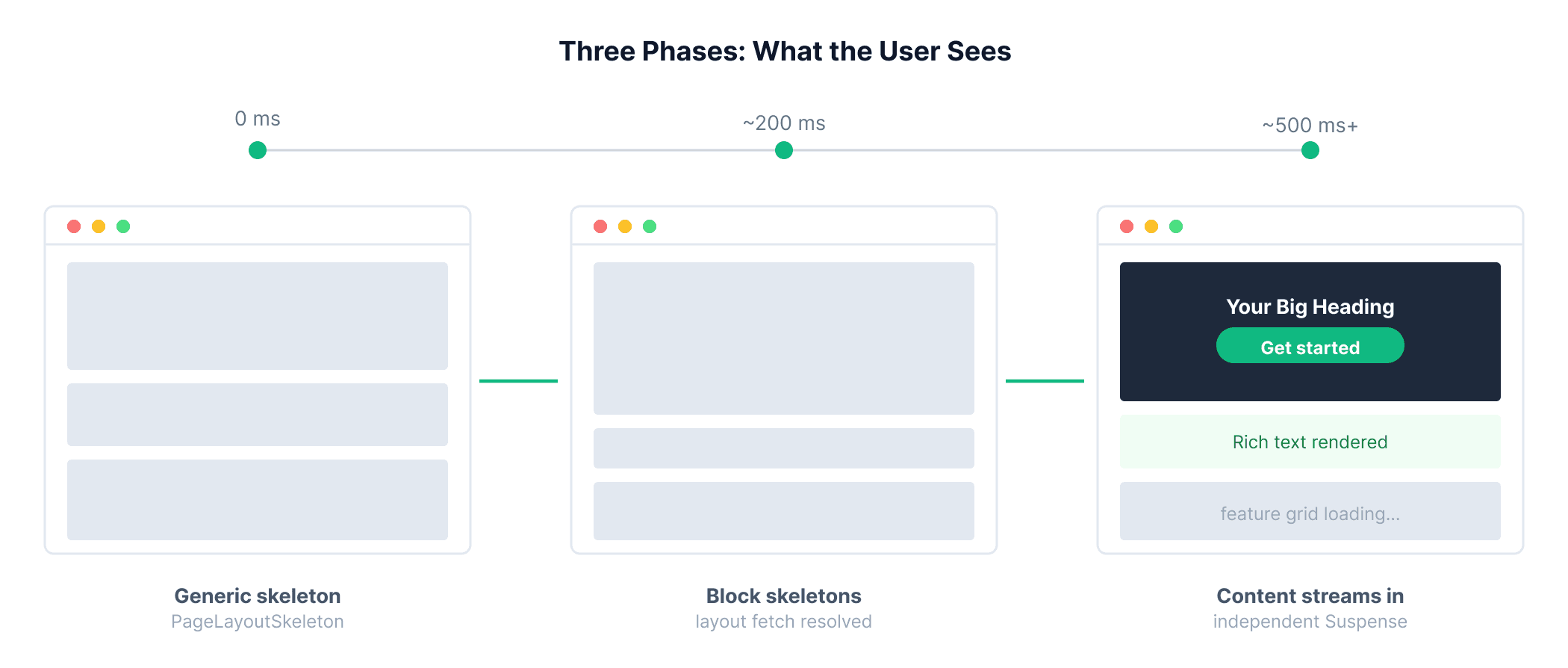
When a visitor opens /home with four blocks:
| Moment | What the user sees | Network |
|---|---|---|
| 0 ms | Full skeleton stack | none |
| Layout resolves | Per-block skeletons for the real page structure | 1 layout request |
| Each block resolves | Real content replaces that block's skeleton | 1 request per block, in parallel |
There is no useEffect and no client-side fetching of CMS content, every interaction with Strapi happens exclusively within async Server Components on the server.
To observe streaming clearly in development, you can wrap the fetch call in fetchBlockById with a configurable delay: read a FETCH_DELAY_MS environment variable and call await new Promise(r => setTimeout(r, ms)) before returning. Remove that variable before shipping to production.
Build the block registry
Create src/blocks/registry.ts as a central registry that maps each Strapi Dynamic Zone block type (__component UID) to its corresponding React block component:
// File: src/blocks/registry.ts
import type { ComponentType } from "react";
import type { BlockComponentUid, BlockLayout, BlockShellProps } from "@/lib/strapi/types";

import { HeroBlock } from "@/components/blocks/HeroBlock";
import { RichTextBlock } from "@/components/blocks/RichTextBlock";
import { FeatureGridBlock } from "@/components/blocks/FeatureGridBlock";

type BlockRegistry = {
  [K in BlockComponentUid]: ComponentType<
    BlockShellProps & { __component: K }
  >;
};

export const blockRegistry: BlockRegistry = {
  "hero.hero": HeroBlock,
  "rich-text.rich-text": RichTextBlock,
  "feature-grid.feature-grid": FeatureGridBlock,
};

const knownComponents = new Set<string>(Object.keys(blockRegistry));

export function isKnownBlock(
  block: { __component: string }
): block is BlockLayout {
  return knownComponents.has(block.__component);
}
Registry entries now accept BlockShellProps (id, __component, slug, status) rather than the full Strapi payload. Each async block is responsible for fetching its own content.
Build the block components
Every block follows the same async shell pattern: receive layout props, call fetchBlockById, render a presentational child.
Hero block
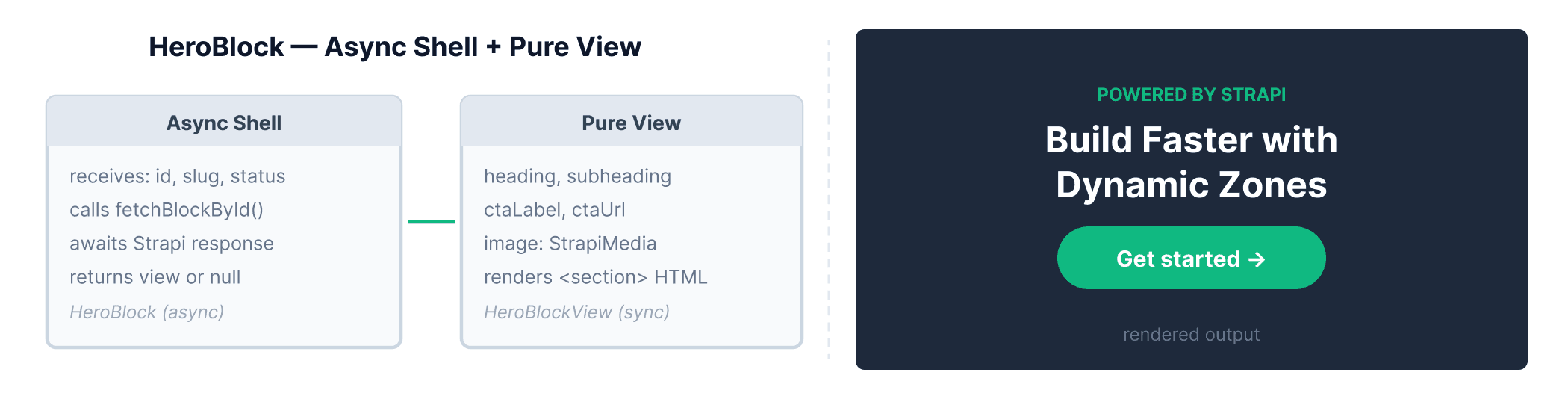
Create src/components/blocks/HeroBlock.tsx to render a full-bleed hero section with an optional background image, heading, subheading, and CTA link:
// File: src/components/blocks/HeroBlock.tsx
import Link from "next/link";
import { StrapiImage } from "@/components/StrapiImage";
import { fetchBlockById } from "@/lib/strapi/client";
import { ctaClassName, sectionClassName } from "@/lib/ui";
import type {
  BlockShellProps,
  HeroBlock as HeroBlockData,
} from "@/lib/strapi/types";

export async function HeroBlock({
  id,
  slug,
  status,
}: BlockShellProps & { __component: "hero.hero" }) {
  const data = await fetchBlockById({
    slug,
    blockId: id,
    component: "hero.hero",
    status,
  });

  if (!data) return null;

  return <HeroBlockView {...data} />;
}

function HeroBlockView({
  heading,
  subheading,
  ctaLabel,
  ctaUrl,
  image,
}: HeroBlockData) {
  return (
    <section className="relative overflow-hidden bg-zinc-950 py-20 sm:py-28">
      {image ? (
        <div className="absolute inset-0">
          <StrapiImage
            media={image}
            fill
            className="object-cover opacity-30"
            priority
            sizes="100vw"
          />
        </div>
      ) : null}
      <div className={`${sectionClassName} relative text-center`}>
        {subheading ? (
          <p className="mb-4 text-sm font-semibold uppercase tracking-widest text-brand">
            {subheading}
          </p>
        ) : null}
        {heading ? (
          <h1 className="mx-auto max-w-4xl text-4xl font-bold tracking-tight text-white sm:text-5xl lg:text-6xl">
            {heading}
          </h1>
        ) : null}
        {ctaLabel && ctaUrl ? (
          <div className="mt-8">
            <Link href={ctaUrl} className={ctaClassName}>
              {ctaLabel}
            </Link>
          </div>
        ) : null}
      </div>
    </section>
  );
}
RichTextBlock and FeatureGridBlock follow the same shell → view pattern. The sections below show their complete files.
Rich text block
The async shell calls fetchBlockById with component: "rich-text.rich-text". RichTextBlockView renders markdown via react-markdown + remark-gfm, with an HTML fallback when content looks like markup.
Create src/lib/richtext.ts with a single helper that detects whether a string contains HTML markup, so RichTextBlockView knows whether to call dangerouslySetInnerHTML or <ReactMarkdown>:
// File: src/lib/richtext.ts
export function isRichTextHtml(content: string) {
  return /<[a-z][\s\S]*>/i.test(content);
}
Create src/components/blocks/RichTextBlock.tsx:
// File: src/components/blocks/RichTextBlock.tsx
import ReactMarkdown from "react-markdown";
import remarkGfm from "remark-gfm";
import { fetchBlockById } from "@/lib/strapi/client";
import { isRichTextHtml } from "@/lib/richtext";
import { sectionClassName } from "@/lib/ui";
import type { BlockShellProps, RichTextBlock as RichTextBlockData } from "@/lib/strapi/types";

const richTextProseClassName =
  "prose prose-zinc mx-auto max-w-4xl text-center prose-headings:mx-auto prose-headings:max-w-4xl prose-headings:font-bold prose-headings:tracking-tight prose-h1:text-3xl prose-h1:sm:text-4xl prose-h1:lg:text-5xl prose-h1:leading-tight prose-p:text-muted prose-p:text-lg prose-p:leading-relaxed prose-a:text-brand prose-a:no-underline hover:prose-a:underline";

export async function RichTextBlock({
  id,
  slug,
  status,
}: BlockShellProps & { __component: "rich-text.rich-text" }) {
  const data = await fetchBlockById({
    slug,
    blockId: id,
    component: "rich-text.rich-text",
    status,
  });

  if (!data) return null;
  return <RichTextBlockView content={data.content} />;
}

function RichTextBlockView({ content }: RichTextBlockData) {
  if (!content) return null;

  const isHtml = isRichTextHtml(content);

  return (
    <section
      className="border-y border-border bg-surface py-16 sm:py-20"
      aria-label="Rich text"
    >
      <div className={sectionClassName}>
        {isHtml ? (
          <div
            className={richTextProseClassName}
            dangerouslySetInnerHTML={{ __html: content }}
          />
        ) : (
          <div className={richTextProseClassName}>
            <ReactMarkdown remarkPlugins={[remarkGfm]}>{content}</ReactMarkdown>
          </div>
        )}
      </div>
    </section>
  );
}
In the code above:
- The async shell fetches the block data and returns
nullif it is missing, so the section simply disappears rather than rendering empty space. RichTextBlockViewdetects whether the content is HTML or Markdown and renders accordingly, applyingproseutility classes for consistent typography.
If non-trusted roles can edit richtext in your Strapi instance, sanitize the HTML before rendering it (for example with isomorphic-dompurify) to prevent XSS.
Feature grid block
The async shell calls fetchBlockById with component: "feature-grid.feature-grid". This block tends to resolve last in practice because it populates nested feature images. FeatureGridBlockView adapts column count to item count and filters empty entries via normalizeFeatureItems.
Create src/lib/feature-grid.ts with two pure helpers: one that filters out empty feature entries before rendering, and one that returns a responsive Tailwind grid class based on the item count:
// File: src/lib/feature-grid.ts
import type { FeatureItem } from "@/lib/strapi/types";

export function normalizeFeatureItems(
  features: FeatureItem[] | null | undefined
): FeatureItem[] {
  return (features ?? []).filter(
    (feature) =>
      feature.heading?.trim() || feature.subtext?.trim() || feature.image
  );
}

export function getFeatureGridClassName(count: number) {
  if (count <= 1) return "grid-cols-1";
  if (count === 2) return "grid-cols-1 sm:grid-cols-2";
  if (count === 3) return "grid-cols-1 sm:grid-cols-2 lg:grid-cols-3";
  if (count === 4) return "grid-cols-1 sm:grid-cols-2 lg:grid-cols-2";
  return "grid-cols-1 sm:grid-cols-2 lg:grid-cols-3";
}
Create src/components/blocks/FeatureGridBlock.tsx to fetch and render a responsive grid of feature cards, each with an optional image, heading, and description:
// File: src/components/blocks/FeatureGridBlock.tsx
import { fetchBlockById } from "@/lib/strapi/client";
import { StrapiImage } from "@/components/StrapiImage";
import {
  getFeatureGridClassName,
  normalizeFeatureItems,
} from "@/lib/feature-grid";
import { sectionClassName } from "@/lib/ui";
import type { BlockShellProps, FeatureGridBlock as FeatureGridBlockData } from "@/lib/strapi/types";

export async function FeatureGridBlock({
  id,
  slug,
  status,
}: BlockShellProps & { __component: "feature-grid.feature-grid" }) {
  const data = await fetchBlockById({
    slug,
    blockId: id,
    component: "feature-grid.feature-grid",
    status,
  });

  if (!data) return null;
  return <FeatureGridBlockView title={data.title} feature={data.feature} />;
}

function FeatureGridBlockView({ title, feature }: FeatureGridBlockData) {
  const items = normalizeFeatureItems(feature);

  if (!title && items.length === 0) return null;

  const gridClassName = getFeatureGridClassName(items.length);

  return (
    <section className="bg-white py-16 sm:py-20 lg:py-24">
      <div className={sectionClassName}>
        {title ? (
          <div className="mx-auto max-w-3xl text-center">
            <h2 className="text-3xl font-bold tracking-tight text-zinc-950 sm:text-4xl">
              {title}
            </h2>
          </div>
        ) : null}

        {items.length > 0 ? (
          <ul
            className={`grid gap-10 sm:gap-12 lg:gap-16 ${gridClassName} ${title ? "mt-12 lg:mt-16" : ""}`}
          >
            {items.map((featureItem) => (
              <li key={featureItem.id} className="text-center lg:text-left">
                {featureItem.image ? (
                  <div className="relative mb-6 aspect-[4/3] overflow-hidden rounded-xl border border-border bg-surface">
                    <StrapiImage
                      media={featureItem.image}
                      fill
                      className="object-cover"
                      sizes="(max-width: 768px) 100vw, 33vw"
                    />
                  </div>
                ) : (
                  <div className="mx-auto mb-6 h-1 w-12 rounded-full bg-brand lg:mx-0" />
                )}
                {featureItem.heading ? (
                  <h3 className="text-lg font-semibold text-zinc-950 sm:text-xl">
                    {featureItem.heading}
                  </h3>
                ) : null}
                {featureItem.subtext ? (
                  <p
                    className={`mx-auto max-w-sm whitespace-pre-wrap text-base leading-relaxed text-muted lg:mx-0 ${featureItem.heading ? "mt-3" : ""}`}
                  >
                    {featureItem.subtext}
                  </p>
                ) : null}
              </li>
            ))}
          </ul>
        ) : null}
      </div>
    </section>
  );
}
In the code above:
normalizeFeatureItemsfilters out empty feature entries before computing the grid layout, so editors can leave placeholder rows in Strapi without breaking the UI.getFeatureGridClassNameadapts the column count to the number of items, so a two-feature grid splits into halves while a single feature takes the full width.
Build the DynamicZoneRenderer
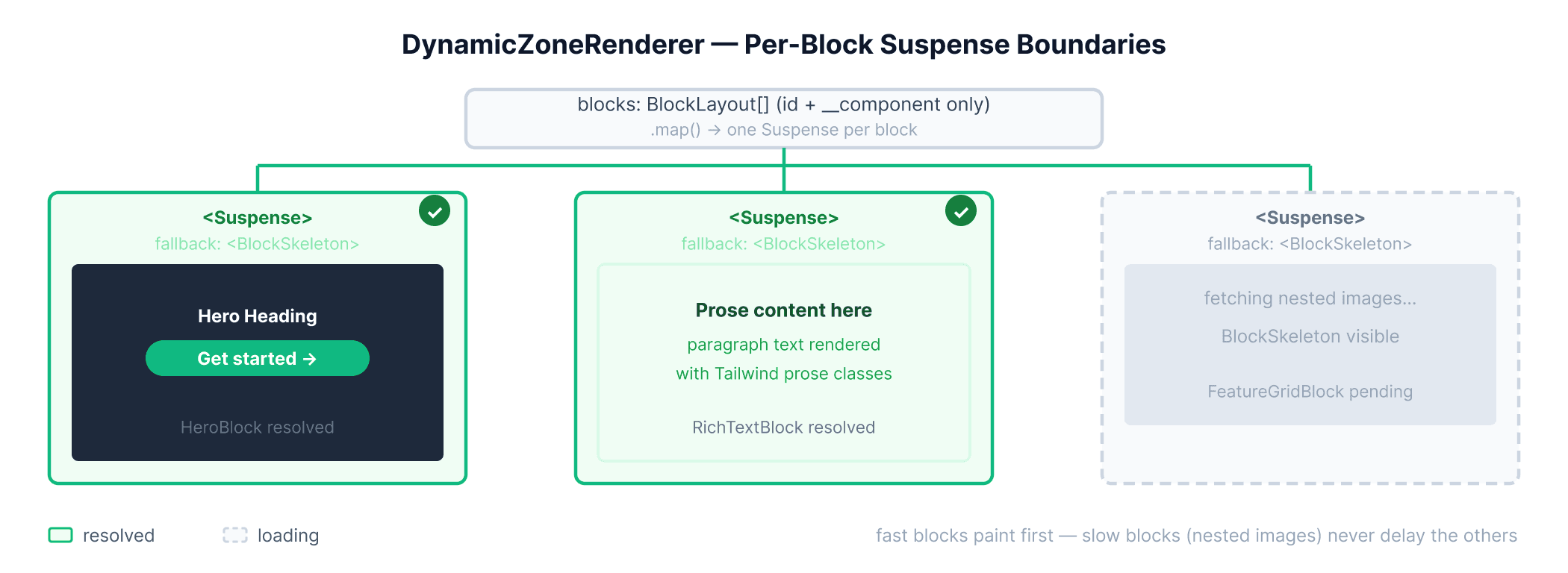
Every block gets its own Suspense boundary. BlockSlot is an async server component that delegates to the registry. When a block's fetchBlockById suspends, only that block's skeleton shows.
Create src/components/dynamic-zone/BlockSkeleton.tsx with a height variant for each block type:
// File: src/components/dynamic-zone/BlockSkeleton.tsx
import type { BlockComponentUid } from "@/lib/strapi/types";

const heights: Partial<Record<string, string>> = {
  "hero.hero": "h-[520px]",
  "rich-text.rich-text": "h-48",
  "feature-grid.feature-grid": "h-80",
};

export function BlockSkeleton({ variant }: { variant: BlockComponentUid | string }) {
  const height = heights[variant] ?? "h-48";
  return <div className={`animate-pulse bg-surface ${height} w-full`} aria-hidden />;
}
Create src/components/dynamic-zone/DynamicZoneRenderer.tsx to map over the layout blocks, wrap each in its own Suspense boundary with a matching skeleton fallback, and delegate rendering to BlockSlot:
// File: src/components/dynamic-zone/DynamicZoneRenderer.tsx
import { Suspense } from "react";
import { blockRegistry } from "@/blocks/registry";
import { BlockSkeleton } from "./BlockSkeleton";
import type { BlockLayout } from "@/lib/strapi/types";

async function BlockSlot({
  block,
  slug,
  status,
}: {
  block: BlockLayout;
  slug: string;
  status: "draft" | "published";
}) {
  const shell = { ...block, slug, status };

  switch (block.__component) {
    case "hero.hero": {
      const Hero = blockRegistry["hero.hero"];
      return <Hero {...shell} __component="hero.hero" />;
    }
    case "rich-text.rich-text": {
      const RichText = blockRegistry["rich-text.rich-text"];
      return <RichText {...shell} __component="rich-text.rich-text" />;
    }
    case "feature-grid.feature-grid": {
      const FeatureGrid = blockRegistry["feature-grid.feature-grid"];
      return <FeatureGrid {...shell} __component="feature-grid.feature-grid" />;
    }
    default:
      return null;
  }
}

export function DynamicZoneRenderer({
  blocks,
  slug,
  status,
}: {
  blocks: BlockLayout[] | null | undefined;
  slug: string;
  status: "draft" | "published";
}) {
  if (!blocks?.length) return null;

  return (
    <div className="flex flex-col">
      {blocks.map((block, index) => {
        const key = `${block.__component}-${block.id ?? index}`;

        return (
          <Suspense key={key} fallback={<BlockSkeleton variant={block.__component} />}>
            <BlockSlot block={block} slug={slug} status={status} />
          </Suspense>
        );
      })}
    </div>
  );
}
In the code above:
BlockSlotis an async Server Component that receives only the block's shell props and delegates to the registry. Theswitchstatement narrows the__componentdiscriminant so TypeScript can verify the props match each block's type.DynamicZoneRendererwraps eachBlockSlotin its ownSuspenseboundary, which means a slow block (the feature grid loading nested images) never delays a fast block (hero or rich text) from rendering.
BlockSkeleton has a variant per block type (hero.hero, feature-grid.feature-grid, etc.) so each fallback matches the real section layout.
Why this streams
page.tsxnever awaits Strapi. TheSuspensefallback (PageLayoutSkeleton) streams on the first byte.PageBlocksresolves the layout. Per-block skeletons replace the generic stack.- Each
BlockSlotsuspends on its ownfetchBlockById. Fast blocks (hero, rich text) paint before slow ones (feature grid with nested images).
All blocks in this guide are Server Components, and DynamicZoneRenderer stays on the server as well.
When you add an interactive block later (accordion, map, carousel), split it into an async server shell that fetches data and a 'use client' child for UI, or use next/dynamic to lazy-load the client bundle:
// File: src/blocks/registry.ts (excerpt for a future interactive block)
import dynamic from "next/dynamic";

const MapBlock = dynamic(() => import("@/components/blocks/MapBlock"), {
  loading: () => <BlockSkeleton variant="map" />,
});
Configure images from Strapi
Next.js 16 blocks localhost image optimization by default. When your Strapi instance is running on localhost:1337 during development, you will need to enable dangerouslyAllowLocalIP and include the port in remotePatterns.
Update next.config.ts with the following code:
// File: next.config.ts
import type { NextConfig } from "next";

const strapiUrl = process.env.NEXT_PUBLIC_STRAPI_URL ?? "http://localhost:1337";
const { hostname, protocol, port } = new URL(strapiUrl);

const nextConfig: NextConfig = {
  images: {
    // Required in dev when Strapi runs on localhost (Next.js 16 blocks local IP by default)
    dangerouslyAllowLocalIP: true,
    remotePatterns: [
      {
        protocol: protocol.replace(":", "") as "http" | "https",
        hostname,
        ...(port ? { port } : {}),
        pathname: "/uploads/**",
      },
    ],
  },
};

export default nextConfig;
Note that dangerouslyAllowLocalIP is only needed in development when Strapi runs on a local IP address. In production, a public Strapi hostname works with remotePatterns alone and you can remove that flag.
Create src/lib/utils.ts with the following to handle the image URL switch:
// File: src/lib/utils.ts
export function getStrapiMediaUrl(path: string) {
  const base = (process.env.NEXT_PUBLIC_STRAPI_URL ?? "http://localhost:1337").replace(
    /"/g,
    ""
  );
  if (path.startsWith("http")) return path;
  return `${base}${path}`;
}
Create src/components/StrapiImage.tsx. It supports both fixed dimensions and fill mode. Use fill for hero and feature images when Strapi omits width/height (for example with AVIF uploads):
// File: src/components/StrapiImage.tsx
import Image from "next/image";
import { getStrapiMediaUrl } from "@/lib/utils";
import type { StrapiMedia } from "@/lib/strapi/types";

type Props = {
  media: StrapiMedia;
  className?: string;
  priority?: boolean;
  sizes?: string;
  fill?: boolean;
};

export function StrapiImage({
  media,
  className,
  priority,
  sizes,
  fill = false,
}: Props) {
  const src = getStrapiMediaUrl(media.url);

  if (fill) {
    return (
      <Image
        src={src}
        alt={media.alternativeText ?? ""}
        fill
        className={className}
        priority={priority}
        sizes={sizes}
      />
    );
  }

  const width = media.width ?? 1200;
  const height = media.height ?? 800;

  return (
    <Image
      src={src}
      alt={media.alternativeText ?? ""}
      width={width}
      height={height}
      className={className}
      priority={priority}
      sizes={sizes}
    />
  );
}
Wrap fill images in a relative container with an explicit aspect ratio (such as aspect-[16/9]) to prevent layout shift. Because this uses server-rendered <Image />, there is no client-side fetch needed.
Caching and revalidation
By default, all fetch calls in client.ts use cache: "force-cache", so Next.js stores the response in the Data Cache and serves it on subsequent requests without hitting Strapi again. This section shows two complementary strategies to keep that cache fresh: tag-based revalidation triggered by a Strapi webhook, and a time-based fallback for mostly-static sites.
Tag-based revalidation
Create src/app/api/revalidate/route.ts to create such a route that you can to bust the cache whenever editors publish content in Strapi:
// File: src/app/api/revalidate/route.ts
import { revalidateTag } from "next/cache";
import { NextResponse } from "next/server";

export async function POST(request: Request) {
  const secret = request.headers.get("x-revalidate-secret");
  if (secret !== process.env.REVALIDATE_SECRET) {
    return NextResponse.json({ message: "Invalid secret" }, { status: 401 });
  }

  const body = await request.json();
  const slug = body?.entry?.slug as string | undefined;

  revalidateTag("strapi-pages", "max");
  if (slug) revalidateTag(`page:${slug}`, "max");

  return NextResponse.json({ revalidated: true, slug });
}
To wire Strapi up to this route, go to Settings → Webhooks and click Create new webhook. Give it a name (for example Entry changes), set the URL to https://your-domain.com/api/revalidate, add a header with key x-revalidate-secret and your REVALIDATE_SECRET value, then check the Update, Delete, Publish, and Unpublish events for the Entry row.
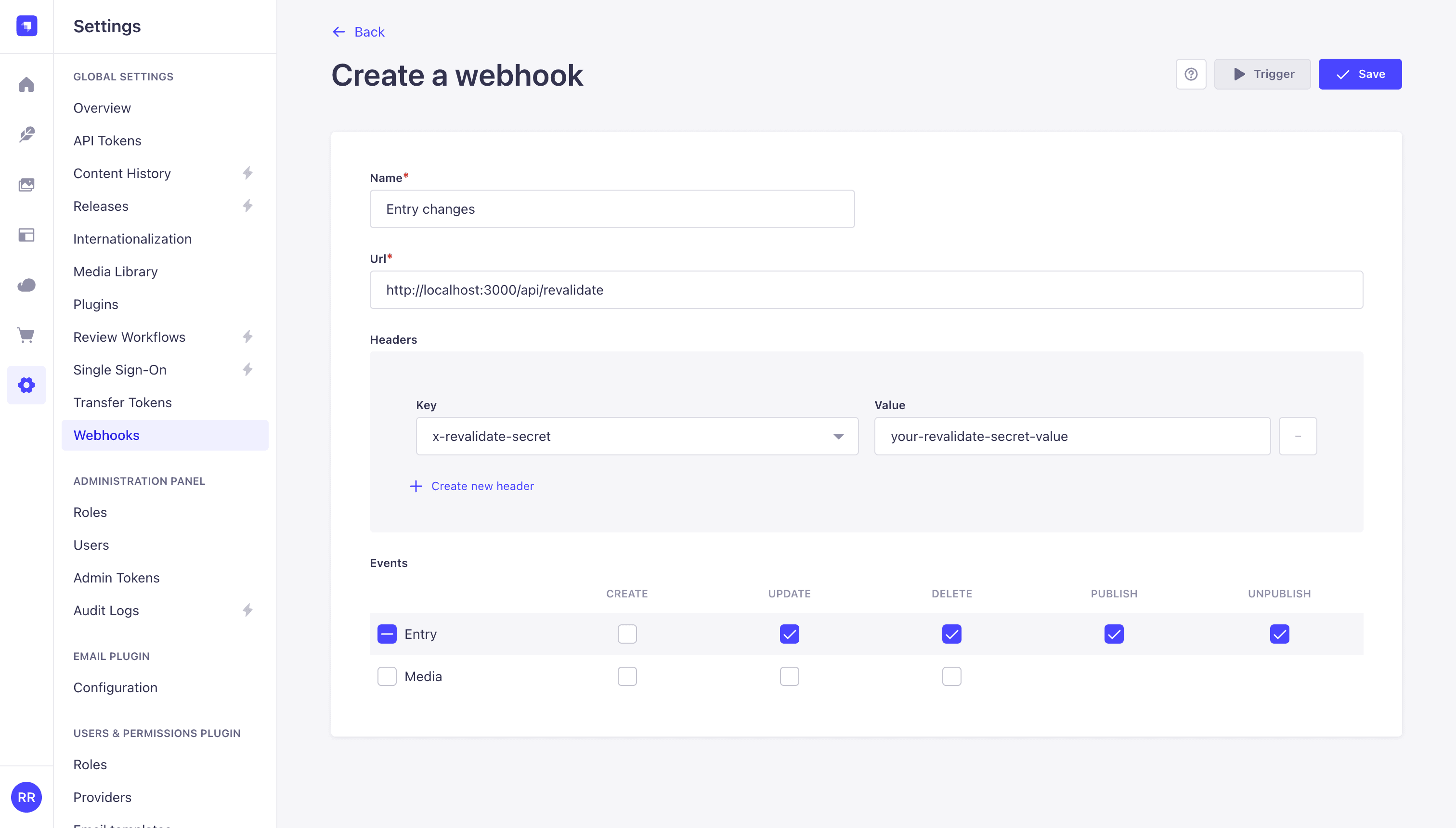
Click Save. From this point on, every publish, update, or delete in the Strapi content manager triggers a POST to your revalidation route, which purges strapi-pages globally and the specific page:<slug> tag if the payload includes a slug. Note that in Next.js 16, revalidateTag requires a second argument ("max" is the recommended profile) and omitting it is a type error.
Time-based fallback
If your site is mostly static, you can also combine cache tags with a revalidate interval on fetch:
// Option to add to fetch() calls in src/lib/strapi/client.ts
next: { revalidate: 300, tags: [`page:${slug}`] },
Set up draft preview
In Strapi 5, publicationState was replaced with status (draft | published) (migration guide). You will pair that with Next.js Draft Mode.
Create the Next.js preview route
Create src/app/api/preview/route.ts to validate the shared secret, toggle Next.js Draft Mode on or off, and redirect to the correct page slug:
// File: src/app/api/preview/route.ts
import { draftMode } from "next/headers";
import { redirect } from "next/navigation";

export async function GET(request: Request) {
  const { searchParams } = new URL(request.url);
  const secret = searchParams.get("secret");
  const status = searchParams.get("status");
  const slug = searchParams.get("slug"); // pass from Strapi handler if needed

  if (secret !== process.env.PREVIEW_SECRET) {
    return new Response("Invalid preview secret", { status: 401 });
  }

  const draft = await draftMode();
  if (status === "draft") {
    draft.enable();
  } else {
    draft.disable();
  }

  // Prefer slug-based paths you control -- avoid open redirects
  redirect(slug ? `/${slug}` : "/");
}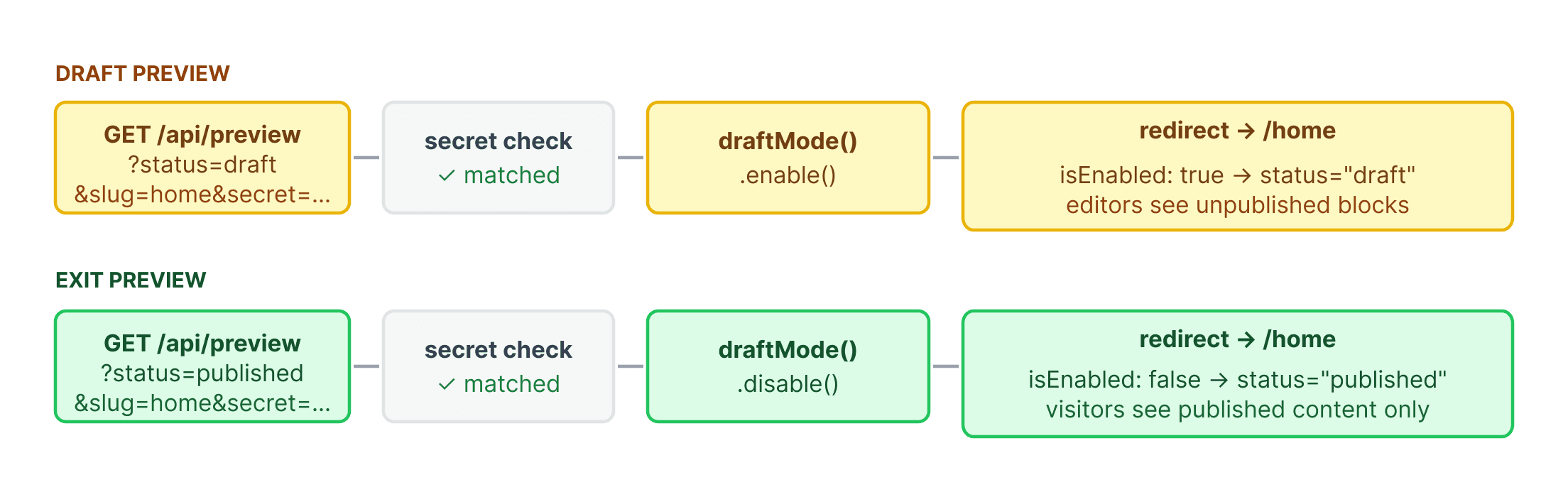
Your page route reads draftMode() and passes status: "draft" into PageBlocks and each block's fetchBlockById call, so editors can see unpublished blocks without exposing draft content to visitors.
To exit preview mode, link to /api/preview?secret=...&status=published&slug=home or call draftMode().disable() from a dedicated "Exit preview" button.
GitHub Repositories
The complete code for the frontend and backend of this project can be found below.
Conclusion
The two-phase fetch pattern scales beyond the three blocks built here. Any async Server Component can be dropped into blockRegistry with a single entry, and it automatically gets its own Suspense boundary, its own on population fragment, and its own cache tag, all without touching DynamicZoneRenderer or page.tsx.
Once page.tsx stops awaiting Strapi, every data dependency becomes independently streamable. Editors get a block composer that does not require a deploy to rearrange a page. Visitors get a page that feels instant because skeleton HTML is on the wire before the first Strapi fetch completes. And the Next.js Data Cache, seeded by force-cache and invalidated by tag-based webhooks, means most requests never reach Strapi at all.