Part 4 of a 4-part series on building with GraphQL, Strapi v5, and Next.js 16. Each part builds directly on the project from the previous post.
- Part 1, GraphQL basics with Strapi v5. Fresh install, a full Shadow CRUD tour, and your first custom resolvers.
- Part 2, Advanced backend customization. A
Note+Tagmodel, middlewares and policies, custom queries, and custom mutations. - Part 3, Next.js 16 frontend. Apollo Client on the App Router: Server Component reads, Server Action writes, one page per GraphQL operation.
- Part 4 (this post), Users and per-user content. Sign-in, automatic ownership on every note, an
is-note-ownerpolicy for GraphQL writes, the gap that policy leaves on REST, and a Document Service middleware that closes both APIs from one file.
After Part 3 you have a note-taking app that anyone can use. In Part 4 every user signs in, sees only their own notes, and cannot read or change anyone else's, no matter which API they call.
TL;DR
- Strapi's
users-permissionsplugin gives us JWT sign-in, aUsercontent type, and theregister,login, andmeGraphQL operations. We turn it on and grant the right permissions. We do not write auth code ourselves. - Notes get an
ownerrelation toUser. A Document Service middleware insrc/index.tsregister()writesownerautomatically on every new note, taking the value fromctx.state.user(the signed-in user). The client cannot pass someone else's id; the middleware overwrites the field at the data layer. The same code path covers REST, GraphQL, custom resolvers, and the seed script. - Reads work the same way. A second clause in the same middleware adds
owner = ctx.state.user.idto the filter of everyfindManyandfindOneon Note. RESTGET /api/notesand GraphQLQuery.notesboth go through the Document Service, so one rule limits each user to their own notes on both APIs. - Writes get two layers of protection. The read filter above means a non-owner cannot even load the target note, so any update or delete attempt against someone else's note misses. On top of that, an
is-note-ownerpolicy on the four GraphQL write mutations gives us a worked policy example and a second check before the resolver runs. - The custom queries from Part 2 (
searchNotes,noteStats,notesByTag) build their own filter object or query a different content type, so the Document Service middleware does not cover them. Each one gets an inlineownercheck. Part 4's Step 6.3 covers that. - The frontend gets three small things:
/loginand/registerpages backed by Server Actions that set an HTTP-only cookie, an Apollo link that addsAuthorization: Bearer <jwt>to every request, and a Next.jsmiddleware.tsthat sends signed-out users to/login.
Backend authorization at a glance:
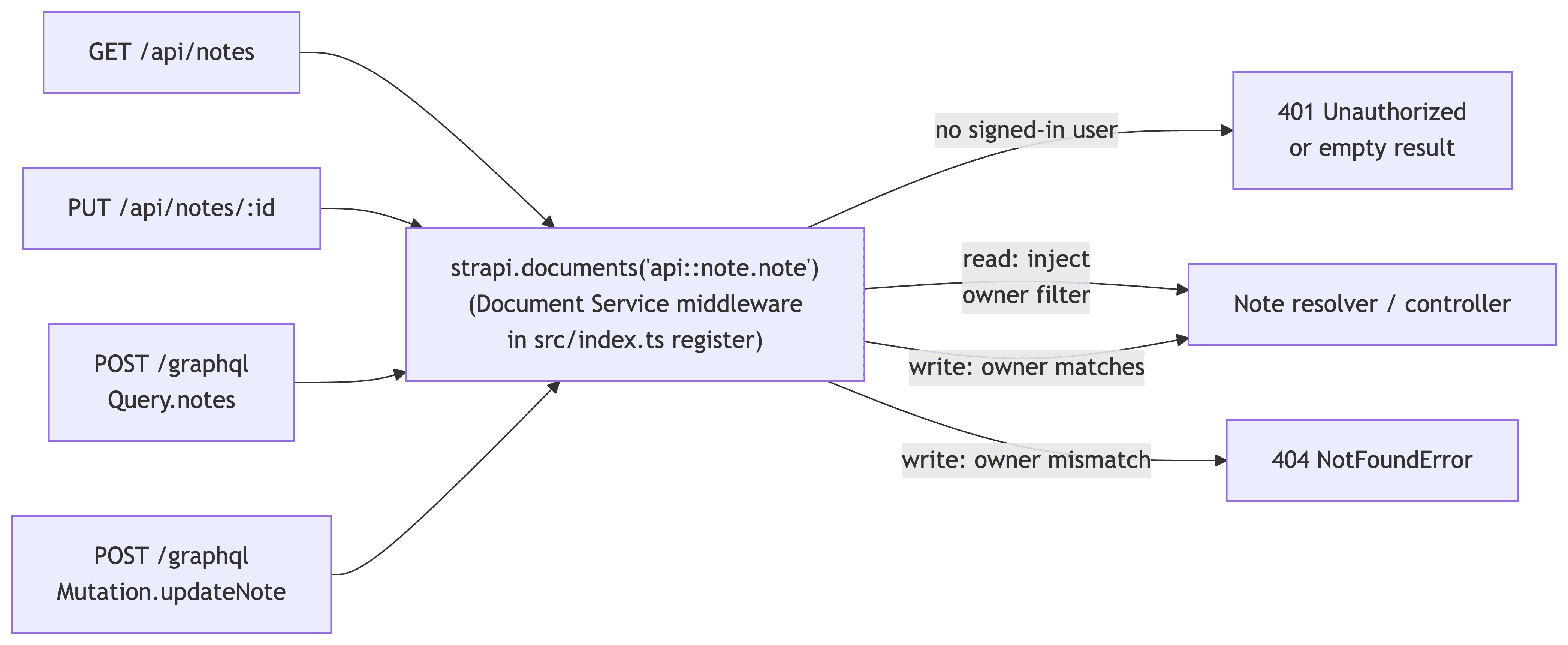
REST and GraphQL both end up calling strapi.documents("api::note.note").<action>(...), so a rule placed there fires for both APIs.
Prerequisites
- The Part 2 backend running on
http://localhost:1337/graphql, with theNote+Tagschema, the soft-delete middlewares, thecap-page-sizepolicy, and the test script (scripts/test-graphql.mjs) all green. - The Part 3 frontend cloned and working against that backend, including the seeded notes and the home page rendering them. If you skipped Part 3, clone the starter template and run through Steps 1 through 5.
- Node.js 20.9+. Strapi 5 and Next.js 16 both require it.
Scope
Part 4 covers backend authorization end-to-end and the minimum frontend wiring to test it. Skipped:
- Social login (OAuth providers). Email + password only.
- Password reset and email verification. Not part of the authorization story. See the users-permissions docs when you need them.
- Roles beyond owner / not-owner. No admin, no read-only viewer, no sharing. The pattern below is the foundation; richer roles use the same machinery.
- Note sharing or public links. Same reason.
- Refresh tokens. The default 30-day JWT is fine for a tutorial. Production apps would issue a short-lived access token plus a refresh flow.
How auth fits together
Three pieces work together so each user only sees their own notes:
Sign-in (who you are). Strapi's users-permissions plugin handles this for free. It ships a User content type, the register and login mutations, and a JWT issuer. Logging in returns { jwt, user }. Every later request sends Authorization: Bearer <jwt>, the plugin verifies the signature, and the user object is available as ctx.state.user for the rest of the request.
Authorization (what you can do). Sign-in tells the server who the caller is. Authorization decides what they can see or change. The rule across Part 4 is simple: only the owner. Reads filter to owner = ctx.state.user.id. Writes only succeed if the target note's owner.id matches the caller's id.
Ownership (the data that makes the check possible). We add owner as a manyToOne relation from Note to User. The server assigns it automatically when a note is created. From then on, the authorization check is just note.owner.id === user.id.
The diagram in the TL;DR shows the request path. The Document Service middleware does most of the work: it writes owner on create, and it adds an owner filter on read. The is-note-owner policy on the four GraphQL write mutations is the worked policy example for Part 4 and a second check before the resolver runs. After Step 6 the policy is technically redundant on the GraphQL side (the Document Service middleware already keeps a non-owner from loading the target note when Mutation.updateNote runs), but we keep it on purpose so you end up with a working policy file in your codebase to compare.
Step 1: Turn on sign-in and set the right permissions
users-permissions ships with every fresh Strapi project. Check that it is in package.json:
"@strapi/plugin-users-permissions": "^5.x"1.1 Check the JWT secret
The plugin signs JWTs with a value from the JWT_SECRET environment variable. Open .env and make sure it has a real value:
JWT_SECRET=<a-long-random-string>If it is missing, generate one with openssl rand -hex 32 and paste it in. Anything 32 bytes or longer works. Keep it secret in production.
1.2 Lock down the Public role
After Part 2, anyone who can hit your server can read and write Notes and Tags. We need to close that. From now on, signed-out users can only register and log in. Everything else (listing notes, creating notes, updating notes) requires sign-in, and the rules in Steps 3 through 6 make sure each signed-in user only sees and edits their own data.
Open the admin UI at http://localhost:1337/admin → Settings → Users & Permissions Plugin → Roles → Public.
-
Expand Note and uncheck everything. The Public role has no access to Notes.
-
Expand Tag and leave
find/findOnechecked (tags are reference data, fine to expose). Uncheckcreate,update,delete.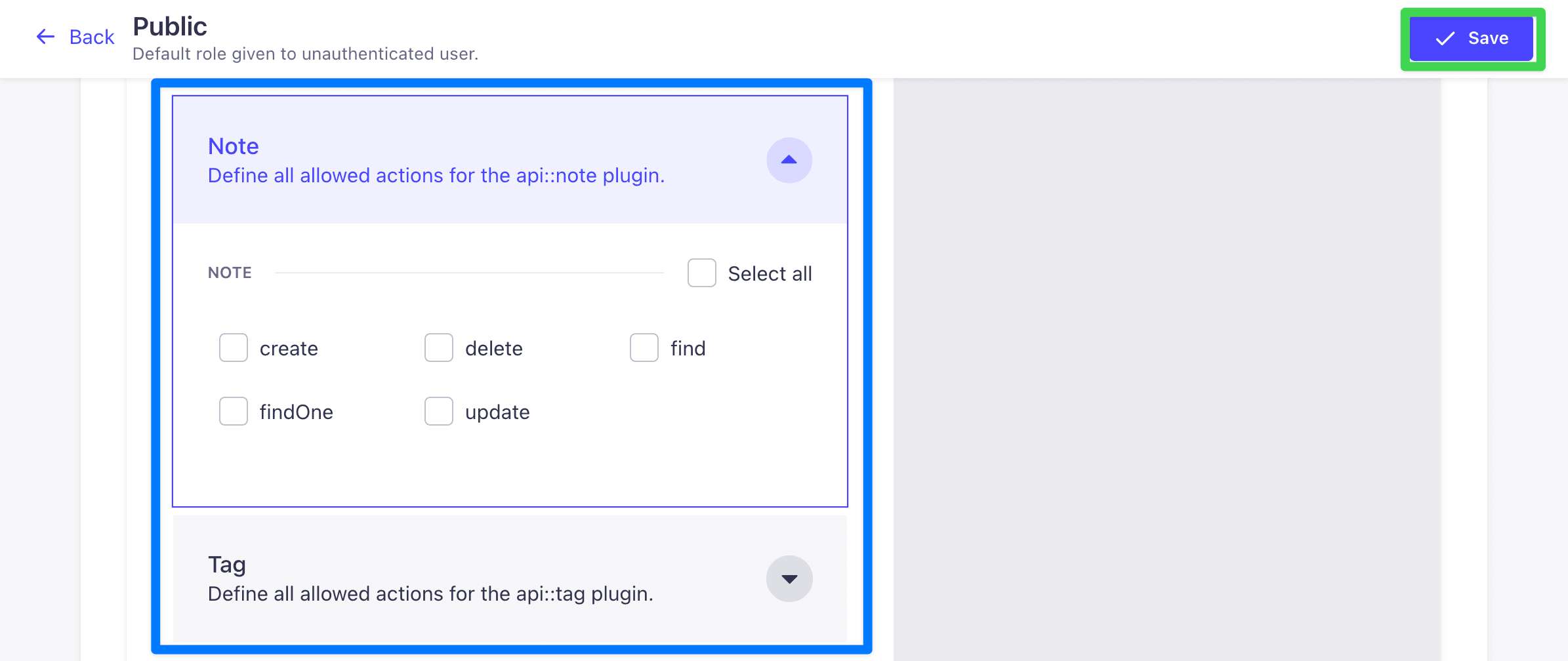
-
Expand Users-permissions → Auth and confirm
registerandcallbackare checked. They are usually enabled by default on the Public role; if either is unchecked, tick it now.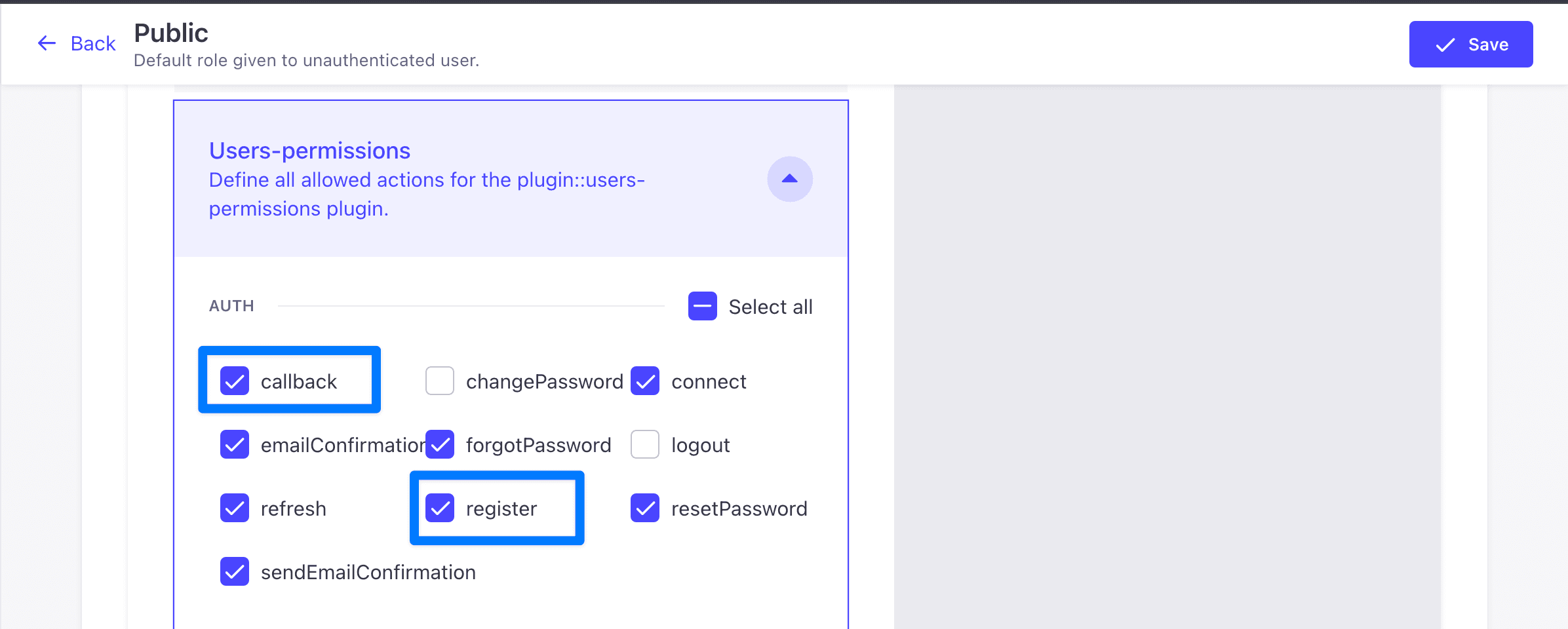
The other auth actions in that list (forgotPassword, resetPassword, emailConfirmation, sendEmailConfirmation, refresh, connect) are unused in this tutorial and can stay at whatever default Strapi shipped them with.
- Click Save.
Now go to Roles → Authenticated.
-
Expand Note and check
find,findOne,create,update. Leavedeleteunchecked.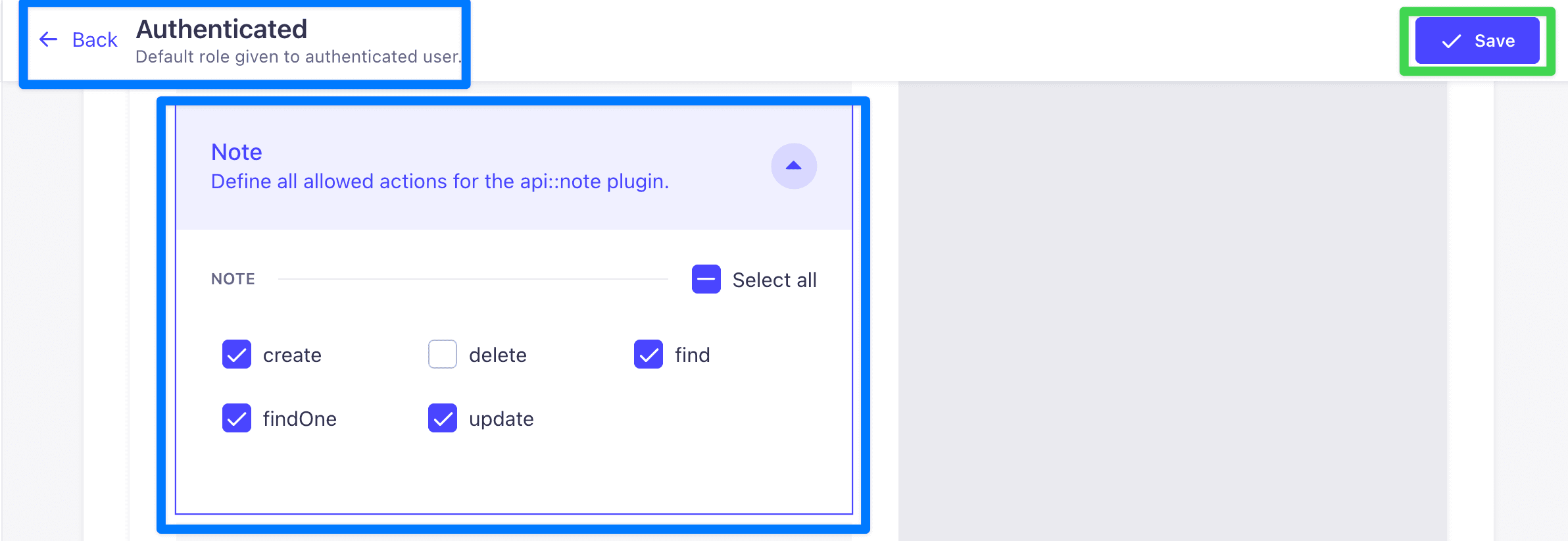
-
Expand Tag and check
findandfindOne. Anything else stays unchecked.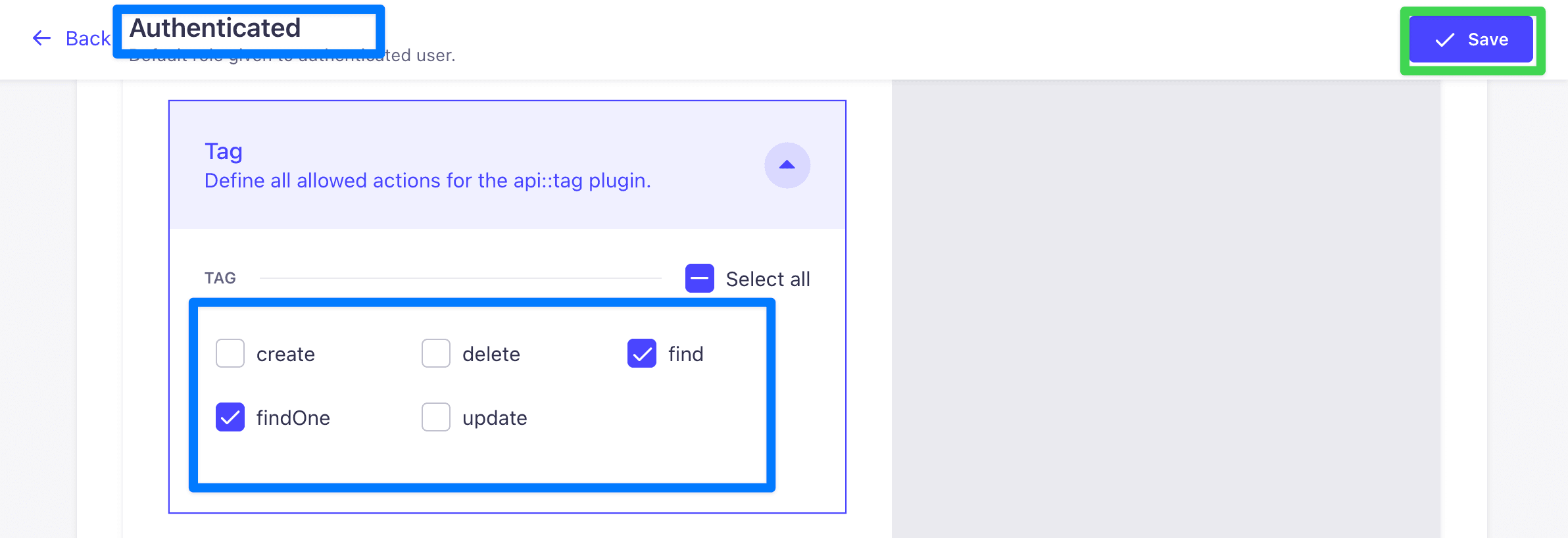
-
Expand Users-permissions → User and confirm
meis checked. It is enabled by default on the Authenticated role; the frontend will read it to display the signed-in user's name. -
Click Save.
1.3 Lock down the custom GraphQL mutations
In Part 2 we set auth: false on the three custom mutations (togglePin, archiveNote, duplicateNote) so they could be called without sign-in. That was fine while we had no users. Now we want them to require the same Authenticated role permissions you just set.
A bit of context on how the GraphQL plugin checks permissions:
- Shadow CRUD operations (
Query.notes,Query.note,Mutation.createNote, etc.) come pre-wired to a permission name. The list queryQuery.noteschecks forapi::note.note.find; the single-item queryQuery.notechecks forapi::note.note.findOne;Mutation.createNotechecks forapi::note.note.create. Those names match the checkboxes in the admin UI's Roles screen, so tickingfind,findOne,create, andupdateon the Authenticated role in 1.2 is enough to cover both list and detail reads plus the basic writes. - Custom mutations (the three from Part 2) are not pre-wired to anything. The plugin has no way to guess
togglePinis "really an update". Without a setting that tells it which permission to check, the only check left is "must be signed in", and any signed-in user passes.
If you only deleted the auth: false lines, anonymous calls would still be blocked, but any signed-in user could call those mutations. The role checkboxes would not gate them. That is inconsistent with the Shadow CRUD behavior we just relied on.
The fix is to tell each custom mutation which permission to check, using the auth.scope setting in resolversConfig. Pinning and archiving are kinds of update, so they reuse api::note.note.update. Duplicating creates a new row, so it reuses api::note.note.create.
Open src/extensions/graphql/mutations.ts, scroll to the resolversConfig block at the bottom, and swap the three auth: false entries:
// before
"Mutation.togglePin":     { auth: false },
"Mutation.archiveNote":   { auth: false },
"Mutation.duplicateNote": { auth: false },

// after
"Mutation.togglePin":     { auth: { scope: ["api::note.note.update"] } },
"Mutation.archiveNote":   { auth: { scope: ["api::note.note.update"] } },
"Mutation.duplicateNote": { auth: { scope: ["api::note.note.create"] } },
What this gives us:
- Anonymous requests are rejected before the resolver runs. No JWT, no entry.
- Signed-in users without the
updatepermission are also rejected. If you ever add a read-only "Viewer" role, those users cannot calltogglePinorarchiveNote. The role checkbox decides. - Signed-in users with
updateget through, then run into theis-note-ownerpolicy from Step 4, which checks that the user actually owns the row they are touching.
Three checks before the resolver runs: signed in, has the right permission, owns the row. The first two come from auth.scope. The third is the policy in Step 4.
Same fix for the three custom queries. Part 2 also added searchNotes, noteStats, and notesByTag, and they have the same auth: false entries in src/extensions/graphql/queries.ts. Open that file, scroll to the resolversConfig block at the bottom, and swap:
// before
// "Query.searchArticles": { auth: false },
"Query.searchNotes": { auth: false },
"Query.noteStats":   { auth: false },
"Query.notesByTag":  { auth: false },

// after
// "Query.searchArticles": { auth: false },
"Query.searchNotes": { auth: { scope: ["api::note.note.find"] } },
"Query.noteStats":   { auth: { scope: ["api::note.note.find"] } },
"Query.notesByTag":  { auth: { scope: ["api::note.note.find"] } },
find is the right scope because all three are reads. Signed-out calls are now rejected; signed-in calls go through.
Leave Query.searchArticles alone — it is a Part 1 holdover for the Article content type and is not part of the Note ownership story.
What about scoping these to the current user? Partially. The Document Service middleware in Step 6 adds an
ownerfilter to everyfindManyandfindOneonapi::note.note, sosearchNotesandnotesByTagwould inherit the scope through filter merging. The genuine gaps are insidenoteStats: it callscount()(the middleware skips it because the early return only matchesfindManyandfindOne) andfindManyonapi::tag.tag(the middleware'suidcheck skips other content types entirely). On top of that, we want each owner check visible at the call site so a future reader of the resolver does not have to know the middleware is silently merging filters in. Step 6.3 adds an explicitownerfilter to all three resolvers for those reasons.
Why reuse
updateinstead of giving each mutation its own permission? You could add a custom controller method for each mutation so it shows up as a separate checkbox in the admin UI. That would let an "Editor" role toggle pin without being able to do a full update. We do not need that level of detail here. There is one Authenticated role, every signed-in user has the same permissions, so reusingupdateandcreatekeeps the file count down. The Strapi GraphQL plugin docs cover the custom-permission variant if you need it.
1.4 Test in the Sandbox
Open the Apollo Sandbox at http://localhost:1337/graphql. Same Sandbox you used in Parts 1 and 2.
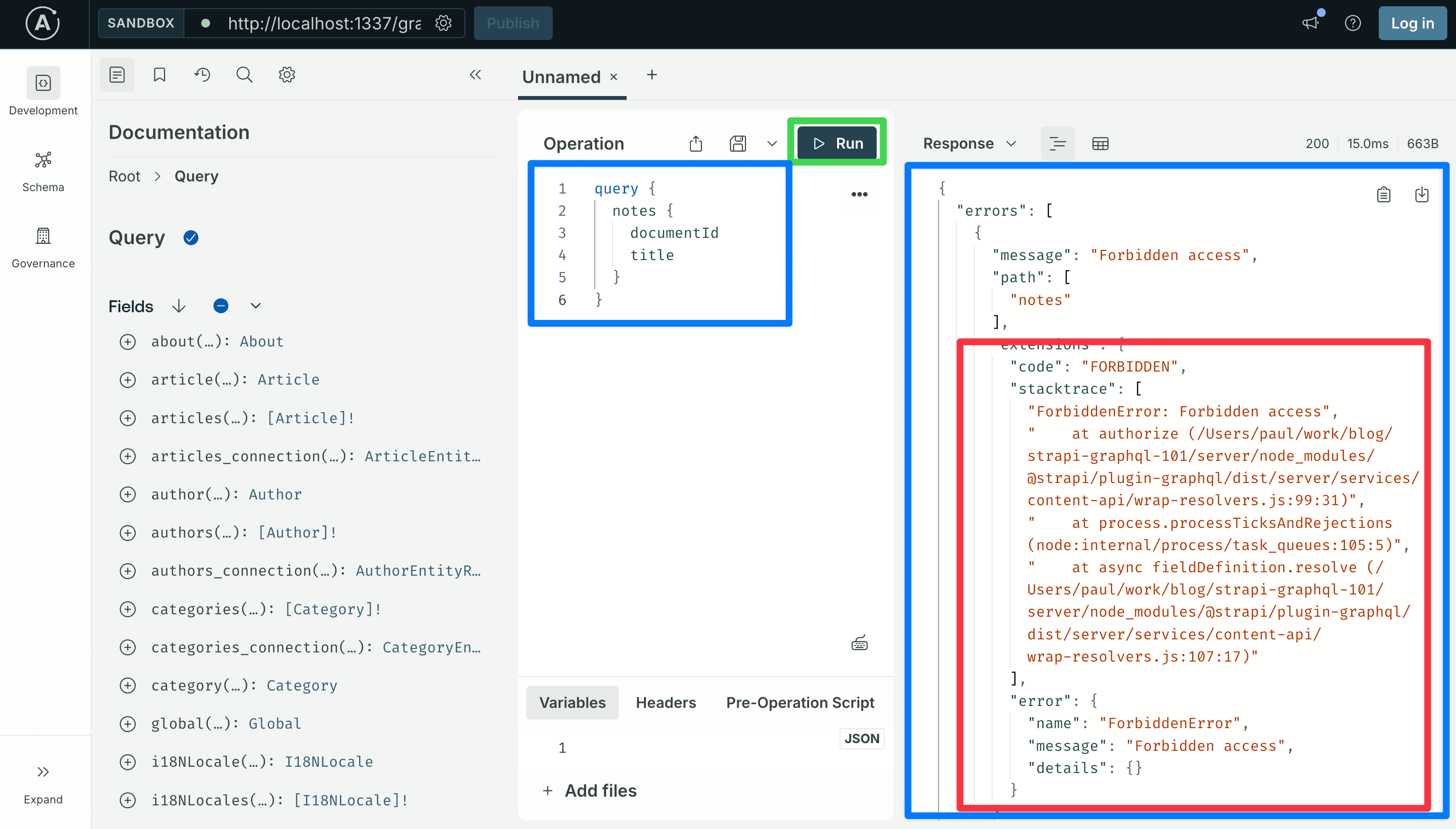
Check that the Public role cannot list notes. Paste this and run it (no headers):
query {
  notes {
    documentId
    title
  }
}
The response is Forbidden access. Good — signed-out reads are blocked before any middleware runs.
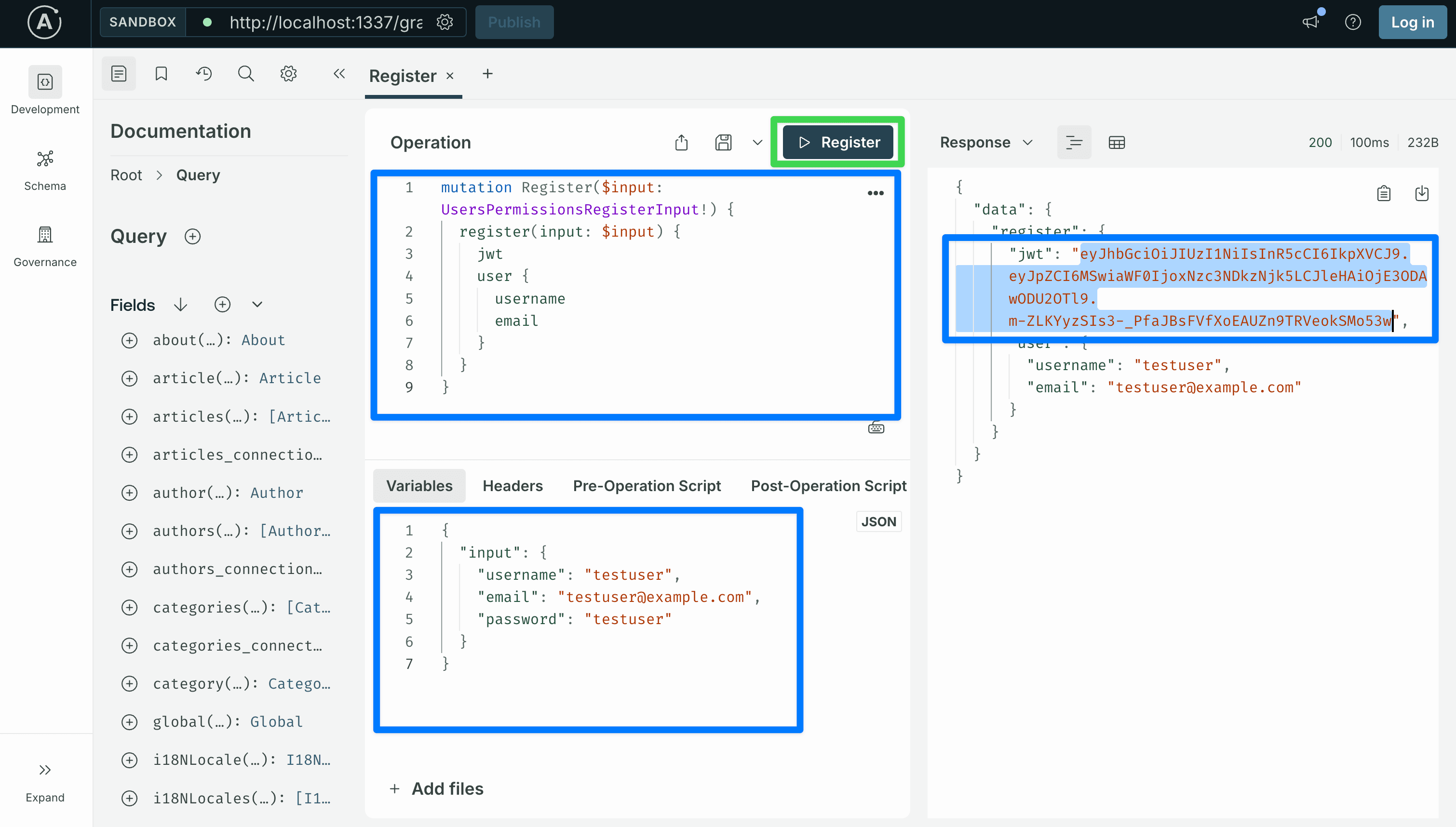
Register a user. We need an account to test with. Paste the mutation into the Operation editor first so the Sandbox knows the $input variable's type before you fill it in:
mutation Register($input: UsersPermissionsRegisterInput!) {
  register(input: $input) {
    jwt
    user {
      username
      email
    }
  }
}
Then open the Variables panel at the bottom of the Sandbox and paste:
{
  "input": {
    "username": "testuser",
    "email": "testuser@example.com",
    "password": "testuser"
  }
}
Click Register. The response has a JWT. Copy it — we will use it as a header in a moment.
Logging in. The JWT from register lasts 30 days, so you only register once per user. Every later session uses the login mutation. It takes identifier (username or email) and password and returns the same { jwt, user } shape:
mutation Login($input: UsersPermissionsLoginInput!) {
  login(input: $input) {
    jwt
    user {
      username
      email
    }
  }
}
And the Variables panel with:
{
  "input": {
    "identifier": "testuser",
    "password": "testuser",
    "provider": "local"
  }
}
provider: "local" is the built-in email-and-password provider. The input type requires it even though most apps never pass anything else. (OAuth flows would use "google", "github", etc.) Click Login and you get back a fresh JWT. The frontend in Step 8 calls this mutation when a returning user signs in.
List notes as testuser. Open the Headers panel and add a row. Header name is Authorization; value is the word Bearer, a space, and the JWT you copied earlier. No quotes, no backticks:
| Key (header name) | Value |
|---|---|
| Authorization | Bearer eyJhbGciOiJIUzI1NiIsInR5cCI6IkpXVCJ9.eyJpZCI6MSwiaWF0Ijox...rest-of-jwt |
- Type the literal word Authorization into the Key field — eight letters, no surrounding characters. The backticks you see in inline-code formatting elsewhere in this post are markdown styling on a rendered page, not part of the value.
- In the Value field, type Bearer, then a single space, then paste the JWT.
- No quotes, no backticks, no leading or trailing whitespace.
- Make sure the checkbox on the left of the row is ticked. Sandbox keeps unticked rows around but does not send them.
Now re-run the notes query:
query {
  notes {
    documentId
    title
  }
}
This time the response is every note in the database.
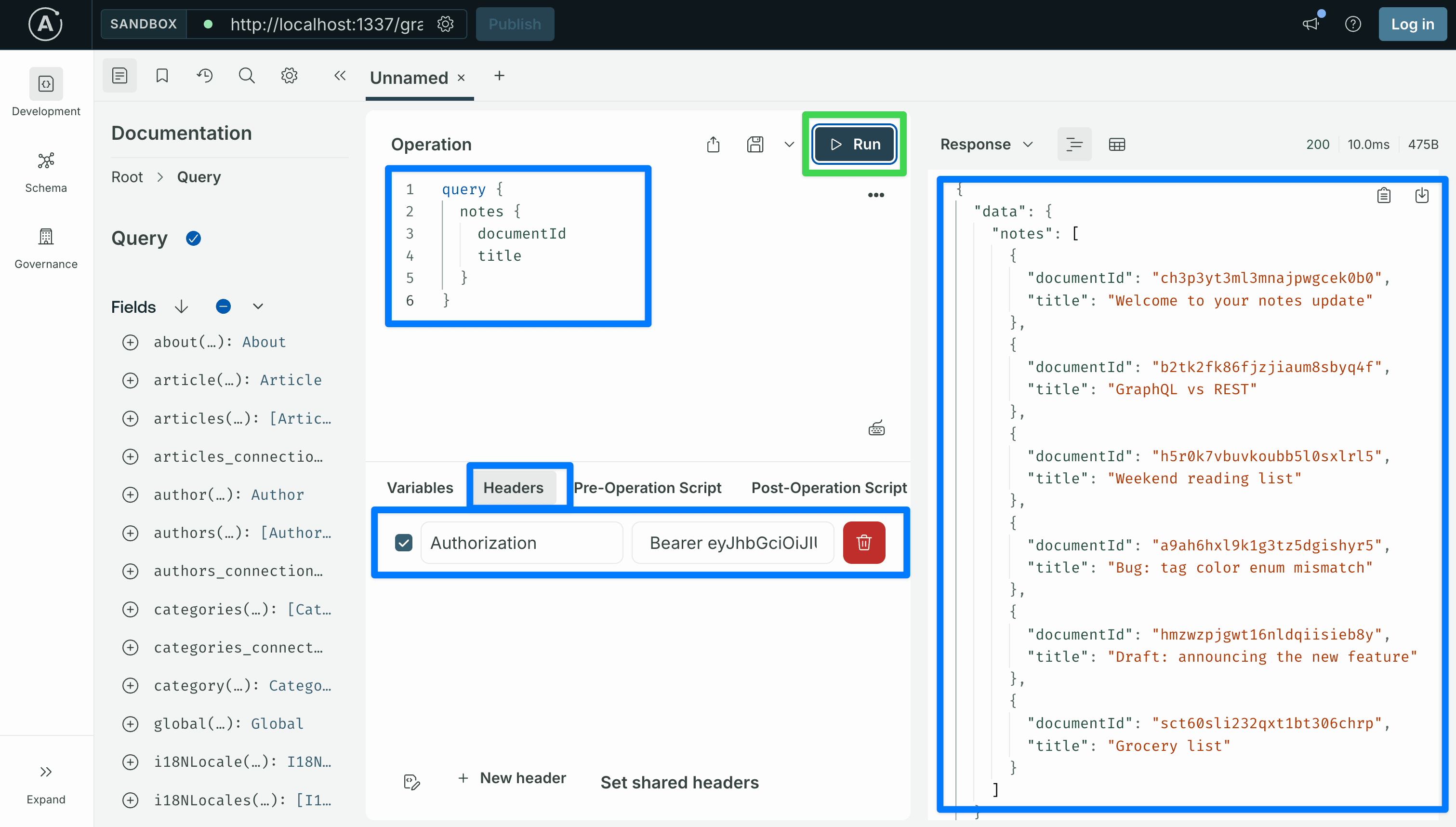
That is the problem Part 4 fixes. testuser is signed in, but the API does not know about ownership yet, so they see everyone's notes. Steps 3 through 6 close that gap.
If you would rather use the terminal, the same three checks via curl:
# 1. Public role: Forbidden
curl -s -X POST http://localhost:1337/graphql \
  -H 'Content-Type: application/json' \
  -d '{"query":"{ notes { documentId title } }"}'
# -> {"errors":[{"message":"Forbidden access", ... }],"data":null}

# 2. Register testuser
curl -s -X POST http://localhost:1337/graphql \
  -H 'Content-Type: application/json' \
  -d '{"query":"mutation R($input: UsersPermissionsRegisterInput!) { register(input: $input) { jwt user { username email } } }","variables":{"input":{"username":"testuser","email":"testuser@example.com","password":"testuser"}}}'
# -> {"data":{"register":{"jwt":"<JWT>", ... }}}

# 3. Signed-in read: every note in the database
JWT="<paste-the-token>"
curl -s -X POST http://localhost:1337/graphql \
  -H 'Content-Type: application/json' \
  -H "Authorization: Bearer $JWT" \
  -d '{"query":"{ notes { documentId title } }"}'
# -> {"data":{"notes":[ ... every note in the database ... ]}}
Step 2: Add the owner relation to Note
Open the admin UI → Content-Type Builder → Note → Add another field:
- Pick Relation.
- Leave Note on the left.
- On the right, pick User (from: users-permissions).
- Choose manyToOne: one user has many notes, each note has one owner.
- Name the field owner on the Note side and notes on the User side.
- Click Finish, then Save. Strapi restarts.
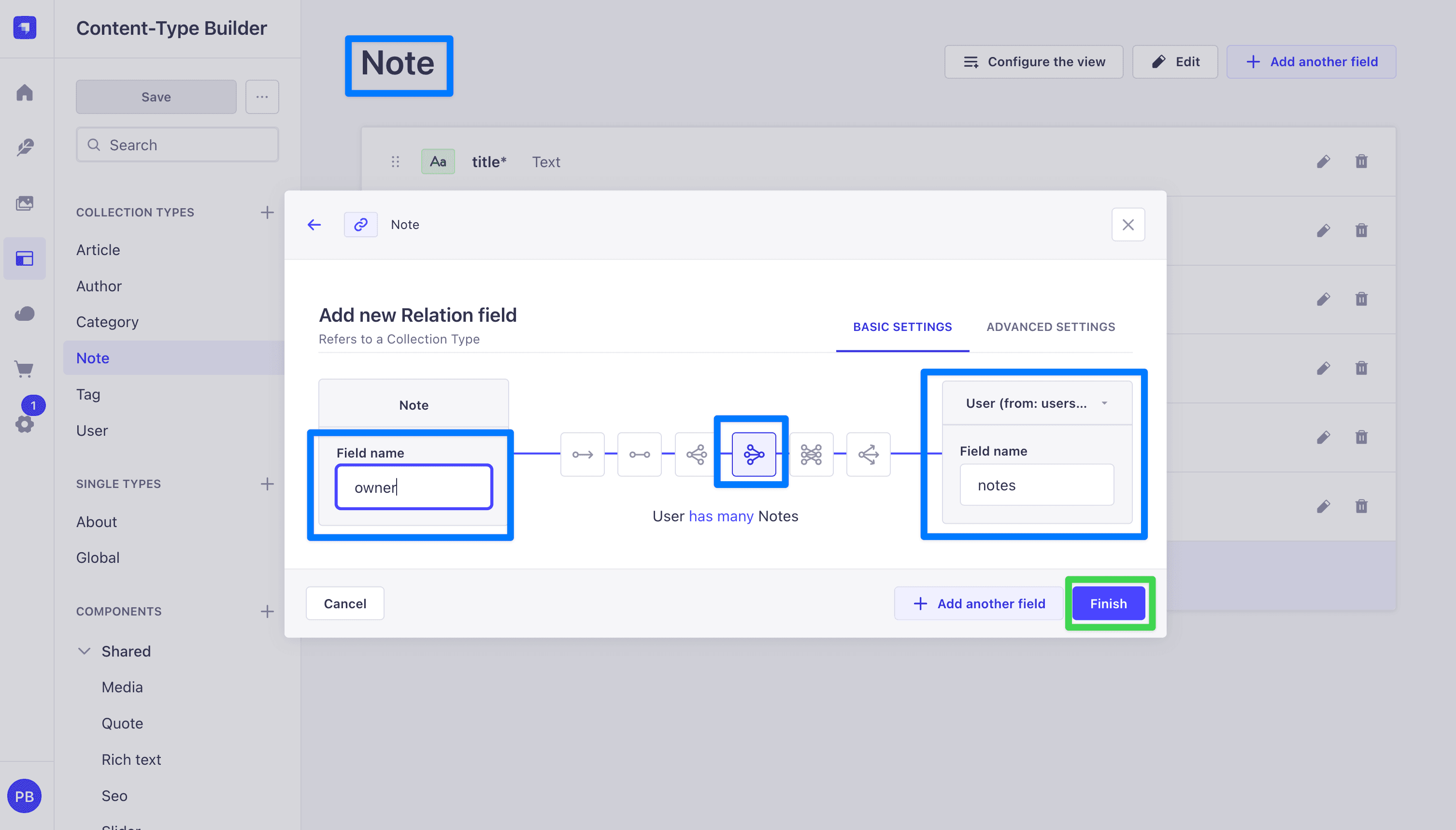
After restart, the Note schema has:
{
  "owner": {
    "type": "relation",
    "relation": "manyToOne",
    "target": "plugin::users-permissions.user",
    "inversedBy": "notes"
  }
}
The relation is nullable by default. Step 3 fixes that by stamping an owner automatically on every new note.
2.1 Backfill existing notes
The notes you seeded in Part 3 do not have an owner yet. The cleanest fix is a one-shot script that bootstraps Strapi, assigns every existing note to testuser, and exits. From server/, create scripts/backfill-owner.js:
// server/scripts/backfill-owner.js
"use strict";

async function main() {
  const { createStrapi, compileStrapi } = require("@strapi/strapi");
  const app = await createStrapi(await compileStrapi()).load();
  app.log.level = "error";

  const testuser = await app
    .documents("plugin::users-permissions.user")
    .findFirst({ filters: { username: "testuser" } });
  if (!testuser) {
    throw new Error('No user with username "testuser". Register one first.');
  }

  const notes = await app
    .documents("api::note.note")
    .findMany({ pagination: { pageSize: 100 } });

  for (const note of notes) {
    await app.documents("api::note.note").update({
      documentId: note.documentId,
      data: { owner: testuser.id },
    });
  }

  console.log(
    `Backfilled ${notes.length} notes to owner ${testuser.username}.`,
  );

  await app.destroy();
  process.exit(0);
}

main().catch((err) => {
  console.error(err);
  process.exit(1);
});
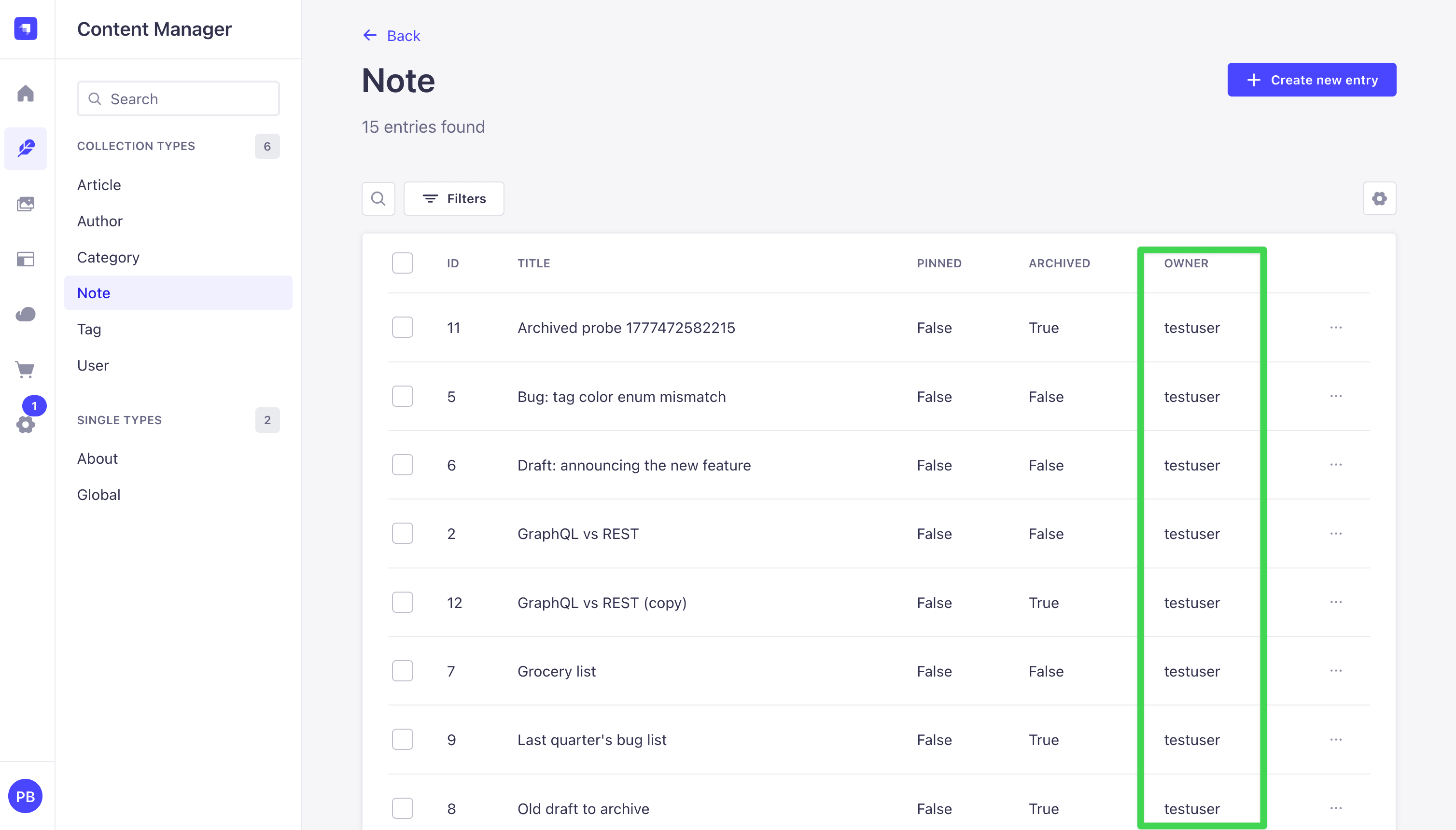
Run it with node scripts/backfill-owner.js. The script boots a Strapi instance, runs the backfill against the Document Service, and exits. Or, if you prefer a GUI-based approach, open the admin UI's Content Manager and assign the owner relation on each note by hand.
Every existing note now has testuser as its owner. New notes get one automatically once Step 3 is in place.
Step 3: Set the owner automatically on every new note
Clients should not be able to pick an owner. Every signed-in request has the user available as ctx.state.user; we want to use that to set owner on a new note no matter how the request comes in.
Strapi gives you four reasonable places to do this. Pick once and the same answer works for any "set this field on create" rule you hit later (createdBy, tenantId, defaults).
Option A: Content-type lifecycle hook
A lifecycles.ts file in src/api/note/content-types/note/ exporting a beforeCreate function that modifies event.params.data before the row is written. This was the standard answer in Strapi v4.
Strapi v5 still supports it, but Content lifecycle management and When to use lifecycle hooks in Strapi explain why it is no longer the recommended option:
- It is buried inside a content-type folder, so a new developer has to know to look for it.
- It runs inside the database transaction, which makes error handling harder.
- There is no way to opt a single call out of the rule.
Skipping.
Option B: GraphQL middleware on Mutation.createNote
A resolversConfig middleware that reads context.state.user and writes args.data.owner before the resolver runs. Same setup as the cap-page-size policy from Part 2:
// hypothetical entry in src/extensions/graphql/middlewares-and-policies.ts
"Mutation.createNote": {
  middlewares: [
    async (next, parent, args, context, info) => {
      const user = context?.state?.user;
      if (user?.id) {
        args.data = { ...(args.data ?? {}), owner: user.id };
      }
      return next(parent, args, context, info);
    },
  ],
},
Clean for GraphQL. But REST POST /api/notes does not run through this middleware. A client that sends {"data": {"owner": 99, "title": "..."}} to the REST endpoint writes owner: 99 straight to the database. Same half-coverage problem we hit in Part 2.
Option C: REST route middleware on the Note router
The mirror of Option B. A Koa middleware on src/api/note/routes/note.ts that writes ctx.request.body.data.owner before the controller runs. Covers POST /api/notes, does nothing for GraphQL. The gap is now on the other side.
You can do Options B and C together and cover both APIs, but then the rule lives in two files with two different argument names (args.data.owner vs ctx.request.body.data.owner). One side gets updated, the other does not, and the two slowly drift apart.
Option D: Document Service middleware (what we use)
A Document Service middleware registered in register() runs whenever any code calls strapi.documents("api::note.note").create(...). The Document Service sits below both REST and GraphQL: every controller and every GraphQL resolver eventually calls into it. So a rule here covers REST, GraphQL, custom resolvers (including Mutation.duplicateNote, which calls strapi.documents("api::note.note").create(...) directly), the seed script, and the admin UI, all from one file.
Coverage
| Code path | Lifecycle hook | GraphQL middleware | Route middleware | Document Service middleware |
|---|---|---|---|---|
REST POST /api/notes | ✓ | ✗ | ✓ | ✓ |
GraphQL Mutation.createNote | ✓ | ✓ | ✗ | ✓ |
Custom resolver calling strapi.documents(...).create() | ✓ | ✗ | ✗ | ✓ |
| Seed script | ✓ | ✗ | ✗ | ✓ |
| Admin UI | ✓ | ✗ | ✗ | ✓ |
| Type-checked, visible at boot, opt-out-able per call | ✗ | ✓ | ✓ | ✓ |
| Idiomatic Strapi v5 | ✗ | ✓ | ✓ | ✓ |
Why Option D
Two reasons.
REST is always on in Strapi. Even if your code only calls GraphQL, the REST routes still exist and accept requests. From the outside, every "GraphQL-only" Strapi app is also a REST API. A rule about how data gets written has to apply to both. Picking Option B and saying "we only use GraphQL" creates a hole that opens the first time a developer, a script, or an attacker sends a POST /api/notes request.
Only Option D sits below both APIs. Options B and C run inside one API's request handling: B inside the GraphQL resolver wrapper, C inside the Koa router. Option D runs inside the Document Service, which both APIs call into for every read and every write. A rule placed there cannot be bypassed by a new code path, because anything that touches Note data has to go through strapi.documents("api::note.note").<action>(...).
So data rules (like "set this field automatically on create") go in Document Service middlewares. Step 3 puts owner-stamping there. Step 6 will add a second clause to the same middleware for read-scoping. One file holds both.
Open server/src/index.ts and register the middleware in register(). The Document Service middlewares docs say middlewares should be registered in the register() lifecycle, not bootstrap(), so the rule is in place before any plugin's bootstrap runs.
// server/src/index.ts
import type { Core } from "@strapi/strapi";
import registerGraphQLExtensions from "./extensions/graphql";

export default {
  register({ strapi }: { strapi: Core.Strapi }) {
    registerGraphQLExtensions(strapi);

    // Stamp the authenticated user as `owner` on every new Note. Runs at
    // the Document Service layer, so it applies to REST, GraphQL, custom
    // resolvers, and seed scripts uniformly.
    strapi.documents.use(async (context, next) => {
      if (context.uid !== "api::note.note") return next();
      if (context.action !== "create") return next();

      const requestCtx = strapi.requestContext.get();
      const user = requestCtx?.state?.user;
      if (user?.id) {
        context.params.data = {
          ...(context.params.data ?? {}),
          owner: user.id,
        } as typeof context.params.data;
      }

      return next();
    });
  },

  bootstrap() {
    // Bootstrap intentionally empty for now. Step 6 leaves it that way too.
  },
};
Three things to notice:
- The middleware overwrites whatever the client sent. Even if a client sends
data: { owner: 99 }tocreateNoteorPOST /api/notes, the middleware runs at the data layer and writesowner: <signed-in user's id>instead. The client's99is dropped. The "I'll claim to be user 99" hole closes here, below the place either API hands the data off. - A signed-out create produces a note with no owner. That is the right outcome, and Step 1 already blocks signed-out create through the role permissions before we ever reach the middleware. Two checks, one after the other.
- Reads are unaffected. The early
return next()whencontext.action !== "create"makes the middleware skip on every other action (findMany,findOne,update,delete). Step 6 adds a second clause to the same middleware for read-scoping.
Restart Strapi and test in the Sandbox.
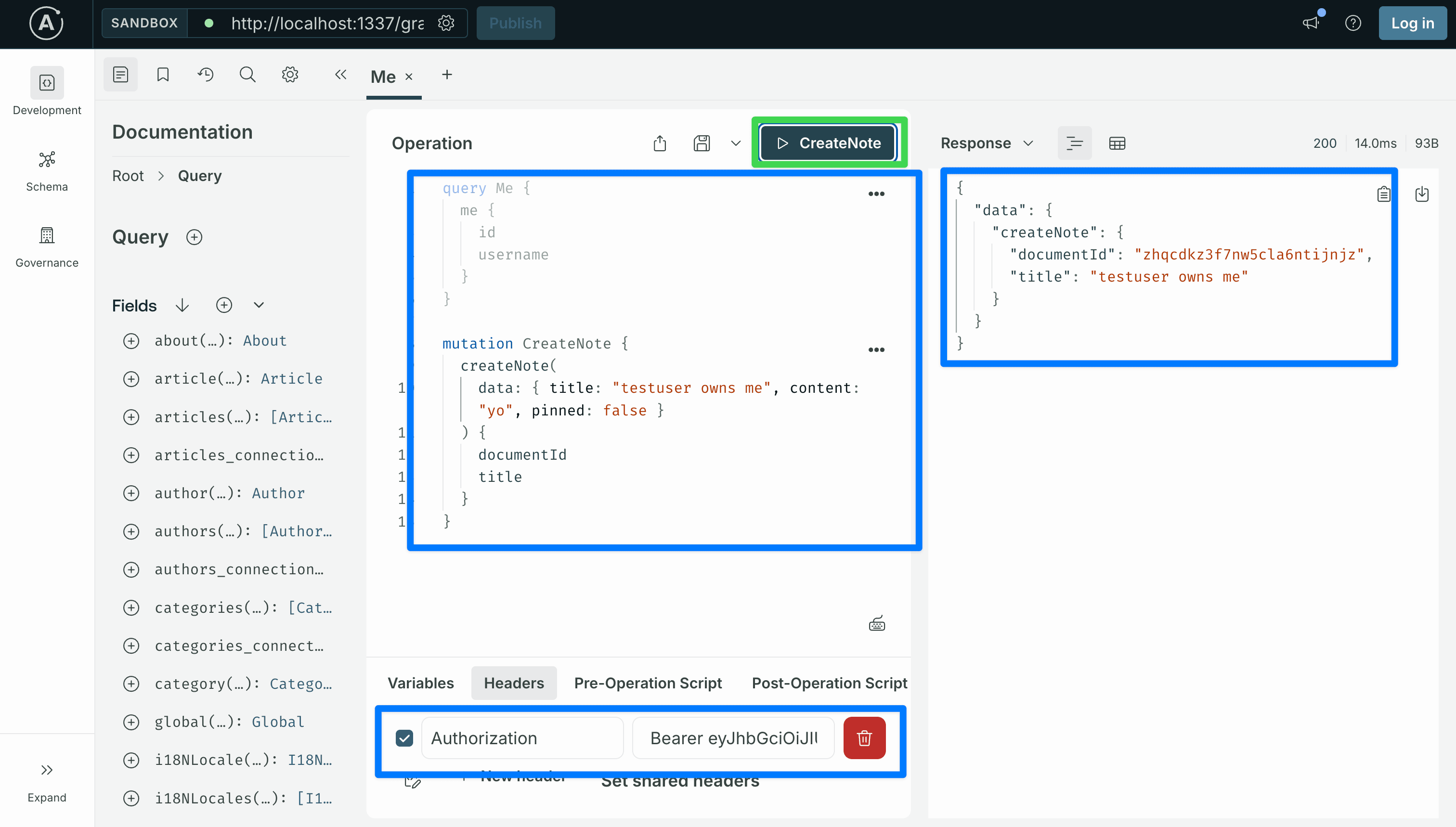
In the Sandbox at http://localhost:1337/graphql, make sure the Authorization header from Step 1.4 is still ticked. The two operations below show the middleware did its job without us having to read the owner field back through GraphQL.
Paste both into the Operation editor at once. The Sandbox supports multiple named operations in one document and shows a dropdown next to the run button:
query Me {
  me {
    id
    username
  }
}

mutation CreateNote {
  createNote(
    data: { title: "testuser owns me", content: "yo", pinned: false }
  ) {
    documentId
    title
  }
}
Run Me first. The response shows username: "testuser". That is who the next mutation will be authenticated as, and the value the upcoming MyNotes query will filter by.
Then run CreateNote. The response contains a documentId and the title you sent. The data input did not include an owner field anywhere; the Document Service middleware stamped it server-side before the resolver wrote the row.
List the current user's notes
We need one more verification: read back the notes belonging to the signed-in user and confirm the new note shows up.
Try this query first. Add this to the Sandbox document and run it (Authorization header still set):
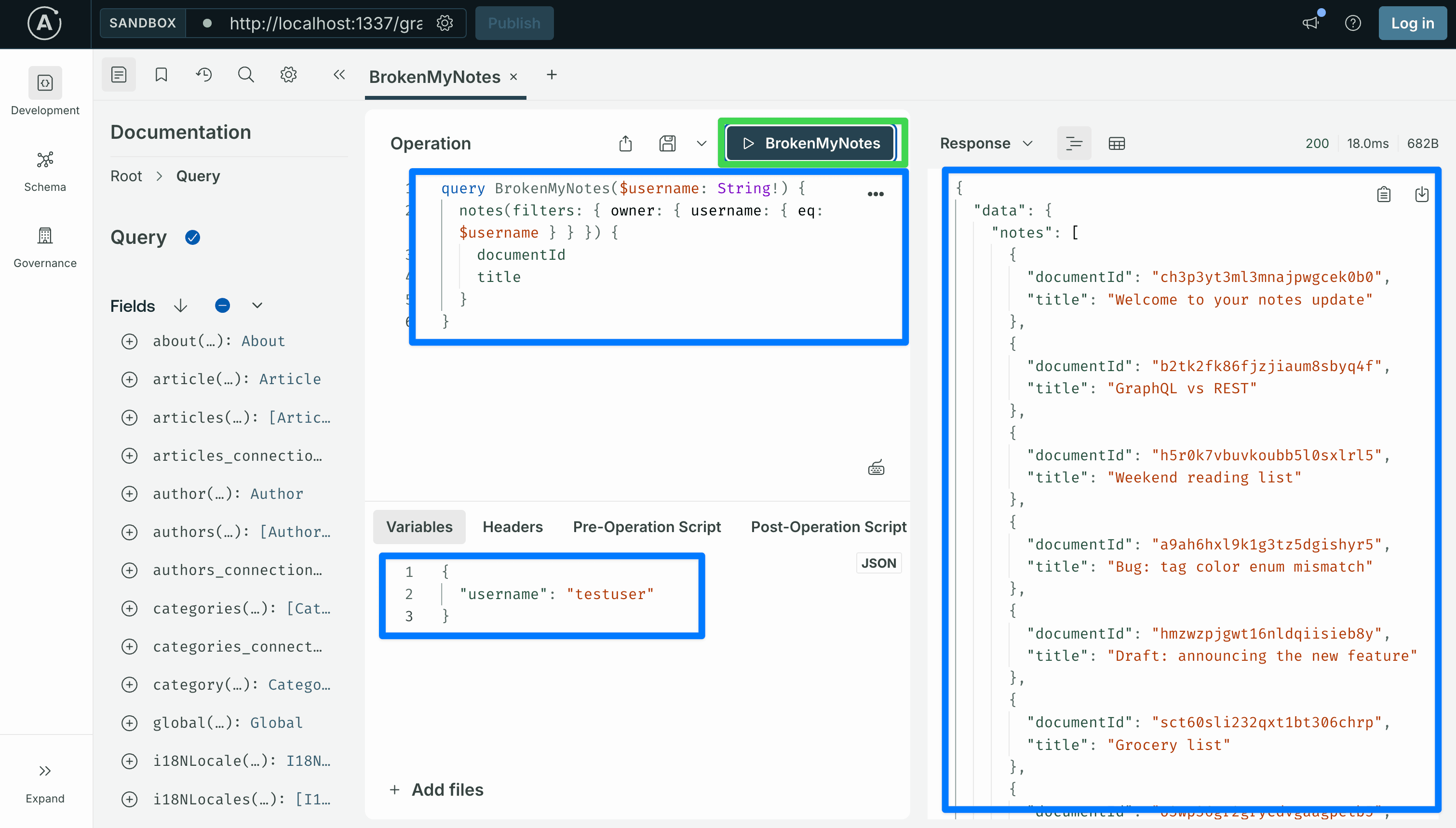
query BrokenMyNotes($username: String!) {
  notes(filters: { owner: { username: { eq: $username } } }) {
    documentId
    title
  }
}
Variables:
{ "username": "testuser" }The response will be an error:
{
  "errors": [
    {
      "message": "Invalid key owner",
      "path": ["notes"],
      "extensions": {
        "code": "BAD_USER_INPUT",
        "error": {
          "name": "ValidationError",
          "details": {
            "key": "owner",
            "path": "owner",
            "source": "query",
            "param": "filters"
          }
        }
      }
    }
  ],
  "data": null
}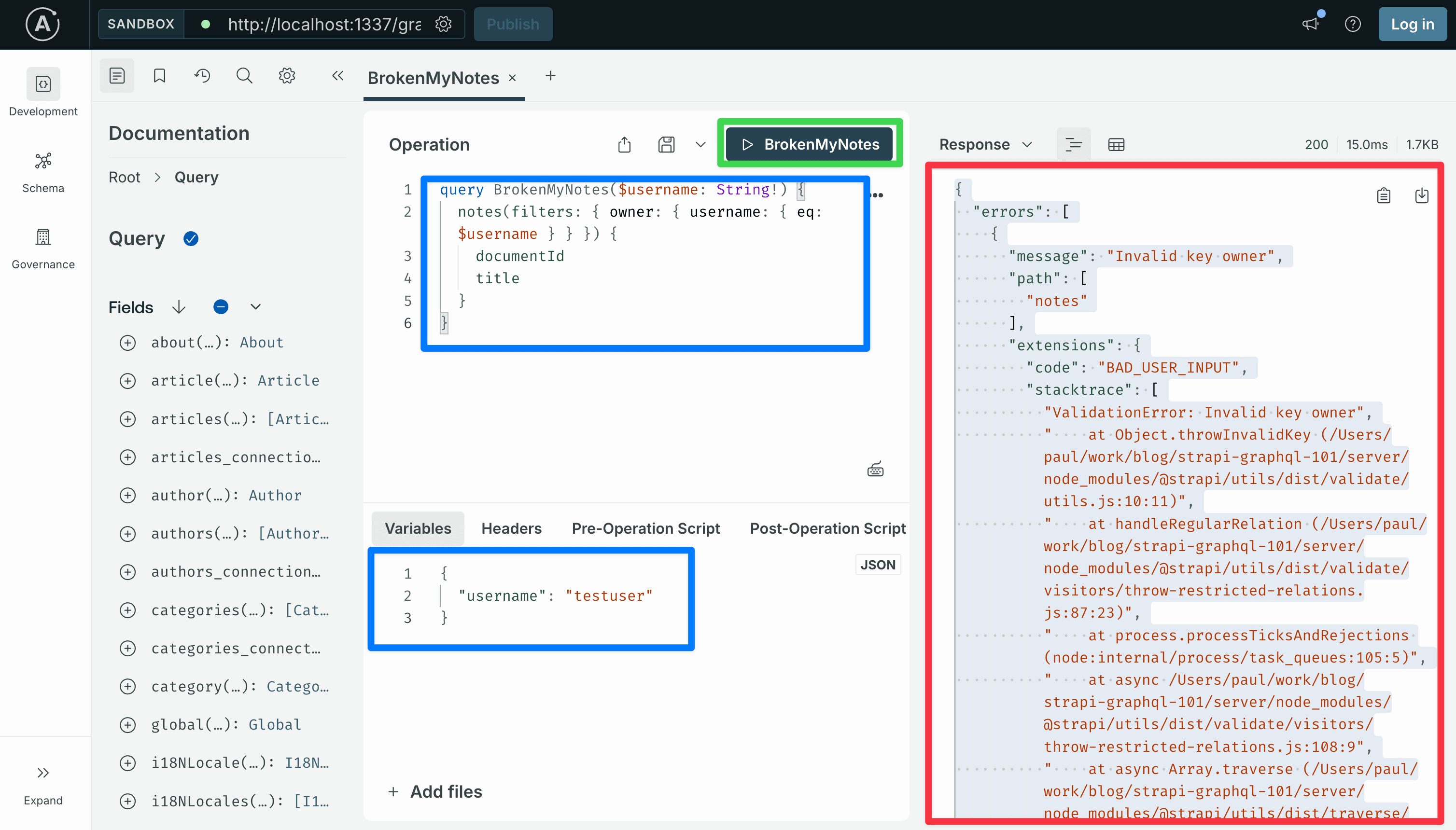
Reading the stack trace from top to bottom tells you exactly what happened:
ValidationError: Invalid key owner: Strapi rejectsowneras a key the caller is not allowed to use in this position (thefiltersargument).handleRegularRelationin@strapi/utils/.../throw-restricted-relations.js:87: this function walks every relation named infiltersand checks whether the caller has read permission on the related content type.ownerpoints at User. The Authenticated role has no permissions on User. The check fails.validateFilters→validateQuery→findManyin the GraphQL plugin: the rejection happens inside the resolver. The Part 2 soft-delete middleware has already run by this point, and the database query has not yet been built.resolversConfig.Query.notes.middlewaresat the bottom: our Part 2 soft-delete middleware. It is innocent here; the error fires after it.
The takeaway: filtering on a relation requires read permission on the related content type, even if the response never selects any field from that relation. Strapi enforces this during query validation, before the resolver runs the database query.
The first instinct: grant the permission and move on. It is right there in the admin UI. Open http://localhost:1337/admin → Settings → Users & Permissions Plugin → Roles → Authenticated → expand Users-permissions → User → tick find. Save.
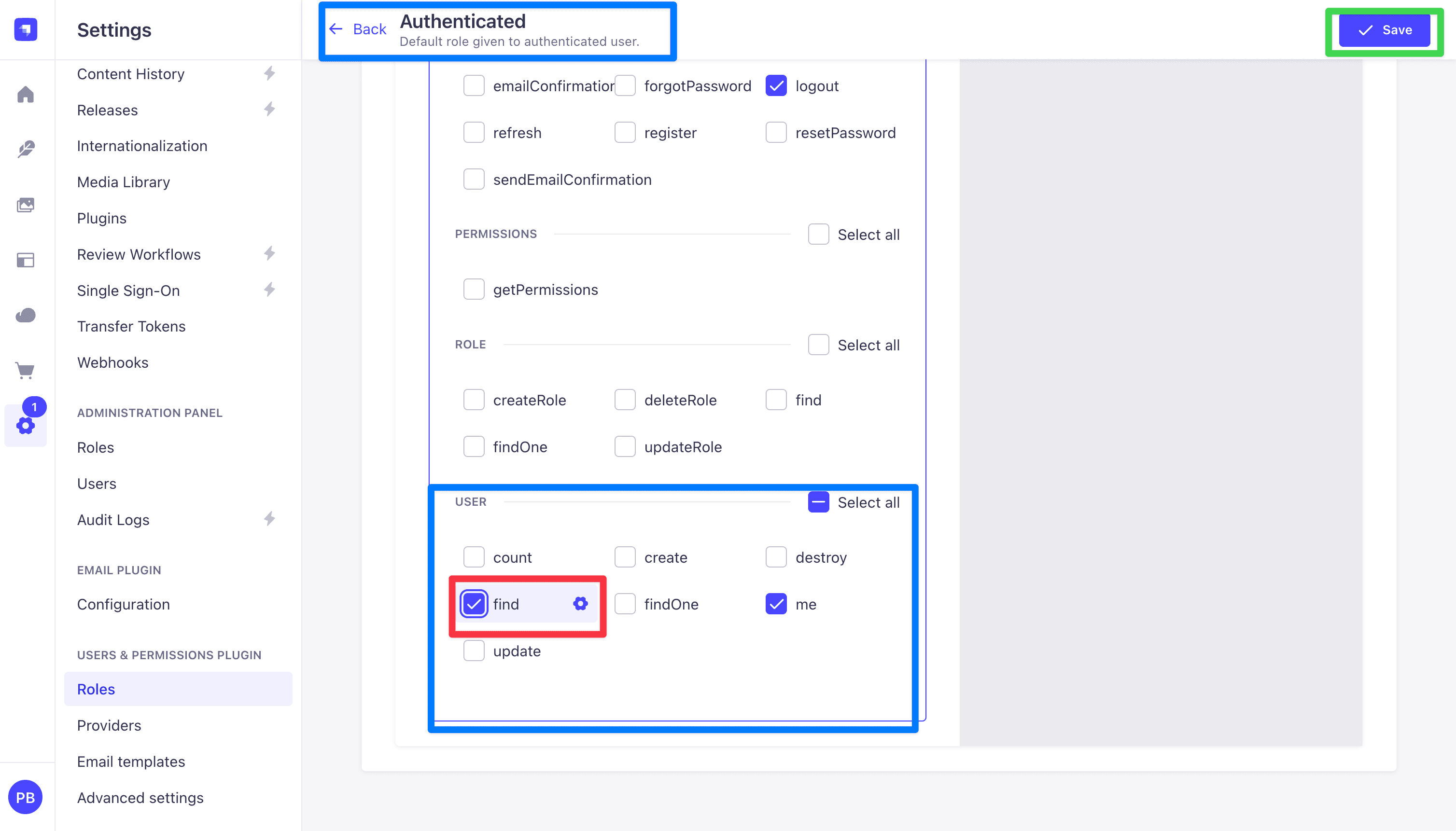
Re-run BrokenMyNotes in the Sandbox. The error is gone; the response is the array of notes whose owner.username equals testuser. Filter validated, query succeeded.
Why this is the wrong fix. That same find permission also unblocks the standard list endpoint for the User content type. With testuser still authenticated, run this in the Sandbox:
Heads-up before running this. If
testuseris the only account you have registered so far, the response below will only contain one row and the privacy leak will not be obvious. Register a second user first (any username and email; reuse theRegistermutation block from Step 1.4 with new variables, or sign in to the Sandbox withtestuser2 / testuser2 / testuser2@example.com) so the query has more than one row to leak.
query AllUsers {
  usersPermissionsUsers {
    documentId
    username
    email
  }
}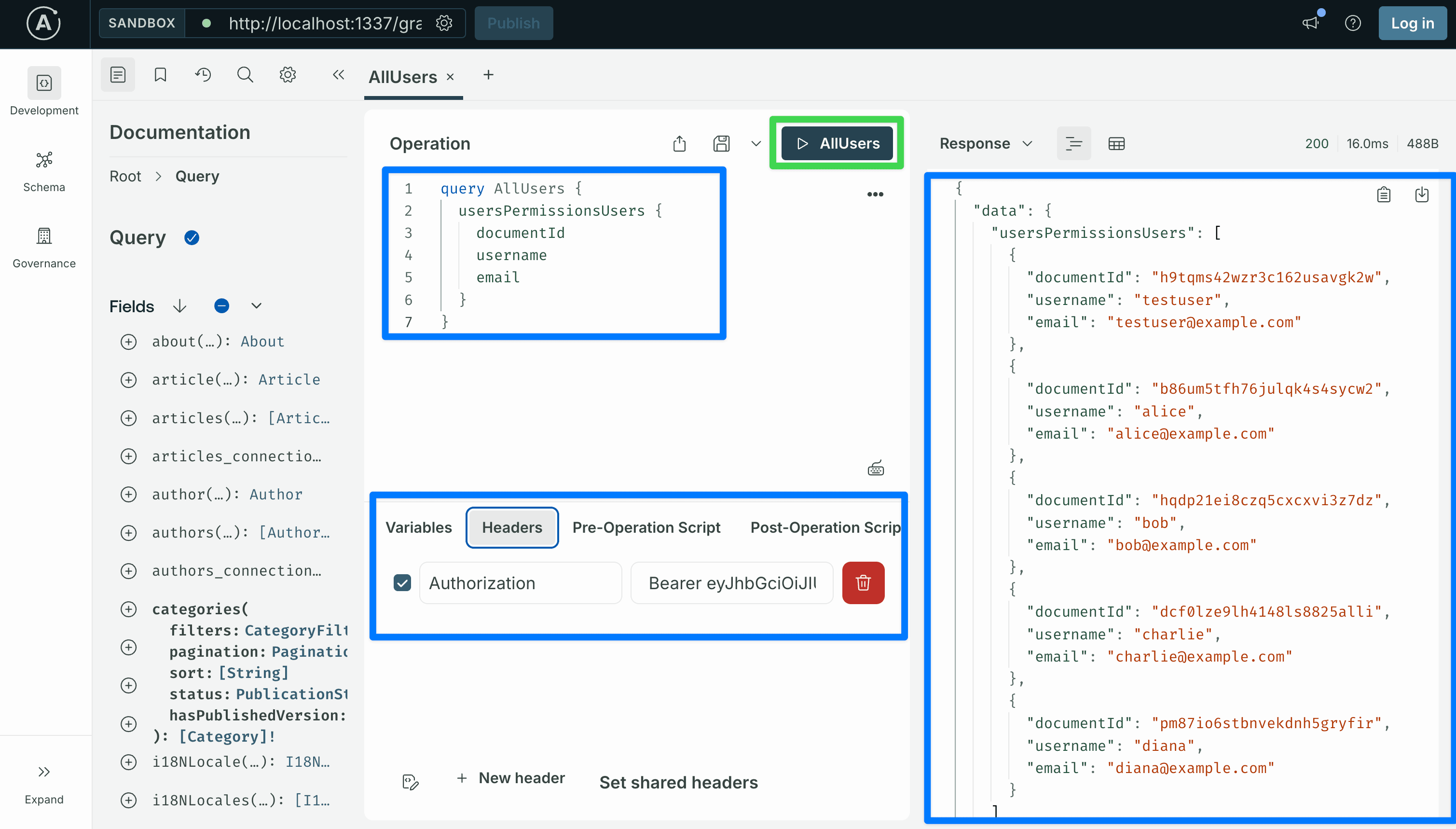
The response is every user in the database: testuser, testuser2, anyone else who registered, all their usernames and emails handed to any signed-in caller. The admin UI does not have a "let me filter by user, but don't let me list users" toggle. The find permission covers both. That is a real privacy leak.
Go back to the admin UI and uncheck find on User for the Authenticated role. Save. We need an approach that does not require the permission at all.
The right approach: a custom Query.myNotes resolver. It reads the user id from the JWT server-side, then filters using the Document Service. The Document Service builds the query directly against the database, so it does not run through the GraphQL validation that rejected our owner filter above. The client never names owner (the query takes no arguments), so the validation has nothing to reject. The User content type stays fully closed; signed-in callers cannot list users.
Step 1: define a payload type and add the field. Open server/src/extensions/graphql/queries.ts. We want myNotes to return both the signed-in user (so the frontend can render "logged in as ") and the list of notes, in one round trip.
Add two new object types as siblings to the existing TagCount and NoteStats declarations at the top of the types array. The first, MyNotesUser, is a deliberately small view of the user that only exposes id and username (the only two fields a list page actually needs). The second, MyNotesPayload, wraps that user with the notes array:
nexus.objectType({
  name: "MyNotesUser",
  definition(t) {
    t.nonNull.id("id");
    t.nonNull.string("username");
  },
}),
nexus.objectType({
  name: "MyNotesPayload",
  definition(t) {
    t.nonNull.field("user", { type: "MyNotesUser" });
    t.nonNull.list.nonNull.field("notes", { type: "Note" });
  },
}),
Why a custom MyNotesUser instead of reusing the built-in UsersPermissionsMe type? UsersPermissionsMe exposes id, documentId, username, email, confirmed, blocked, and role. If we returned that type from myNotes, a client could ask for any of those fields by writing them in their query (for example myNotes { user { email role { name } } }), and the server would return them. Since this query is only meant to power a list page that needs username and nothing else, we say so in the schema itself. MyNotesUser has two fields, and those are the only two fields a client of myNotes can ever ask for. The schema is the contract; relying on the client to "select less" is not.
If a page genuinely needs email, role, or other user fields (think a profile or settings page), it calls Query.me directly on that page. Two queries, two purposes, each one returning only the fields its page actually renders.
Then inside the existing nexus.extendType({ type: "Query", definition(t) { ... } }) block, after the notesByTag field, add the resolver:
t.field("myNotes", {
  type: nexus.nonNull("MyNotesPayload"),
  async resolve(_parent: unknown, _args: unknown, ctx: any) {
    const user = ctx?.state?.user;
    if (!user?.id) {
      // Should never reach here because of the `auth.scope` config below,
      // but a tutorial-grade fallback. Return an empty payload shape that
      // the frontend can render without special cases.
      return { user: { id: 0, username: "" }, notes: [] };
    }
    const notes = await strapi.documents("api::note.note").findMany({
      filters: { owner: { id: user.id } },
      sort: ["pinned:desc", "updatedAt:desc"],
      populate: ["tags"],
    });
    return {
      user: { id: user.id, username: user.username },
      notes,
    };
  },
});
The resolver explicitly picks only id and username off ctx.state.user and assembles the slim payload. Even if a future change adds new fields to MyNotesUser, the resolver only sends what it explicitly chooses to.
Step 2: tie it to the role permission. In the same file's resolversConfig block at the bottom, add:
"Query.myNotes": { auth: { scope: ["api::note.note.find"] } },This requires the caller to have find on Note (which the Authenticated role already has from Step 1.2). Anonymous calls are rejected before the resolver runs.
Step 3: save and let Strapi restart. The dev server picks up the change automatically.
Step 4: run the working query. Replace the broken BrokenMyNotes operation in the Sandbox with:
query MyNotes {
  myNotes {
    user {
      id
      username
    }
    notes {
      documentId
      title
      pinned
    }
  }
}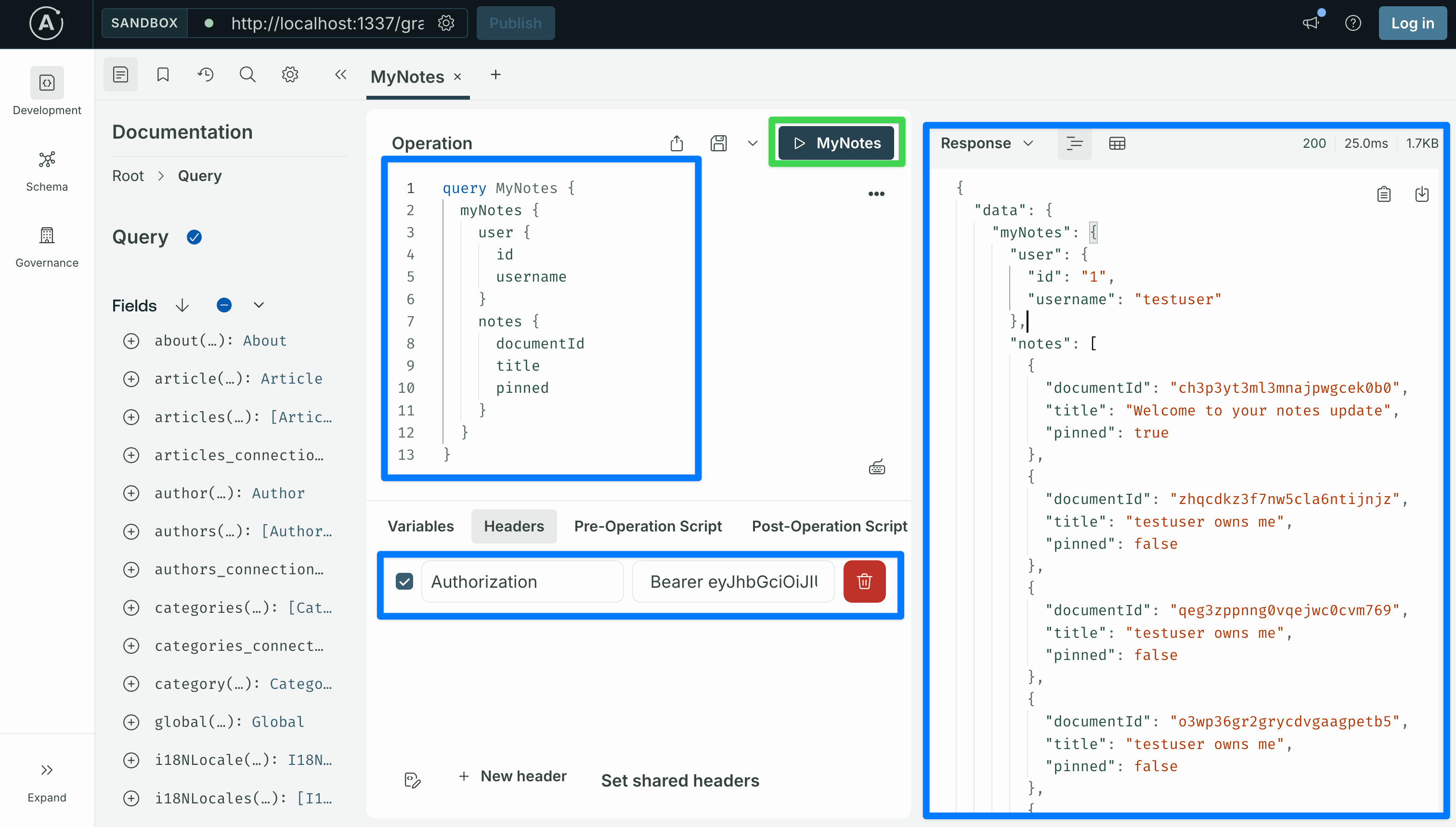
The response contains the current user's id and username plus the array of notes owned by them, including the one CreateNote just created. Run it as testuser2 (different JWT) and the user block changes to testuser2 and the notes array contains only their notes.
What this resolver gets right:
- The user id stays on the server. The client never sees, stores, or passes it. The JWT is the source of truth, and the server is the only thing that reads it.
- No new role permissions needed. The User content type stays closed, and no usernames or emails leak to other signed-in users.
- The schema only exposes two fields on the user. A client of
myNotescan only ever ask foridandusername. There is no way to write a query that pulls backemailorrolefrom this endpoint, even if a future change to the resolver accidentally returns more. - One endpoint, zero client logic. A page that wants "the signed-in user's notes" calls
myNotesand is done. There is no path where the client could pass a wrong id, because the client does not pass an id at all.
Looking ahead: Document Service middleware vs custom resolver. A custom resolver like
myNotesis the right tool when you want a named endpoint that the schema makes obvious (a query calledmyNotesis a clear contract: "the current user's notes"). A Document Service middleware is the right tool when you want the existing endpoint to behave correctly without any per-call work from the caller (the barenotesquery should always be scoped, no matter who calls it from where). Step 6 adds a Document Service middleware so the barenotesquery also returns only the caller's notes, on both REST and GraphQL. Neither approach replaces the other; we use both in the final design.
Step 4: A first cut at the is-note-owner policy
In Part 2 we said the real authorization example would land in Part 4. Here it is.
Only the note's owner should be able to update it. That means gating these four mutations, all of which take a note's documentId as input:
Mutation.updateNoteMutation.togglePinMutation.archiveNoteMutation.duplicateNote
Mutation.createNote is intentionally excluded; ownership is set there by the Document Service middleware from Step 3, not checked.
Create server/src/policies/is-note-owner.ts:
// server/src/policies/is-note-owner.ts
import type { Core } from "@strapi/strapi";

type PolicyContext = {
  args?: { documentId?: string };
  state?: { user?: { id?: number | string } };
  context?: { state?: { user?: { id?: number | string } } };
};

const isNoteOwner = async (
  policyContext: PolicyContext,
  _config: unknown,
  { strapi }: { strapi: Core.Strapi },
): Promise<boolean> => {
  const user =
    policyContext?.state?.user ?? policyContext?.context?.state?.user;
  if (!user?.id) {
    strapi.log.warn("is-note-owner: rejected, no authenticated user.");
    return false;
  }

  const documentId = policyContext?.args?.documentId;
  if (!documentId) {
    strapi.log.warn("is-note-owner: rejected, no documentId in args.");
    return false;
  }

  const note = await strapi
    .documents("api::note.note")
    .findOne({ documentId, populate: ["owner"] });

  if (!note) return false;
  if (note.owner?.id === user.id) return true;

  strapi.log.warn(
    `is-note-owner: rejected, user ${user.id} is not the owner of note ${documentId}.`,
  );
  return false;
};

export default isNoteOwner;
Now wire the policy onto the four write mutations.
Open server/src/extensions/graphql/middlewares-and-policies.ts and find the resolversConfig block. It already has entries for Query.notes and Query.note from Part 2. Add four new sibling keys inside the same object, right after the Query.note block:
return {
  resolversConfig: {
    "Query.notes": {
      // ... unchanged from Part 2 ...
    },
    "Query.note": {
      // ... unchanged from Part 2 ...
    },

    // NEW: per-row ownership check on every Note write
    "Mutation.updateNote": { policies: ["global::is-note-owner"] },
    "Mutation.togglePin": { policies: ["global::is-note-owner"] },
    "Mutation.archiveNote": { policies: ["global::is-note-owner"] },
    "Mutation.duplicateNote": { policies: ["global::is-note-owner"] },
  },
};
A few things to know:
- The four new keys go inside the same
resolversConfigobject asQuery.notesandQuery.note. Same indentation, separated by commas. Mutation.createNoteis not in the list. Ownership is set on create by the Document Service middleware from Step 3, not checked.- All four mutations take
documentIdas an argument. That is what the policy reads to load the target row. - The string
"global::is-note-owner"matches the filenamesrc/policies/is-note-owner.tsyou wrote above. Strapi auto-registers files insrc/policies/under that prefix; if the file is missing or misnamed, Strapi will fail to start withCannot find policy is-note-owner.
Test the policy in the Sandbox
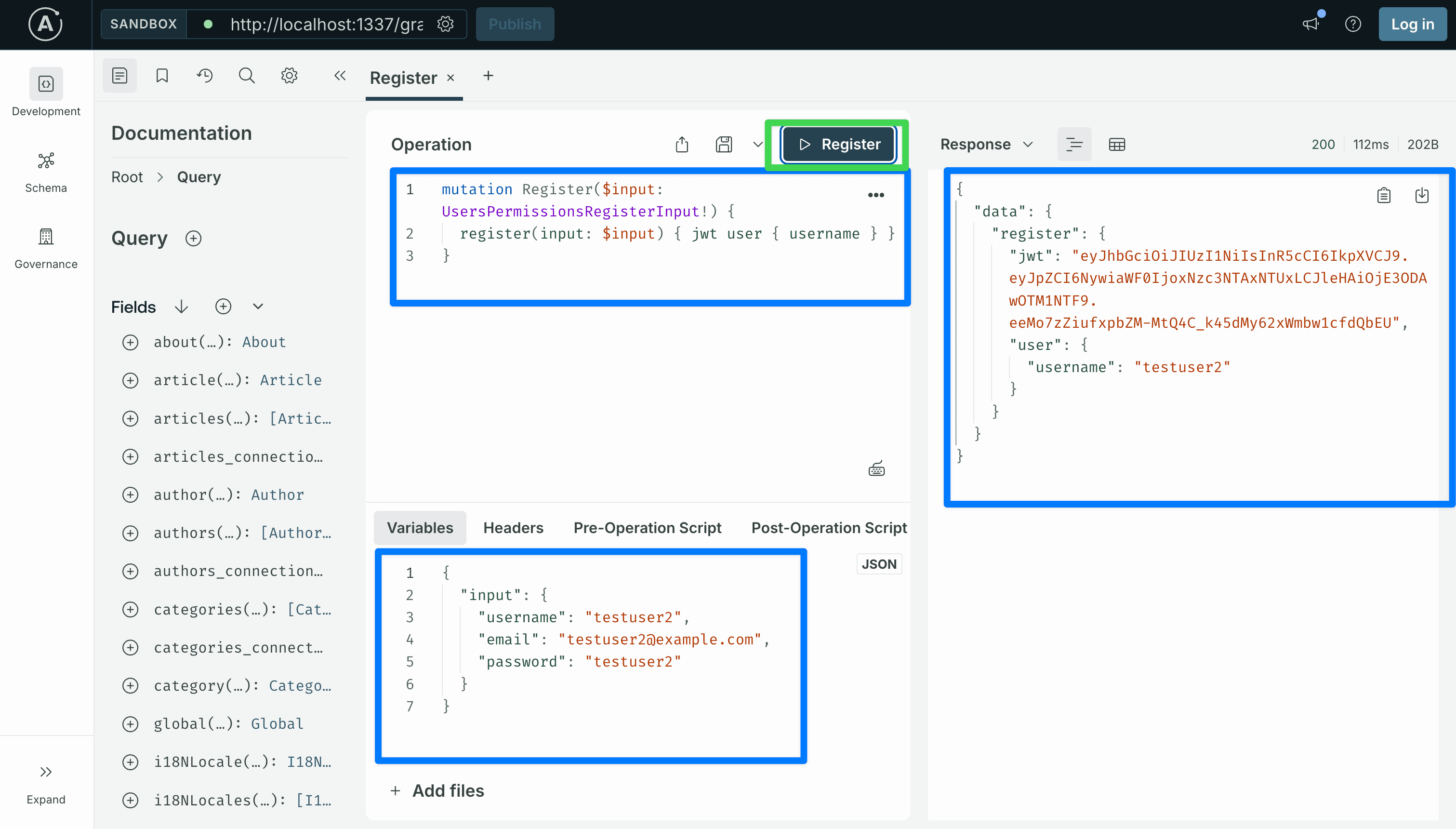
We need a second user to play the part of "not the owner." If you already registered one earlier (for the privacy-leak demonstration in Step 3), reuse the Login mutation block from Step 1.4 to grab a fresh JWT for that account, then jump down to the TogglePin test. Otherwise, register testuser2 now in the Sandbox:
mutation Register($input: UsersPermissionsRegisterInput!) {
  register(input: $input) {
    jwt
    user {
      username
    }
  }
}
Variables:
{
  "input": {
    "username": "testuser2",
    "email": "testuser2@example.com",
    "password": "testuser2"
  }
}
Copy testuser2's JWT.
Now grab any existing note's documentId (they all belong to testuser after the backfill in Step 2.1). Swap the Authorization header in the Sandbox to Bearer <testuser2-jwt> and try to pin testuser's note:
mutation TogglePin($id: ID!) {
  togglePin(documentId: $id) {
    documentId
    pinned
  }
}
Variables:
{ "id": "<paste-note-documentId>" }The response is Policy Failed.
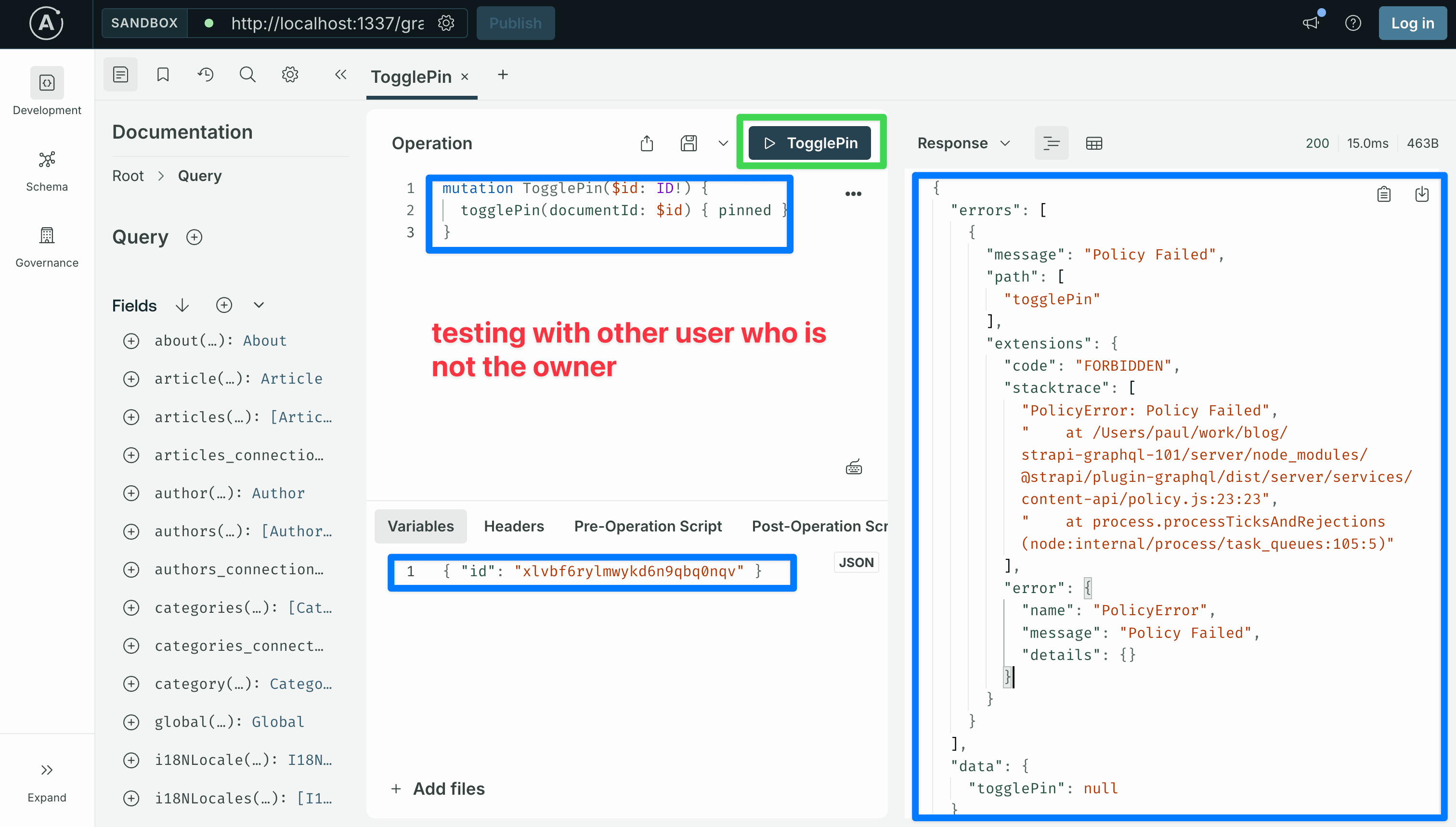
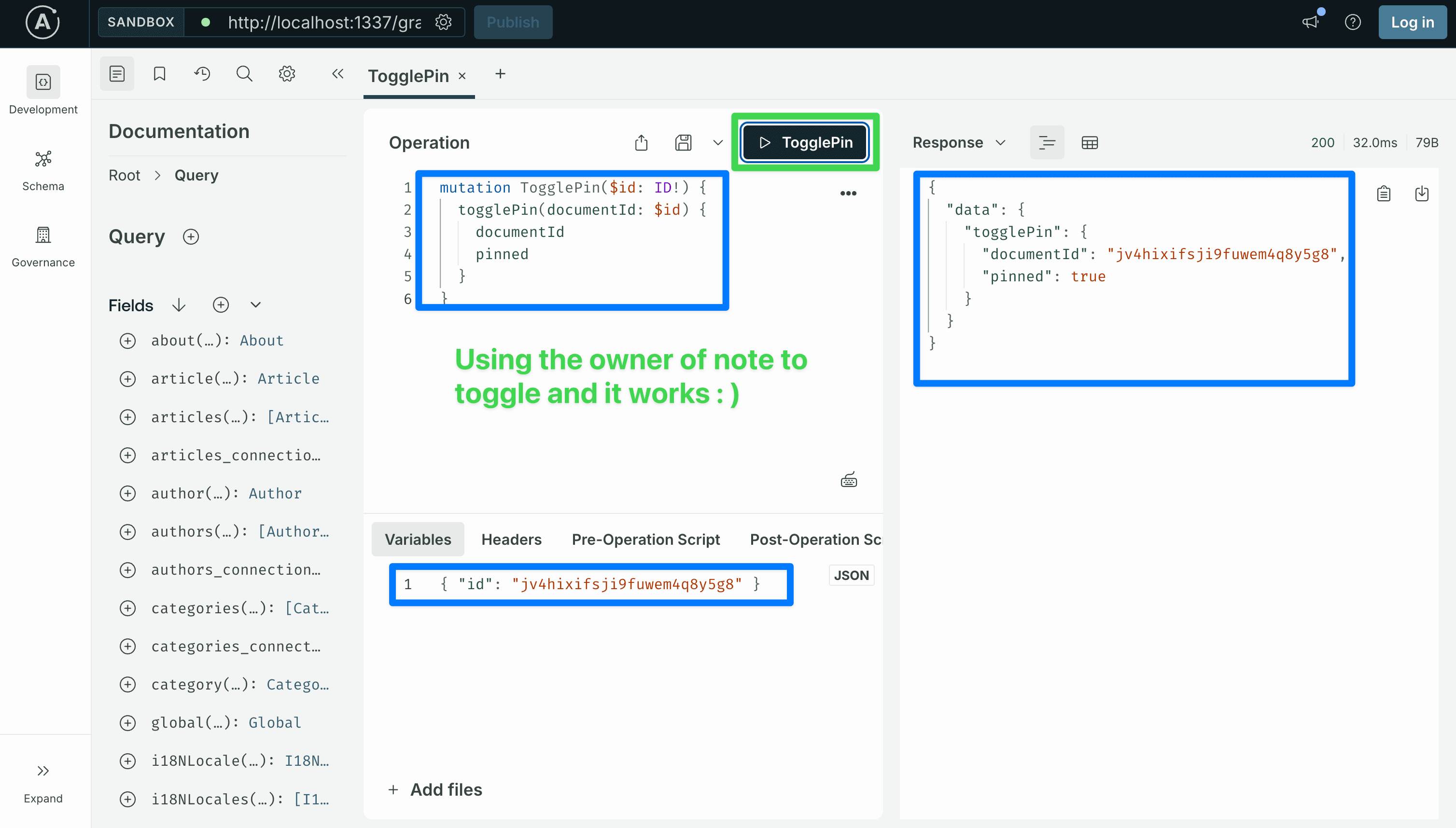
Swap the header back to testuser's JWT and run the same mutation. Now it succeeds and the note flips between pinned and unpinned.
Step 5: The REST leak
Anything in resolversConfig only runs for GraphQL. The same gap we hit in Part 2 with the soft-delete and page-cap rules. The is-note-owner policy does nothing for REST, and testuser2 can prove it by editing testuser's note over REST:
TESTUSER2_JWT="<testuser2-jwt>"
NOTE_ID="<a-note-documentId>"
curl -s -X PUT "http://localhost:1337/api/notes/$NOTE_ID" \
  -H 'Content-Type: application/json' \
  -H "Authorization: Bearer $TESTUSER2_JWT" \
  -d '{"data":{"title":"testuser2 was here"}}'
# -> 200 OK, title updated.
That is a real bug. The policy gates GraphQL but not REST. One rule, half-covered.
Restore the title before moving on:
TESTUSER_JWT="<testuser-jwt>"
curl -s -X PUT "http://localhost:1337/api/notes/$NOTE_ID" \
  -H 'Content-Type: application/json' \
  -H "Authorization: Bearer $TESTUSER_JWT" \
  -d '{"data":{"title":"<original title>"}}'
Two reasonable ways to close the gap:
- Mirror the rule on REST. Add a route-level middleware on
src/api/note/routes/note.ts(same setup Part 2 used for soft-delete) plus a small policy on the route'sfind,findOne,update, anddeleteactions that loads the target note and rejects when the owner does not match. The rule now lives in two files: aresolversConfigpolicy for GraphQL and a route middleware/policy for REST. Both have to be kept in sync. - Move the rule below both APIs into a Document Service middleware. Step 3 already uses one to write
owneron create. We extend that same middleware with a second clause: it watches everyfindManyandfindOneonapi::note.noteand addsowner = ctx.state.user.idtoparams.filters. REST controllers and GraphQL Shadow CRUD resolvers both eventually callstrapi.documents("api::note.note").<action>(...), so a rule placed there fires for both. One file, both APIs.
The next step builds option 2.
Why not option 1? It works, but it puts the same rule in two files. A future change updates the GraphQL side and forgets the REST side, and the same kind of leak we just demonstrated comes back. Option 2 puts the rule one layer deeper, where REST and GraphQL share the same code path: any caller that ends up at
strapi.documents("api::note.note").findOne(...)goes through the rule, with no extra wiring. We took a similar position in Part 2's "GraphQL-only vs. both APIs" section. Part 4's ownership rule is the case where that one-rule-one-file approach earns its keep, because the rule has to readctx.state.userand behave the same way for REST and GraphQL.
Step 6: A Document Service middleware for both APIs
The owner-stamping middleware from Step 3 already lives in src/index.ts register(). We add two more strapi.documents.use(...) clauses in the same file, sitting right after it.
The three clauses together do three things:
- Stamp
owneron every new note (the existing Step 3 clause). - Filter
findManyandfindOneto the signed-in user. Both RESTGET /api/notes//:idand GraphQLQuery.notes/Query.notego through the Document Service, so one rule covers both. - Block
updateanddeletefor non-owners. A pre-flightfindOne(which inherits the read filter from clause 2) returns null for non-owners; we throwNotFoundError. RESTPUT/DELETE /api/notes/:idis covered the same way GraphQLupdateNote/deleteNoteis.
The rules live at the Document Service layer, so REST and GraphQL share them. There is no per-resolver attachment on the GraphQL side and no route-level middleware on the REST side. One file, both APIs, both verbs.
6.1 Extend the Document Service middleware
Open server/src/index.ts and replace its contents:
// server/src/index.ts
import type { Core } from "@strapi/strapi";
import { errors } from "@strapi/utils";
import registerGraphQLExtensions from "./extensions/graphql";

export default {
  register({ strapi }: { strapi: Core.Strapi }) {
    registerGraphQLExtensions(strapi);

    // From Step 3: stamp `owner` on every new note.
    strapi.documents.use(async (context, next) => {
      if (context.uid !== "api::note.note") return next();
      if (context.action !== "create") return next();

      const requestCtx = strapi.requestContext.get();
      const user = requestCtx?.state?.user;
      if (user?.id) {
        context.params.data = {
          ...(context.params.data ?? {}),
          owner: user.id,
        } as typeof context.params.data;
      }

      return next();
    });

    // Scope every Note read to the signed-in user.
    strapi.documents.use(async (context, next) => {
      if (context.uid !== "api::note.note") return next();
      if (context.action !== "findMany" && context.action !== "findOne") {
        return next();
      }

      const requestCtx = strapi.requestContext.get();
      const user = requestCtx?.state?.user;
      const existingFilters = (context.params.filters ?? {}) as Record<
        string,
        unknown
      >;

      if (!user?.id) {
        // No signed-in user: force the filter to match nothing.
        // -1 is never a valid User id, so the query returns zero rows
        // instead of falling through to "return everything."
        context.params.filters = {
          ...existingFilters,
          owner: { id: { $eq: -1 } },
        } as typeof context.params.filters;
        return next();
      }

      context.params.filters = {
        ...existingFilters,
        owner: { id: { $eq: user.id } },
      } as typeof context.params.filters;
      return next();
    });

    // Gate every Note write (update, delete) for non-owners.
    // The pre-flight findOne goes back through the Document Service
    // and inherits the read filter above, so a non-owner sees null
    // for the lookup. We throw NotFoundError to match the read
    // posture (no existence leak via 403).
    strapi.documents.use(async (context, next) => {
      if (context.uid !== "api::note.note") return next();
      if (context.action !== "update" && context.action !== "delete") {
        return next();
      }

      const documentId = (context.params as { documentId?: string })
        .documentId;
      if (!documentId) return next();

      const existing = await strapi
        .documents("api::note.note")
        .findOne({ documentId });
      if (!existing) {
        throw new errors.NotFoundError("Note not found.");
      }

      return next();
    });
  },

  bootstrap() {},
};
What this code does.
On reads (findMany and findOne):
- It looks up who is signed in. Inside this middleware we do not get the request directly, so we ask Strapi for it with
strapi.requestContext.get(). If testuser is signed in,user.idis testuser's id. If nobody is signed in,userisundefined. - If nobody is signed in, the query returns zero notes. We add the filter
owner.id = -1to the query. No user has id-1, so the database finds nothing. We do not throw an error here because the route in Step 1 already rejects requests without a JWT. This is just a backstop in case anything slips past it. - The caller cannot ask for someone else's notes. If a caller sends
notes(filters: { owner: { id: { eq: 99 } } })hoping to read user 99's notes, we copy their filter into ours, then write our ownownervalue on top. Our value wins, so the database only returns notes owned by the signed-in user.
On writes (update and delete):
- It checks ownership by looking the note up first. Before the update or delete runs, we call
strapi.documents("api::note.note").findOne({ documentId }). That lookup goes through the same middleware, so the read code above runs on it and addsowner = signed-in userto the query. If testuser2 tries to update one of testuser's notes, the lookup returnsnull, and we throw. We never write the ownership check twice; the write code borrows it from the read code. - It throws
NotFoundError, notForbiddenError. When testuser2 reads testuser's note, the read code above already returns nothing, as if the note does not exist. We want the write to look the same.ForbiddenErrorwould tell testuser2 "this note exists, you just cannot touch it," which tells them something they should not know. - It only runs on
updateanddelete.createis already handled by the owner-stamping code at the top of the file. Plain reads are handled by the read code above.countis handled insidenoteStatsin Step 6.3.
Heads-up: this fires on the admin UI too. The Document Service sits below every API surface, including the Content Manager in
http://localhost:1337/admin. When you open Note in the admin UI, the request runs as your admin user (a row inadmin::user), andstrapi.requestContext.get()?.state?.userreturns that admin user. The owner filter then becomesowner.id = <admin-user-id>, butownerpoints atplugin::users-permissions.user, which is a different content type. The two id spaces happen to overlap by coincidence, so the Content Manager's Note list will look mostly empty (or show the wrong rows) until you log in as the end-user whose id matches an admin id. If you need the Content Manager to keep working as an admin, branch onrequestCtx?.state?.auth?.strategyandreturn next()early when the strategy is the admin one ("admin") so admins keep their full view; the rule we wrote above only applies to the public REST and GraphQL surfaces. The tutorial leaves the simpler version in place because the demo never opens the Note Content Manager again, and an admin caveat hides the rule we just spent the section building.
6.2 Test it
Restart Strapi, then exercise reads and writes on both APIs.
GraphQL reads. With testuser's JWT in the Authorization header, run:
query {
  notes {
    documentId
  }
}
You see the notes testuser owns. Swap the Authorization header to testuser2's JWT and re-run. testuser2 sees an empty list (or only the notes they created themselves).
GraphQL writes. Try to update one of testuser's notes as testuser2:
mutation UpdateNote($id: ID!, $data: NoteInput!) {
  updateNote(documentId: $id, data: $data) {
    documentId
    title
  }
}
Variables:
{
  "id": "<testuser-note-documentId>",
  "data": { "title": "testuser2 was here" }
}
The response is Policy Failed. The is-note-owner policy from Step 4 rejects the call before the resolver runs. Even if the policy were absent, the write-gate clause would now throw NotFoundError from the same lookup.
REST reads. Same shape, different surface:
TESTUSER_JWT="<testuser-jwt>"
TESTUSER2_JWT="<testuser2-jwt>"

curl -s -H "Authorization: Bearer $TESTUSER_JWT" "http://localhost:1337/api/notes" | jq '.data | length'
# -> 9

curl -s -H "Authorization: Bearer $TESTUSER2_JWT" "http://localhost:1337/api/notes" | jq '.data | length'
# -> 0
REST writes. This is what the write-gate clause is for. Pick any of testuser's note documentIds and try to PUT to it as testuser2:
NOTE_ID="<testuser-note-documentId>"
curl -s -X PUT "http://localhost:1337/api/notes/$NOTE_ID" \
  -H 'Content-Type: application/json' \
  -H "Authorization: Bearer $TESTUSER2_JWT" \
  -d '{"data":{"title":"testuser2 was here"}}'
# -> {"data":null,"error":{"status":404,"name":"NotFoundError", ... }}
testuser2's PUT returns 404. testuser's own PUT on the same note returns 200 and updates the title.
curl -s -X PUT "http://localhost:1337/api/notes/$NOTE_ID" \
  -H 'Content-Type: application/json' \
  -H "Authorization: Bearer $TESTUSER_JWT" \
  -d '{"data":{"title":"testuser updated this"}}'
# -> 200, title now "testuser updated this"
One file (src/index.ts), three clauses, both APIs, both verbs. Reads scoped, writes gated, ownership stamped on create. The intro promise — a Document Service middleware that closes both APIs from one file — holds.
6.3 Scope the three custom queries to the owner
The Document Service middleware covers Query.notes, Query.note, and the REST find/findOne, because all four end up calling strapi.documents("api::note.note").findMany(...) or findOne(...). The three custom queries from Part 2 (searchNotes, noteStats, notesByTag) are different:
searchNotesandnotesByTagcallstrapi.documents("api::note.note").findMany(...)themselves, with their own filter object. The middleware'sownerclause does merge in, but it is harder to read what the final filter is from inside the resolver, and any future change to the resolver could clobber it. Adding theownerclause inline makes the rule visible at the call site.noteStatscallscount()three times (which the middleware does not match because the early return only allowsfindManyandfindOne) and thenfindManyonapi::tag.tag(which is a different content type, so the middleware'suidcheck skips it entirely).
Step 1.3 already made all three queries require sign-in. We now add an explicit owner filter inside each resolver so each signed-in user only sees their own data.
The same pattern in all three: read ctx.state.user.id and add owner: { id: user.id } to the filter. Each resolver now takes ctx as its third argument.
Open server/src/extensions/graphql/queries.ts.
searchNotes. Replace the resolver with:
t.list.field("searchNotes", {
  type: nexus.nonNull("Note"),
  args: {
    query: nexus.nonNull(nexus.stringArg()),
    includeArchived: nexus.booleanArg({ default: false }),
  },
  async resolve(
    _parent: unknown,
    { query, includeArchived }: { query: string; includeArchived: boolean },
    ctx: any,
  ) {
    const user = ctx?.state?.user;
    if (!user?.id) return [];
    const where: any = {
      title: { $containsi: query },
      owner: { id: user.id },
    };
    if (!includeArchived) where.archived = false;
    return strapi.documents("api::note.note").findMany({
      filters: where,
      populate: ["tags"],
      sort: ["pinned:desc", "updatedAt:desc"],
    });
  },
});noteStats. Each count and findMany call gets the owner filter:
t.nonNull.field("noteStats", {
  type: "NoteStats",
  async resolve(_parent: unknown, _args: unknown, ctx: any) {
    const user = ctx?.state?.user;
    if (!user?.id) return { total: 0, pinned: 0, archived: 0, byTag: [] };
    const owner = { id: user.id };
    const [total, pinned, archived, tags] = await Promise.all([
      strapi.documents("api::note.note").count({ filters: { owner } }),
      strapi.documents("api::note.note").count({
        filters: { pinned: true, owner },
      }),
      strapi.documents("api::note.note").count({
        filters: { archived: true, owner },
      }),
      strapi.documents("api::tag.tag").findMany({
        populate: { notes: { filters: { owner } } },
        sort: ["name:asc"],
      }),
    ]);

    const byTag = tags
      .map((tag: any) => ({
        slug: tag.slug,
        name: tag.name,
        count: Array.isArray(tag.notes) ? tag.notes.length : 0,
      }))
      .sort((a, b) => b.count - a.count || a.name.localeCompare(b.name));

    return { total, pinned, archived, byTag };
  },
});
The line worth pointing at is populate: { notes: { filters: { owner } } }. Every user can see every tag (tags are shared), but the number of notes on each tag has to be scoped to the current user. The Document Service lets us filter populated relations inline, so we add { owner } to the populate. Each user sees their own per-tag counts, never anyone else's.
notesByTag. Add owner to the existing filter object:
t.list.field("notesByTag", {
  type: nexus.nonNull("Note"),
  args: { slug: nexus.nonNull(nexus.stringArg()) },
  async resolve(_parent: unknown, { slug }: { slug: string }, ctx: any) {
    const user = ctx?.state?.user;
    if (!user?.id) return [];
    return strapi.documents("api::note.note").findMany({
      filters: {
        archived: false,
        tags: { slug: { $eq: slug } },
        owner: { id: user.id },
      },
      populate: ["tags"],
      sort: ["pinned:desc", "updatedAt:desc"],
    });
  },
});
Save. Strapi auto-restarts.
Test in the Sandbox. With testuser's JWT in the Authorization header, run each one:
query {
  searchNotes(query: "GraphQL") {
    documentId
    title
  }
}
query {
noteStats {
total
pinned
archived
byTag {
slug
name
count
}
}
}query {
notesByTag(slug: "ideas") {
documentId
title
}
}You only see testuser's notes. Swap the Authorization header to testuser2's JWT and re-run the same queries. testuser2 only sees their own notes.
Why repeat the owner filter inline in each resolver instead of pulling it into a helper? A
withOwner(filters, ctx)helper looks like the obvious refactor, but each resolver here is short, and the helper would barely save any lines. Writing theownerfilter inline also keeps the rule visible at every read site, so a future reader of the resolver does not have to know that a helper exists. With twenty custom queries the helper would pay off; with three, inline is plainer.
6.4 Should we keep the GraphQL policy?
After Step 6, the is-note-owner policy from Step 4 is technically redundant. The Document Service middleware adds an owner filter to every findOne, so when Mutation.updateNote (or togglePin, archiveNote, duplicateNote) calls strapi.documents("api::note.note").findOne(...) to load the target note, a non-owner gets back nothing. The mutation fails before the policy would have had a chance to reject it.
The policy is still useful as a second check and as a worked example of how policies are written. Two reasonable choices:
- Keep it. A second check, run before the resolver. If someone disables or breaks the Document Service middleware by accident, GraphQL writes are still gated. The cost is that the same rule lives in two places.
- Delete it. One source of truth. Trust the Document Service middleware to do the work.
We keep the policy in this tutorial. The file is small, the overlap is on purpose, and the codebase ends up with two patterns side by side: a Document Service middleware doing the main work, plus a policyContext-based policy as a worked example.
Step 7: Test the backend contract
The starter's test script already covers Part 2. Add a section at the bottom that covers ownership. Open starter-template/scripts/test-graphql.mjs (and the canonical copy in server/scripts/test-graphql.mjs) and append:
// 9. Ownership: two-user isolation
section("Ownership: two-user isolation");

const testuserJwt = (
  await gql(
    `mutation { register(input: { username: "testuser-${Date.now()}", email: "a-${Date.now()}@x.com", password: "testuser" }) { jwt } }`,
  )
)?.data?.register?.jwt;

const testuser2Jwt = (
  await gql(
    `mutation { register(input: { username: "testuser2-${Date.now()}", email: "b-${Date.now()}@x.com", password: "testuser2" }) { jwt } }`,
  )
)?.data?.register?.jwt;

const testuserNote = (
  await gql(
    `mutation { createNote(data: { title: "testuser-only", content: "secret" }) { documentId } }`,
    undefined,
    { Authorization: `Bearer ${testuserJwt}` },
  )
)?.data?.createNote;

const testuser2View = await gql(`{ notes { documentId } }`, undefined, {
  Authorization: `Bearer ${testuser2Jwt}`,
});
check(
  "testuser2 does not see testuser's notes in the list",
  !testuser2View?.data?.notes?.some(
    (n) => n.documentId === testuserNote.documentId,
  ),
);

const testuser2Attack = await gql(
  `mutation A($id: ID!) { togglePin(documentId: $id) { documentId } }`,
  { id: testuserNote.documentId },
  { Authorization: `Bearer ${testuser2Jwt}` },
);
check(
  "testuser2 cannot toggle pin on testuser's note (Policy Failed)",
  testuser2Attack?.errors?.some((e) =>
    /Policy Failed|Forbidden/i.test(e.message),
  ),
);
Run it:
npm run test:backendHeads-up: the existing checks now need authentication. Sections 1 through 8 of
test-graphql.mjsmake anonymous GraphQL calls (noAuthorizationheader). After Step 1.2 disabled anonymous reads onNote, the script bails at Section 1 withNo active notes in the databaseand never reaches the new ownership block. Two ways to fix the script:
- Register a user at the top and authenticate every request by passing
{ Authorization: \Bearer ${jwt}` }as the third argument to everygql(...)` call.- Skip Sections 1 through 8 if you only want to run the ownership block; comment out everything before
// 9. Ownership: two-user isolation.The two new ownership checks themselves work correctly — they register fresh users and pass their own JWTs — so once you have
npm run test:backendrunning again, those two lines will be green.
Step 8: Wire up the frontend
Backend done. The frontend needs three things: pages to register and log in, a way to attach the JWT to every GraphQL call, and a route gate that sends signed-out users to /login.
8.1 Cookie helpers
Create lib/auth.ts:
// starter-template/lib/auth.ts
import { cookies } from "next/headers";

export const JWT_COOKIE = "strapi_jwt";

export async function getJwt(): Promise<string | undefined> {
  const store = await cookies();
  return store.get(JWT_COOKIE)?.value;
}

export async function setJwt(jwt: string): Promise<void> {
  const store = await cookies();
  store.set(JWT_COOKIE, jwt, {
    httpOnly: true,
    sameSite: "lax",
    secure: process.env.NODE_ENV === "production",
    path: "/",
    maxAge: 60 * 60 * 24 * 30, // 30 days
  });
}

export async function clearJwt(): Promise<void> {
  const store = await cookies();
  store.delete(JWT_COOKIE);
}
httpOnly matters. The browser keeps the cookie but JavaScript cannot read it, so an XSS payload cannot steal the token. The cookie is only read on the server, by Server Components and Server Actions through cookies().
8.2 Attach the JWT in Apollo Client
Open lib/apollo-client.ts and add a fetch wrapper that adds the token when one is present:
// starter-template/lib/apollo-client.ts
import { HttpLink } from "@apollo/client";
import {
  registerApolloClient,
  ApolloClient,
  InMemoryCache,
} from "@apollo/client-integration-nextjs";
import { getJwt } from "./auth";

const STRAPI_GRAPHQL_URL =
  process.env.STRAPI_GRAPHQL_URL ?? "http://localhost:1337/graphql";

export const { getClient, query, PreloadQuery } = registerApolloClient(() => {
  return new ApolloClient({
    cache: new InMemoryCache({
      typePolicies: {
        Note: { keyFields: ["documentId"] },
        Tag: { keyFields: ["documentId"] },
        UsersPermissionsUser: { keyFields: ["id"] },
      },
    }),
    link: new HttpLink({
      uri: STRAPI_GRAPHQL_URL,
      fetchOptions: { cache: "no-store" },
      fetch: async (url, init = {}) => {
        const jwt = await getJwt();
        const headers = new Headers(init.headers);
        if (jwt) headers.set("Authorization", `Bearer ${jwt}`);
        return fetch(url, { ...init, headers });
      },
    }),
  });
});
registerApolloClient runs the factory once per request, so getJwt() runs fresh for every render and Server Action. The token never reaches the browser bundle.
8.3 Login, register, me operations
Append to lib/graphql.ts:
export const LOGIN = gql`
  mutation Login($input: UsersPermissionsLoginInput!) {
    login(input: $input) {
      jwt
      user {
        id
        username
        email
      }
    }
  }
`;

export const REGISTER = gql`
  mutation Register($input: UsersPermissionsRegisterInput!) {
    register(input: $input) {
      jwt
      user {
        id
        username
        email
      }
    }
  }
`;

export const ME = gql`
  query Me {
    me {
      id
      username
      email
    }
  }
`;
8.4 The login page
The starter already ships app/login/page.tsx with the form, the error banner, and a stub loginAction that just console.logs. Open the file if you want to see the JSX. To wire it up, replace the contents of app/login/actions.ts:
// starter-template/app/login/actions.ts
"use server";

import { redirect } from "next/navigation";
import { getClient } from "@/lib/apollo-client";
import { LOGIN } from "@/lib/graphql";
import { setJwt } from "@/lib/auth";

const asString = (v: FormDataEntryValue | null) =>
  typeof v === "string" ? v : "";

export async function loginAction(formData: FormData) {
  const identifier = asString(formData.get("identifier")).trim();
  const password = asString(formData.get("password"));

  if (!identifier || !password) return;

  let jwt: string | undefined;
  try {
    const { data } = await getClient().mutate<{
      login: { jwt: string };
    }>({
      mutation: LOGIN,
      variables: { input: { identifier, password } },
    });
    jwt = data?.login?.jwt;
  } catch {
    // Apollo throws CombinedGraphQLErrors when Strapi returns an error
    // (e.g. "Invalid identifier or password"). Catch it and fall through
    // to the !jwt redirect below; otherwise the throw bubbles to Next's
    // runtime overlay instead of giving the user an error message.
  }

  if (!jwt) redirect("/login?error=invalid");

  await setJwt(jwt);
  redirect("/");
}
Two things to notice:
- The
try/catchmatters. Apollo'smutate()throws on Strapi errors, it does not return{ data: null }. Without the catch, a wrong password produces a runtime error overlay in dev (and a 500 in production) instead of redirecting back to/login?error=invalid. - The page already handles
searchParams.error. The starter'sapp/login/page.tsxreadserrorfromsearchParamsand renders a red banner when it equals"invalid"— that pairs with the redirect above.
The register page has the same shape with three inputs and the REGISTER mutation. The starter ships app/register/page.tsx and a stub app/register/actions.ts already; replace the action contents:
// starter-template/app/register/actions.ts
"use server";

import { redirect } from "next/navigation";
import { getClient } from "@/lib/apollo-client";
import { REGISTER } from "@/lib/graphql";
import { setJwt } from "@/lib/auth";

const asString = (v: FormDataEntryValue | null) =>
  typeof v === "string" ? v : "";

export async function registerAction(formData: FormData) {
  const username = asString(formData.get("username")).trim();
  const email = asString(formData.get("email")).trim();
  const password = asString(formData.get("password"));

  if (!username || !email || !password) return;

  let jwt: string | undefined;
  try {
    const { data } = await getClient().mutate<{
      register: { jwt: string };
    }>({
      mutation: REGISTER,
      variables: { input: { username, email, password } },
    });
    jwt = data?.register?.jwt;
  } catch {
    // Same try/catch shape as the login action: Apollo throws on Strapi
    // validation errors (duplicate username/email, password too short),
    // so we catch and fall through to the redirect below.
  }

  if (!jwt) redirect("/register?error=invalid");

  await setJwt(jwt);
  redirect("/");
}
8.5 Logout
The starter has app/logout/actions.ts as a stub. Replace its contents:
// starter-template/app/logout/actions.ts
"use server";

import { redirect } from "next/navigation";
import { clearJwt } from "@/lib/auth";

export async function logoutAction() {
  await clearJwt();
  redirect("/login");
}
Replace components/nav.tsx with a version that reads the signed-in user via the me query and shows their username plus a sign-out button when authenticated. When anonymous (e.g. on /login or /register), it falls back to a "Sign in" link.
// components/nav.tsx
import Link from "next/link";
import { query } from "@/lib/apollo-client";
import { ME } from "@/lib/graphql";
import { logoutAction } from "@/app/logout/actions";

const LINKS = [
  { href: "/", label: "Notes" },
  { href: "/search", label: "Search" },
  { href: "/stats", label: "Stats" },
];

type Me = { id: string; username: string; email: string } | null;

export async function Nav() {
  // The Apollo client (Step 8.2) injects the JWT cookie automatically.
  // On /login and /register there is no JWT, so the query throws and we
  // fall back to anonymous.
  let me: Me = null;
  try {
    const { data } = await query<{ me: Me }>({ query: ME });
    me = data?.me ?? null;
  } catch {
    me = null;
  }

  return (
    <header className="border-b">
      <div className="mx-auto flex max-w-3xl items-center justify-between px-6 py-4">
        <Link href="/" className="text-lg font-semibold">
          Notes
        </Link>
        <nav className="flex items-center gap-5 text-sm text-neutral-600">
          {me ? (
            <>
              {LINKS.map((l) => (
                <Link key={l.href} href={l.href} className="hover:text-black">
                  {l.label}
                </Link>
              ))}
              <Link
                href="/notes/new"
                className="rounded bg-black px-3 py-1.5 text-sm font-medium text-white hover:bg-neutral-800"
              >
                New
              </Link>
              <span className="text-neutral-500">@{me.username}</span>
              <form action={logoutAction}>
                <button
                  type="submit"
                  className="text-neutral-500 hover:text-black"
                >
                  Sign out
                </button>
              </form>
            </>
          ) : (
            <Link
              href="/login"
              className="rounded bg-black px-3 py-1.5 text-sm font-medium text-white hover:bg-neutral-800"
            >
              Sign in
            </Link>
          )}
        </nav>
      </div>
    </header>
  );
}
Four things to notice:
Navis nowasync. It runs as a Server Component, callsme, and renders the result. There is no client-side fetch; the user state is resolved on the server before the HTML ships.- The
try/catchis required. When the request has no JWT cookie (the/loginand/registerroutes), themequery rejects with aForbiddenerror from Apollo. Catching it and falling back tome = nullkeeps the public pages rendering normally. - The whole nav switches on auth. When
meis null (anonymous), only the brand link and the Sign in button render. Notes / Search / Stats / New are all behind sign-in, both because the routes are protected bymiddleware.ts(Step 8.6) and because there is nothing meaningful to point at when the user has no notes yet. - The sign-out button is a
<form action={logoutAction}>. That is the supported shape for invoking a Server Action without args. The button submits, the action runs, the cookie is cleared, and the redirect to/loginhappens server-side.
8.6 Protect the routes with Next.js Proxy
Next 16 rename. What was called Middleware in earlier versions of Next.js is now called Proxy. The functionality is identical; only the file name (
proxy.tsinstead ofmiddleware.ts) and the exported function name (proxyinstead ofmiddleware) changed. Seenode_modules/next/dist/docs/01-app/01-getting-started/16-proxy.mdfor the official note.
Create proxy.ts at the root of the starter (next to package.json, not inside app/):
// starter-template/proxy.ts
import { NextResponse, type NextRequest } from "next/server";
import { JWT_COOKIE } from "@/lib/auth";

const PUBLIC_ROUTES = ["/login", "/register"];

export function proxy(req: NextRequest) {
  const { pathname } = req.nextUrl;

  if (PUBLIC_ROUTES.some((p) => pathname.startsWith(p))) {
    return NextResponse.next();
  }

  const hasJwt = req.cookies.has(JWT_COOKIE);
  if (!hasJwt) {
    const url = req.nextUrl.clone();
    url.pathname = "/login";
    url.searchParams.set("returnTo", pathname);
    return NextResponse.redirect(url);
  }

  return NextResponse.next();
}

export const config = {
  matcher: ["/((?!_next/|favicon|api/).*)"],
};
This uses Next.js's matcher syntax. The pattern excludes Next.js's internal _next/ paths, the favicon, and any /api/ routes you might add later. Everything else requires a JWT.
8.7 A clearer 404 for the detail route
The Document Service middleware from Step 6 makes other users' notes invisible: when testuser2 fetches testuser's note by documentId, the lookup misses, the Server Component calls notFound(), and the user sees Next's default 404 — This page could not be found. page. That is the security-correct behavior: leaking "this note exists but isn't yours" would tell an attacker probing IDs which ones belong to other users versus which ones don't exist.
The starter ships a generic app/notes/[documentId]/not-found.tsx page that catches the notFound() call and renders a friendlier message than Next's default. Replace its contents with a tutorial-aware version that names the policy doing the work, so a reader trying the cross-user URL trick can see the system is working as designed:
// starter-template/app/notes/[documentId]/not-found.tsx
import Link from "next/link";
export default function NotFound() {
return (
<div className="mx-auto max-w-xl space-y-4 py-12 text-center">
<h1 className="text-2xl font-semibold">Note not found</h1>
<p className="text-sm text-neutral-600">
This note either doesn’t exist or isn’t yours. We
don’t tell you which: ownership scoping makes other users’
notes invisible to you (Step 6’s Document Service middleware). If
you typed this URL hoping to peek at a friend’s note, it’s
working as designed.
</p>
<Link
href="/"
className="inline-block rounded bg-black px-4 py-2 text-sm font-medium text-white hover:bg-neutral-800"
>
Back to your notes
</Link>
</div>
);
}The status code is still 404 — this only changes the rendered body, not the HTTP response. The middleware still does the gatekeeping; this page just tells the user what they're looking at.
8.8 End-to-end test
Restart npm run dev in the starter, then:
- Open
http://localhost:3000/. You are redirected to/login. - Click "Register here", fill in username/email/password (
testuserworks since you registered her in Step 1; pick a new password if needed). Submit. - After register the cookie is set and you redirect to
/. The home page is empty because testuser has no notes (the seed-script notes are owned by the testuser you registered at the curl step, not this fresh registration if usernames collide; create a couple of notes via the New button to get content). - Click a note, click Pin, click Archive. All work.
- Open an incognito window, register testuser2, log in. testuser2's home page is empty. Try the URL
http://localhost:3000/notes/<testuser-note-documentId>directly. You get a 404 because the Document Service middleware addedowner = testuser2.idto the lookup filter, so the row is not found for them.
The contract holds end to end: testuser and testuser2 each see only their own notes, on every page.
Step 9: Cleanup and what changed
The final backend layout under server/:
server/
├── config/
│   ├── plugins.ts
│   └── middlewares.ts                    # unchanged from Part 2
└── src/
    ├── index.ts                          # updated: register() registers
    │                                       three Document Service middleware
    │                                       clauses (owner-stamping on create,
    │                                       read scoping on findMany/findOne,
    │                                       write gating on update/delete)
    ├── api/
    │   └── note/
    │       └── content-types/
    │           └── note/
    │               └── schema.json       # updated: owner relation
    ├── policies/
    │   ├── cap-page-size.ts
    │   └── is-note-owner.ts              # new: GraphQL write policy
    └── extensions/
        └── graphql/
            ├── index.ts
            ├── middlewares-and-policies.ts
            ├── computed-fields.ts
            ├── queries.ts                # updated: ownership filter in
            │                               searchNotes / noteStats / notesByTag
            └── mutations.ts              # updated: auth.scope on the three
                                            custom mutations
The frontend:
starter-template/
├── proxy.ts                              # new: route protection
│                                           (Next.js 16 rename of middleware.ts)
├── app/
│   ├── login/
│   │   ├── page.tsx                      # new
│   │   └── actions.ts                    # new
│   ├── register/                         # new (same shape as login/)
│   ├── logout/
│   │   └── actions.ts                    # new
│   └── notes/                            # unchanged from Part 3
└── lib/
    ├── apollo-client.ts                  # updated: JWT fetch wrapper
    ├── auth.ts                           # new: cookie helpers
    └── graphql.ts                        # updated: LOGIN, REGISTER, ME
What you just built
- Strapi authentication through the
users-permissionsplugin: register, login, JWT issuance, andctx.state.userpopulated on every authenticated request. - A
Note → Userownership relation with automatic owner stamping via a Document Service middleware insrc/index.tsregister(). Clients cannot claim someone else's identity, regardless of whether they hit REST, GraphQL, or any other code path that reaches the Document Service. - Read scoping for both REST and GraphQL via a second clause in the same Document Service middleware. It injects
owner = ctx.state.user.idinto the filter on everyfindManyandfindOneagainstapi::note.note. One file, one rule, both API surfaces covered. - Write gating for both REST and GraphQL via a third clause in the same middleware. On
updateanddeleteit does a pre-flightfindOne(which inherits the read filter from the second clause) and throwsNotFoundErrorwhen the row is not visible to the caller. RESTPUT /api/notes/:idand GraphQLMutation.updateNoteare both covered without any per-resolver wiring. - An
is-note-ownerpolicy attached to four GraphQL write mutations as a worked example of authorization-shaped logic inpolicyContextand as a second check at the resolver boundary. - Per-resolver scoping on the three custom queries (
searchNotes,noteStats,notesByTag), sincenoteStatscallscount()andfindManyonapi::tag.tag, neither of which the Document Service middleware matches; and because writing theownerfilter inline keeps the rule visible at the call site forsearchNotesandnotesByTageven though it would otherwise merge in via the middleware. - A frontend authentication flow with HTTP-only cookie-stored JWT,
/loginand/registerServer Actions, an Apollo fetch wrapper that attaches the token, and a Next.js Proxy (proxy.ts) that redirects unauthenticated requests to/login?returnTo=.... - A second pass of the test script with a two-user isolation assertion that exercises the ownership model end to end.
The ownership pattern, generalized
Stripped of the note-taking specifics, the pattern is:
- Add an owner relation to every owner-scoped content type.
manyToOne User, namedowner. - Stamp the owner automatically with a Document Service middleware in
src/index.tsregister(). Readstrapi.requestContext.get()?.state?.user, assign toparams.data.owneroncreate. This closes the "client claims any owner" hole below the API surface, so it covers REST, GraphQL, and any other code path that calls into the Document Service. - Scope reads with a second Document Service middleware in the same file. On
findManyandfindOnefor that content type, addowner = ctx.state.user.idtoparams.filters. Both REST controllers and GraphQL Shadow CRUD resolvers go through the Document Service, so one rule covers both APIs. - For each custom resolver that does not flow through Shadow CRUD, add the owner filter inline. Custom queries that build their own filter object or query a different content type bypass the Document Service middleware's rule and have to scope themselves.
- Optionally add a per-resolver policy on GraphQL writes as a second check at the resolver boundary, and as a place to express GraphQL-shaped business rules ("you can only archive a note that has at least one tag" is awkward to put in a Document Service middleware).
Step 1 is the data model. Step 2 is the create-time invariant. Step 3 is read scoping. Step 4 is per-resolver coverage for anything Step 3 misses. Step 5 is taste.
Every Strapi project that needs per-user data ends up here. The users-permissions plugin handles authentication; you write authorization as a small set of Document Service middlewares plus, optionally, a policy or two for GraphQL writes.
What's next
This is the end of the four-part series. The repo at this point is a complete Strapi + Next.js application with auth, ownership, soft-delete, GraphQL customization, and a frontend that exercises everything.
Areas worth exploring on your own from here:
- Sharing notes between users. Add a many-to-many
sharedWithrelation on Note. Update the read-scoping Document Service middleware to allow reads whenowner.id === user.id || sharedWithincludes the user. Writes still gate to owner only. - Roles beyond owner / not-owner. Add an
Adminrole inusers-permissions. The read-scoping middleware can short-circuit withreturn next()for admin users; everyone else goes through the owner filter. - Refresh tokens. Issue a short-lived access token alongside the JWT, store the refresh token in a separate HTTP-only cookie, rotate on every authenticated request.
- Real-time updates. Add a Document Service middleware on
update/create/deletethat publishes to a pub/sub layer (Postgres LISTEN/NOTIFY, Redis, or a managed broker), and surface the events as GraphQL subscriptions on the Apollo side. The ownership filter from Step 6 is already authoritative, so subscriptions inherit it.
Each of those builds on the same shape: a content-type relation plus one or more Document Service middlewares. The mechanics from this series are the load-bearing parts.
If you found this series useful, the Strapi blog has more deep dives in this style, and the Strapi v5 docs are the canonical reference for everything we used here. Thanks for reading.