TL;DR
- The reliable way to build an AI SaaS is to let AI generate the frontend but keep full control of the backend. A bug in your auth flow or data model is not a styling fix you patch later.
- Strapi, an open-source headless CMS, gives you a working backend on day one. It auto-generates APIs from your data models, ships with JWT auth, and supports role-scoped permissions out of the box.
- A Next.js plus Strapi setup lets you build chat, image, and video generation features on top of a backend you actually understand, without rewriting infrastructure for each new feature.
- Two backend patterns from this AI SaaS build are worth stealing: streaming chat responses with the AI SDK's
useChathook, and a polling pattern for long-running jobs like video generation.
Check out the full tutorial here:
The core idea: AI for the frontend, you for the backend
The whole tutorial rests on one idea. Every AI SaaS app has two halves, frontend and backend, and AI is now genuinely good at one of them. UI code, components, even mobile screens, you can generate in minutes and throw away if you don't like the result. The cost of getting it wrong is low.
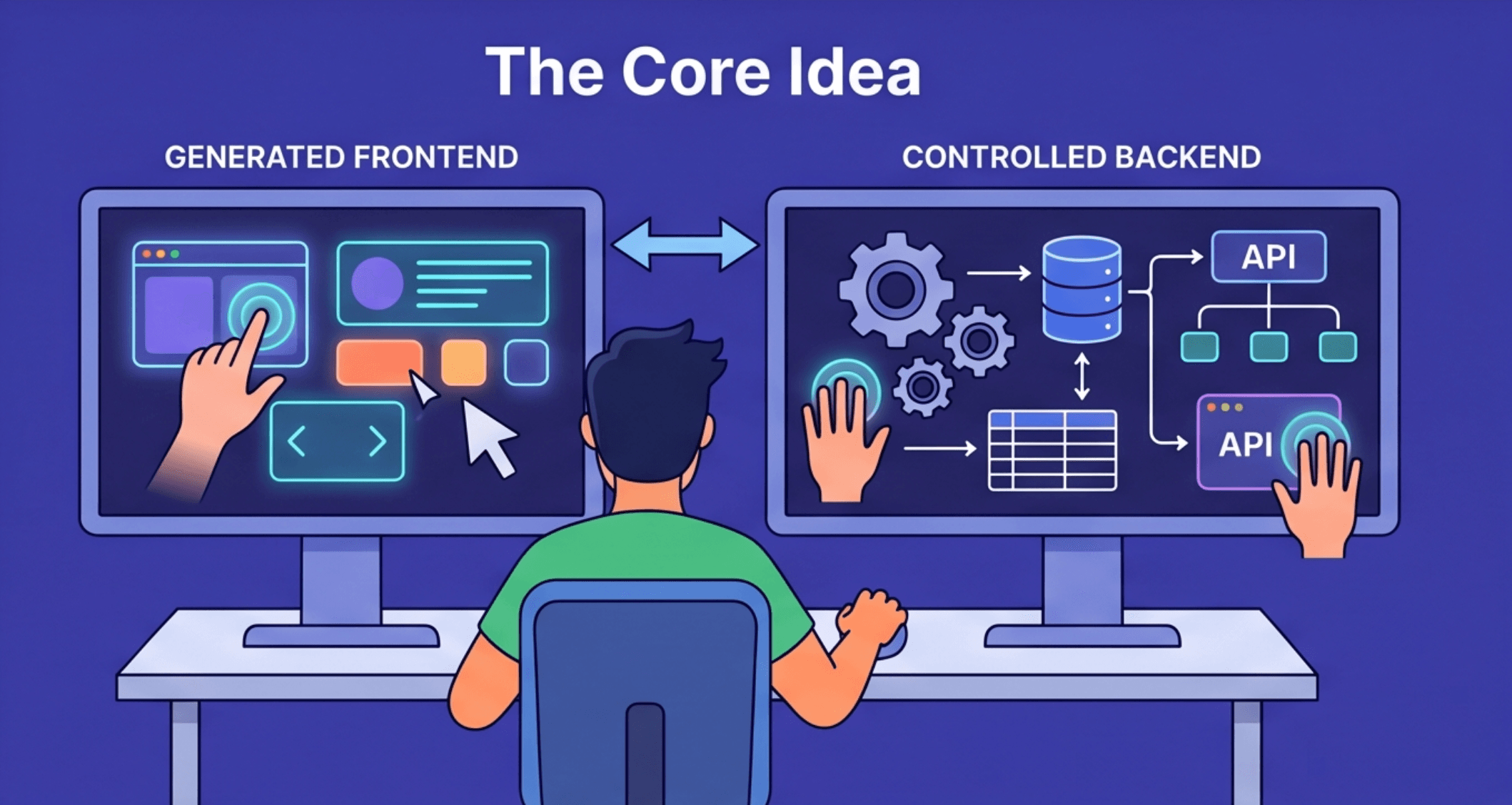
The backend is different. A bug in your auth flow logs people out. A bug in your data model leaks data into the wrong tenant. A bug in your billing logic charges people twice. None of these are styling fixes you patch later.
So the split the video proposes is: generate the surface, control the foundation. AI is still useful on the backend, but for extending what you already have (writing a custom controller, a service, a lifecycle hook), not for owning the whole thing end to end. This is exactly where a headless CMS earns its place in the stack — it gives you the backend structure without making you write it.
Why a headless CMS, and why Strapi specifically
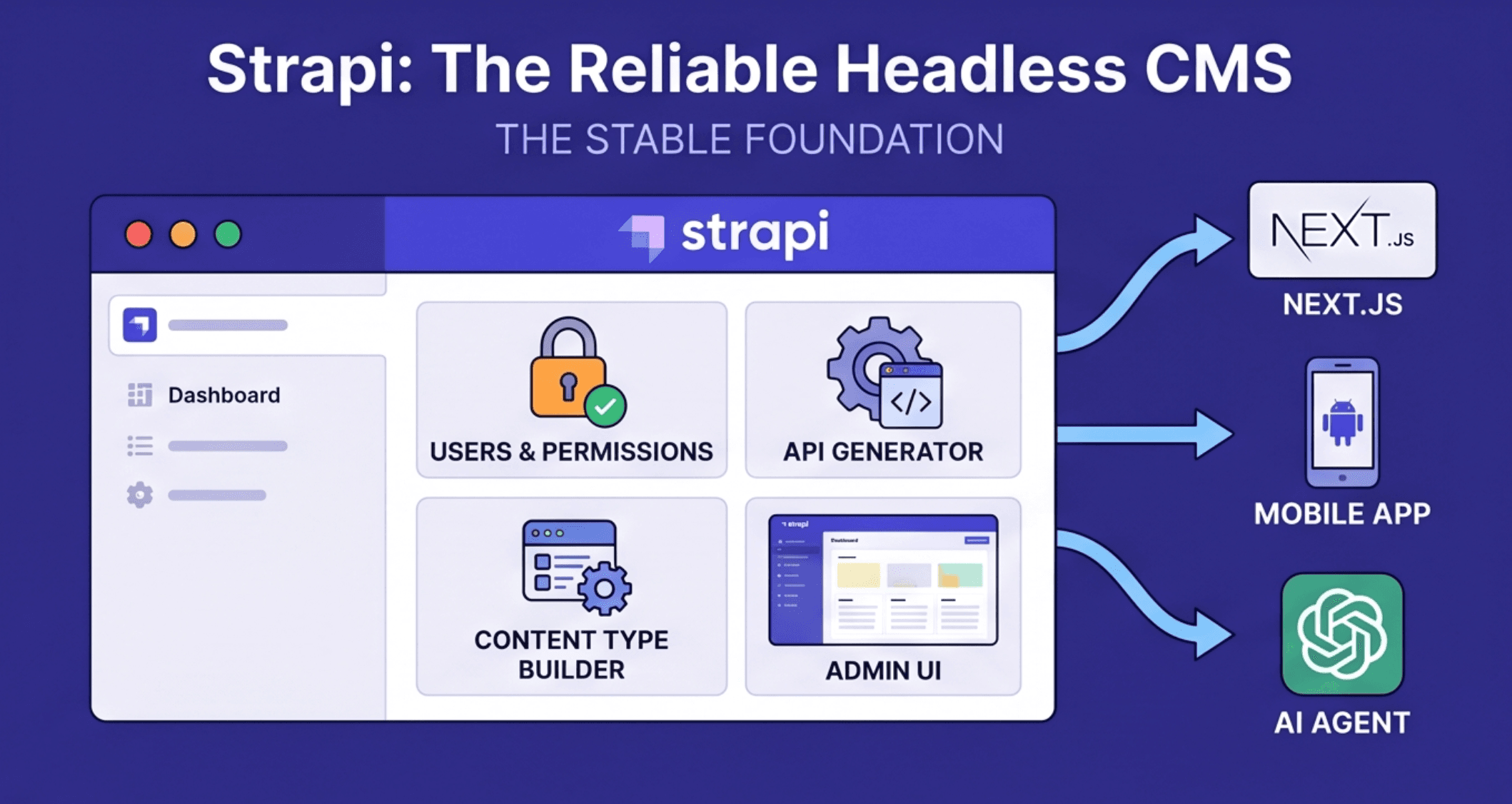
Strapi shows up in this build because it solves the "I need a real backend, not a toy" problem without forcing you to write one from scratch. A headless CMS is the right shape for an AI SaaS because the data layer needs to serve multiple consumers — your web app today, an API client or AI agent tomorrow — and the CMS shouldn't dictate what any of them look like.
A few things stand out:
- It is open source. You can read the full codebase. That matters when you're handing it your auth and your user data. It also means the security improvements are community-driven, not locked behind a vendor.
- It is headless. The CMS does not care what the frontend is. The same Strapi instance can serve a Next.js web app, an Expo mobile app, or a Flutter client. You design the consumer, the headless CMS exposes the data.
- The Content Type Builder is the central piece. You define your data models in the admin UI: fields, one-to-one and one-to-many relationships, dynamic components. Strapi generates the REST endpoints for you. You don't write controllers for basic CRUD.
- Permissions are role-scoped, not all-or-nothing. Instead of just "admin" and "user", you can build a role that can create images but cannot delete them. Or a role that can read user records but cannot edit them. This matters once AI agents are calling your API on behalf of users. Each agent only gets the actions it needs.
- Single types hold global settings. Things like site description, default model name, or a feature flag get their own first-class home in Strapi, instead of being shoved into a generic config table.
The takeaway: a good headless CMS gives you the parts of a backend that are tedious to build and easy to get wrong (data modeling, auth, permissions, an admin UI) in a configuration you fully control. For an AI SaaS where the surface area changes weekly, that stable foundation is the thing that lets the rest of the stack move fast.
Authentication is already solved
One of the biggest time savings in the tutorial is that auth is done on day one. You do not write the registration flow, the password hashing, or the JWT logic. Strapi's built-in Users and Permissions plugin handles all of it: registration, login, token issuance, and session management.
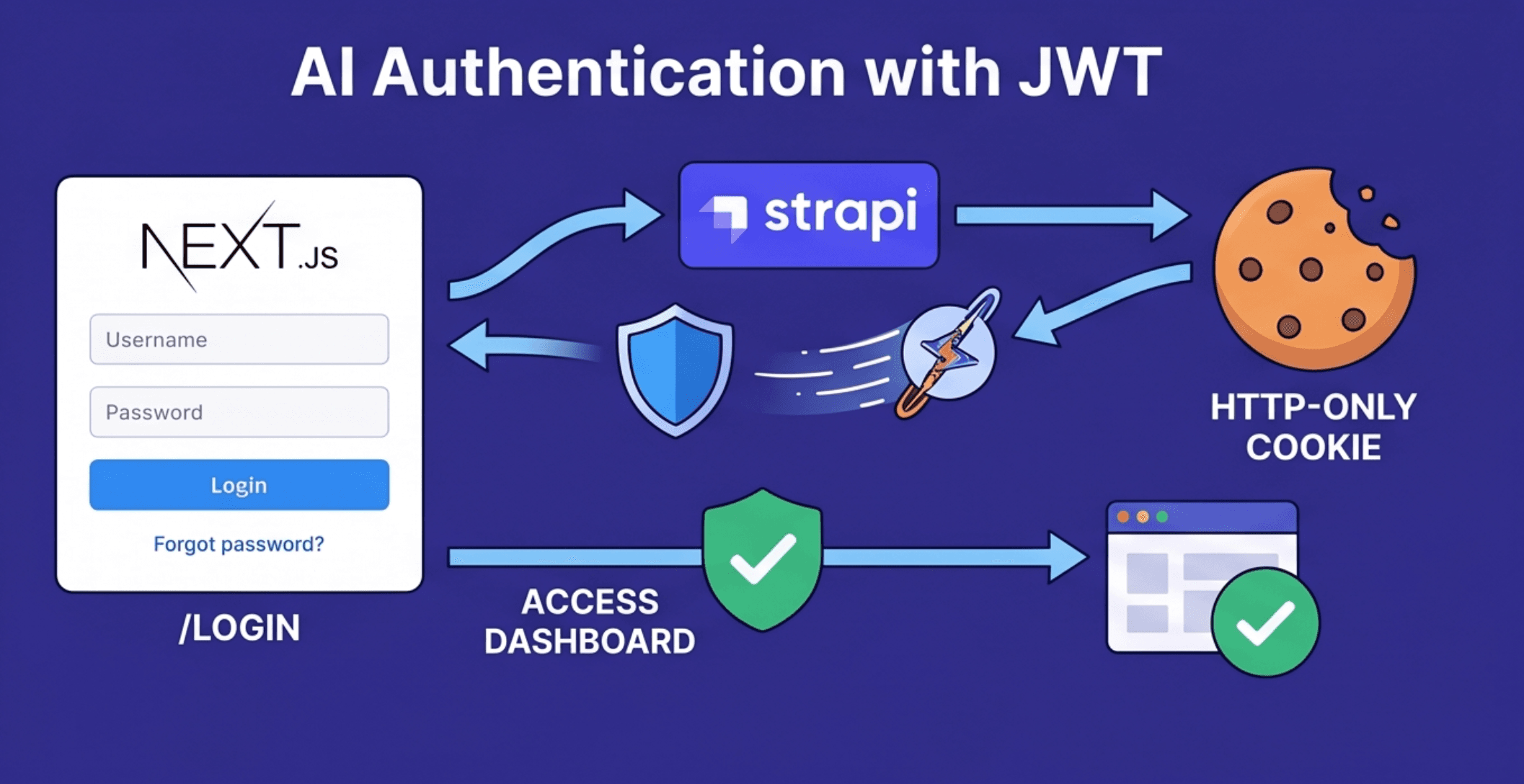
The Next.js side wraps this in a small API layer. The video walks through a handful of helpers, all backed by a shared strappyFetch function:
registerWithStrappycalls the/api/registerendpoint to create a new user.loginWithStrappyauthenticates an existing user against/api/login.fetchCurrentUserretrieves the logged-in user's data using the JWT.
Each of these is mirrored by a Next.js API route (/api/register, /api/login, /api/logout) that handles the server-side flow.
One detail worth copying: on successful login or registration, the API route stores the JWT in an HTTP-only cookie, not in localStorage. An HTTP-only cookie cannot be read by JavaScript running on the page, so a third-party script (an analytics tag, an injected ad, a malicious dependency) cannot steal the token. localStorage gives you no such protection.
The app also uses a requireAuth() helper in the layout to enforce protected routes. Two things happen automatically:
- Users without a valid session who try to hit
/dashboardare redirected to/login. - Logged-in users who try to hit
/loginor/registerare redirected to/dashboard.
Small detail, often forgotten, and very annoying when missing.
The AI features: three patterns worth knowing
With the backend and auth in place, the dashboard ties together chat, image, and video generation. These are the three features most AI SaaS products will need at some point, and the interesting thing is that each of them teaches a slightly different backend pattern.
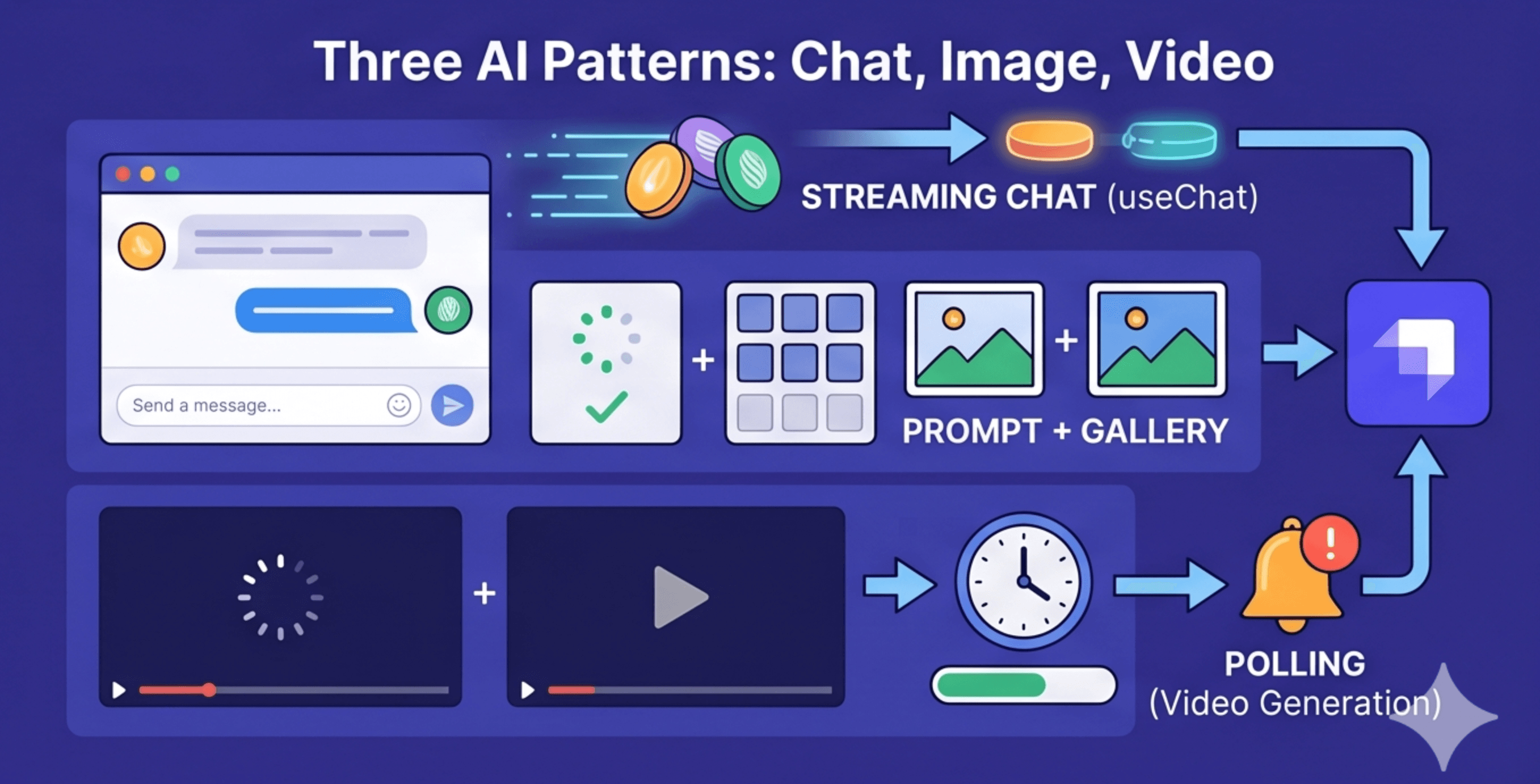
Chat: streaming, not request/response
The chat module is not a send-message-wait-render loop. It uses the AI SDK with Google Gemini and streams the response back to the client in chunks. On the frontend, the @ai-sdk/react package's useChat hook handles the streaming lifecycle. Tokens render as they arrive, the way ChatGPT does it. The user doesn't sit on a loading spinner.
The persistence flow on the backend is worth pulling out, and it's where the headless CMS really pays off:
- The backend first checks the user is authenticated and that the message is valid.
- It looks up the conversation by
conversationId. If one doesn't exist, it creates a new one. - The user's message is saved to Strapi immediately.
- The AI SDK calls Gemini and starts streaming the response back to the client.
- The assistant's full message is saved to Strapi only after the stream finishes.
Step 5 is the one to copy. If you save partial chunks as they come in, a stream error halfway through leaves you with half a reply in the database. Wait for the complete response, then write once.
Image generation: prompts plus a gallery
The image module is structurally simpler than chat, but it adds a piece chat doesn't have: a gallery of past generations.
A new Image collection in Strapi stores the prompt, the generated image URL, and the user it belongs to. The flow:
- The frontend sends a prompt and an
aspectRatio(1:1, 16:9, and so on). - The backend calls Gemini through a
generateImagehelper. - The resulting file is saved locally in the public folder.
- A Strapi record links the prompt to the saved image and the user.
On the frontend, a handleGenerate function manages the loading state and displays the new image when it arrives. A dedicated /api/images endpoint returns the user's past generations, and the UI renders them as a gallery alongside the prompt input.
The gallery is the design choice that matters. Without it, the feature feels like a one-shot tool. With it, the feature feels like a workspace — which is the difference between a demo and an AI SaaS people actually pay for.
Video generation: now you need polling
Video changes the shape of the backend call. Generation takes long enough that you cannot just await the API and return a response. The HTTP request would time out, or the user would stare at a spinner for thirty seconds with no feedback.
The fix is polling. The backend kicks off the generation job, gets back a job ID, then checks the API status every ten seconds until the video is ready or a timeout hits. Only then does it return the final video URL.
The Strapi side gets a Video collection that mirrors the Image one: prompt, URL, user relation. The frontend adds a duration picker (4, 6, or 8 seconds) so the user can pick how long the generated clip should be. The render layer swaps the <img> tag for a <video> tag. Everything else stays the same as the image flow.
That last point is worth pausing on. The image and video flows are nearly identical because the architecture was set up consistently the first time. When the backend pattern is clean, adding a new AI capability is a small extension, not a rebuild — which is exactly the property you want when shipping AI SaaS features on a tight cadence.
A scalable AI SaaS development blueprint
The architecture the tutorial walks through is modular by design. Each layer has a clear job:
- Control the backend with a headless CMS like Strapi. Data models, auth, permissions, and the admin UI all live in one place you understand and can extend.
- Build the frontend with Next.js and Shadcn UI. Component-based, fast to iterate, easy to regenerate pieces of with AI when you want.
- Integrate AI through the AI SDK. One integration point for whichever generative models you call, whether that's Gemini for text, images, and video, or something else later.
That split is what makes an AI SaaS build scale. You can swap Gemini for another model without touching auth. You can add a mobile client without rewriting your data layer. You can give an AI agent scoped API access without exposing the whole system. The headless CMS keeps the data contract stable while everything around it evolves.
The frontend can be generated. The backend has to be designed. This tutorial is a solid template for getting the second half right, so the first half can move as fast as the tools allow.
Citations
- Learn to build AI SAAS with strapi powered reliable backend (Hitesh Choudhary): https://youtube.com/watch?v=4HaFaYMbal0