Integrating AI agents with your existing toolset shouldn't require complex custom code for every tool combination. This challenge affects developers building content systems: coordinating CMS integrations, editorial workflows, publishing pipelines, or content analytics across evolving tool ecosystems. Integration complexity scales at O(n²), where each tool potentially requires custom code to interact with every other tool.
MCP standardizes how agents communicate with tools. Building on JSON-RPC 2.0 and extending it with stateful session management, MCP provides a unified protocol for how AI agents discover capabilities, exchange context, and invoke tools across your stack.
MCP standardizes agent-tool communication, similar to how HTTP standardized web interactions. Choosing infrastructure that supports protocol-based agent coordination becomes critical for building AI-powered systems that adapt as requirements evolve.
In brief:
- MCP uses a three-tier architecture (hosts, clients, servers) with standardized messaging.
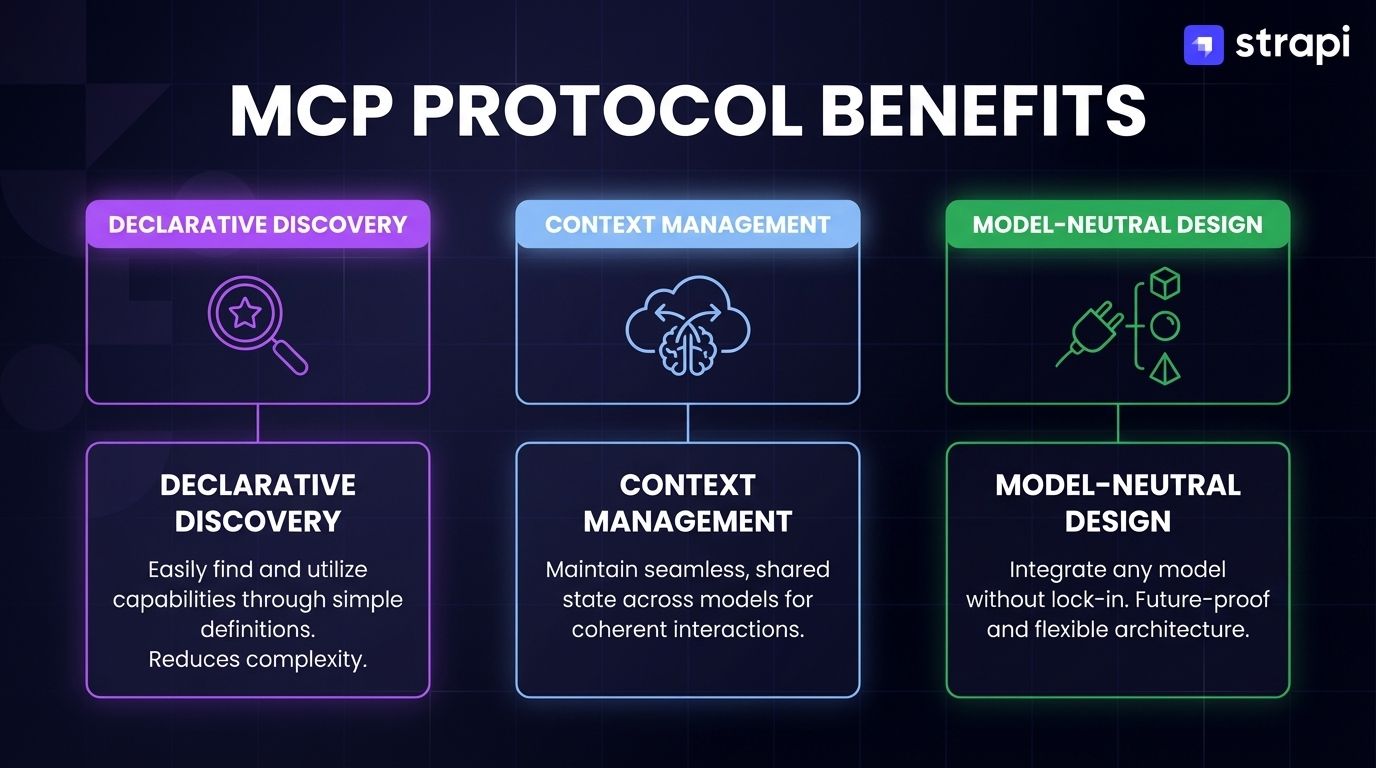
- The protocol addresses SDK sprawl through declarative capability discovery, automatic context management, and model-neutral design across Claude, GPT, Gemini, and other LLMs.
- Multi-agent coordination benefits from MCP's stateful sessions, structured context sharing, and OAuth 2.1-compliant access control for enterprise deployments.
- Production implementations exist for content automation pipelines, with TypeScript and Python SDKs.
What Is MCP(Model Context Protocol)?
The Model Context Protocol (MCP) is an open standard that defines how AI agents communicate with external tools through a three-tier client-server architecture.
MCP provides a unified protocol specification for connecting AI models to data sources, tools, and services, enabling agents to discover capabilities, exchange context, and invoke operations across diverse systems. This architecture consists of three distinct components:
- Hosts embed AI capabilities (like Claude Desktop or VS Code)
- Clients handle protocol communication
- Servers expose tools, resources, and prompts
Each client maintains a 1:1 bidirectional connection with a single server, though hosts can manage multiple clients for multi-service integration.
MCP's three core primitives enable declarative discovery of agent capabilities.
- Tools represent executable functions like database queries or API calls that agents can dynamically invoke.
- Resources provide structured data access including file contents, API responses, or database records.
- Prompts define reusable templates for consistent agent behavior across operations.
Key MCP Design Principles
MCP's architecture rests on three foundational principles that enable reliable agent-tool coordination. These design choices address the core challenges of building scalable multi-agent systems.
- Protocol Standardization: Uniform message formats enable runtime tool discovery without code changes.
- Model-Neutral Design: The protocol works with any LLM (Claude, GPT, Gemini, LLaMA) without vendor-specific dependencies.
- Stateful Context Management: Maintaining context across multi-turn interactions reduces redundant data exchange and enables efficient multi-tool workflows.
The Pain MCP Solves for Developers
SDK sprawl creates O(n²) integration complexity, where each tool potentially requires custom code to interact with every other tool. Most teams learn this the hard way: you start with two integrations that feel manageable, then add a third tool, and suddenly you're maintaining six connection points.
This challenge affects teams building content systems that must integrate CMS platforms, SEO tools, analytics services, and publishing workflows across constantly evolving tool ecosystems.
MCP addresses this through several key mechanisms:
- Single protocol interface: Write one MCP server per tool rather than custom integration code for every tool combination
- Automatic context propagation: Context flows between tools without manual serialization logic
- Protocol-level authentication: OAuth 2.0 integrates at the protocol layer, reducing per-tool authentication work
- Runtime tool discovery: Agents query available capabilities without code changes
These mechanisms reduce the complexity of building multi-tool workflows and eliminate the need for custom integration code between every tool pair.
How Does MCP Power Agentic Intelligence?
MCP's standardized protocol enables AI agents to coordinate complex workflows across multiple tools and services.
The Role of AI Agents in Modern Systems
Modern agents require reliable access to three core components: tools (database queries, API calls, code execution), memory systems (context across sessions), and environment context (schema information, authentication state, resource availability).
MCP serves as the standardized protocol agents use to communicate with external components through a three-tier client-server architecture. Agents discover available capabilities through dynamic runtime queries, invoke tools with structured JSON Schema parameters, and maintain context through session-oriented state management.
Coordinating Multi-Agent Workflows
Multi-agent systems require coordination mechanisms that scale beyond simple tool invocation. Research workflows demonstrate performance improvements in enterprise knowledge management and distributed problem-solving when agents can discover each other's capabilities and coordinate actions through structured protocols.
Academic research emphasizes MCP's flexible plug-and-play architecture through several key capabilities:
- Runtime capability discovery: Query server capabilities without reconfiguration
- Dynamic tool composition: Compose tool chains based on current availability
- Adaptive coordination: Adjust to changing availability without manual intervention
These capabilities enable agents to work together without hard-coded dependencies or brittle integration layers.
Enabling Long-Term and Multi-Step Reasoning
MCP supports complex multi-step workflows through standardized message formats and context preservation. The bidirectional communication model allows agents to query available tools, receive structured responses, and maintain context without custom serialization code.
A content automation pipeline queries SEO keyword research through one MCP server, fetches existing content drafts from another, updates content with improvements, and triggers publishing workflows. MCP maintains context across these operations through persistent client-server connections and structured context retrieval.
Predictable state transitions make agents more reliable and auditable. Studies on agent design identify accountability as critical for reliable systems. MCP's structured message format enables comprehensive logging: every tool invocation includes request parameters, response data, and execution metadata.
Why Are AI Content Agents Early Adopters?
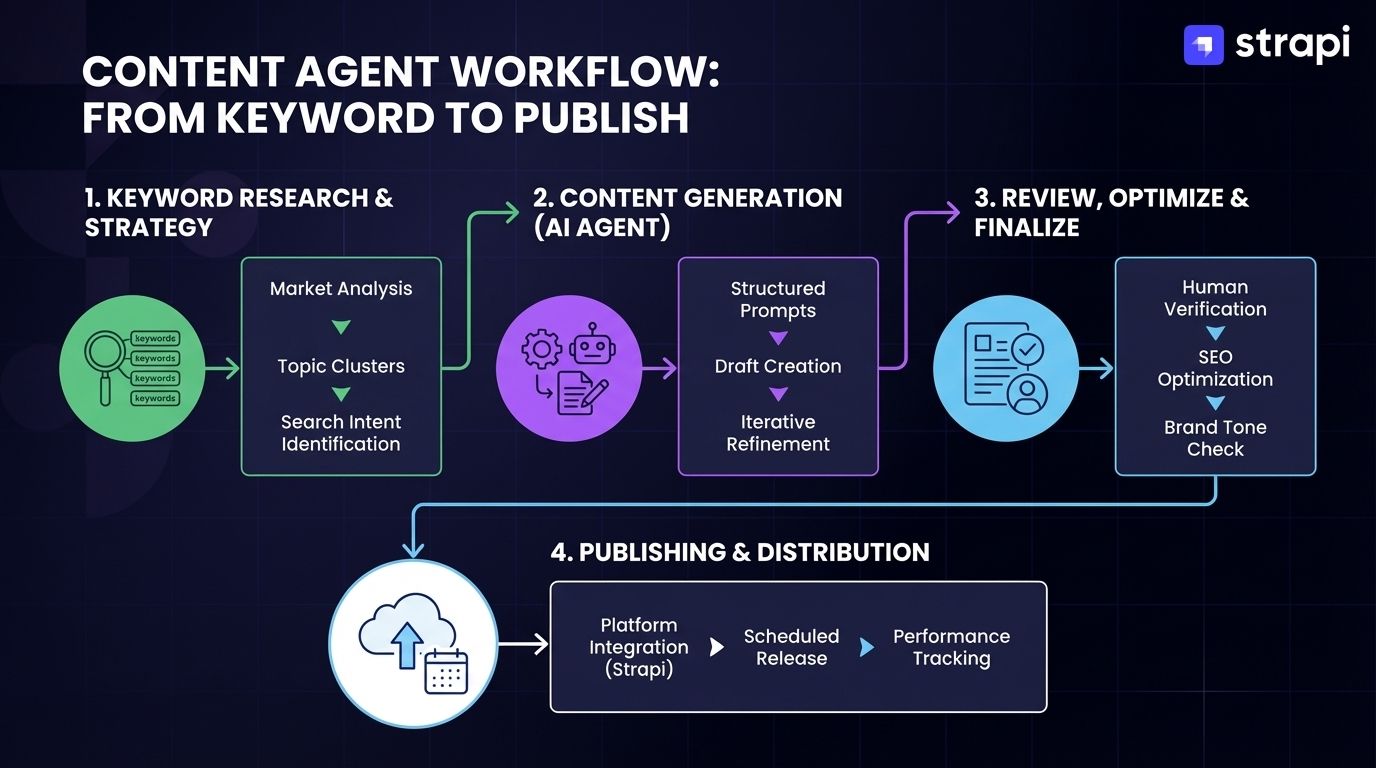
Content operations demonstrate MCP's practical value through real-world implementations that solve integration challenges teams face daily. The following case study examines how content agents leverage MCP to coordinate editorial workflows, SEO optimization, and publishing pipelines without the brittle custom integrations that plagued pre-protocol approaches.
The Rise of AI Content Agents
AI Content agents represent AI systems that plan, generate, and refine content autonomously rather than simply responding to generation prompts. These systems exhibit agentic characteristics: they initiate content planning based on analytics, adapt strategies when performance metrics shift, and coordinate multiple tools without constant human intervention.
AI Content agents provide value for editorial operations where content planning, SEO optimization, and multi-channel publishing require constant coordination.
Teams building content applications prioritize headless CMS architectures with protocol-based agent integration: systems that expose structured content data, editorial workflows, and publishing operations through standardized APIs that agents can discover and orchestrate autonomously.
Marketing pipeline implementations combine content strategy planning, draft generation, SEO optimization, and publishing workflows through coordinated MCP tool invocations.
An MCP-based agent coordinator manages multiple specialized servers (SEO analysis tools, content management systems, and analytics integrations) while maintaining persistent context across multi-turn interactions.
The Pre-MCP Challenge
Before MCP, content teams navigated integration chaos across fragmented tooling ecosystems. Each content operation required SDK-specific implementations:
- Proprietary CMS APIs for publishing operations
- Vendor-specific SDKs for structured content management
- GraphQL clients for headless CMS access
- Specialized libraries for SEO analysis tools
Teams managed separate authentication schemes across platforms. This is where scope creep comes back to haunt you. A simple content update that should take minutes turns into an afternoon of debugging authentication flows across three different systems.
Context from keyword research tools couldn't automatically flow to content drafts without custom serialization logic. Developers wrote translation layers to convert SEO recommendations into CMS-compatible formats, then built separate pipelines to propagate changes to publishing workflows.
This resulted in brittle automation chains where a single API change could cascade failures across entire content operations.
How MCP Simplifies the Stack
Consider a concrete workflow: drafting and optimizing a blog post. The agent invokes keyword_research() through the SEO server, queries list_content_types() to understand schemas, calls create_content() with the draft, then invokes analyze_seo(). The protocol handles context propagation automatically; developers don't write serialization code between operations.
How Do You Build an MCP Server for Strapi?
Building an MCP server for Strapi transforms a headless CMS into a protocol-native tool that agents can discover and invoke without custom integration code. This section walks through the implementation pattern, from exposing content-type schemas as MCP resources to handling tool invocations with proper authentication and error handling.
Why Strapi and MCP?
Strapi 5 provides a headless Content Management System (CMS) with API-first architecture suitable for building AI-powered systems.
For developers building content systems, Strapi's unified API provides structured content modeling: its content-type system handles articles, media assets, and structured data with consistent schemas designed for integration with various applications, including AI agents after appropriate setup.
The REST API and GraphQL plugin provide programmatic access AI agents require, while the Document Service abstracts database operations into a consistent interface regardless of underlying storage.
MCP connects AI content agents to Strapi's structured API layer through standardized tool definitions. Instead of writing custom code that calls Strapi's REST endpoints directly, you build an MCP server that exposes content operations as protocol tools. This abstraction provides:
- Capability discovery: Runtime tool enumeration without hardcoded dependencies
- Tool-based CRUD operations: Standardized content manipulation across all content types
- Session-oriented context management: Preserved state across multi-turn interactions
Implementation Overview
Start by exposing Strapi content-type schemas through MCP resources. Programmatically enumerate available content types, extract their field definitions and validation rules using Strapi's Document Service API, and map these to MCP resource definitions with URIs like strapi://content-type/article. This enables agents to discover your content structure dynamically.
Each Strapi endpoint maps to a corresponding MCP tool capability for CRUD operations. The REST API's POST /api/articles becomes an MCP tool named create_content.
Similarly, GET /api/articles/{documentId} maps to get_content, PUT /api/articles/{documentId} becomes update_content, and DELETE /api/articles/{documentId} maps to delete_content. Each tool definition includes a JSON Schema describing required parameters (content type, title, body, metadata).
You write handlers for the Strapi MCP Server integration using TypeScript. In this pattern, ListToolsRequestSchema returns your available operations, and CallToolRequestSchema executes the actual Strapi API calls—with authentication managed by API tokens and errors mapped to MCP's format. This is specific to the Strapi MCP server integration, not the official Strapi TypeScript SDK.
The workflow follows this sequence: An AI content agent queries available content types and schemas via MCP, receiving structured information about content-type definitions. It analyzes requirements and determines that it needs to create an article.
The agent invokes the create_content tool with parameters matching Strapi's content-type schema. The MCP server validates input against the schema, calls Strapi's REST API, and returns the created content's documentId. The agent can then invoke update_content or publish_content tools, with MCP maintaining context about which content item it's manipulating.
Example Setup Snippet
Here's a minimal MCP server exposing Strapi content operations:
import { Server } from "@modelcontextprotocol/sdk/server/index.js";
import { StdioServerTransport } from "@modelcontextprotocol/sdk/server/stdio.js";
import {
  CallToolRequestSchema,
  ListToolsRequestSchema,
} from "@modelcontextprotocol/sdk/types.js";

const STRAPI_URL = process.env.STRAPI_URL || "http://localhost:1337";
const STRAPI_TOKEN = process.env.STRAPI_TOKEN;

const server = new Server(
  { name: "strapi-mcp-server", version: "1.0.0" },
  { capabilities: { tools: {} } }
);

// Define available tools
server.setRequestHandler(ListToolsRequestSchema, async () => ({
  tools: [
    {
      name: "create_content",
      description: "Creates a new content item in Strapi CMS",
      inputSchema: {
        type: "object",
        properties: {
          contentType: { type: "string", description: "Content type" },
          title: { type: "string", description: "Content title" },
          body: { type: "string", description: "Content body" },
          status: {
            type: "string",
            enum: ["draft", "published"],
            description: "Publication status"
          }
        },
        required: ["contentType", "title", "body"]
      }
    },
    {
      name: "update_content_status",
      description: "Updates the publication status of content",
      inputSchema: {
        type: "object",
        properties: {
          documentId: { type: "string", description: "Content document ID" },
          contentType: { type: "string", description: "Content type" },
          status: {
            type: "string",
            enum: ["draft", "published", "archived"],
            description: "New publication status"
          }
        },
        required: ["documentId", "contentType", "status"]
      }
    }
  ]
}));

// Handle tool execution
server.setRequestHandler(CallToolRequestSchema, async (request) => {
  const { name, arguments: args } = request.params;

  try {
    if (name === "create_content") {
      const response = await fetch(`${STRAPI_URL}/api/${args.contentType}`, {
        method: "POST",
        headers: {
          "Authorization": `Bearer ${STRAPI_TOKEN}`,
          "Content-Type": "application/json"
        },
        body: JSON.stringify({ data: args })
      });

      if (!response.ok) {
        throw new Error(`Failed to create content: ${response.statusText}`);
      }

      const data = await response.json();
      return {
        content: [{
          type: "text",
          text: JSON.stringify(data, null, 2)
        }]
      };
    }

    if (name === "update_content_status") {
      const response = await fetch(
        `${STRAPI_URL}/api/${args.contentType}/${args.documentId}`,
        {
          method: "PUT",
          headers: {
            "Authorization": `Bearer ${STRAPI_TOKEN}`,
            "Content-Type": "application/json"
          },
          body: JSON.stringify({ data: { status: args.status } })
        }
      );

      if (!response.ok) {
        throw new Error(`Failed to update status: ${response.statusText}`);
      }

      const data = await response.json();
      return {
        content: [{
          type: "text",
          text: JSON.stringify(data, null, 2)
        }]
      };
    }

    throw new Error(`Unknown tool: ${name}`);

  } catch (error) {
    return {
      content: [{
        type: "text",
        text: JSON.stringify({
          error: "INTERNAL_ERROR",
          message: error instanceof Error ? error.message : "An unexpected error occurred"
        })
      }],
      isError: true
    };
  }
});

// Start server
async function main() {
  const transport = new StdioServerTransport();
  await server.connect(transport);
  console.error("CMS MCP server running on stdio");
}

main();
Configure the server in Claude Desktop:
{
  "mcpServers": {
    "strapi": {
      "command": "node",
      "args": ["/path/to/strapi-mcp-server/index.js"],
      "env": {
        "STRAPI_URL": "https://your-strapi-instance.com",
        "STRAPI_TOKEN": "${STRAPI_API_TOKEN}"
      }
    }
  }
}
The AI agent now discovers Strapi capabilities through protocol queries, invokes content operations as standardized tools, and maintains context across multi-step workflows without custom integration code for each operation.
The Protocol Era of AI Agents
MCP transforms isolated AI tools into interoperable, context-aware agents through standardized communication. Protocol-based coordination reduces complexity, improves reliability, and enables architectural flexibility impossible with SDK sprawl.
Key capabilities for evaluating integration approaches:
- Declarative discovery: Agents query tools at runtime without code changes
- Automatic context management: Preserves semantic meaning across interactions
- Model-neutral design: Compatible with Claudxe, GPT, Gemini, and other LLMs
For AI-driven content applications, Strapi provides the API-first architecture and extensible plugins protocol-based agents require. Its Document Service abstracts database complexity while content-types map directly to MCP tools—enabling autonomous operations that adapt as requirements evolve.