

Introduction
Route handlers in Next.js 13.2+ provide a cleaner, platform-native alternative to legacy API Routes. They use the standard Request and Response Web APIs and make it easy to build server-side logic and REST endpoints with familiar HTTP methods like GET, POST, PUT, and DELETE.
Beyond simple CRUD, route handlers are ideal for tasks that don’t belong in React components, such as file generation, data transformation, proxying, and other backend-for-frontend responsibilities.
This article walks through 3 production-ready use cases that show how to apply route handlers effectively in real Next.js applications.
Why Use Next.js Route Handlers?
Route handlers are ideal whenever your application needs server-side logic that sits outside the React rendering lifecycle. In practice, they’re a great fit for:
- Shared API logic with Higher-Order Functions (HOFs): Apply logging, validation, authorization, or context forwarding across multiple REST endpoints without repeating code.
- Backend responsibilities without a backend server: Route handlers can perform tasks such as:
- Generating downloadable files (CSV, PDFs, exports)
- Transforming or aggregating data
- Proxying or forwarding requests
- Streaming responses from LLMs
- Handling third-party webhooks
These patterns become increasingly powerful as your application grows and your API endpoints take on backend-for-frontend duties.
Project Overview
For this walkthrough, we start with a Next.js 16 dashboard application based on the current official App Router tutorial.
The project has been extended with:
- A Strapi backend providing invoice and customer data
- A JSON REST API built entirely through App Router route handlers
Throughout the article, you'll build 3 advanced server-side capabilities:
- CSV export route: Generate downloadable invoice data directly from a route handler.
- Locale-aware currency conversion route: Transform data using live exchange rates, plus a proxy that redirects based on the client’s IP.
- Redirect management system: A middleware powered by Vercel Edge Config and a dedicated route handler for efficient redirect lookups.
By the end, you'll see how route handlers can cleanly encapsulate backend logic without needing a separate API service.
Prerequisites
This guide assumes you’re comfortable working with:
- React’s
page.ts|jsfiles in the Next.js 16 App Router - REST endpoints using standard HTTP verbs (GET, POST, PUT, DELETE).
Vercel Edge Config
Two of the examples rely on Vercel Edge Config, so it's helpful to be familiar with:
- Create an Edge Config store
- Connect it to your Vercel project
- Pull configuration values locally using
vercel env pull - The
@vercel/edge-configSDK for accessing config values in route handlers
System / Environment Requirements
To follow along after forking the starter repository, you’ll need:
- The latest version of Node.js
- npm or pnpm
- A cloned or scaffolded version of the example app:
npx create-next-app --example https://github.com/anewman15/nextjs-route-handlers/tree/prepareThe Starter Code — A Typical JSON API Built with Next.js 16 Route Handlers
The starter code for the example Next.js 16 app router API application is available in the prepare branch here. It has a similar-looking dashboard application with customers and invoices resources as the original Next.js tutorial. Some features have been discarded for brevity, focusing on the topics of this post.
For demonstration purposes, the base invoices REST endpoints are already implemented in this branch. You’ll expand on these throughout the article as you build more advanced functionality.
To get the project running locally:
- Bootstrap the starter project
npx create-next-app --example https://github.com/anewman15/nextjs-route-handlers/tree/prepare- CD into the
appdirectory and install dependencies
npm i- Start the development server:
npm run dev- Visit
http://localhost:3000/dashboard. You’ll see the classic Next.js dashboard with routes for:
/dashboard/dashboard/invoices/dashboard/customers
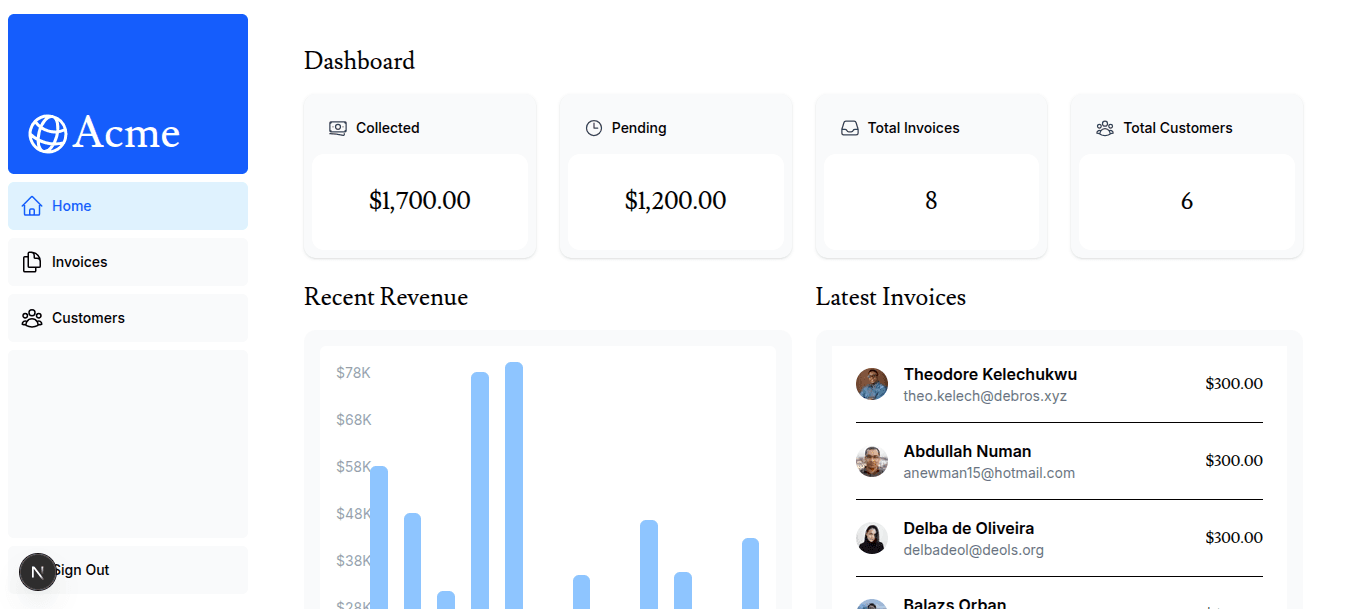
This dashboard fetches resources from a Strapi backend hosted at: https://proud-acoustics-2ed8c6b135.strapiapp.com/api.
Because the data comes from a cloud-hosted CMS, you’ll need an active internet connection as you follow along.
The examples in this article assume you are working from the prepare branch.
The fully completed project lives in the main branch if you want to inspect the final implementation.
Next.js Route Handlers for JSON REST APIs
The starter code makes heavy use of route handlers (route.ts) to implement its REST API. This aligns with the recommended pattern in the App Router: each nested segment can define its own API surface using exported HTTP method functions, such as:
GETPOSTPUTDELETE
Example: Collection Endpoint: We will use a GET() and a POST() handler for invoices endpoints at the /api/v2/invoices/(locales)/en-us routing level:
// Path: app/api/v2/invoices/(locales)/en-us/route.ts

import { NextRequest, NextResponse } from "next/server";
import { invoices } from "@/app/lib/strapi/strapiClient";

export async function GET() {

  try {
    const allInvoices = await invoices.find();

    return NextResponse.json(allInvoices);
  } catch (e: any ){
    return NextResponse.json(e, { status: 500 });
  }
};

export async function POST(request: NextRequest) {
  const formData = await request.json();

  try {
    const createdInvoice = await invoices.create(formData);

    return NextResponse.json(createdInvoice);
  } catch (e: any){

    return NextResponse.json(e, { status: 500 });
  };
};
As it goes with React views in the page.ts file, we can use dynamic route segments to define endpoints for an individual item (invoices item in this case) with its :ids.
Example: Single-Item Endpoint: So, we have a route handler at /api/v2/invoices/(locales)/en-us/[id]. For this segment, we have a GET(), a PUT() and a DELETE() handler in the route.ts file:
// Path: app/api/v2/invoices/(locales)/en-us/[id]/route.ts

import { NextRequest, NextResponse } from "next/server";
import { invoices } from "@/app/lib/strapi/strapiClient";

export async function GET(
  request: NextRequest,
  { params }: { params: Promise<{ id: string }>}
) {
  const id = (await params).id;

  try {
    const invoice = await invoices.findOne(id);

    return NextResponse.json(invoice);
  } catch (e: any) {
    return NextResponse.json(e, { status: 500 });
  };
};

export async function PUT(
  request: NextRequest,
  { params }: { params: Promise<{ id: string }> }
) {

  const id = (await params).id;
  const formData = await request.json();

  try {
    const invoice = await invoices.update(id, formData);

    return NextResponse.json(invoice);
  } catch (e: any) {
    return NextResponse.json(e, { status: 500 });
  };
};

export async function DELETE(
  request: NextRequest,
  { params }: { params: Promise<{ id: string }> }
) {

  const id = (await params).id;

  try {
    const invoice = await invoices.delete(id);

    return NextResponse.json(invoice);
  } catch (e: any) {
    return NextResponse.json(e, { status: 500 });
  };
};
The Next.js 16 route.ts file facilitates hosting multiple REST API endpoints by allowing more than one handler/action export. So, for each action for an invoices item at /api/v2/invoices/(locales)/en-us/[id], we have:
- a
GET()handler that serves aninvoicesitem with:id, - a
PUT()handler that helps update aninvoicesitem with:id, - a
DELETE()handler that helps delete aninvoicesitem with:id.
NextRequest and NextResponse APIs in Next.js 16
Route handlers use NextRequest and NextResponse, which extend the native Web APIs (Request and Response) with features optimized for the Next.js runtime:
- Access to cookies and headers
- URL utilities
- Built-in JSON helpers
- Enhanced redirect and response handling
These abstractions make building REST endpoints in the App Router ergonomic and familiar.
Authentication & Middleware in the Next.js App Router
Authentication can be introduced at multiple layers in a Next.js App Router application:
- Sitewide auth — via OAuth, NextAuth.js, credentials, SSO, or JWT sessions
- Middleware-based authorization — using middleware.ts with matcher patterns for RBAC or LBAC
- Higher-order function (HOF) middleware — apply shared logic (auth, validation, logging) to groups of route handlers
- Service-specific SDKs — attach access tokens to requests for external services (e.g., Stripe, Strapi, Vercel APIs)
- Custom per-handler logic — manually adding headers inside individual route handlers, adding auth tokens to request headers from individual route handlers.
Example: Strapi Token Authentication
In our case above, we are handling the Strapi token authentication very granularly at every request with the strapiClient initialized in app/lib/strapi/strapiClient.ts:
// Path: app/lib/strapi/strapiClient.ts

import { strapi } from "@strapi/client";

const strapiClient = strapi({
  baseURL: process.env.NEXT_PUBLIC_API_URL!,
  auth: process.env.API_TOKEN_SALT,
});

export const revenues = strapiClient.collection("revenues");
export const invoices = strapiClient.collection("invoices");
export const customers = strapiClient.collection("customers");
This strapiClient sends the auth token as a header at every Strapi request, so in this case, there is no need for authorizing backend Strapi requests with a specialized/shared middleware.
Next.js 16 Route Handlers - 3 Advanced Use Cases
So far, we’ve used route handlers for relatively standard REST endpoints. But route handlers really shine when you start delegating heavier backend responsibilities to them.
Because they run on the server and are built on top of the Web Request/Response APIs, route handlers are a great fit for tasks like:
- Generating and streaming files (CSV, PDF, etc.)
- Aggregating or transforming data from multiple sources
- Implementing location- or locale-aware APIs
- Handling webhooks and callback URLs
- Acting as a backend-for-frontend layer without a separate API service
The trade-off is always cost vs performance: you want to keep serverless invocations efficient while still doing useful work at the edge of your app.
In the next sections, we’ll walk through three concrete, production-style use cases:
- A CSV download route for invoices
- A location-based proxy + currency conversion endpoint
- A redirect-management middleware backed by Vercel Edge Config and a dedicated route handler
Use Case 1: Implementing a File Download (CSV Export)
A classic pattern for route handlers is file generation: fetch data, transform it, and stream it back as a downloadable file.
In this example, we want to:
- Fetch all invoices from our Strapi backend
- Convert them to CSV
- Return the result as an
invoices.csvfile from a route handler
We’ll create a route at /api/v2/invoices/(locales)/en-us/csv:
// Path : ./app/api/v1/invoices/(locales)/en-us/csv.route.ts

import { json2csv } from "json-2-csv";
import { invoices } from "@/app/lib/strapi/strapiClient";

export async function GET() {

  const allInvoices = await invoices.find({
    populate: {
      customer: {
        fields: ["name", "email"],
      },
    },
  });

  const invoicesCSV = await json2csv(allInvoices?.data, {
    expandNestedObjects: true,
  });

  const fileBuffer = await Buffer.from(invoicesCSV as string, "utf8");

  const headers = new Headers();
  headers.append('Content-Disposition', 'attachment; filename="invoices.csv"');
  headers.append('Content-Type', "application/csv");

  return new Response(fileBuffer, {
    headers,
  });
};
Here’s what happens step-by-step:
invoices.find()fetches invoice data (including related customer info) from Strapi.json2csvconverts the JSON array into CSV.- We create a
Bufferfrom the CSV string. - We set headers so the browser treats the response as a file download.
- We return a raw
Responsecontaining the CSV buffer.
Now, any GET request to /api/v2/invoices/(locales)/en-us/csv returns a downloadable invoices.csv file.
In the UI, we simply wire a “Download as CSV” button on the /dashboard/invoices page to this endpoint:
This keeps file generation purely server-side, with a minimal surface in your React components.
Use Case 2: Location-Based Proxy + Data Transformation
For the second use case, we’ll combine:
- A data transformation route handler that converts invoice amounts from USD → EUR from Exchange Rates API
- A location-aware proxy route handler that redirects traffic based on the client’s country
This kind of pattern is useful when you want to serve region-specific views of the same underlying data.
Step 1: Currency Conversion Endpoint (/api/v2/invoices/(locales)/fr)
First, we create a route handler that:
- Fetches invoices in USD using
invoices.find() - Fetches live forex rates from the exchange rates provider
- Returns invoices with amounts converted to EUR using the
NextResponse
// Path: ./app/api/v2/invoices/(locales)/fr/route.ts

import { NextResponse } from "next/server";
import { invoices } from "@/app/lib/strapi/strapiClient";

export async function GET() {
  let invoicesInUSD;
  let USDRates;

  try {
    invoicesInUSD = await invoices.find({
      fields: ["date", "amount", "invoice_status"],
      populate: {
        customer: {
          fields: ["name", "email", "image_url"],
        },
      },
    });

    USDRates = (await (
      await fetch("https://open.er-api.com/v6/latest/USD"))
      .json()
    )?.rates?.EUR;

    const USDtoEURRate = USDRates || (0.86 as number);
    const invoicesJSON = await JSON.parse(JSON.stringify(invoicesInUSD?.data));

    const invoicesInEUR = await invoicesJSON.map((invoice: any) => ({
      date: invoice?.date,
      amount: USDtoEURRate * invoice?.amount,
      invoice_status: invoice?.invoice_status,
      customer: invoice?.customer,
    }));

    return NextResponse.json({ data: [...invoicesInEUR] });
  } catch (e: any) {
    return NextResponse.json(e, { status: 500 });
  };
};
Key points:
- All the “heavy” work — external API call + transformation — happens server-side.
- The client just consumes a clean JSON API with EUR amounts.
- You can swap out the forex provider or rate logic without touching any React code.
We are able to access this directly from the /api/v2/invoices/(locales)/fr endpoint. However, we want to implement a location-based proxy that redirects routing based on the request IP address. In particular, if the user is requesting /api/v1/invoices from an IP located in FR, we want to redirect them to /api/v2/invoices/(locales)/fr. Otherwise, we send the invoices as in v1.
Let's now add a location proxy route handler.
Step 2: Location-Based Proxy (/api/v1/invoices)
Next, we create a location-aware proxy route:
- If the request originates from France (FR), we redirect to the
/frendpoint. - Otherwise, we return the default invoices as-is.
// Path: app/api/v1/invoices/route.ts

import { NextRequest, NextResponse } from "next/server";
import { invoices } from "@/app/lib/strapi/strapiClient";

export async function GET(request: NextRequest) {
  const ip = (await request.headers.get("x-forwarded-for"))?.split(",")[0];
  // const ip = "51.158.36.186"; // FR based ip

  let allInvoices;
  let country = "FR";

  try {
    allInvoices = await invoices.find();
    country = (await (await fetch(`http://ip-api.com/json/${ip}`)).json())?.countryCode;

    if (country !== "FR") {
      return NextResponse.json(allInvoices);
    };

    return NextResponse.redirect(new URL("/api/v2/invoices/fr", request.url), {
      status: 302,
    });
  } catch (e: any) {
    return NextResponse.json(e, { status: 500 });
  };
};
Behavior:
- Non-French IPs hit
/api/v1/invoicesand receive the default USD dataset. - French IPs are transparently redirected to
/api/v2/invoices/fr, where amounts are converted to EUR.
This is a perfect example of route handlers acting as a focused, backend-for-frontend layer: regional logic lives in the API, not in your React components.
Use Case 3: Redirect Management with Middleware + Vercel Edge Config
For the final example, we’ll build a redirect management system that:
- Stores redirect rules in Vercel Edge Config
- Uses a dedicated route handler to fetch individual redirect entries
- Uses a middleware (in Next.js 16, proxy.ts) to decide whether to redirect a request
This pattern scales to thousands of redirects while keeping middleware fast and lightweight.
Step 1: Store Redirects in Edge Config
For the first step, we should add a redirects map to an Edge Config Store. Use this Vercel Edge Config guide to add a redirects map to Vercel Edge Config.
{
  "-api-v1-revenues": {
    "destination": "/api/v2/revenues/en-us",
    "permanent": false
  },
  "-api-v1-revenues-fr": {
    "destination": "/api/v2/revenues/en-us",
    "permanent": true
  },
  "-api-v1-revenues-de": {
    "destination": "/api/v2/revenues/en-us",
    "permanent": false
  }
}
Notes:
- Keys represent normalized request paths (e.g.,
/api/v1/revenues→-api-v1-revenues). - Values contain a destination and a permanent flag.
- Edge Config keys can only contain alphanumeric characters, -, and _.
Follow Vercel’s docs to:
- Create the Edge Config store
- Connect it to your project
- Use
vercel env pullto bring environment variables into your localenv.localfile
Step 2: Route Handler for a Single Redirect Item
Next, we expose a route handler that returns a single redirect entry from Edge Config.
This keeps the middleware simple; it doesn’t have to know how to talk to Edge Config directly.
// Path: app/api/redirects/[path]

import { NextRequest, NextResponse } from "next/server";
import { get } from "@vercel/edge-config";

export async function GET(
  request: NextRequest,
  { params }: { params: Promise<{ path: string }> }
) {
  try {
    const path = (await params)?.path;
    const redirectEntry = await get(path);

    return NextResponse.json(redirectEntry);
  } catch (e: any) {
    return NextResponse.json(e, { status: e.status });
  };
};
What this does:
- Reads the path parameter from the URL
- Uses get() from @vercel/edge-config to read the corresponding redirect entry
- Returns the entry as JSON
Step 3: Middleware to Apply Redirects Finally, we wire up a middleware that:
- Normalizes the incoming
pathnameinto a redirect key - Uses
edgeConfigHas()to quickly check if a redirect exists for that key - If it exists, fetches the full redirect entry from the route handler
- Redirects with
307or308depending on thepermanentflag
Add a proxy.ts (as opposed to middleware.ts, which is in version 15) file and use the following code:
// Path: proxy.ts

/* eslint-disable @typescript-eslint/no-explicit-any */
import { NextRequest, NextResponse } from "next/server";
import { has as edgeConfigHas } from "@vercel/edge-config";

export interface RedirectsEntry {
  destination: string;
  permanent: boolean;
};

export type RedirectsRecord = Record<string, RedirectsEntry>;

export async function proxy(request: NextRequest) {
  const pathname = request?.nextUrl?.pathname;
  const redirectKey = pathname?.split("/")?.join("-");

  try {
    const edgeRedirectsHasRedirectKey = await edgeConfigHas(redirectKey);

    if (edgeRedirectsHasRedirectKey) {
      const redirectApi = new URL(
        `/api/redirects/${redirectKey}`,
        request.nextUrl.origin
      );
      const redirectData = await fetch(redirectApi);

      const redirectEntry: RedirectsEntry | undefined =
        await redirectData?.json();
      const statusCode = redirectEntry?.permanent ? 308 : 307;

      return NextResponse.redirect(
        new URL(redirectEntry?.destination as string, request.nextUrl.origin),
        statusCode
      );
    }

    return NextResponse.next();
  } catch (e: any) {
    return NextResponse.json(e, { status: e.status });
  };
};

export const config = {
  matcher: ["/(api/v1/revenues*.*)"],
};
The whole point of a Next.js root middleware is to keep its operations lightweight so that it can make faster routing decisions.
- So, first, without much overload, we just reached out to Vercel Edge Config with
has()to quickly decide whether the redirect map has a key that represents the requested URLpathname. - We have to do some string gymnastics in the meantime to conform to Edge Config rules for naming Edge Config keys with alphanumeric characters,
-, and_. - If the key doesn't exist, our decision is to swiftly continue to the next step of the request cycle with
NextResponse.next(). So, this improves routing decisions on the spot.
On the other hand, if the redirects map has an item for the pathname being requested, we have additional things to do:
- Create a URL from the
pathnamethat represents a redirect URL key. - Send a
fetch()request to the redirects key endpoint we created above at/api/redirects/[path]for this redirect URL key. Get that redirect entry via the route handler dedicated to this URL key. - redirect the request to the
redirectEntry.destination.
So, here, we could have sent a get() request in the first place to Edge Config, but that would be a lengthy thing for the middleware to tackle -- particularly costly for a request that does not have a redirect URL. This becomes obvious when you have more and more entries in your redirects map.
Since has() is quicker and we have a route handler to tackle lengthy data fetching, we are choosing to keep our middleware performant. Essentially, for an efficient specialty middleware, we have handed off the otherwise slower yielding task of data fetching over to a route handler, which does it well in itself under the hood.
Other Advanced Route Handler Use Cases
Beyond the 3 examples above, Next.js 16 route handlers are a great fit for:
- Implementing draft mode with Next.js 16
draftModeAPIs, where third-party CMS data is accessed via a route handler. - Features A/B testing, where feature-related live user data is fetched through a route handler.
- Handling webhooks from third-party services like payment gateways, instrumentation tools, CMS content providers, and the like.
- Redirecting requests to a callback URL sent by third-party service workflows.
- Implementing mailers from fetched/aggregated data.
- Streaming responses from LLM models.
- Handling server-sent events via the SSE protocol.
Next.js 16 Route Handlers - Pitfalls & Best Practices
While route handlers bring a powerful backend-for-frontend model to the App Router, they also introduce important architectural considerations. To use them effectively, especially for non-trivial backend logic, you need to be aware of their runtime constraints and apply performance-friendly patterns.
Next.js Route Handler Limitations
Because Next.js deploys route handlers as serverless functions (Node or Edge runtimes), they come with inherent limitations:
- WebSockets cannot be used reliably due to connection timeouts.
- Shared state between requests is not guaranteed; execution is isolated and ephemeral.
- File-system writes may not work in serverless environments.
- Lengthy or blocking operations may be terminated due to execution time limits.
These constraints should guide how much work you push into a route handler and when to offload tasks elsewhere.
Advanced Next.js 16 Route Handlers Best Practices
Just like other aspects of Next.js 16, route handler best practices obviously involve making proper trade-offs between cost and performance.
Since Next.js route handlers are serverless and subject to timeouts, we need to make sure route handlers are implemented in such a way that optimizes persistent performance against the cost of the processes handled at the route.
To get consistent performance and predictable behavior, keep the following best practices in mind:
- Minimize long-running data transformations. Push heavy workloads to background jobs or external services whenever possible.
- Reduce the number of aggregated data sources. If you’re combining more than a few external APIs, consider a dedicated aggregator service.
- Use granular, specialized route handlers. Smaller handlers are easier to cache and revalidate using Next.js dynamic and revalidate configs.
- Apply scoped access control. Use middleware matchers, location-based or role-based strategies, or shared higher-order middleware to keep endpoints secure and performant.
- Leverage shared middleware for context forwarding. Keep route handlers focused and push repeated logic, like auth, logging, or header injection, into shared HOF middleware where possible.
Summary
In this post, we explored how Next.js 16 route handlers can power both standard and advanced server-side features within an App Router application. We began by reviewing how route handlers implement RESTful JSON APIs and then added a CSV file download endpoint built entirely in a route handler.
From there, we demonstrated how route handlers can take on more complex backend tasks, including a currency-conversion API backed by a location-aware proxy layer. We also implemented a redirect-management middleware using Vercel Edge Config and saw how a dedicated route handler improves performance by handling redirect lookups outside the middleware.
Finally, we touched on additional advanced use cases, along with the limitations and best practices to keep in mind when using route handlers for production workloads.