
Standard React performance advice assumes you control your data layer. CMS-driven sites face different failure modes: content queries that cascade into related content queries, flexible schemas that make overfetching easy, and cache invalidation that's either too aggressive or not aggressive enough.
These aren't edge cases. A product page that fetches its content, then its related products, then personalization rules, can easily add 400-600ms of sequential waiting before the first paint. That cost hits every page load. Strategic configuration of the populate and fields parameters reduces payload size by 320x (2.04 MB → 6.72 KB) and response time by 5x (801ms → 160ms), while properly structured components render this optimized data efficiently.
This guide covers six practices specific to Strapi + Next.js architectures, ordered by typical impact.
In brief:
- Configure Strapi's
populateandfieldsparameters to drastically reduce payload sizes and response times. - Restructure queries to fetch in parallel with
Promise.all, reducing total load time from the sum of all requests to the duration of the longest single request. - Implement webhook-based cache invalidation with Next.js revalidation tags to serve fresh content without rebuilding your entire site.
- Keep CMS data fetching in Server Components to avoid client-side request waterfalls that delay content until after JavaScript execution.
CMS Queries Compound Differently
 The flexibility that makes Strapi useful—relations, dynamic zones, nested components—also makes it easy to create request waterfalls and oversized payloads without noticing. A blog post component might fetch the article, wait for the response, then fetch the author based on that data, wait again, then fetch related articles. Each await blocks the next—creating delays that compound across your entire page load.
This compounds differently than performance problems in applications where you control the data schema. When your API returns exactly what your database query retrieves, adding a field costs one column.
When your CMS returns full objects by default—using wildcard population like populate=*—a single additional relation can dramatically inflate your payload. Strapi's official performance benchmarks show unoptimized wildcard population resulting in response payloads of 2.04 MB compared to carefully selected fields delivering just 6.72 KB, a 320x difference in payload size.
Optimize at the query layer first. Strategic configuration of the populate and fields parameters provides dramatic payload reduction and response time improvements, and properly structured components then render this optimized data efficiently.
Practice 1: Prevent Waterfalls from Content, Relations, and Personalization
Impact: Critical
The problem surfaces in page components: fetch main content, wait, fetch related content based on the response, wait, fetch personalization rules. Three sequential requests (1s + 3s + 5s) sum to 9 seconds total, compared to 5 seconds when executed in parallel—a 44% performance penalty that increases with each additional dependent query.
The async/await syntax makes sequential execution look clean:
async function getArticleData(slug) {
  const article = await fetch(`/api/articles?filters[slug][$eq]=${slug}`);
  const data = await article.json();

  const author = await fetch(`/api/authors/${data.data[0].author.id}`);
  const authorData = await author.json();

  const related = await fetch(`/api/articles?filters[category][$eq]=${data.data[0].category}`);
  const relatedData = await related.json();

  return { article: data, author: authorData, related: relatedData };
}
The Fix: Restructure Queries to Fetch in Parallel
Restructure queries with Strapi's populate parameter to pull relations in a single request. Move queries that don't depend on each other to parallel execution with Promise.all—parallel fetching reduces total load time to the duration of the longest request instead of summing all requests.
async function getArticleData(slug) {
  const [article, relatedArticles] = await Promise.all([
    fetch(`${STRAPI_URL}/api/articles?` + new URLSearchParams({
      'filters[slug][$eq]': slug,
      'fields[0]': 'title',
      'fields[1]': 'slug',
      'fields[2]': 'content',
      'populate[author][fields][0]': 'name',
      'populate[author][fields][1]': 'email',
      'populate[coverImage][fields][0]': 'url',
      'populate[category][fields][0]': 'name'
    }), {
      next: { revalidate: 3600 }
    }),

    fetch(`${STRAPI_URL}/api/articles?` + new URLSearchParams({
      'filters[featured][$eq]': 'true',
      'fields[0]': 'title',
      'fields[1]': 'slug',
      'populate[coverImage][fields][0]': 'url',
      'populate[coverImage][fields][1]': 'alternativeText',
      'pagination[limit]': '10'
    }), {
      next: { revalidate: 3600 }
    })
  ]);

  const [articleData, relatedData] = await Promise.all([
    article.json(),
    relatedArticles.json()
  ]);

  return { article: articleData.data[0], related: relatedData.data };
}
For queries with unavoidable dependencies, fetch the article first to get its category ID, then parallelize all category-dependent queries together at the next level. This two-stage approach minimizes waterfall depth.
Practice 2: Use Field Selection to Eliminate Payload Bloat
Impact: Critical
When using Strapi's wildcard populate parameter (populate=*), responses return full objects including all relations, media fields, components, and nested data. A blog listing that needs titles and slugs receives rich text content fields, complete image objects with multiple formats, and nested component data the template never renders.
Response size inflates, parsing time increases, and bandwidth consumption spikes. The browser downloads and JavaScript parses data that never reaches the DOM.
The Fix: Request Only What the Component Needs
Configure Strapi's populate and fields parameters explicitly to optimize data fetching. For GraphQL users, explore Strapi's GraphQL API documentation for similar optimization patterns—this happens naturally through query structure. REST API users need to be deliberate about requesting only the data they need, as Strapi doesn't populate relations, media fields, components, or dynamic zones by default.
// Returns 2.04 MB with unused rich text, media, timestamps
fetch('/api/articles?populate=*')

// Selective field fetching with explicit media population
fetch('/api/articles?' + new URLSearchParams({
  'fields[0]': 'title',
  'fields[1]': 'slug',
  'fields[2]': 'publishedAt',
  'populate[coverImage][fields][0]': 'url',
  'populate[coverImage][fields][1]': 'alternativeText'
}))
The second request delivers identical rendered output with 99.67% less data transfer.
For complex queries with multiple relation levels, leverage the qs library to build nested populate structures without manual URL encoding:
import qs from 'qs';

const query = qs.stringify({
  fields: ['title', 'slug'],
  populate: {
    author: {
      fields: ['name', 'slug'],
      populate: {
        avatar: { fields: ['url', 'alternativeText'] }
      }
    }
  }
}, { encodeValuesOnly: true });

fetch(`${STRAPI_URL}/api/articles?${query}`)
Critical limitation: the fields parameter doesn't work on relational fields, media, components, or dynamic zones. You must use explicit populate configuration to fetch these types of data.
Practice 3: Structure Content Types to Match Component Boundaries
 Impact: High
Content types designed for editorial convenience often require optimization for component data needs. Strapi's documentation emphasizes using explicit populate and fields parameters rather than wildcard approaches—the research shows dramatic payload reduction when properly implemented.
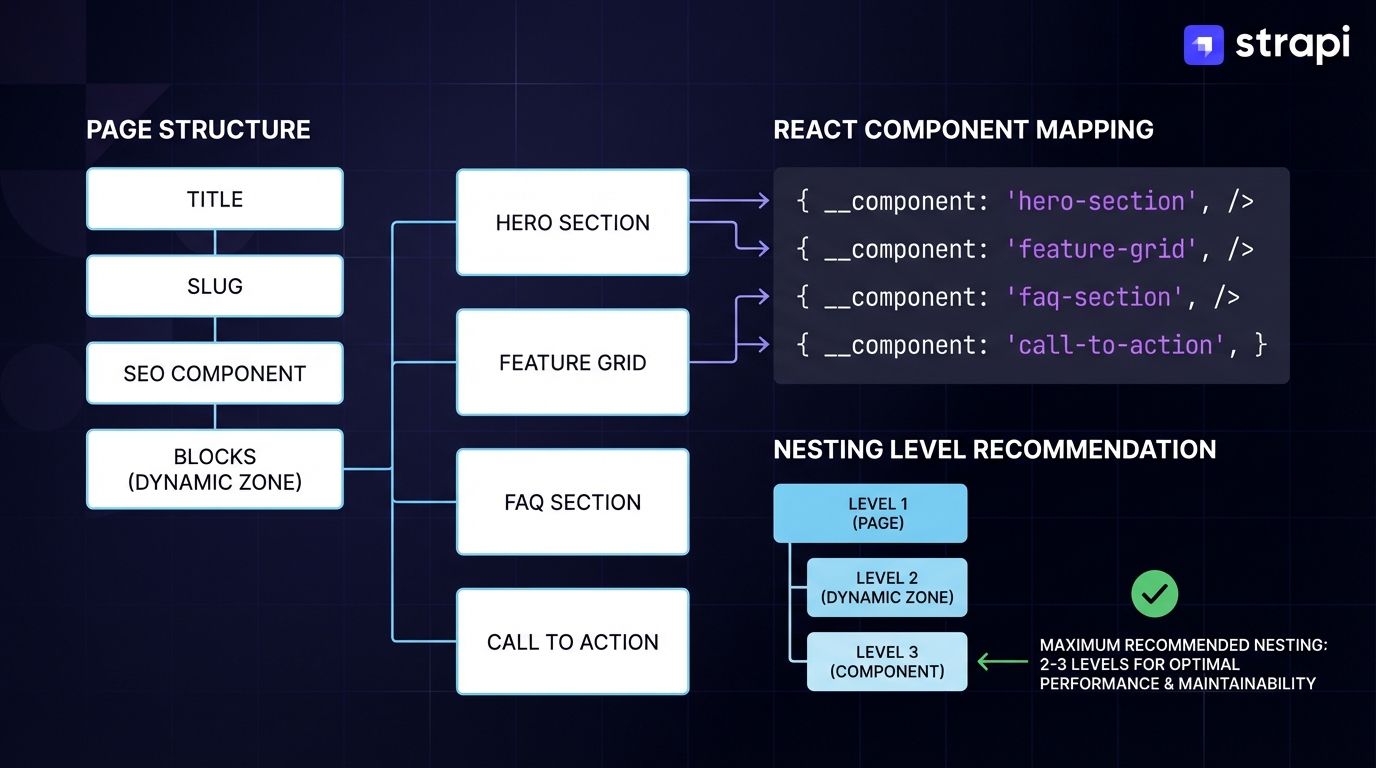
Additionally, components should be kept to 2-3 nesting levels maximum to avoid performance degradation. Instead of designing Page types with numerous optional sections returning full schemas on every query, developers should implement selective field fetching and explicit populate configuration so components receive only the data they need, preventing unnecessary prop filtering at runtime.
The Fix: Design Content Types with Consumption in Mind
Design content types with Strapi's components and dynamic zones to create focused, composable structures. For detailed guidance on content modeling, see Strapi's Content Manager documentation. When a content type serves multiple page types, consider splitting it:
Page {
  title,
  slug,
  seo (component),
  blocks (dynamic zone) {
    HeroSection (component),
    FeatureGrid (component),
    FaqSection (component),
    CallToAction (component)
  }
}
Each component in the dynamic zone contains only its required fields, and the API returns only components the editor added to that specific instance. Your React code uses a component map to match each component's __component identifier to its corresponding implementation:
const componentMap = {
  'blocks.hero-section': HeroSection,
  'blocks.feature-grid': FeaturesGrid,
  'blocks.faq-section': FaqSection,
  'blocks.call-to-action': CallToAction,
};

{page.blocks.map((block, index) => {
  const Component = componentMap[block.__component];
  return <Component key={index} {...block} />;
})}
This pattern enables flexible, layout-agnostic content management. The mapping pattern means editors can add, remove, or reorder page sections through Strapi's interface without requiring code changes.
When implementing this pattern, establish naming conventions that bridge CMS and code. If your React component expects a buttonText prop, name the Strapi field buttonText—not btn_text, button_label, or ctaText. This 1:1 mapping eliminates transformation layers and reduces maintenance overhead.
Teams that maintain separate naming conventions spend time writing and debugging mappers that translate CMS field names to component props. Direct alignment means your Strapi content can spread directly into your React components without intermediate transformation functions.
For complex components requiring validation or computed values, keep the transformation logic in a single utility layer rather than scattering it across component files. This creates a clear boundary between CMS data and presentation logic.
However, note that dynamic zones can't be nested inside other components, and performance degrades significantly with deeply nested structures (7+ nesting levels), so it's recommended to limit component nesting to 2-3 levels maximum.
Align your Strapi component structure with your React component library by ensuring field names match exactly. If your design system has a Card component, create a matching Strapi component with identical field names. This direct alignment allows props to flow from CMS to component without transformation, improving maintainability and reducing mapping errors.
Practice 4: Cache by Content Volatility, Not Page Type
Impact: High
Teams set cache policies by URL pattern: marketing pages get long cache times, product pages get short times. But a marketing page with a "trending products" component needs different handling than a static about page. The URL pattern doesn't tell you what content volatility exists on the page.
The Fix: Analyze Content Volatility at the Component Level
Leverage Next.js revalidation with Strapi webhooks to invalidate precisely when content changes. Learn more about webhook event types in Strapi's webhook reference. Static content gets long TTLs. Dynamic components revalidate on publish:
// app/api/revalidate/route.ts
import { NextRequest, NextResponse } from 'next/server';
import { revalidateTag } from 'next/cache';

export async function POST(request: NextRequest) {
  const secret = request.nextUrl.searchParams.get('secret');

  if (secret !== process.env.REVALIDATE_SECRET) {
    return NextResponse.json({ message: 'Invalid token' }, { status: 401 });
  }

  const { event, entry, model } = await request.json();

  if (model === 'article') {
    revalidateTag(`article-${entry.id}`);
    revalidateTag('articles');
  }

  return NextResponse.json({ revalidated: true });
}
Strapi webhooks fire when content changes, sending the entry data to your Next.js revalidation endpoint. Point the webhook at your API route (with a secret token for validation), subscribe to the entry events you care about (entry.create, entry.update, entry.publish), and your handler uses that data to invalidate affected cache tags.
Tag your fetches with content identifiers and configure webhook-triggered revalidation:
async function getArticle(slug: string) {
  const params = new URLSearchParams({
    'filters[slug][$eq]': slug,
    'fields[0]': 'title',
    'fields[1]': 'content',
    'fields[2]': 'publishedAt',
    'populate[author][fields][0]': 'name'
  });

  const res = await fetch(
    `${STRAPI_URL}/api/articles?${params.toString()}`,
    {
      next: {
        tags: [`article-${slug}`, 'articles'],
        revalidate: 3600
      }
    }
  );
  return res.json();
}
The revalidate parameter provides a time-based fallback interval for automatic cache refresh. The tags parameter enables precise, event-driven invalidation triggered by webhooks. When content changes and a webhook fires, affected cache tags invalidate immediately via revalidateTag().
When content doesn't change, the cache serves responses without hitting your origin server. Monitor your cache hit rates in production—a cache strategy that invalidates too frequently defeats the purpose; one that invalidates too rarely serves stale content to users.
Practice 5: Colocate CMS Queries with Server Components
Impact: Medium
Fetching CMS content in client components means the data round-trip happens after JavaScript loads and executes. The browser waits for the bundle to download, parses it, runs React, then starts the content request.
This sequential loading pattern creates a request waterfall that delays content from reaching users, a problem that Server Components help solve by enabling data fetching during server-side rendering instead of after client hydration.
This anti-pattern occurs when developers unnecessarily add 'use client' to React components that could execute on the server, forcing client-side rendering and losing benefits of Server Components like direct CMS data fetching, automatic request deduplication, and reduced bundle size.
'use client'
import { useEffect, useState } from 'react';

export default function Articles() {
  const [articles, setArticles] = useState([]);

  useEffect(() => {
    fetch('/api/articles').then(r => r.json()).then(setArticles);
  }, []);

  return articles.map(article => <ArticleCard key={article.id} {...article} />);
}
The Fix: Keep CMS Fetches in Next.js Server Components
Pass only the rendered result or minimal props to client components that need interactivity. Server components fetch data at request time (with configurable caching strategies) rather than relying on client-side hydration.
Reserve 'use client' for components with actual interactivity requirements: event handlers, browser APIs, state management.
CMS content fetching can be handled server-side with Next.js Server Components to avoid client-side JavaScript overhead, but interactive features like filtering, search, or dynamic updates within CMS-driven content require client-side rendering with the 'use client' directive.
When you need both server-fetched data and client interactivity, compose them:
async function ArticlesPage() {
  const res = await fetch(
    `${STRAPI_URL}/api/articles?fields[0]=title&fields[1]=slug&populate[coverImage][fields][0]=url`,
    { next: { revalidate: 3600 } }
  );
  const { data } = await res.json();
  const articles = data.map(article => article);

  return <InteractiveArticleList articles={articles} />;
}

'use client'
function InteractiveArticleList({ articles }) {
  const [filter, setFilter] = useState('');
  const filtered = articles.filter(a => a.title.includes(filter));

  return (
    <>
      <input value={filter} onChange={e => setFilter(e.target.value)} />
      {filtered.map(article => <ArticleCard key={article.id} {...article} />)}
    </>
  );
}
Data flows from Server Components to Client Components through props, with the server fetching data directly during render. Next.js automatically memoizes identical fetch requests within the same render pass, preventing redundant API calls.
The browser receives pre-rendered HTML with content already populated. Client Components then add interactivity, and JavaScript loads to enhance the UI—but content displays immediately without waiting for JavaScript execution.
This architecture enables optimized cache strategies: static caching with cache: 'force-cache', incremental revalidation with next: { revalidate: 3600 } for ISR patterns, or bypassing cache entirely with cache: 'no-store' for real-time content.
Practice 6: Normalize Repeated Entities to Prevent Re-Render Cascades
Impact: Medium
When the same entity appears multiple times in a CMS response—an author on multiple articles, a category on multiple posts—each instance arrives as a separate object. Updating the author's name doesn't update the other references. React sees different object identities and triggers re-renders across unrelated components.
This happens with Strapi's populated relations where the same author object gets duplicated across multiple articles in the response. Each duplication creates a new object reference, and React's shallow equality checks fail even when the data is logically identical.
The Fix: Normalize CMS Responses Before They Hit Component State
Normalize nested API response data into lookup tables indexed by entity IDs to prevent re-render cascades. This pattern, documented in Redux's normalization guidelines, ensures that React's shallow equality checks work efficiently—updating a single entity only triggers re-renders in components explicitly subscribed to that entity, rather than cascading re-renders through parent and sibling components.
Extract repeated entities into a lookup structure. Components reference by ID, and updates propagate correctly:
function normalizeArticles(response) {
  const articles = {};
  const authors = {};

  response.data.forEach(article => {
    const { author, ...articleData } = article;

    articles[article.id] = {
      ...articleData,
      authorId: author.data.id
    };

    authors[author.data.id] = author.data;
  });

  return { articles, authors };
}

function ArticleList({ articleIds, articles, authors }) {
  return articleIds.map(id => {
    const article = articles[id];
    const author = authors[article.authorId];
    return <ArticleCard key={id} article={article} author={author} />;
  });
}
This normalization pattern delivers the greatest benefit when the same entity appears multiple times in a single API response—for example, a popular author appearing on 20 articles in a blog listing, or a featured category appearing across dozens of products. Without normalization, updating that author's name requires changing 20 separate objects; with normalization, you update one entry in the authors lookup table.
The normalization pattern delivers compound performance benefits beyond preventing re-renders. When 20 articles reference the same author object without normalization, your application stores 20 separate copies of that author data in memory—duplicating the name, email, bio, and avatar URL 20 times.
Normalized storage maintains one author entry referenced 20 times, reducing memory consumption proportionally to the number of duplicates. This matters in listings with hundreds of items: a category page showing 100 products from 10 vendors stores 10 vendor objects instead of 100, and updating a vendor's featured status triggers re-renders only for components explicitly subscribed to that vendor, not for every product in the listing.
When the author updates, change one entry in the authors object. Components subscribed to that author through memoized selectors will re-render with the updated data. Components displaying articles only re-render if their specific props change. If you're using React.memo and selector memoization, they won't re-render unless the article data itself changed or they're directly subscribed to the author data being updated.
For applications using Redux, createEntityAdapter provides this normalization automatically with optimized selectors. For simpler state management, a normalization utility applied after fetch and before setState prevents the cascade.
Where to Start in Existing Projects
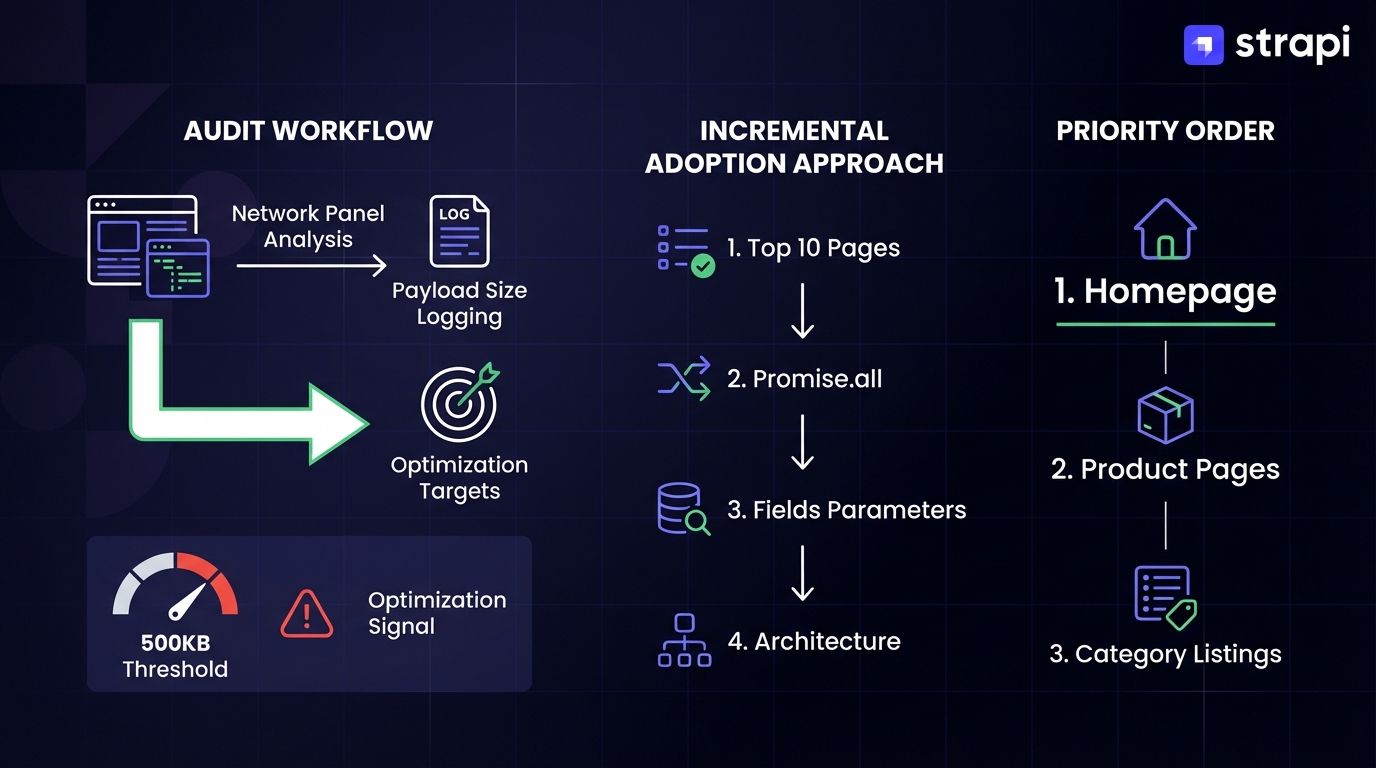
For teams with established Strapi + Next.js architectures, start your audit by logging response sizes for your top 10 most-visited pages. Open the Network panel, filter for Strapi API calls, and note payload sizes. Any response over 500KB signals an optimization opportunity.
Export these baseline metrics. You'll compare them after implementing selective field fetching. Look for duplicate data in responses: if the same author object appears 15 times in a blog listing response, normalization will deliver immediate benefits.
Measure payload sizes on key pages using the Network panel. Add Promise.all to parallelize existing queries. Add fields parameters to existing fetch calls. These changes don't require restructuring content types or rebuilding caching infrastructure.
After you've captured those gains, audit your content type structure. Consider dynamic zones for flexible page layouts with components (though note that dynamic zones can't currently nest inside components). Layer in webhook-based cache invalidation using Next.js revalidatePath() and revalidateTag() with secret token validation for precise, on-demand cache freshness without requiring origin server rebuilds.
These optimizations don't require a rewrite. Start with your highest-traffic pages. These are usually home page, product pages, and category listings. Incremental adoption lets you validate performance improvements at each stage before investing in deeper architectural changes.
Build Faster React Apps with Strapi
These patterns address structural issues that compound across every user session. The goal isn't micro-optimization—it's keeping CMS flexibility without paying a performance tax. An editorial team that can add new page sections through dynamic zones shouldn't force users to download unused component data on every request.
Strapi's REST and GraphQL APIs provide granular control over API response payloads through explicit populate and fields parameters, enabling selective data fetching with official benchmarks showing up to 320x payload reduction. Strapi gives you the controls to implement these optimizations cleanly.
For implementation details, explore Strapi's Next.js and Strapi 5 beginner's guide and REST API documentation. If you're starting a new project, check out the official Strapi demo app: Strapi Launchpad applies several of these patterns by default.